SQL_VARIANT_PROPERTY exposes the underlying type information that a printed value can hide. I inspect the typed value before drawing conclusions from its display. Equal-looking numbers can carry different precision and scale.

Preserve the types before combining the rows
The first two inputs represent twelve point three at different decimal widths. One is decimal(6,2), while the other is decimal(10,4). Their mathematical values do not describe their full type contracts.
Each row converts its already typed input to sql_variant separately. That matters when using VALUES to combine different source types. A common decimal conversion before variant construction could erase the contrast being inspected.
The remaining inputs are an int, a bounded Unicode string and a variant NULL. They extend the inspection beyond decimal values. The query changes no table definitions or stored application data.
Every property result is cast to a plain output type. The base type becomes nvarchar, and the numeric properties become int. This keeps the result grid from requiring another variant inspection to understand its own columns.
WITH ValuesToInspect AS
(
    SELECT CaseId,StoredValue
    FROM (VALUES
        (1,CAST(CAST(12.30 AS decimal(6,2)) AS sql_variant)),
        (2,CAST(CAST(12.3000 AS decimal(10,4)) AS sql_variant)),
        (3,CAST(CAST(12 AS int) AS sql_variant)),
        (4,CAST(CAST(N'AB' AS nvarchar(6)) AS sql_variant)),
        (5,CAST(NULL AS sql_variant))
    ) AS v(CaseId,StoredValue)
)
SELECT CaseId,
    CAST(SQL_VARIANT_PROPERTY(StoredValue,'BaseType') AS nvarchar(128)) AS BaseType,
    CAST(SQL_VARIANT_PROPERTY(StoredValue,'Precision') AS int) AS NumericPrecision,
    CAST(SQL_VARIANT_PROPERTY(StoredValue,'Scale') AS int) AS NumericScale,
    CAST(SQL_VARIANT_PROPERTY(StoredValue,'MaxLength') AS int) AS MaximumBytes
FROM ValuesToInspect
ORDER BY CaseId;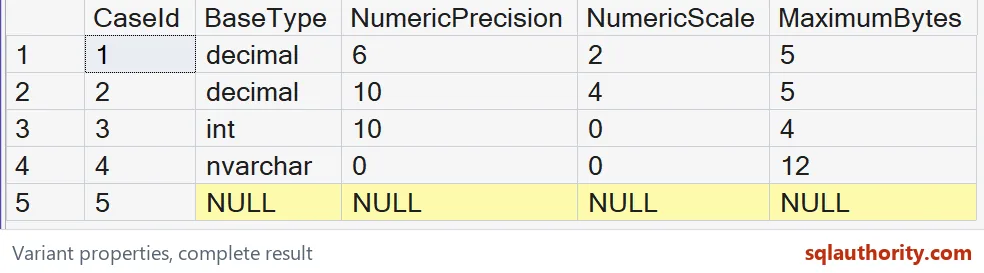
Read precision and scale as type information
The first decimal row is expected to report precision six and scale two. The second is expected to report precision ten and scale four. Those differences remain meaningful even if a client formats both values similarly.
Precision describes the decimal type’s available total digits. Scale describes its digits to the right of the decimal point. Neither property is a count of only the visible digits in this particular number.
The int row is expected to report precision ten and scale zero. That describes the type information returned for int. It does not claim that the sample value twelve contains ten written digits.
I’d inspect these properties when reviewing a type-sensitive expression or variant import. The properties can reveal an earlier conversion. They cannot tell me which source text or application field originally supplied the value.
Keep maximum length separate from current contents
The Unicode input contains two letters but was declared as nvarchar(6). Its expected MaximumBytes value is twelve. That maximum describes the underlying type’s declared capacity, not the two-character payload alone.
The supplied decimal types still differ in precision and scale. The MaximumBytes values here are five for both decimal rows. They do not establish a storage-width rule for ordinary decimal columns.
A property named TotalBytes would answer a different question. It includes value data and variant metadata. This example does not request it, and MaximumBytes should not be relabeled as complete variant storage.
The Unicode row’s numeric precision and scale are expected to be zero. That does not turn its letters into a numeric value. Read each property in the context of the reported underlying type.

Use inspection without inventing a schema contract
The variant NULL row is expected to report NULL for all requested properties. It supplies no underlying value to inspect. I do not substitute a guessed base type from a neighboring row.
A flexible variant collection can contain values with different underlying types. That flexibility does not establish that an application should accept every type. Define allowed types and conversion rules separately.
If a downstream calculation requires decimal(10,4), inspect and convert according to that requirement. Merely seeing decimal in the base-type column is insufficient. Precision and scale are part of the decision.
The sample uses explicit literals to make the intended type model reviewable. When adapting it, retain the casts before variant construction. Otherwise the test may inspect a type selected by the combining expression instead of the original inputs.
Precision and scale remain part of the value’s type contract. MaximumBytes describes a different property and should retain its own label. Use ordinary typed columns when their fixed schema already expresses the required contract.
A quick look at the type can save a long debugging session.
A printed number is not a type contract, it is one value in a particular type.
Published by Pinal Dave on SQLAuthority. More of my work at pinaldave.com.
Discover more from SQL Authority with Pinal Dave
Subscribe to get the latest posts sent to your email.