
One question came up just a day ago while I was writing SQL SERVER – 2005 – Difference Between INTERSECT and INNER JOIN – INTERSECT vs. INNER JOIN. The question was how to find one column from all tables of the database.
How many tables in database AdventureWorks have column name like ‘EmployeeID’?
It was quite an interesting question and I thought if there are scripts which can do this would be great. I quickly wrote down following script which will go return all the tables containing specific column along with their schema name.
USE AdventureWorks

GO

SELECT t.name AS table_name,

SCHEMA_NAME(schema_id) AS schema_name,

c.name AS column_name

FROM sys.tables AS t

INNER JOIN sys.columns c ON t.OBJECT_ID = c.OBJECT_ID

WHERE c.name LIKE '%EmployeeID%'

ORDER BY schema_name, table_name;
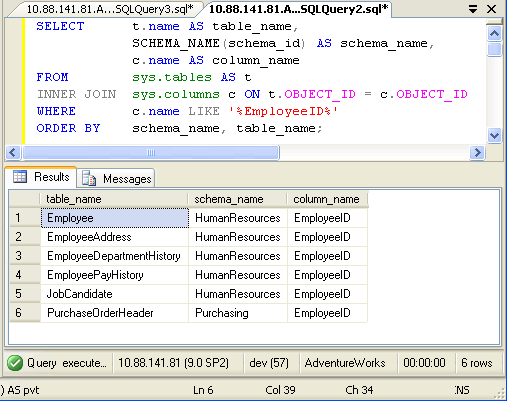
In above query replace EmployeeID with any other column name.
SELECT t.name AS table_name,

SCHEMA_NAME(schema_id) AS schema_name,

c.name AS column_name

FROM sys.tables AS t

INNER JOIN sys.columns c ON t.OBJECT_ID = c.OBJECT_ID

ORDER BY schema_name, table_name;

If you want to find all the column name from your database run following script. You can down any condition in WHERE clause to get desired result.
Published by Pinal Dave on SQLAuthority. More of my work at pinaldave.com.




191 Comments. Leave new
How to find Sys.types column name. Please help any one..
Can i write an sql to look for a particular account number in all the tables.?
If all the account number fields in all the tables in the Db are called Account_Num and i want a list of tables that have the Account_Num = ’45’.
Sebas, I don’t know if you have a solution or not, but I was doing this exact thing a few minutes ago. This isn’t the best, but it is quick and easy. In my query below, you’ll need to update the @Column value and @Value values. Run the query into the “Results as Text” window. Copy all of the IF EXISTS lines to a new query window and run it. Enjoy! John
DECLARE @Column VARCHAR(30) = ‘BACHNUMB’
DECLARE @Value VARCHAR(30) = ”’12-09-20 B”’ — Note the extra quotes (‘) because I’m looking for character vaue. ’10’ will work if you are looking for a number
SELECT ‘IF EXISTS(SELECT * FROM ‘ + sys.tables.name + ‘ WHERE ‘ + sys.columns.name + ‘ = ‘ + @Value + ‘) BEGIN PRINT ”’ + sys.tables.name + ”’; SELECT * FROM ‘ +
sys.tables.name + ‘ WHERE ‘ + sys.columns.name + ‘ = ‘ + @Value + ‘ END’ AS table_name
FROM sys.tables
JOIN sys.columns ON sys.tables.OBJECT_ID = sys.columns.OBJECT_ID
WHERE sys.columns.name LIKE @Column
ORDER BY table_name;
Thanks alot…!!!!
find-a-particular-text-from-all-tables-in-db
pls help me to find out
This i belive consumers less query execution time..
select TABLE_NAME as ‘table name’, COLUMN_NAME as ‘column name’
FROM INFORMATION_SCHEMA.COLUMNS
order by table_name
Awesome, exactly what I needed today. Thansk!
this is what im looking for… THANKS!
dear all
is it possible to get all columns from a table except some specific one like::
select * from table where column_name column_name ;
i need to retrieve 8 columns out of 10 from a table
Thanks for this, very helpful when working your way into an existing system that is not designed properly.
Awesome, saved me some time, this is just what I was looking for! =)
how to display queried data in vb.net 2010?
I have table name as @Table_Name
I have column value as @Value but dont have Column name ( but that exist at 1st position )
how can I compare that table column name value ?
I want something like
SELECT * FROM @Table_Name
WHERE Table.Column[1].Value = @Value
How can I do that ……
Why do you want to do this? This does not sound a way to go
I have table name as @Table_Name
How can I get 1st Column Name from MyTable(@Table_Name) without knowing Column name ..??
DECLARE @column_name varchar(20)
@column_name = SELECT top 1 column_name
FROM INFORMATION_SCHEMA.COLUMNS
WHERE table_name = ‘bb_match’
select * from bb_match
where @column_name = 6
this is not working ..where is mistake ???
This is showing only column name not showing data ??
DECLARE @column_name varchar(20)
set @column_name = (SELECT top 1 column_name
FROM INFORMATION_SCHEMA.COLUMNS
WHERE table_name = ‘bb_match’)
select * from bb_match
where @column_name = ‘8’
how can show data or this record ???
You need to use Dynamic SQL which is not recommended in this case
DECLARE @column_name varchar(20)
DECLARE @sql varchar(20)=”
set @column_name = (SELECT top 1 column_name
FROM INFORMATION_SCHEMA.COLUMNS
WHERE table_name = ‘bb_match’)
set @sql=’select * from bb_match where ‘+@column_name+’ = ‘’8”’;
exec(@sql)
how to find all the tables in a database which contains a column referenced from a particular table in the databse?
Hi Pinal – I’m looking for a query which will return me database name, table name, column name for a search value. e.g. I want to search for a value = “test rating” across all tables in the database.
I have some queries, but they return values for only user created tables and not system tables or tables created by an asp.net web application for instance. Any help is appreciated!
Thank you.
The basic script has saved me from having to manually trawl through a 2GB database with over 500 tables.
You rock Pinal. I always check your blogs first when I have SQL Server questions as your answers are always easy to understand and straight to the point.