
How do you find one column from all tables of the database? How many tables in AdventureWorks have a column called EmployeeID? It came up while I was writing Difference Between INTERSECT and INNER JOIN, and it turned out to be a handy script to have.
USE AdventureWorks
GO
SELECT t.name AS table_name,
SCHEMA_NAME(schema_id) AS schema_name,
c.name AS column_name
FROM sys.tables AS t
INNER JOIN sys.columns c ON t.OBJECT_ID = c.OBJECT_ID
WHERE c.name LIKE '%EmployeeID%'
ORDER BY schema_name, table_name;
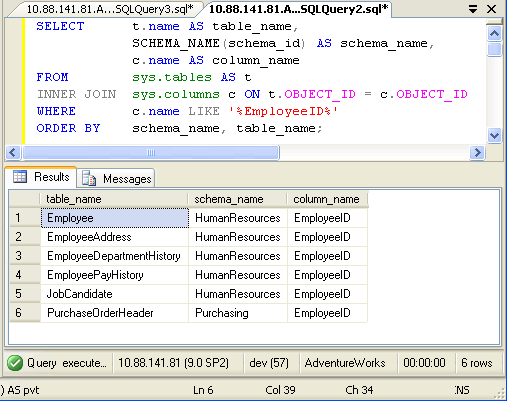
In above query replace EmployeeID with any other column name.
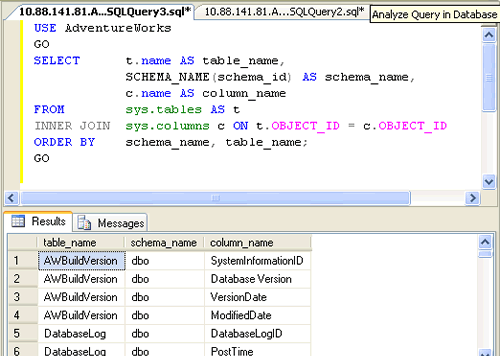
If you want to find all the column names from your database, run the same script without the WHERE clause.
SELECT t.name AS table_name,
SCHEMA_NAME(schema_id) AS schema_name,
c.name AS column_name
FROM sys.tables AS t
INNER JOIN sys.columns c ON t.OBJECT_ID = c.OBJECT_ID
ORDER BY schema_name, table_name;
Add the data type while you are there
Nine times out of ten, the reason you are hunting for a column across tables is that you are about to change it, or you are wondering why a join is slow. Both questions need the type, not just the name.
SELECT SCHEMA_NAME(t.schema_id) AS SchemaName,
       t.name AS TableName,
       c.name AS ColumnName,
       ty.name AS DataType,
       c.max_length,
       c.is_nullable
FROM sys.tables AS t
INNER JOIN sys.columns AS c ON t.object_id = c.object_id
INNER JOIN sys.types AS ty ON c.user_type_id = ty.user_type_id
WHERE c.name LIKE '%EmployeeID%'
ORDER BY SchemaName, TableName;
Run this across a database you have inherited and you often find the same column defined three different ways: INT in one table, BIGINT in another, VARCHAR in a third. That is usually the reason a join runs badly, and it is very hard to spot any other way.
Views and procedures have columns too
sys.tables only returns tables, which is exactly what the question asked for. But if you are looking for everywhere a column appears, views are part of the answer.
SELECT SCHEMA_NAME(o.schema_id) AS SchemaName,
       o.name AS ObjectName,
       o.type_desc AS ObjectType,
       c.name AS ColumnName
FROM sys.objects AS o
INNER JOIN sys.columns AS c ON o.object_id = c.object_id
WHERE c.name LIKE '%EmployeeID%'
  AND o.type IN ('U', 'V')
ORDER BY o.type_desc, SchemaName, ObjectName;
U is a user table and V is a view. Swapping sys.tables for sys.objects is the only real change.
The standard version
There is an INFORMATION_SCHEMA version of this, and it is worth knowing because it works on other database engines too.
SELECT TABLE_SCHEMA, TABLE_NAME, COLUMN_NAME, DATA_TYPE
FROM INFORMATION_SCHEMA.COLUMNS
WHERE COLUMN_NAME LIKE '%EmployeeID%'
ORDER BY TABLE_SCHEMA, TABLE_NAME;
Use this one if your script has to travel. Use the sys version on SQL Server, because it knows about things the standard views do not, like whether a column is an identity or computed.
Searching every database on the server
Sometimes you do not know which database the column is in. This walks them all.
DECLARE @sql NVARCHAR(MAX) = N'';

SELECT @sql = @sql + N'
SELECT ''' + name + N''' AS DatabaseName,
       SCHEMA_NAME(t.schema_id) AS SchemaName,
       t.name AS TableName, c.name AS ColumnName
FROM ' + QUOTENAME(name) + N'.sys.tables AS t
JOIN ' + QUOTENAME(name) + N'.sys.columns AS c ON t.object_id = c.object_id
WHERE c.name LIKE ''%EmployeeID%'' UNION ALL'
FROM sys.databases
WHERE state = 0 AND database_id > 4;

SET @sql = LEFT(@sql, LEN(@sql) - 9);
EXEC sp_executesql @sql;
Two details make it safe. state = 0 skips databases that are offline or restoring, which is what breaks most scripts like this. database_id > 4 skips master, model, msdb and tempdb, which you almost never want in the results.
One thing to watch with LIKE
Searching for ‘%ID%’ will match EmployeeID, OrderID, and also Identity, Video and Guidance. If you want the column named exactly EmployeeID, drop the wildcards and use c.name = 'EmployeeID'. If you want columns ending in ID, use '%ID' with the wildcard only at the front.
Published by Pinal Dave on SQLAuthority. More of my work at pinaldave.com.
Discover more from SQL Authority with Pinal Dave
Subscribe to get the latest posts sent to your email.




191 Comments. Leave new
Pinal sir, please help me find out list of columns/tables in a database based on a given column value.
running through migration and due to nomenclature changes, couldn’t able to figure out corresponding attribute.
Hoping if i can matchup based on column value, can match up.
I really wish I can help Mohan, this is more of consultation or hands-on experience.