NULLIF denominators let me avoid dividing by zero without inventing a numeric answer. I still retain the original denominator so zero and missing input remain distinguishable.

Give an undefined ratio a meaning
A ratio needs a numerator and a usable denominator. Zero in the denominator doesn’t produce a meaningful finite quotient. Replacing that input with a guessed number changes the calculation. I’d rather keep the reason visible beside a missing result.
NULLIF returns NULL when its two expressions compare equal. Otherwise it returns the first expression. Its return type follows that first expression. Applied to an integer denominator and zero, it yields an integer or NULL.
The guarded division then uses that resulting value. The example doesn’t turn error handling off. It defines the numeric input before dividing. That is easier to inspect than relying on a connection setting to conceal the problem.
Compare integer and decimal arithmetic
The first case divides five by two. The integer quotient is two because both operands use integer arithmetic. The decimal version converts the numerator before division. Its final output is explicitly cast to decimal(12,4).
I keep both columns because a zero-denominator fix doesn’t address integer truncation. An expression can avoid an error and still calculate the wrong business ratio. Those are separate checks. The target output type belongs in the specification too.
Converting an already calculated integer quotient to decimal doesn’t recover its discarded fraction. The conversion must occur before the division when a fractional result is required. The example makes that placement visible. It doesn’t rely on a formatted display to suggest precision.
WITH Inputs AS
(
    SELECT Id, Numerator, Denominator
    FROM (VALUES (1, 5, 2), (2, 5, 0), (3, 5, CAST(NULL AS int)),
                 (4, CAST(NULL AS int), 2), (5, 0, 2), (6, -5, 2))
         AS v(Id, Numerator, Denominator)
)
SELECT Id, Numerator, Denominator,
       NULLIF(Denominator, 0) AS SafeDenominator,
       Numerator / NULLIF(Denominator, 0) AS IntegerQuotient,
       CAST(CAST(Numerator AS decimal(12,4)) / NULLIF(Denominator, 0)
            AS decimal(12,4)) AS DecimalQuotient,
       CAST(CASE WHEN Numerator IS NULL THEN 'Missing numerator'
                 WHEN Denominator IS NULL THEN 'Missing denominator'
                 WHEN Denominator = 0 THEN 'Zero denominator'
                 ELSE 'Available' END AS varchar(20)) AS Reason
FROM Inputs
ORDER BY Id;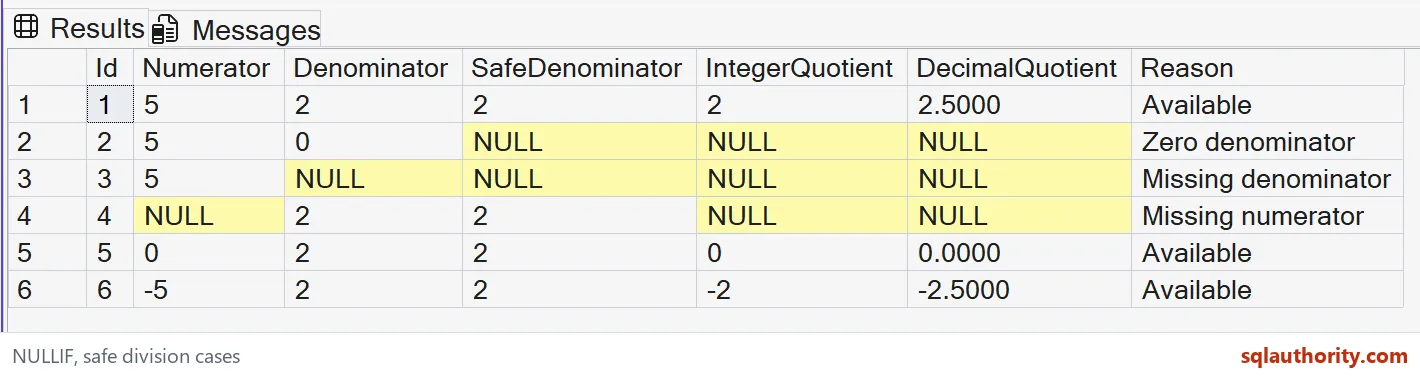
Keep the original input beside the guard
The next cases supply a zero denominator and a NULL denominator. Both guarded denominators become NULL. Both quotients are therefore NULL. The original column and reason label preserve the distinction the computed denominator no longer carries.
A NULL numerator is another separate case. Even a nonzero denominator can’t supply the missing numerator. The result remains NULL and the reason identifies that missing input. This is a simple reporting policy, not a repair to the source data.
The zero-numerator row provides a useful contrast. With a usable denominator, zero is a legitimate quotient. It isn’t the same result as an undefined ratio. Keeping this row prevents an absent result from becoming an accidental zero during display cleanup.
Do not replace NULL without a rule
A dashboard can request a display label for an unavailable ratio. That label shouldn’t quietly become a numeric zero used in later totals. I’d keep the computed value and display text separate. Their consumers need different contracts.
I can argue for a fixed numeric fallback when a business rule explicitly prescribes it. That decision belongs to the business calculation. NULLIF itself doesn’t establish such a fallback. The example deliberately leaves unavailable ratios as NULL.
The negative input checks the sign without creating another policy. Integer division gives the truncated integer result. The decimal calculation keeps the fractional negative result. Neither operation validates whether that negative amount is acceptable in a real transaction.

Check every returned case
This demonstration contains a SELECT over six literal input pairs. It creates no objects, modifies no data and changes no session options. The reason labels describe the selected test inputs. They don’t claim to cover every possible numeric overflow or conversion.
Keep the original values, safe denominator and both quotients together. Their declared types explain the integer and decimal division paths. Compare a missing denominator separately from a zero denominator. A successful execution alone doesn’t prove the intended ratio policy.
Before using the expression in an application, I’d confirm its permitted numeric range. A guarded denominator doesn’t make every division type safe from overflow. The business scale and source types still matter. Treat the zero check as one explicit part of the contract.
Leave the undefined results visible, and the report stays honest.
A guarded quotient is not a repaired measurement, it is a calculation with its undefined inputs left visible.
Published by Pinal Dave on SQLAuthority. More of my work at pinaldave.com.
Discover more from SQL Authority with Pinal Dave
Subscribe to get the latest posts sent to your email.