DATEPART quarter returns a calendar quarter number, not a unique reporting period. I keep the year beside it when grouping events. Otherwise, January from different years can share one quarterly total.

Read the calendar components together
The example includes January 31 and March 31 in 2026. Both dates belong to quarter one. April 1 begins quarter two. December 31 belongs to quarter four of that same year.
Another event occurs on January 1, 2027. Its quarter number returns to one, but its calendar year changes. Keeping both components shows the new reporting period. The missing-date row supplies neither component.
The source uses eight-digit date text with explicit conversion style 112. The resulting expression has the date type. It doesn’t depend on a display format to establish the year. Every date and identifier remains visible in the first query.
WITH Inputs AS
(
    SELECT CaseId, CONVERT(date, DateText, 112) AS EventDate
    FROM (VALUES
        (1, CAST('20260131' AS varchar(8))), (2, '20260331'),
        (3, '20260401'), (4, '20261231'), (5, '20270101'), (6, NULL)
    ) AS v(CaseId, DateText)
)
SELECT CaseId, EventDate, DATEPART(year, EventDate) AS CalendarYear,
       DATEPART(quarter, EventDate) AS CalendarQuarter,
       DATEPART(month, EventDate) AS CalendarMonth
FROM Inputs
ORDER BY CaseId;
Group by the complete reporting key
The second query groups by year and quarter together. Quarter one of 2026 has two events. Quarter two and quarter four each have one. Quarter one of 2027 remains a separate row with one event.
These are four observed period groups from the supplied dates. The query doesn’t generate a missing quarter three row. A report requiring every calendar quarter needs a separate period population. Keep that completeness rule outside the extraction expression.
I’d use a two-column key or another explicitly defined period identifier. A display label can combine those fields later. The label should retain the same meaning as the key. Changing the presentation shouldn’t merge distinct years.
WITH Inputs AS
(
    SELECT CaseId, CONVERT(date, DateText, 112) AS EventDate
    FROM (VALUES
        (1, CAST('20260131' AS varchar(8))), (2, '20260331'),
        (3, '20260401'), (4, '20261231'), (5, '20270101'), (6, NULL)
    ) AS v(CaseId, DateText)
)
SELECT DATEPART(year, EventDate) AS CalendarYear,
       DATEPART(quarter, EventDate) AS CalendarQuarter, COUNT(*) AS EventCount
FROM Inputs
WHERE EventDate IS NOT NULL
GROUP BY DATEPART(year, EventDate), DATEPART(quarter, EventDate)
ORDER BY CalendarYear, CalendarQuarter;
See what a quarter-only group combines
The last query groups only by quarter number. It combines the two 2026 first-quarter events with the 2027 first-quarter event. Its first-quarter count becomes three. That query answers a different question from a sequence of quarterly periods.
A seasonal report can intentionally combine first quarters across several years. In that case, the quarter-only key can fit the requirement. I wouldn’t reject that grain automatically. I’d name the population so readers understand which years contribute.
For a period-by-period trend, combining years hides the time sequence. A plausible first-quarter total doesn’t reveal that merge. Keep the cross-year January case when checking the query. One year’s data alone can’t expose this mistake.
WITH Inputs AS
(
    SELECT CaseId, CONVERT(date, DateText, 112) AS EventDate
    FROM (VALUES
        (1, CAST('20260131' AS varchar(8))), (2, '20260331'),
        (3, '20260401'), (4, '20261231'), (5, '20270101'), (6, NULL)
    ) AS v(CaseId, DateText)
)
SELECT DATEPART(quarter, EventDate) AS CalendarQuarter, COUNT(*) AS EventCount
FROM Inputs
WHERE EventDate IS NOT NULL
GROUP BY DATEPART(quarter, EventDate)
ORDER BY CalendarQuarter;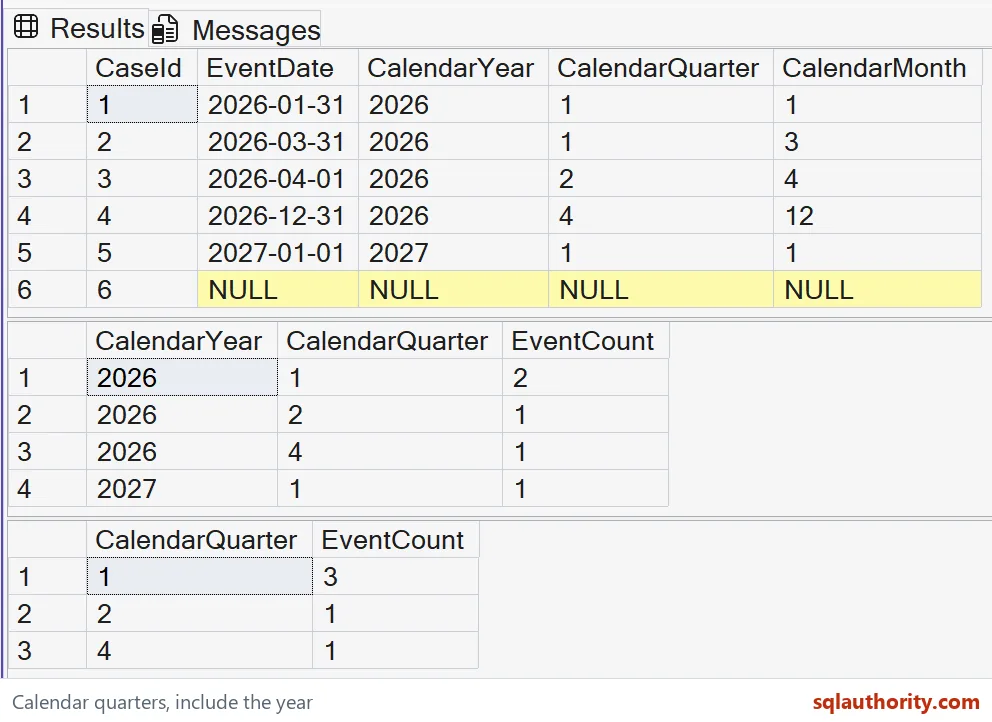
Keep missing dates and fiscal rules explicit
The summaries exclude the missing date through an explicit predicate. That row has no established calendar period. Assigning it to quarter one would invent a date classification. A report can count unavailable dates separately when completeness matters.
DATEPART quarter follows the calendar year in this demonstration. It doesn’t infer a company’s fiscal calendar. A fiscal year starting in another month requires its own mapping. The reporting-year label must follow that same fiscal rule.
The source values contain dates without time-zone information. These expressions don’t convert an event timestamp into a local reporting date. Establish that date before extracting its calendar components. An event near midnight can need that additional temporal policy.
Preserve the intended period population
DATEPART returns integer components, and the count describes source rows in each selected group. It doesn’t measure elapsed quarters between two dates. A quarter number also doesn’t locate the first or last day. Those requirements need different expressions.
All three queries use literal inputs and read-only CTEs. They create no tables and change no settings. The explicit ORDER BY clauses make the result sequence understandable. Neither the grouping expression nor a display label guarantees order by itself.
Compare the complete year-quarter rows with the quarter-only summary. Retain the March-to-April boundary and both January years. Those examples check classification and grouping independently. Decide whether the report needs periods or seasons before choosing its key.
Keep the year next to the quarter, and January stays honest.
A quarter number is not a period, it is only half of the key.
Published by Pinal Dave on SQLAuthority. More of my work at pinaldave.com.
Discover more from SQL Authority with Pinal Dave
Subscribe to get the latest posts sent to your email.