
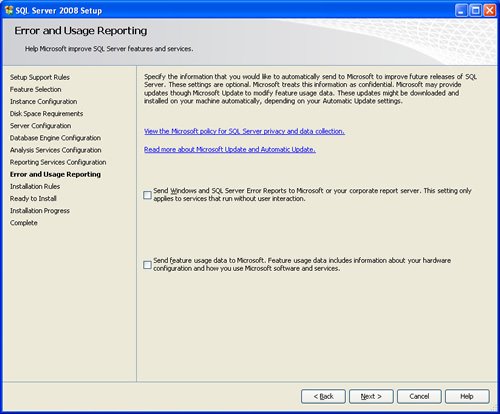
SQL SERVER 2008 has been released for some time and I have got numerous request about how to install SQL Server 2008. I have created this step by step guide Installation Guide. Images are used to explain the process easier.
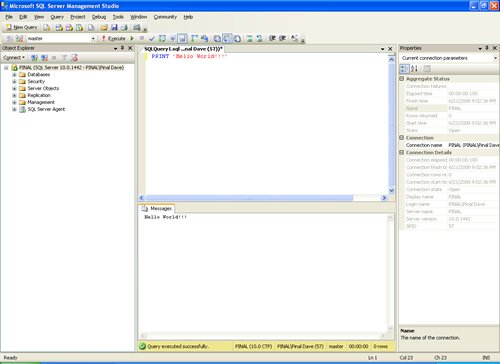
SQL Server 2008 is a major improvement from SQL Server 2005. Honestly, I still see lots of people still using SQL Server 2000. I would like to say it is time to upgrade and move to the next version of SQL Server. In SQL Server 2000, DBA had to use two different tools to maintain the database as well as the query database, specifically SQL Server Enterprise Manager and SQL Server Query Analyzer. With the release of SQL Server 2005 both of these tools are combined into one tool: SQL Server Management Studio. For a while DBA who were fans of Query Analyzer requested to bring it back, but as they keep on using SQL Server Management Studio (SSMS) they realized that it was much more convenient if every task related to SQL Server could be accomplished using SSMS. With the release of SQL Server 2008 Microsoft has upgraded SSMS with many new features as well as added tons of new functionalities requested by DBAs for long time.








Reference : Pinal Dave (https://blog.sqlauthority.com)




402 Comments. Leave new
Hello, I want to install SQL Server 2008 on Server 2008 Enterprise but it failed to install saying that
“sql server 2008 edition not supported on this operating system”
O/S Server 2008 Enterprise Edition.
It is really nice.
But what I think is, it will be better utilised if provided some add info. such as how to saperate .mdf,.ldf,tempdb e.t.c.
during setup or after setup. In particular if we use raid 10.
I will be obliged if provided something neccessary.
Any way many many thanks to Pinal Sir.
Hi Pinal,
I am working with SQL Server 2008 on Win 7 Pro. Installed successfully, but can’t connect to server instance from SQL Server Mgmt Studio.
I named db as “PHCG” and I see a service running as SQL Server (PHCG).
What should be my Server Name when connecting?
Thanks much in advance,
Santanu Bera
HI
please use as below
\
if your server name is server01 then
use as below
server01\PHCG
and use windows or SA authentication for connecting
ALL THE STEPS WORKED FINE. FANTASTIC JOB.THANKS A LOT.
TNX very much.!
Thanks very much.!
If you are getting error “the credential you provided for the sql server agent is invalid”
One of the best way of handling this is to install it with a local account first.
Once SQL Server installed, now you can change the service account by changing the user at services.msc
Change the service account, stop & start it. Its now working with your service account.
Thanks.
Syed Wajahat
Principal Consultant
Techerz.
SharePointGulf
Hi,
I want to do a silent install of SQL 2008 under W7entreprise, But when i install it whith this command “Setup.exe /q /ACTION=Install /FEATURES=SQL /INSTANCENAME=MSSQLSERVER /SQLSVCACCOUNT=”” /SQLSVCPASSWORD=”” /SQLSYSADMINACCOUNTS=”” /AGTSVCACCOUNT=”NT AUTHORITY\Network Service”, i receive “the specified credentials for the sql server service are not valid. to continue, provide a valid account and password for the SQL server services”
What is the exact command line for to do an automatic silernt install ??
thanx
Hey dude
you have just saved my butt with this guid, thanks for everything that you are doing in helping when we are having problems.
take care
Thankx a million Mr. Pinaldave
It really helped me.
hi, man thanks for putting all this stuff
that was really helpful coz reading all docs and then install takes much time. you saved my time from that.
thanks a lot.
It is really nice.
But what I think is, it will be better utilised if provided some add info. such as how to saperate .mdf,.ldf,tempdb e.t.c.
during setup or after setup. In particular if we use raid 10.
I will be obliged if provided something neccessary.
Any way many many thanks to Pinal Sir.
Thank u So much dear
Really its very very Helpful …
Thanks
Thank you very much for the article, it was soo easy to install it with your screenshots.
There is a benefit in agreeing to a recommended set of features and corresponding tags in order to create, interpret and display a common . Thanks for sharing info.
I am installing as given above. In “Installation Progress ” step after a few seconds in “validating feature setting” i get the error:
“The folder path specified is invalid. Please enter a valid folder path.. Folder Path=C:\Program Files\Microsoft SQL Server\MSAS10.MSSQLSERVER\OLAP\Data”. If anyone know the solution , please help
i am also getting same error.can u pls tell me the solution if u know
Hi Pinal Dave,
Thank you very much for UR fantastic information about SQL SERVER 2008 Installation. It helped me a lot. Keep posting always…God Be with U…
regards
Andrew
hello sir my prob is my sql sever is install but i am ckeck this out if proper installed
i installed sqlserver2008 in mixedmode.but it is connect only windowsmode.it is not connect sql mode.while connecting to the sql mode it displays error login failed.why? it is not connect.
pls reply
Hi,
I installed sqlserver2008 and it continued to “Installation Rules” it failed with ‘Previous release of Microsoft Visual Studio 2008’ and the Next button is disable too.
So, how can i install it.