I separate simple CASE and NULL tests when classifying an input. A simple CASE uses equality comparisons. A missing value needs an IS NULL condition rather than a WHEN NULL equality branch.

Read both CASE forms beside each other
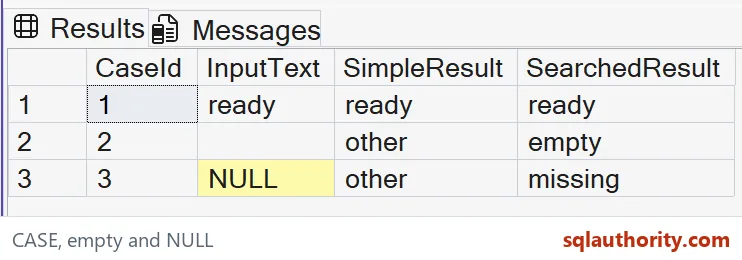
The example supplies ready, empty text and NULL. SimpleResult uses the simple CASE form, while SearchedResult uses Boolean conditions. Both result columns have an explicit nvarchar(12) type.
The ready row returns ready in both columns. That ordinary match supplies a baseline before the missing and empty cases expose the difference. I’d keep the original InputText beside the classifications so a reviewer can connect each label to its actual source value.
WITH Inputs AS
(
 SELECT CaseId, CAST(InputText AS nvarchar(12)) AS InputText
 FROM (VALUES (1,N'ready'),(2,N''),
              (3,CAST(NULL AS nvarchar(12)))) v(CaseId,InputText)
)
SELECT CaseId, InputText,
       CAST(CASE InputText WHEN NULL THEN N'missing'
                 WHEN N'ready' THEN N'ready' ELSE N'other' END
            AS nvarchar(12)) AS SimpleResult,
       CAST(CASE WHEN InputText IS NULL THEN N'missing'
                 WHEN InputText=N'' THEN N'empty'
                 WHEN InputText=N'ready' THEN N'ready' ELSE N'other' END
            AS nvarchar(12)) AS SearchedResult
FROM Inputs
ORDER BY CaseId;
Do not expect WHEN NULL to match
The simple form compares its input expression with each WHEN expression. Comparing NULL through equality doesn’t establish a true match. The missing-input row therefore reaches ELSE and returns other in SimpleResult.
Writing WHEN NULL looks plausible because NULL is visible in the syntax. It still doesn’t mean IS NULL. I’d review that branch if the output classifies missing values as ordinary unmatched inputs. Its syntax can suggest misleading coverage.
Use an explicit searched condition
SearchedResult begins with InputText IS NULL. That condition matches the third row and returns missing. The next condition checks empty text, and the final named condition handles ready.
This order states the classification policy directly. I’d retain the missing branch even when an upstream system usually supplies values. An input-source change can expose NULL. A clear branch makes its intended handling easier to inspect.

Keep empty text separate
The empty input is a known string with no characters. It isn’t SQL NULL. The searched form labels it empty, while the simple example reaches its generic other branch.
I wouldn’t merge these cases just to reduce the number of labels. Missing and supplied-but-empty can have different explanations in a feed. If the application treats them alike, document that normalization before classification. Don’t make CASE hide the decision.
Review result types as well as branches
A CASE expression chooses a result type using SQL Server’s type rules. These branches all supply Unicode text, and the outer casts make the intended result width explicit. Mixing numeric and text outputs would require another type review.
I’d avoid returning an error message from one branch and a number from another without an explicit contract. A classification label should have a stable consumer type. Branch correctness doesn’t remove the need to check how the complete expression is typed.
Keep CASE within its job
CASE is an expression that returns a value. It isn’t a general replacement for procedural control flow or a guarantee that every risky expression elsewhere is protected. The example uses safe comparisons and short literal labels.
I’d validate the complete three-row output rather than only looking for the ready label. That positive match would pass even with broken missing-value handling. Keeping NULL and empty inputs in the same small query makes the intended classification contract much harder to misread.
Keep the missing branch visible and the label tells the truth.
WHEN NULL is not an IS NULL test, it is an equality check that never matches.
Published by Pinal Dave on SQLAuthority. More of my work at pinaldave.com.
Discover more from SQL Authority with Pinal Dave
Subscribe to get the latest posts sent to your email.