
SIN and COS use radians, even when an angle arrives in degrees. A spot on a turning wheel gives me a simple way to explain both results and catch a unit mistake.

One wheel, two positions
Imagine a bright spot on the rim of a waterwheel. For this paper model, freeze the spot at the right edge and call that zero degrees. Count positive turns anticlockwise. A quarter turn puts the spot at the top; half a turn puts it at the left.
Now measure the spot from the axle. COS gives its horizontal position divided by the radius. SIN gives its vertical position divided by the radius. Right and up are positive. Left and down are negative. These are signed positions, not distances travelled around the rim.
At the right edge, the horizontal fraction is one and the vertical fraction is zero. At the top, those roles swap. A clockwise quarter turn reaches the bottom, so its sine is negative one. The wheel illustration supplies the rotation motif, rather than an exact diagram of these positions.
A good-looking number can still use the wrong unit
Passing thirty directly to SIN means thirty radians, not thirty degrees. SQL Server can return a perfectly ordinary number for the wrong question. I convert the degree input before calculating either position.
Radians describe an angle using arc length divided by radius. A full turn is two times PI radians, and a quarter turn is PI divided by two. RADIANS performs the degree conversion here. I cast the integer to float first so that the fractional radian value is retained.

Copy the complete wheel-position query
The seven inputs cover both turning directions, intermediate positions, a half turn and missing input. Native SIN and COS results are float. The outer decimal(12,6) casts choose the six-digit display shown below; they do not change the input unit.
WITH Inputs AS
(
    SELECT Id, DegreesInput
    FROM (VALUES (1, -90), (2, 0), (3, 30), (4, 60),
                 (5, 90), (6, 180), (7, NULL)) AS v(Id, DegreesInput)
)
SELECT i.Id, i.DegreesInput,
       CAST(SIN(a.RadianAngle) AS decimal(12,6)) AS DisplaySine,
       CAST(COS(a.RadianAngle) AS decimal(12,6)) AS DisplayCosine
FROM Inputs AS i
CROSS APPLY (VALUES (RADIANS(CAST(i.DegreesInput AS float)))) AS a(RadianAngle)
ORDER BY i.Id;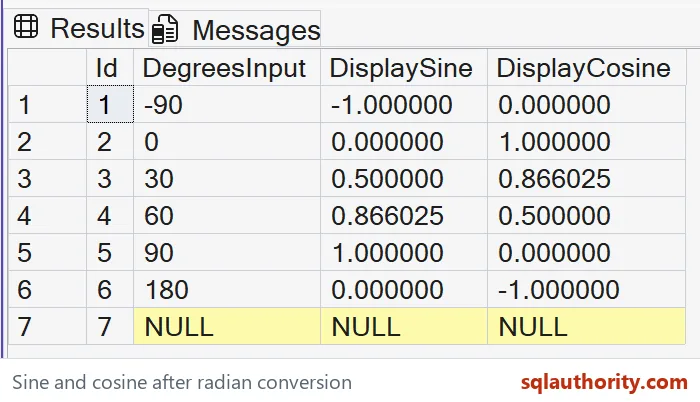
Seven stops, one contract
These cards contain the complete seven-row result from the query above, run on SQL Server 2025. Each degree input stays beside both displayed values. The thirty-degree and sixty-degree rows exchange their fractions: the spot becomes higher and less far to the right.
Row 1
-90 degrees
A clockwise quarter turn
- DisplaySine
- -1.000000
- DisplayCosine
- 0.000000
Row 2
0 degrees
Start at the right edge
- DisplaySine
- 0.000000
- DisplayCosine
- 1.000000
Row 3
30 degrees
Climbing from the right
- DisplaySine
- 0.500000
- DisplayCosine
- 0.866025
Row 4
60 degrees
Closer to the top
- DisplaySine
- 0.866025
- DisplayCosine
- 0.500000
Row 5
90 degrees
An anticlockwise quarter turn
- DisplaySine
- 1.000000
- DisplayCosine
- 0.000000
Row 6
180 degrees
Half a turn to the left
- DisplaySine
- 0.000000
- DisplayCosine
- -1.000000
Row 7
NULL
No angle supplied
- DisplaySine
- NULL
- DisplayCosine
- NULL
For a wheel with radius two units, multiply each fraction by two to obtain the spot’s offset from the axle. A shifted axle needs its own coordinate added afterward. The SQL example returns fractions only; it does not calculate a real wheel’s size, axle location or speed.
Keep the tiny residues in perspective
PI and trigonometric functions use approximate representations. An angle corresponding mathematically to a zero result can produce a tiny floating residue. The selected decimal cast can display that residue as zero. That is a representation decision rather than exact-bit proof.
A tolerance for comparing calculated coordinates needs an explicit error budget. Its size depends on the units and the consumer’s precision requirement. A displayed zero is not permission to choose an arbitrary tolerance for another calculation.
Repeated conversions and intermediate rounding can affect later calculations. I retain the needed precision until the output boundary. The script converts degrees before either function and casts only the final displayed results. It does not round the radian angle first.
A missing angle has no position
NULL stays missing in both outputs. It is not the wheel’s right-edge starting position. Defaulting an unknown angle to zero would invent a direction, so that policy needs separate justification.
These scalar calculations read literal values, create no objects and change no settings. ORDER BY fixes the seven-row sequence. Compare both complete outputs, including their signs and six fractional digits. A plausible sine alone can hide a wrong unit or a lost direction.
Choose the angle unit first, then read COS across the wheel and SIN up the wheel.
An angle is not just a number, it is a number with a unit.
Published by Pinal Dave on SQLAuthority. More of my work at pinaldave.com.
Discover more from SQL Authority with Pinal Dave
Subscribe to get the latest posts sent to your email.


