
REGEXP_SPLIT_TO_TABLE can split a list whose separators include commas, semicolons and pipes. The pattern defines the separators. The import contract decides which tokens to keep.

Check the engine and database compatibility
This example targets SQL Server 2025 with database compatibility level 170. Check both before calling the function. Do not change a shared database setting merely to try a splitter.
SELECT name, compatibility_level
FROM sys.databases
WHERE database_id = DB_ID();
SELECT value, ordinal
FROM REGEXP_SPLIT_TO_TABLE
     (N'red, blue;green | black', N'\s*[,;|]\s*')
ORDER BY ordinal;
The first list should produce red, blue, green and black in positions 1 through 4. The character class names three separators. The surrounding whitespace pattern removes spaces beside a separator, while preserving a space inside a value.
Keep the source key and ordinal
DECLARE @Import table (ImportId int PRIMARY KEY, Tags nvarchar(200));
INSERT @Import VALUES (1,N'red, blue;green | black'),(2,N'white,, sage');
SELECT i.ImportId, TRIM(p.value) AS Tag, p.ordinal
FROM @Import AS i
CROSS APPLY REGEXP_SPLIT_TO_TABLE(i.Tags,N'\s*[,;|]\s*') AS p
WHERE TRIM(p.value) <> N''
ORDER BY i.ImportId, p.ordinal;
The second source contains a repeated comma. Its empty token is filtered out, but the remaining ordinal values are not renumbered. White and sage should retain positions 1 and 3. That gap records a source field, not an ordering error.
Use an explicit ORDER BY when position matters. Without it, a table-valued function does not promise display order. Keep the source string during validation so a disputed token can be traced to its input.
Test empty and missing input separately
DECLARE @Cases table (CaseId int PRIMARY KEY, Tags nvarchar(200));
INSERT @Cases VALUES (1,N''),(2,NULL),(3,N',red,'),
                     (4,N'red,,blue'),(5,N'two words|red');
SELECT c.CaseId, p.ordinal, p.value
FROM @Cases AS c
OUTER APPLY REGEXP_SPLIT_TO_TABLE(c.Tags,N'\s*[,;|]\s*') AS p
ORDER BY c.CaseId,p.ordinal;
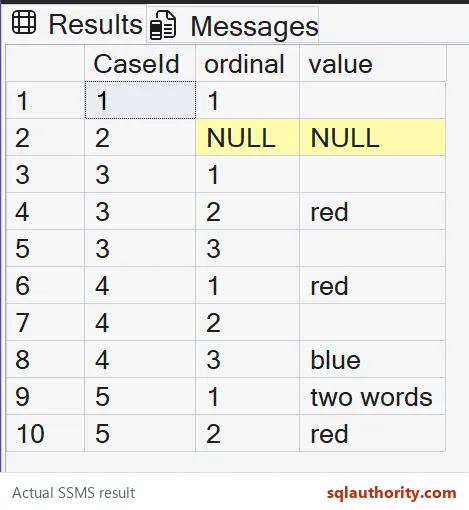
On the test server, empty input produced one empty token at ordinal 1. NULL input produced no token; OUTER APPLY retained its source with NULL output. Leading, trailing and repeated separators produced empty tokens at their original positions.
This pattern is not a CSV parser. It treats a comma inside quotes as a separator too. If separators can occur inside legitimate values, use a parser that understands the source format.

Use a simpler function for a simpler contract
For one single-character separator, STRING_SPLIT is usually easier to read. Its ordinal option is available in SQL Server 2022 and later. Splitting, trimming and deduplicating are separate operations; preserve the first ordinal deliberately when removing repeated tags.
Small lists split easily, and the odd ones deserve a quick test first.
A separator pattern is not a CSV parser, it is a rule for splitting simple lists.
Published by Pinal Dave on SQLAuthority. More of my work at pinaldave.com.
Discover more from SQL Authority with Pinal Dave
Subscribe to get the latest posts sent to your email.




1 Comment. Leave new
hello anurag kulshrestha,Solution for U
set nocount on;
declare @values nvarchar(4000);
set @values=’India|Pakistan|Iran|USA|Australia|Greek|German|turkey|New Zealand|China|Brazil’
declare @Del char(1);
set @Del=’|’;
set @values=@values+@Del;
declare @value nvarchar(100);
WHILE charindex(@Del,@values,0) 0
BEGIN
select @value=rtrim(ltrim(substring(@values,1,charindex(@Del,@values,0)-1))),@values=rtrim (ltrim(substring(@values,charindex(@Del,@values,0)+1,len(@values))))
if not exists(select @value from daybook where Title=@value)
begin
Insert into DayBook(Title) values(@value)
end
END