
Question: How do I perform a case-sensitive search in SQL Server? Compare the text using a case-sensitive collation, either already on the column or applied to the expression with COLLATE.

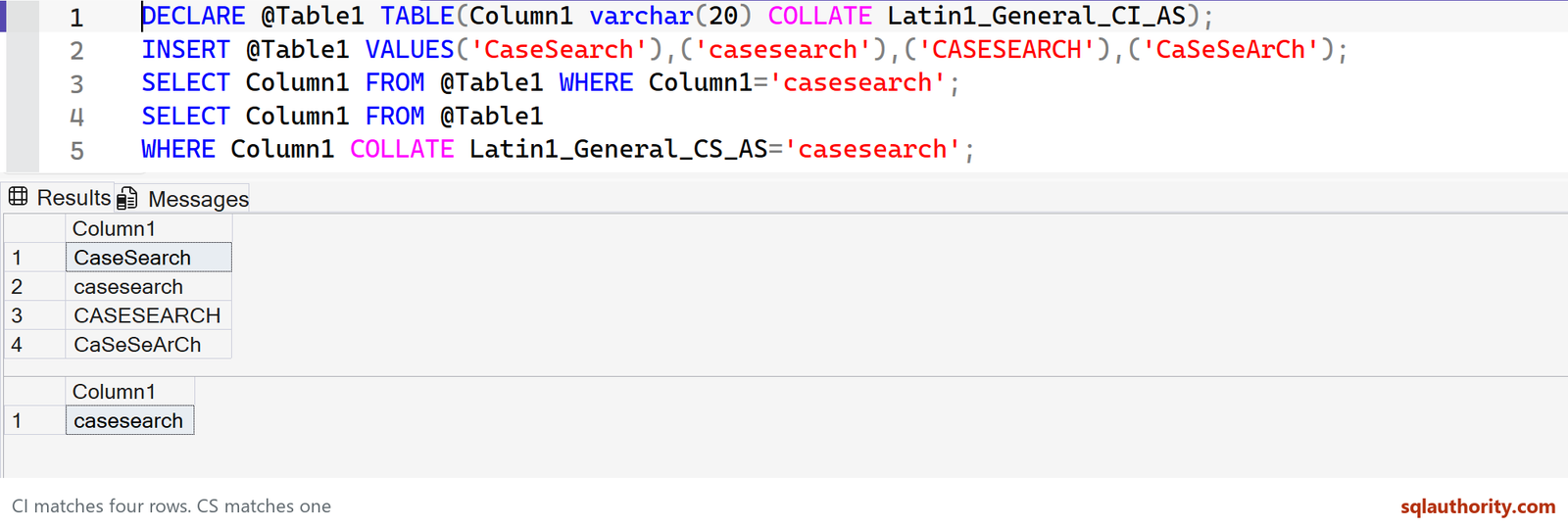
I like this interview question because a short query reveals whether someone understands collation. The original four values are the same spelling with different letter case. A case-insensitive comparison matches all four; the case-sensitive comparison matches only the lowercase value.
DECLARE @Table1 TABLE(Column1 varchar(20) COLLATE Latin1_General_CI_AS);
INSERT @Table1 VALUES('CaseSearch'),('casesearch'),('CASESEARCH'),('CaSeSeArCh');
SELECT Column1 FROM @Table1 WHERE Column1='casesearch';
SELECT Column1 FROM @Table1
WHERE Column1 COLLATE Latin1_General_CS_AS='casesearch';

-- In a real target database, inspect one existing table's column settings:
-- SELECT name,collation_name FROM sys.columns
-- WHERE object_id=OBJECT_ID(N'dbo.Table1');
The first result contains CaseSearch, casesearch, CASESEARCH and CaSeSeArCh. The second contains only casesearch. The example explicitly declares the initial CI collation so it behaves as described even if your server has a different default.
Check the column, not an assumed installation default
CI means case-insensitive; CS means case-sensitive. AS means accent-sensitive, a separate property. A server’s installation default is not guaranteed to be SQL_Latin1_General_CP1_CI_AS, and an individual database or column can use a different collation.
Use sys.columns.collation_name to inspect a table’s text columns. The original sp_help DatabaseName instruction was incorrect for that job. In the intended database, EXEC sys.sp_help N'dbo.Table1' can inspect a table, but the catalog query above makes the collation question explicit.
A query-level comparison is different from a schema change
ALTER COLUMN COLLATE changes the stored column definition and may require reviewing indexes, constraints and other dependencies. Preserve its actual data type, length and nullability; do not copy a generic VARCHAR(20) declaration over a different column.
Applying COLLATE in a predicate can also affect index use. For a frequent case-sensitive workload, choose and test the schema’s collation deliberately. Case-sensitive linguistic comparison is not a promise of byte-for-byte identity.
Published by Pinal Dave on SQLAuthority. More of my work at pinaldave.com.
Discover more from SQL Authority with Pinal Dave
Subscribe to get the latest posts sent to your email.

2 Comments. Leave new
Using COLLATE Latin1_General_CS_AS from last couple of months in one of our legacy application since collation setting was configured at DB level, and now after many request we finally got rid of this case sensitive setting in our new application.
Still I am clueless, under what circumstances we must have enforced this setting at DB level, It was very strange when we saw, we can have 2 columns in a table with same name.
Just an example :
Select Salary,salary from Employee
Also we can have 2 tables with same name in a DB
Just an example :
Select top 1 * from Employee
Select top 1 * from employee
Using COLLATE Latin1_General_CS_AS from last couple of months in one of our legacy application since collation setting was configured at DB level, and now after many request we finally got rid of this case sensitive setting in our new application.
Still I am clueless, under what circumstances we must have enforced this setting at DB level, It was very strange when we saw, we can have 2 columns in a table with same name.
Just an example :
Select Salary,salary from Employee
Also we can have 2 tables with same name in a DB
Just an example :
Select top 1 * from Employee
Select top 1 * from employee