
Readers found five ways to simulate LEAD() and LAG() without the SQL Server 2012 analytic functions. I ran every one on SQL Server 2025 and compared the rows with the real functions. Four give identical results, and the fifth adds a rule of its own.

The Puzzle
Generate following results without using SQL Server 2012 analytic functions.

LEAD gives the value from the next row. LAG gives the value from the previous row. The picture shows the target: four sales orders from AdventureWorks, ten rows, with the neighbor’s SalesOrderDetailID beside each row. SQL Server 2012 added both functions, so the puzzle asks for the same result on older versions. To follow along, install AdventureWorks first.
USE AdventureWorks2025;
The Readers’ Solutions
Here are the solutions readers sent, with the names as they wrote them. The code is theirs.
No Joins and No Analytic Functions
Excellent solution by Geri Reshef.
WITH T1 AS
(SELECT Row_Number() OVER(ORDER BY SalesOrderDetailID) N,
s.SalesOrderID,
s.SalesOrderDetailID,
s.OrderQty
FROM Sales.SalesOrderDetail s
WHERE SalesOrderID IN (43670, 43669, 43667, 43663))
SELECT SalesOrderID,SalesOrderDetailID,OrderQty,
CASE WHEN N%2=1 THEN MAX(CASE WHEN N%2=0 THEN SalesOrderDetailID END) OVER (Partition BY (N+1)/2) ELSE MAX(CASE WHEN N%2=1 THEN SalesOrderDetailID END) OVER (Partition BY N/2) END LeadVal,
CASE WHEN N%2=1 THEN MAX(CASE WHEN N%2=0 THEN SalesOrderDetailID END) OVER (Partition BY N/2) ELSE MAX(CASE WHEN N%2=1 THEN SalesOrderDetailID END) OVER (Partition BY (N+1)/2) END LagVal
FROM T1
ORDER BY SalesOrderID,
SalesOrderDetailID,
OrderQty;
No Analytic Function and Early Bird
Excellent solution by DHall.
-- a query to emulate LEAD() and LAG()
;WITH s AS (
SELECT
1 AS ldOffset, -- equiv to 2nd param of LEAD
1 AS lgOffset, -- equiv to 2nd param of LAG
NULL AS ldDefVal, -- equiv to 3rd param of LEAD
NULL AS lgDefVal, -- equiv to 3rd param of LAG
ROW_NUMBER() OVER (ORDER BY SalesOrderDetailID) AS row,
SalesOrderID,
SalesOrderDetailID,
OrderQty
FROM Sales.SalesOrderDetail
WHERE SalesOrderID IN (43670, 43669, 43667, 43663)
)
SELECT s.SalesOrderID,
s.SalesOrderDetailID,
s.OrderQty,
ISNULL( sLd.SalesOrderDetailID, s.ldDefVal) AS LeadValue,
ISNULL( sLg.SalesOrderDetailID, s.lgDefVal) AS LagValue
FROM s
LEFT OUTER JOIN s AS sLd ON s.row = sLd.row - s.ldOffset
LEFT OUTER JOIN s AS sLg ON s.row = sLg.row + s.lgOffset
ORDER BY s.SalesOrderID, s.SalesOrderDetailID, s.OrderQty
No Analytic Function and Partition By
Excellent solution by DHall.
/* a query to emulate LEAD() and LAG() */
;WITH s AS (
SELECT
1 AS LeadOffset, /* equiv to 2nd param of LEAD */
1 AS LagOffset, /* equiv to 2nd param of LAG */
NULL AS LeadDefVal, /* equiv to 3rd param of LEAD */
NULL AS LagDefVal, /* equiv to 3rd param of LAG */
/* Try changing the values of the 4 integer values above to see their effect on the results */
/* The values given above of 0, 0, null and null
behave the same as the default 2nd and 3rd parameters to LEAD() and LAG() */
ROW_NUMBER() OVER (ORDER BY SalesOrderDetailID) AS row,
SalesOrderID,
SalesOrderDetailID,
OrderQty
FROM Sales.SalesOrderDetail
WHERE SalesOrderID IN (43670, 43669, 43667, 43663)
)
SELECT s.SalesOrderID,
s.SalesOrderDetailID,
s.OrderQty,
ISNULL( sLead.SalesOrderDetailID, s.LeadDefVal) AS LeadValue,
ISNULL( sLag.SalesOrderDetailID, s.LagDefVal) AS LagValue
FROM s
LEFT OUTER JOIN s AS sLead
ON s.row = sLead.row - s.LeadOffset
/* Try commenting out this next line when LeadOffset != 0 */
AND s.SalesOrderID = sLead.SalesOrderID
/* The additional join criteria on SalesOrderID above
is equivalent to PARTITION BY SalesOrderID
in the OVER clause of the LEAD() function */
LEFT OUTER JOIN s AS sLag
ON s.row = sLag.row + s.LagOffset
/* Try commenting out this next line when LagOffset != 0 */
AND s.SalesOrderID = sLag.SalesOrderID
/* The additional join criteria on SalesOrderID above
is equivalent to PARTITION BY SalesOrderID
in the OVER clause of the LAG() function */
ORDER BY s.SalesOrderID, s.SalesOrderDetailID, s.OrderQty
No Analytic Function and CTE Usage
Excellent solution by Pravin Patel.
--CTE based solution
;
WITH cteMain
AS
(
SELECT
SalesOrderID,
SalesOrderDetailID,
OrderQty,
ROW_NUMBER() OVER (ORDER BY SalesOrderDetailID) AS sn
FROM
Sales.SalesOrderDetail
WHERE
SalesOrderID IN (43670, 43669, 43667, 43663)
)
SELECT
m.SalesOrderID, m.SalesOrderDetailID, m.OrderQty,
sLead.SalesOrderDetailID AS leadvalue,
sLeg.SalesOrderDetailID AS leagvalue
FROM
cteMain AS m
LEFT OUTER JOIN cteMain AS sLead
ON sLead.sn = m.sn+1
LEFT OUTER JOIN cteMain AS sLeg
ON sLeg.sn = m.sn-1
ORDER BY
m.SalesOrderID, m.SalesOrderDetailID, m.OrderQty
No Analytic Function and Co-Related Subquery Usage
Excellent solution by Pravin Patel.
-- Co-Related subquery
SELECT
m.SalesOrderID,
m.SalesOrderDetailID,
m.OrderQty,
( SELECT MIN(SalesOrderDetailID)
FROM Sales.SalesOrderDetail AS l
WHERE l.SalesOrderID IN (43670, 43669, 43667, 43663)
AND l.SalesOrderID >= m.SalesOrderID AND l.SalesOrderDetailID > m.SalesOrderDetailID
) AS lead,
( SELECT MAX(SalesOrderDetailID)
FROM Sales.SalesOrderDetail AS l
WHERE l.SalesOrderID IN (43670, 43669, 43667, 43663)
AND l.SalesOrderID <= m.SalesOrderID AND l.SalesOrderDetailID < m.SalesOrderDetailID
) AS leag
FROM
Sales.SalesOrderDetail AS m
WHERE
m.SalesOrderID IN (43670, 43669, 43667, 43663)
ORDER BY
m.SalesOrderID, m.SalesOrderDetailID, m.OrderQty
The Answer, Tested
I ran all five on SQL Server 2025 with AdventureWorks2025. Solutions one, two, four and five return the same ten rows.
| SalesOrderID | SalesOrderDetailID | OrderQty | LeadValue | LagValue |
|---|---|---|---|---|
| 43663 | 52 | 1 | 77 | NULL |
| 43667 | 77 | 3 | 78 | 52 |
| 43667 | 78 | 1 | 79 | 77 |
| 43667 | 79 | 1 | 80 | 78 |
| 43667 | 80 | 1 | 110 | 79 |
| 43669 | 110 | 1 | 111 | 80 |
| 43670 | 111 | 1 | 112 | 110 |
| 43670 | 112 | 2 | 113 | 111 |
| 43670 | 113 | 2 | 114 | 112 |
| 43670 | 114 | 1 | NULL | 113 |
LeadValue is the next SalesOrderDetailID in the whole list, not inside one order. The first row has no previous row and the last row has no next row, so both show NULL.
The third solution, the Partition By version by DHall, differs in five rows. Its neighbors stop at the end of each order, so the first and last row of every order show NULL. Both results are right. The puzzle picture shows the first one, so I treat the second as a variation.
Next, I compared the simulation with the real LEAD and LAG on SQL Server 2025. My check counts the rows that appear on one side only.
WITH Picked AS
(
SELECT SalesOrderDetailID, ROW_NUMBER() OVER (ORDER BY SalesOrderDetailID) AS Pos
FROM Sales.SalesOrderDetail
WHERE SalesOrderID IN (43670, 43669, 43667, 43663)
),
Simulated AS
(
SELECT p.SalesOrderDetailID, nx.SalesOrderDetailID AS NextID, pv.SalesOrderDetailID AS PrevID
FROM Picked AS p
LEFT JOIN Picked AS nx ON nx.Pos = p.Pos + 1
LEFT JOIN Picked AS pv ON pv.Pos = p.Pos - 1
),
BuiltIn AS
(
SELECT SalesOrderDetailID, LEAD(SalesOrderDetailID) OVER (ORDER BY SalesOrderDetailID) AS NextID, LAG(SalesOrderDetailID) OVER (ORDER BY SalesOrderDetailID) AS PrevID
FROM Sales.SalesOrderDetail
WHERE SalesOrderID IN (43670, 43669, 43667, 43663)
)
SELECT (SELECT COUNT(*) FROM (SELECT * FROM Simulated EXCEPT SELECT * FROM BuiltIn) AS a) AS OnlySimulated,
(SELECT COUNT(*) FROM (SELECT * FROM BuiltIn EXCEPT SELECT * FROM Simulated) AS b) AS OnlyBuiltIn;
| OnlySimulated | OnlyBuiltIn |
|---|---|
| 0 | 0 |
Both counts are 0. The simulation and the real functions agree on all ten rows.
Why It Works
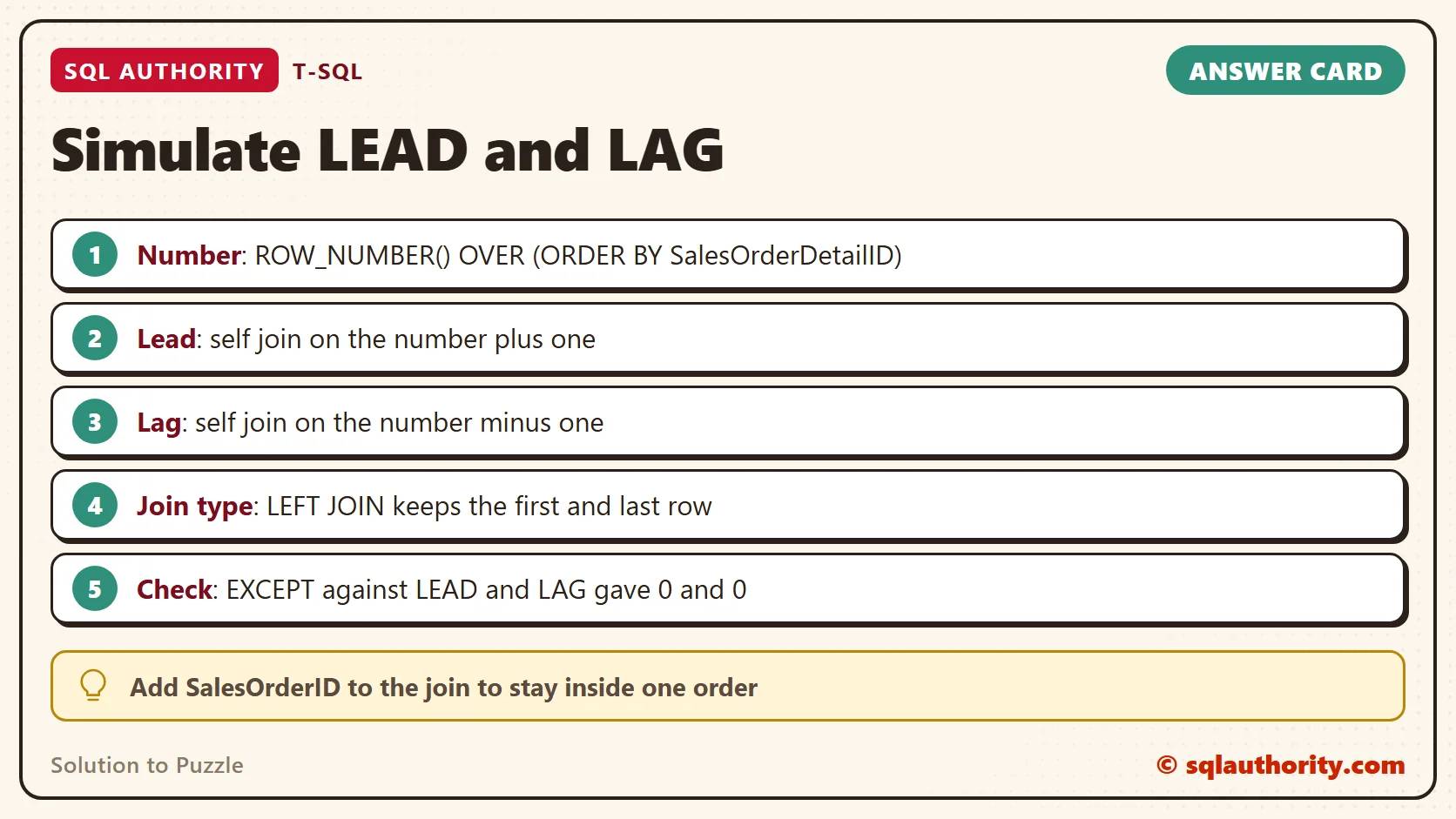
Most of the solutions start with ROW_NUMBER. It numbers the rows 1 to 10 in SalesOrderDetailID order. The lead of row 5 is then the row numbered 6, and the lag is the row numbered 4. A self join on the number plus one, and on the number minus one, finds both neighbors.
Use a LEFT JOIN, not an inner join. The first row has no row 0 and the last row has no row 11. An inner join drops both rows, and the left join keeps them with NULL.
The correlated subquery by Pravin Patel needs no row numbers. For each row it asks for the smallest ID above this one (MIN) and the largest ID below it (MAX). It relies on SalesOrderDetailID growing with SalesOrderID, which holds for these orders. Geri Reshef’s version needs no join. It reads the neighbor from a pair of rows with MAX and OVER.
A reader named dave asked whether OVER, ORDER BY and PARTITION BY make these solutions analytic. The puzzle bans the functions added in SQL Server 2012, such as LEAD and LAG. ROW_NUMBER is a ranking function, and an aggregate with OVER is older too. Both exist in SQL Server 2005.
Two Questions From Readers
Scott asked for the lead only when the SalesOrderID is the same. That is the Partition By query, which joins on the order as well as on the row number. I checked it against LEAD and LAG with PARTITION BY SalesOrderID, and the ten rows match.
Amaury Viera asked how to advance two rows instead of one. In the Early Bird query by DHall, change both offsets from 1 to 2. The first row then gets a LeadValue of 78 and a LagValue of NULL. The real LEAD and LAG with an offset of 2 return the same ten rows.
Geri Reshef’s version has no offset to change. It is built on pairs of rows, so it handles a step of one.
Is It Still Worth Knowing?
You could say this puzzle is a museum piece, because LEAD and LAG exist now. Fair point. On SQL Server 2025 I use the real functions. They are shorter and anyone can read them.
The self join on a row number still matters on a server older than 2012. It also teaches how a neighbor is found. That helps you read any query that compares a row with the next one. To simulate LEAD() and LAG() once is a good way to understand them.
A Simple Rule
Number the rows, then join the list to itself with a shift of one. Use a LEFT JOIN so the first and last row survive. Decide first whether a neighbor can come from another group, and add that column to the join if it cannot. Then check the result against LEAD and LAG with EXCEPT, as above.
These queries only read data, so there is nothing to clean up.
Simulating LEAD() and LAG() is not magic, it is a self join shifted by one row.
Published by Pinal Dave on SQLAuthority. More of my work at pinaldave.com.
Discover more from SQL Authority with Pinal Dave
Subscribe to get the latest posts sent to your email.




10 Comments. Leave new
Well- such a compliment from you – that is the best award.
Thank you very much.
Hi Pinal,
One Request
Can you post the list of people who posted correct answer? For others It Would be helpful and know why the post wasn’t correct.. Will be a great learning.. Thanks.
Regards,
Rajkumar,
Bangalore.
Hi Pinal,
Hello ..I Need Help..I have one table where in one column have name like this
Q1 Atul Prakash N
Q2 Ramesh Kumar Singh V
Q1 Q2 Vishal Kumar V
Q1 Q3 Q5 Ramsh Yadav V
I want Only name i.e. Atul Prakash, Ramesh Kumar singh, Vishal Kumar etc. Please provide me optimized solution for this… and one more thing how to compare data with one column of other table of one columns…please help me..
Hi pinal i have off the track question for you.
Can you please help me to find solution!!!
I have a one database say “test” in sql server 2008 R2. Now i want password protect that database. Is it possible to password protect individual database. If yes please help to get solution.
Thank you Pinal
Looking back for you reply.
Allow only for the people you want them to get access
Sir,
Can you please tell me if thousands of user updating or requesting for same table then how can we handle such type of scenario .
How could I change one of the solutions (preferably the first one) to to give me the lead only if the SalesOrderID is the same?
Doesn’t the usage of over, order by, and partition by clauses mean the evaluation being performed is an analytic function?
Hi,
have you developed a custom Lead & Lag function to work in SQL Server 2008?
Hi. Thanks for post these excellent solutions:
I’m using the one with
CASE WHEN N%2=1 THEN MAX(CASE WHEN N%2=0 THEN SalesOrderDetailID END) OVER (Partition BY (N+1)/2) ELSE MAX(CASE WHEN N%2=1 THEN SalesOrderDetailID END) OVER (Partition BY N/2) END LeadVal,
CASE WHEN N%2=1 THEN MAX(CASE WHEN N%2=0 THEN SalesOrderDetailID END) OVER (Partition BY N/2) ELSE MAX(CASE WHEN N%2=1 THEN SalesOrderDetailID END) OVER (Partition BY (N+1)/2) END LagVal
But I would like to advance two rows instead of one row. I’m having a hard time trying to find how to do this. Do you have any suggestion?