I compare PATINDEX and CHARINDEX by asking what the search text means. One accepts a wildcard pattern. The other searches for a literal substring, so the same characters can answer different questions.

Ask a precise search question
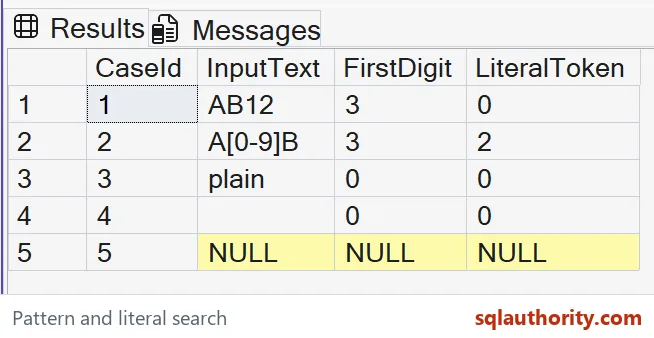
The example asks two questions about each input. FirstDigit looks for a character in the range zero through nine. LiteralToken looks for the five-character text [0-9], including its brackets.
Those aren’t interchangeable searches. In AB12, the pattern finds the digit one at position three. The literal token doesn’t occur anywhere. Keeping both outputs visible makes that distinction easier to review than a query that only filters matching rows.
WITH Inputs AS
(
 SELECT CaseId, CAST(InputText AS nvarchar(40)) AS InputText
 FROM (VALUES (1,N'AB12'),(2,N'A[0-9]B'),(3,N'plain'),
              (4,N''),(5,CAST(NULL AS nvarchar(40)))) v(CaseId,InputText)
)
SELECT CaseId, InputText,
       CASE WHEN InputText IS NULL THEN CAST(NULL AS int)
            ELSE PATINDEX(N'%[0-9]%',
              COALESCE(InputText,N'') COLLATE Latin1_General_100_BIN2)
       END AS FirstDigit,
       CHARINDEX(N'[0-9]', InputText COLLATE Latin1_General_100_BIN2)
           AS LiteralToken
FROM Inputs
ORDER BY CaseId;
Read the bracket characters correctly
The second row contains A[0-9]B. Its pattern result is three because the first digit appears inside the literal token. The literal search returns two, where the opening bracket begins.
I’d keep this row even though it looks artificial. It exposes the mistake of treating a pattern as plain text. A business rule that requires the exact token should use the literal search, rather than borrowing the pattern’s meaning.

Pin the range comparison
Bracket ranges follow collation rules, so the query explicitly uses Latin1_General_100_BIN2. That gives the digit example a stated comparison rule instead of inheriting an unknown database default. The same collation also appears on the literal search.
This choice doesn’t make every possible pattern portable. If the requirement changes to linguistic letters, review the intended alphabet and collation together. I don’t extend a decimal-digit example into a promise about every accented or supplementary character.
Keep missing input missing
PATINDEX and CHARINDEX both return NULL when the input text is NULL. Only a bare untyped NULL literal raises an error (Msg 8116), so keep the input typed. The example still feeds PATINDEX COALESCE(InputText,N”) and wraps it in a CASE. Both are optional.
I like the guard because it states the NULL contract in the code. You can drop it for shorter SQL. Either way, the fifth row shows PATINDEX and CHARINDEX returning the same missing result for missing input.
Distinguish zero from NULL
The plain and empty rows both return zero for these searches. Zero means that the requested match wasn’t found in supplied text. The final row returns NULL because no input text was supplied.
Converting every output to zero would lose that distinction. I’d decide whether missing input should be rejected, retained or defaulted at the application boundary. A search function shouldn’t silently make that business decision just because a convenient integer output is available.
Review positions before using them
Both functions return one-based positions for these non-max inputs. A later extraction needs to account for that numbering. A zero result can’t become a valid character position without an explicit not-found rule.
The example stops at reporting positions. It doesn’t split a file format or interpret quoted fields. If these results feed SUBSTRING, keep the bounds and requested length visible. Add separate examples for missing delimiters.
Separate meaning from access paths
I compare complete rows here, rather than using elapsed time as evidence of correct search semantics. The query reads only its supplied VALUES rows. It creates no index and makes no claim about a production access path.
For a real search workload, review the predicate and its actual plan separately. Pattern and literal searches can produce similar matches on friendly data. That similarity doesn’t mean their contracts or their useful indexing strategies are identical.
Name the question first, and the right function picks itself.
A pattern is not a literal token, it is a search rule with its own comparison contract.
Published by Pinal Dave on SQLAuthority. More of my work at pinaldave.com.
Discover more from SQL Authority with Pinal Dave
Subscribe to get the latest posts sent to your email.