This is very common request recently – How to import CSV file into SQL Server? How to load CSV file into SQL Server Database Table? How to load comma delimited file into SQL Server? Let us see the solution in quick steps.

CSV stands for Comma Separated Values, sometimes also called Comma Delimited Values.
Create TestTable
USE TestData
GO
CREATE TABLE CSVTest
(ID INT,
FirstName VARCHAR(40),
LastName VARCHAR(40),
BirthDate SMALLDATETIME)
GO
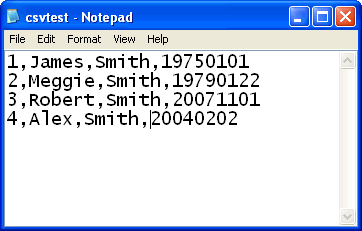
Create CSV file in drive C: with name csvtest.txt with following content. The location of the file is C:\csvtest.txt
1,James,Smith,19750101
2,Meggie,Smith,19790122
3,Robert,Smith,20071101
4,Alex,Smith,20040202
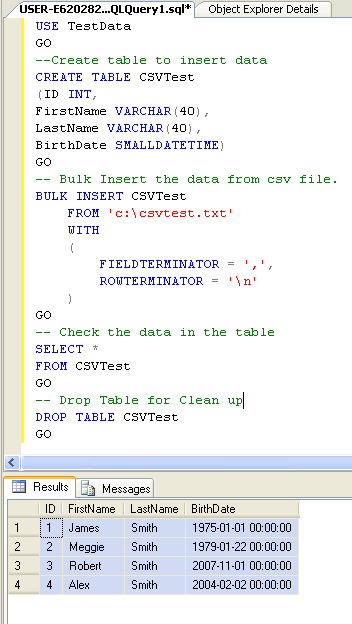
Now run following script to load all the data from CSV to database table. If there is any error in any row it will be not inserted but other rows will be inserted.
BULK
INSERT CSVTest
FROM 'c:\csvtest.txt'
WITH
(
FIELDTERMINATOR = ',',
ROWTERMINATOR = '\n'
)
GO
--Check the content of the table.
SELECT *
FROM CSVTest
GO
--Drop the table to clean up database.
DROP TABLE CSVTest
GO
Reference : Pinal Dave (http://blog.SQLAuthority.com)


Good one.
It solves my problem.
Keep it up. Pinal.
Can i insert current datetime using CSV .
Can anybody help me
Export excel sheet to SQL Database(Remote Server)
insert INTO tbL_excel
SELECT *
FROM OPENROWSET(‘Microsoft.Jet.OLEDB.4.0′,
‘Excel 8.0;Database=\\pc31\C\Testexcel.xls’,
‘SELECT * FROM [Sheet1$]‘)
rajesh u have to use import export wizard
Hi Rajesh,
perform following steps:
1. open your excel file.
2. save file as [name].csv
3.execute the sql statement given by pinal.
if any one help please send that to my mail
Dear Rajesh,
insert INTO tbL_excel
SELECT *
FROM OPENROWSET(‘Microsoft.Jet.OLEDB.4.0′,
‘Excel 8.0;Database=\\pc31\C\Testexcel.xls’,
‘SELECT * FROM [Sheet1$]‘)
The above query posted by you is having a small mistake and the query follows:
SELECT * INTO TBL_EXCEL
OPENROWSET(‘MSDASQL’, ‘DRIVER ={Microsoft Excel Driver (*.xls)}’, ‘DBQ = PATH_NAME’,
‘SELECT * FROM [Sheet1$]‘)
Hi Vishnu,
Thanks for Updated Query.
But it has small mistake in there and gives error message ‘Invalid syntax near OPENROWSET’
so I’h use both of above combination of query is as follow:
SELECT * INTO TBL_EXCEL
FROM OPENROWSET(‘Microsoft.Jet.OLEDB.4.0′,
‘Excel 8.0;Database=C:\Source\Addresses.xls’,
‘SELECT * FROM [Sheet1$]‘)
and it work perfectly
Thanks and Regards
Try to change “\\pc31\C” by the drive and folder of your server location.
Server: Msg 7399, Level 16, State 1, Line 1
OLE DB provider ‘Microsoft.Jet.OLEDB.4.0′ reported an error. The provider did not give any information about the error.
OLE DB error trace [OLE/DB Provider 'Microsoft.Jet.OLEDB.4.0' IDBInitialize::Initialize returned 0x80004005: The provider did not give any information about the error.].
INSERT INTO dbo.ImportTest
SELECT * FROM OPENDATASOURCE(‘Microsoft.Jet.OLEDB.4.0′,
‘Data Source=C:\ImportData.xls;Extended Properties=Excel 8.0′)…[Sheet1$
–Drop the table to clean up database.
SELECT *
FROM CSVTest
GO
Of course, it won’t.
Server: Msg 4860, Level 16, State 1, Line 1
Could not bulk insert. File ‘c:\DAM.txt’ does not exist.
(0 row(s) affected)
I am getting this error. I have tried the same query as given by Pinal. So, pls. guide me.
You will need an UNC path instead of “C:\”.
MAke sure that the file exists in server’s directory
Hi… Where server’s directory in pc???
I have the following error when testing this: cannot bulk load becuase the file CL\Users\Public\Downloads\CSVTest.Txt could not be opened. Operating system error code 3 (the system cannot file the path specified)
Anyone run into this?
Thanks for your great share.
How about csv files that have double quotes? Seems like a formatfile will be needed when using BULK INSERT. Would like to see if you have another approach.
bulk insert
from
with
(
FIELDTERMINATOR = ‘”,”‘,
ROWTERMINATOR = ‘”‘
)
also make sure you dont have an extra carriage return is at the end of the file
since im replying for a post that is more then 3 yrs old, somebody mught benefit from this reply
Regards,
Bhuvana
Yes this helped. Thanks for posting.
Not all of my fields have double quotes around them, only the text quotes.
Any idea for the solution to this?
Many thanks,
not all of my csv cells are surrounded by double quotes only the string columns, is there another way to do this?
not all of my csv cells are surrounded by double quotes only the string columns the integer columns arent delimited using this method, is there a way around this?
My field terminator is ‘~’ and row terminator is ‘\n’. What would my query look like??
Hi all,
I am getting following error in the bulk insert of the .csv file.
The bulk load failed. The column is too long in the data file for row 1, column 25. Verify that the field terminator and row terminator are specified correctly.
Please help me.
Dnyanesh
It means that the actula length of the column is less than the data available in the csv file. Increase the size and try again
What would be the process to import a CSV file into existing MS SQL database tables? I have a CSV file that contains data which is comma delimited that I need to import into a SQL production database which is being used by another application. The CSV file contains a list of defects that basically needs to be imported into the Defects table in our SQL database.
Thanks for all of your help in advanced.. This is a really good website to obtain SQL information.
You have to create a view then bulk insert into the view. You can leave the auto int field out and then it would insert into each one. Or you can just create the fields you plan on inserting. For example.
USE [DatabaseName]
– See if the View exists within the Database
IF EXISTS ( SELECT name
FROM sys.views
WHERE name = ‘YourViewName’
) DROP VIEW YourViewName
GO
CREATE VIEW YourViewName
AS
SELECT Field1, Field2, Field3
FROM PriorTableThatExists
GO
BULK INSERT YourViewName
FROM ‘C:\YourFilePath’
WITH ( FIELDTERMINATOR = ‘,’,
ROWTERMINATOR = ‘\n’
)
GO
I had some problems with bulk inserts too. The data set to insert was somewhat large, around a few hundred megabytes, resulted in some two million rows. Not all data was required, so massaging was needed.
So I wrote a smallish C#/.NET program that reads the input file in chunks of 25,000 rows, picked appropriate rows with regular expression matching and sent results to DB.
String manipulation is so much more easy in about any general-purpose programming language.
Key components: DataTable for data-to-be-inserted and SqlBulkCopy to do the actual copying.
@Dnyanesh: Your input data is likely to not have correct column/row separator characters.
I’d guess you have a line-break as row separator. If that is the case, the problem is, in Windows CR LF (0x0a 0x0d) is often used, in other systems only CR or LF are used. Check your separator characters. Use a hex editor to be sure.
@Branden: Just use sed to change quote characters :-)
@Dragan: Use Import/Export wizard or write a program to do inserting like I did.
A CSV file can contain commas in a field ‘,’ as well as be used as the delimiter. How does this Bulk import handle these circumstances? Does it handle all the CSV standards?
@vonPryz: See Example Below (don’t just replace quotes)
Example CSV lines with format (Name,Address):
Scott,123 Main St
Mike,”456 2nd St, Apt 5″
More on CSV files can be found here
http://en.wikipedia.org/wiki/Comma-separated_values
Hi Scott – did you get an answer to this question? I have a similar situation where some of the data has ” ” around it while other data does not.
You can change your delimiter in to a “pipe” | . Then change your SQL to use “|” as your FIELDTERMINATOR.
1.
In Notepad, I did a “find and replace all” for “,” (double quote, comma, double quote) to be replaced with pipe. Then did a “find and replace all” for ” (double quote) to be replaced with nothing.
2.
Update your SQL to read:
BULK
INSERT CSVTest
FROM ‘c:\csvtest.txt’
WITH
(
FIELDTERMINATOR = ‘|’,
ROWTERMINATOR = ‘\n’
)
GO
Another thing:
When replacing the delimiters in your text file:
1. Start out with a “find and replace all” for “,” (double quote, comma, double quote) to be replaced with pipe.
2. Then remove all the beginning and ending ” (double quote) with a “find and replace all” for ” (double quote) to be replaced with nothing.
3. Then to make sure you have accounted for empty columns in the text file:
i. do a “find and replace all” for ,,, (comma comma comma) to be replaced
by ||| (pipe pipe pipe)
ii. next do a “find and replace all” for ,, (comma comma) to be replaced
by || (pipe pipe)
Don’t ever try to do a “find and replace all” for a single comma – or else you may be updating comma characters within columns.
You should be able to simply use Excel to replace the delimiters and remove double quotes, then re-save file. But this the my old school methodology I’ve been doing for years.
ANOTHER PROBLEM: HELP
Hey everyone… can anyone help me with this… i had read a txt file with the bulk sintax but after that i find another problem, in my txt file it has the same header and detail in it so my problem now is how i can to put the header in a table1 and the detail in a table2, another thing i create just a field1 for put all my rows(header and detail), but they have FIELDTERMINATOR = ‘|’, but the header it has seven fields and the detail it has eleven fields so thats another problem because i cannot create just one table with the exact fields to put my detail and header… this an example of a txt file:
HR|001580/06|RG|11/01/2013 12:00|BG|3573|001580
IT|001580/01|1|00147066||1200|852.3|830.3|1.35|UNIDAD|0|31/12/2014 00:00
IT|001580/02|1|00147066||200|852.3|830.3|1.35|UNIDAD|1|31/12/2014 00:00
IT|001580/03|1|00147066||100|852.3|830.3|1.35|UNIDAD|55|31/12/2014 00:00
IT|001580/04|2|00254276||200|852.3|830.3|1.35|UNIDAD|0|31/12/2014 00:00
IT|001580/05|3|00305359||1700|852.3|830.3|1.35|UNIDAD|0|31/12/2014 00:00
IT|001580/06|3|00305359||300|852.3|830.3|1.35|UNIDAD|1|31/12/2014 00:00
and this is the query i have…
CREATE TABLE #temp
(
campo1 VARCHAR(max)–,
–campo2 VARCHAR(max),
–campo3 VARCHAR(max),
–campo4 VARCHAR(max),
–campo5 VARCHAR(max),
–campo6 VARCHAR(max),
–campo7 VARCHAR(max)
)
BULK INSERT #temp
FROM ”
WITH
(
FIELDTERMINATOR = ‘|’,
ROWTERMINATOR = ‘\n’
)
This firs query it is for the header
SELECT *
FROM #temp
WHERE SUBSTRING(campo1,1,2) = ‘HR’
This firs query it is for the detail
SELECT *
FROM #temp
WHERE SUBSTRING(campo1,1,2) = ‘IT’
so then come my problem how i can Separate the fields for the header and the detail.
Thanks for all in this forum,
I have used BULK INSERT command load CSV file into existing SQL server table. It is executing sucessfully withougt giving any error but only concern is it is inserting every alternative records.
BULK INSERT EDFE_Trg.dbo.[tblCCodeMast]
FROM ‘c:\temp\Catalogue.txt’
WITH
(
FIELDTERMINATOR = ‘,’,
ROWTERMINATOR = ‘\n’
)
GO
this is my code. Please help me on this.
With advance thanks…
kumar
How did you know it is inserting alternate records?
Run this before and after import to see if recordcount is correct
select count(*) from table
thank you very mush for this,
it willy helped me.
regards
Hi,
I need to import a significant number of Latitude and Longitude data into one of my SQL tables… (running SQL2005)
Tried the above, but got you do not have permission to use Bulk Load statement.
Logged in as administrator… any thoughts?
Martin
ok…solced that issue…logged in using Windows Authentication, and gave my SQL admin the rights for BULKINSERT
SQL code now runs with no errors… and if I do a select * from the table, it shows the field headings, but no data … 0 rows affected
Any thoughts? This one has me stumped… no error message leaves me nowhere to look
Cheers
Did the fie have data? Also did you get any errors/warnings during bulk insert?
Hi Pinal
Please help me
Iam using sql server 2005,..I want to do a similar operation..
I have my file in C:\Test.txt. Also I create the table in my DB.
BULK INSERT CSVTest
FROM ‘c:\Test.txt’
WITH
(
FIELDTERMINATOR = ‘\t’,
ROWTERMINATOR = ‘\n’
)
GO
When I run this …am getting error saying…
Cannot bulk load. The file “c:\Test.txt” does not exist.
infact, I have the file given in the path.
Thanks,
Might be this only work when the database is local on the system that contain the text file.
the path should be UNC path like:
‘\\server’s name\XXX\csv.txt’
instead of ‘c:\Test.txt’
Make sure the given path & file name are correct or not. because i got the same error when i run that query. Then i change the file name as same as in the script (csvtest.txt)
and stored it in the same path.
@Siva
SQL Sever 2005 must have access rights to the file (“c:\Test.txt”). Make sure the file is accessible for the database account
How to import data from a Excel Sheet using “Bulk Insert” command?
You need OPENROWSET function
Refer this post
http://www.sqlteam.com/forums/topic.asp?TOPIC_ID=49926
Will this method work for SQL Server Compact Edition?
Panel, Excellent Job, Congrats.
Please help me for this….
I have on line in .csv file as …
863807129312681,G052360310001
I want to do BulkInsert as….
Column1: 86380 71293 12681
Column2: ;
Columns3: G052360310001
please help me…..
Great stuff, codes perfect, helped me alot lot
hai dave,
i want to iterate the record from collection of records without using cursors. how can i achieve this
Hi,
What if my Table has 4 Columns and the CSV file has 3 Columns and I wanna the last column of the Table to be a variable?
Refer this post. This exactly describes what to do when you are in such a situation
http://beyondrelational.com/blogs/madhivanan/archive/2010/03/17/bulk-insert-to-table-with-specific-columns.aspx
THANK YOU!
Hey there, thanks for the great article.
I have one question, is it possible to read a CSV file line-by-line without using bulk import?
It’s just more convenient in my situation so please let me know if its a possible option,
Thank you
Can you give us more informations on what you are trying to do?
Please help me for this….
I have on line in .csv file as …
863807129312681,G052360310001
I want to do BulkInsert as….
Column1: 86380 71293 12681
Column2: ;
Columns3: G052360310001
please help me…..
Do you mean to skip column 2?
Refer this post
http://beyondrelational.com/blogs/madhivanan/archive/2010/03/17/bulk-insert-to-table-with-specific-columns.aspx
i want to get data from CSv file into sql database.suppose the CSV file changes that is updations will be done on CSV file for every 8 hrs or 4 hrs like that.Then i have to get the updations reflected in my sql datbase also. Then how it is possible ????
you never answered scott’ question above. thoughts?
his question:
A CSV file can contain commas in a field ‘,’ as well as be used as the delimiter. How does this Bulk import handle these circumstances? Does it handle all the CSV standards?
@vonPryz: See Example Below (don’t just replace quotes)
Example CSV lines with format (Name,Address):
Scott,123 Main St
Mike,”456 2nd St, Apt 5″
I am using SQL Express Edition to Run the code..
But I am Getting the error
Msg 102, Level 15, State 1, Line 3
Incorrect syntax near ‘‘’.
Msg 319, Level 15, State 1, Line 4
Incorrect syntax near the keyword ‘with’. If this statement is a common table expression or an xmlnamespaces clause, the previous statement must be terminated with a semicolon.
Please help me to resolve the error…
Thanx in advance…
It is becuase single quotes are represented differently in this site. Change it single quote and try
What happens to the rows that fail? I wuold like to save those off to allow the user to fix them….
You can make use the method that is explained in this link
http://beyondrelational.com/blogs/madhivanan/archive/2009/10/19/finding-out-problematic-data-in-bulk-insert-data-truncation-error.aspx
to different scott
I have fields with commas as well. Convert the csv (using Excel) to a tab-delimited text file and then use the ‘\t’ delimiter instead.
to Abdul
I have used Excel to break longer fixed-length columns into smaller columns. I believe this will help you. Open the file in Excel, add two columns after the first column. use the Data –> Text to Columns option. you can break the data into additional columns and then save the file back out to a csv.
i have one csv file in that file the data is like
CATEGORY,10,10,10,10
ERP Code,Creation date (DD/MM/YYYY),NoProgram,Contract number,Contract position
920,4/8/2010,971156,12914,1
LINES,10,10,10,10
Date (DD/MM/YYYY),Quantity,Horizon,10,10
16/09/2010,20,Frozen,10,10
28/10/2010,20,Flexible,10,10
23/12/2010,11,Flexible,10,10
27/01/2011,13,Flexible,10,10
24/02/2011,14,Flexible,10,10
24/03/2011,19,Flexible,10,10
28/04/2011,13,Flexible,10,10
26/05/2011,13,Flexible,10,10
23/06/2011,16,Flexible,10,10
28/07/2011,23,Flexible,10,10
1/8/2011,13,Forecast,10,10
29/08/2011,7,Forecast,10,10
24/10/2011,19,Forecast,10,10
21/11/2011,14,Forecast,10,10
19/12/2011,13,Forecast,10,10
16/01/2012,18,Forecast,10,10
13/02/2012,12,Forecast,10,10
12/3/2012,12,Forecast,10,10
9/4/2012,19,Forecast,10,10
7/5/2012,16,Forecast,10,10
4/6/2012,14,Forecast,10,10
2/7/2012,17,Forecast,10,10
30/07/2012,12,Forecast,10,10
24/09/2012,8,Forecast,10,10
like this give a solution to insert this one to one sql table
i tryed by using bulk insert but it gettting updated with one column i neeed field by field
plse help me
I have over 1,200 separate csv files to import and have two issues where I could use some help.
First, all of the files contain date fields but they are in the standard MM/DD/YYYY format. Is there a way to import them and then change them to an acceptable format for SQL Server?
Next, each file name is unique and I have created a temporary table that has the directory and file name. Is it possible to nest a query something like this:
BULK INSERT MyTable
FROM (Select FileName from Files;)
WITH
(
FIELDTERMINATOR = ‘,’,
ROWTERMINATOR = ‘\n’
)
GO
As an addendum, I discovered that some columns are in scientific notation so I need to change all numeric columns in the CSVs to be numeric with 6 decimal
Did it. I used a combination of tools:
1. Lots of brute force – over 20 hours formatting, saving and converting the data. There has to be a more elegant solution but I couldn’t find it.
2. Excel 2007 because it can open a csv file that has over 200,000 rows. I loaded 25 files at a time into a worksheet (max of computer resources), reformatted the columns in bulk and used a nifty VBA script to write each worksheet out to a separate csv with the name of the worksheet.
3. Found a great procedure that uses XP_CMDSHELL and the BCP utility in SQL 2005 that loads all files located in a specified directory. Loaded over 1,300 files in less than 30 minutes.
Now daily maintenance is loading one file a day.
D.
im getting the foll err can u help
ulk Insert fails. Column is too long in the data file for row 1, column 1. Make sure the field terminator and row terminator are specified correctly.
Check the length of the first column of the table
You need to increase it as the incoming data length is more than column’s length
Hi,
Does BULK INSERTing into an existing table that has an index on it take longer than inserting into an existing table without an index?
Cheers
If the table has clustered index, it may take more time to import
Hi Pinal,
I was wondering how will i insert thousands of row from excel sheet.
But I converted the file to csv (comma seperate file ) and then usiing your bulk import statement i created all of my rows into my Table.
This was really wonderful
Thanks,
Keep it up
Happy Coding!!!
Puneet
I’m doing exactly what is said above but when I try the
BULK
INSERT CSVTest
FROM ‘c:\csvtest.txt’
WITH
(
FIELDTERMINATOR = ‘,’,
ROWTERMINATOR = ‘\n’
)
GO
I’m recieving the following error??? I was wondering could someone help me with this or is it just some tiny error that I can’t see, help would be really appreciated!!
Msg 102, Level 15, State 1, Line 3
Incorrect syntax near ‘‘’.
Msg 319, Level 15, State 1, Line 4
Incorrect syntax near the keyword ‘with’. If this statement is a common table expression or an xmlnamespaces clause, the previous statement must be terminated with a semicolon.
It is because single quotes are represented differently in this blog. Change them to single quotes and try
Hi,
I was using BULK insert to import a csv file to a database table(following the original example by Pinaldave in the beginning of this email stream), but got errors. I have granted “Everyone” full control to this file.
Thanks so much,
Sheldon
============================================
BULK INSERT dbo.CSVTest
FROM ‘c:\csvtest.csv’
WITH
(
FIELDTERMINATOR = ‘,’,
ROWTERMINATOR = ‘\n’
)
GO
Msg 4860, Level 16, State 1, Line 1
Cannot bulk load. The file “c:\csvtest.csv” does not exist.
please try to change the data-type of the destinations column.
regards,
Ahmad Elayyan
The file should exists in the server and not in your system
i have a text file that is not comma or tab delimited. the data needs to be separated using fixed width counts. ie: characters 1-3 go into column1. characters 4-12 go into column 2 and so on. can this method be adapted to handle pos statements?
Hi,
I Just want to Thank’s for this Code realy help me a lot.
and i want to how to inport a .csv file through imprt command.
I ran code in sql 2000 worked fine. During cut and paste it has problem with ‘ ‘. I had to re-enter from my keyboard. Also like to suggest for those it doesn’t run, please name extension .csv in than .txt for sql 2000.
Thanks it works!
Also just wanted to point out that the query you said uses ” ` ” instead of ” ‘ ” shouldn’t you change it?
Hi Pinal
Please help me
Iam using sql server 2000,..I want to do a similar operation..
I have my file in C:\Test.txt. Also I create the table in my DB.
BULK INSERT CSVTest
FROM ‘c:\Test.txt’
WITH
(
FIELDTERMINATOR = ‘\t’,
ROWTERMINATOR = ‘\n’
)
GO
When I run this …am getting error saying…
Cannot bulk load. The file “c:\Test.txt” does not exist.
infact, I have the file given in the path.
Thanks,
As I replied to other person, the file should exists in the server and not in your system
What is the Max size that SQL server can read and insert into database table? Please help me for this because i am inserting up to 4MB file into a table using .NET code, it is not inserting records in the table. Up to 3 MB files are inserting into the table.
Thanks
Hi,
i have to upload data from a fixed width text file to sql server 2000.
data in file is like rahulankilprogrammer
we have two create a table of three column fname,lname and job, first 5 letters will go in first column , next 5 letters will go in second and than next 10 letters will go in third column .
please help me to do this ,as it is not a CSV file.
this file come to us on daily basis, daily we hav to upload it on sql server.
pls pls help me out ASAP
ThanX in advance
Hello,
I have a proplem with BULK in stored procedures.
I want to do a BULK from a file (.CSV) wich name changes every day. So I have an attribute “@FileName” in order to change the name every single day.
BULK INSERT dbo.TableName
FROM @FileName
WITH ( FIELDTERMINATOR=’;', ROWTERMINATOR=’\\n’)
But it gives me an error telling that there’s a sintax error after FROM. I have tried with all kind of punctuation (‘,”,`,´,+)
It would be gratefull if some one could answer to my question.
Thanks in advance
declare @sql varchar(1000)
set @sq=’BULK INSERT dbo.TableName
FROM ”’+@FileName+”’
WITH ( FIELDTERMINATOR=’’;”, ROWTERMINATOR=’’\\n’’)’
EXEC(@sql)
Hi,
I try that code. But my saved location is D drive.
But i shows one error. That is Incorrect syntax near ‘ ‘ ‘.
Give the solution.
Thanks,
Vijay Ananth
Post the full code you used
hi
it solved my problem
can u please tell how can i schedule stored procedure in sql server2005
thanks
rajeh
Read about JOBs in SQL Server help file
Hello,
I’m using bulk insert and everything works fine but I cannot get latin characters to import properly. For example, my flat data file contains Sertãozinho but the imported data displays Sert+úozinho. The “a” character changes to something with plus sign. I tried using nvarchar datatype but it did not help.
Here is my code:
DROP TABLE [DumpData]
GO
CREATE TABLE [dbo].[DumpData](
[DataField1] [varchar](255) NULL
ON [PRIMARY]
–import data using bulk insert
DECLARE @bulk_cmd varchar(1000)
SET @bulk_cmd = ‘BULK INSERT [NalcoSAPDump]
FROM ”c:\DataImport\import.dat”
WITH (FIELDTERMINATOR = ”;”,ROWTERMINATOR = ”’+CHAR(10)+”’)’
EXEC(@bulk_cmd)
Thanks!!
You should have used nvarchar datatype instead of varchar
USE @bulk_cmd use nvarchar
The table you are creating use the appropriate Collation for that column(s)
Hello,
thanks for your answer, Vijay Ananth. :D
Does anybody know something about incremental bulk? It’s just the “normal” bulk insert or there is another thing that I have to add to the bulk sentence?
I want to do a BULK from a csv file. Firstly I do a Bulk of the whole file.
But that csv file changes every time, and in order to have those new rows in my DB I would like to know if there is another way to bulk just the new rows. With that incremental bulk or something else.
At the moment I’m doing it with bulk every second. So I don’t know if somebody that is writting the file can get an error while the bulk is working.
Any suggestions will be wellcome.
Thanks
insert Excel file record in a table + SQL SERVER + C#.net
Thanks, helpful post.
Pinal one more time you saved my life, althought it is the first time that I submit you a commend! Mate you are the best! I hope to reach your level one day!
Panagiotis Lepeniotis
MCDBA,
MSc Database Professional Student!
As for the dataMate who asked about the quotations, I will suggest to edit the csv file, at least thats what I did and worked!
Cheers
Hi Pinal,
i want to batch upload from excel to sqlserver where i want to insert into multiple table as dependency is there between tables. How to do it? Is it possible to do in c#?
Thank you in advance. I would be very thankful if I get answer quickly as I’m badly in need of it?
Dave B
Regarding your question:
Does BULK INSERTing into an existing table that has an index on it take longer than inserting into an existing table without an index?
The answer is no. We tried it out on a large Table (10 mil rows) into which we are loading even more rows. WITHOUT the index, the application timed out. With the index, it loaded in fine time.
thanks a lot!
exactly what i was looking for.
BULK INSERT CSVTest
FROM ‘c:\CSVTest.txt’
WITH
(
FIELDTERMINATOR = ‘,’,
ROWTERMINATOR = ‘\n’
)
GO
I got the following error
Msg 102, Level 15, State 1, Line 2
Incorrect syntax near ‘‘’.
Msg 319, Level 15, State 1, Line 3
Incorrect syntax near the keyword ‘with’. If this statement is a common table expression or an xmlnamespaces clause, the previous statement must be terminated with a semicolon.
Can you please let me know what needs to be done in this case?
Can we do conversions while doing Bulk inserts? (like string to decimal conversions, string to date, string to time etc..,)
Any suggestions is highly appreciated! :)
Import data as such
If you want ot convert them to different data types, use update statement
I also get the error: Msg 4860, Level 16, State 1, Line 1
Cannot bulk load. The file “c:\csvtest.txt” does not exist.
How do I grant SQL access to the file?
I am running on SQL2005 on an instant I created for myself.
I tried to change the file to have access approved for ‘everyone’, but still this didn’t make any difference. I still get the file doesn’t exist error.
Thank you,
Anke
How were you able to resolve this?
I was able to resolve.
Thank you!
I have the same problem as Kumar. Runs without errors but only every second (alternative) record gets inserted. I have tried different rowterminators, but the problem remains.
bulk insert Gen_ExcelImports from ‘C:\Software\invoices\April2008\csvfile.txt’
with ( FIELDTERMINATOR = ‘,’,FIRSTROW=2,ROWTERMINATOR = ‘\n’)
Any help would be greatly apprciated. Thanks in advance!
I have imported a flat (csv) into SQL Server 2005 using the wizard. I have field called Product Code which has 3 numbers e.g. 003. I imported it as text (default). When I open the ipmorted table, i have a plus sign next to the Product Codes e.g. +003. Why is it there and how do i get rid of that plus sign? I just want it to show 003.
It is particularly annoying and I want to concatenate the Product Codes with other codes to create an ID.
Please Help
You should have formatted the cell to be of character type
or use convert function to convert number to varchar
Hola your example i good
How conncted remote computer for read file in this remote computer.
for example
BULK
INSERT dbo.tblPsoArchivosCalificacion
FROM ‘\\10.63.200.28\Paso\LibroDatos.csv’
WITH
(
FIELDTERMINATOR = ‘,’,
ROWTERMINATOR = ‘\n’
)
the question is?
i need net use userid and password to access remote computer.
sorry but my english is bad.
Hi All,
Appreciate help on below
I want to do conditioal sum in an SQL table as follows
Column1 column2 column3 column 4 column5
a b zzz jjj 4
b a yyy rrr 7
a a fff hhh 3
a b ccc kkk 2
b a kkk ttt 7
b a ggg lll 4
a b yyy kkk 3
what i want to do is,
For values of column1 = ‘a’ then add(sum) column 5 by grouping by column3. for values of column2 = ‘b’ then add (sum) co lumn5 by grouping by column4.
please help!
Krish
Replace ` with ‘ (single quotes)
When I run this particular stored proc all of my data comes out in the table with double quotes around it. How would I get rid of these double quotes?
Thanks
Simple and Suberb information.
Thanx.
Hi
Can you tell me if it is possible to execute tis code with sqlcmd in VB.NET.
I am using express editions of VS 2008 and SQL server 2005
I get the error: Msg 4860, Level 16, State 1, Line 1
Cannot bulk load. The file “c:\csvtest.txt” does not exist.
OR
Cannot bulk load. The file “c:\csvtest.csv” does not exist.
Make sure the file exists in SERVER’s directory
Thanks, it was a very simple solution to meet my requirement.
I’m using the bulk insert statement
BULK INSERT Received
FROM ‘\\Admfs1\users\CPurnell\Responses\C0009348.iff’
WITH
(
FIELDTERMINATOR =’|',
ROWTERMINATOR =’ {CR}{LF}\n’
)
This works great for one file. But what I really need to do is bulk insert all .iff files from the Responses folder.
Any suggestions?
You may need to run the BULK INSERT for all the files
How many such files do you have in the folder?
Hi
I tried to insert the data in the table using INSERT Bulk Query.
I used the Query like this:
BULK INSERT insertdatdata FROM ‘D:\mani_new\standard.Dat’
WITH (
DATAFILETYPE = ‘char’,
FIELDTERMINATOR = ‘ ‘,
ROWTERMINATOR = ‘\n’
)
GO
The file is there in correct path.
But i got the following error.
Cannot bulk load because the file “D:\mani_new\standard.Dat” could not be opened. Operating system error code 3(The system cannot find the path specified.).
please give me some solution.
Its urgent.
Thanks,
Sathya.
I got the error:
Msg 4860, Level 16, State 1, Line 1
Cannot bulk load. The file “D:\test.txt” does not exist.
Plz give the solution.
Thanks
Sathya.
How do we create a table in SQL server through VB.NET code by importing the schema from a TEXT file?
USE OPENROWSET
Refer this
http://beyondrelational.com/blogs/madhivanan/archive/2009/10/19/finding-out-problematic-data-in-bulk-insert-data-truncation-error.aspx
g8
its a true solution
hi,
sathya
i think u r using sql server client verson. on ur pc
so u have to put the text file on ur data base server’s
“D:\mani_new\standard.Dat” paths.
just do it …………
hi pinale,
While working on it i m getting the error file doesnt exist can u suggest me any thing to be done
Thanks
Hi,
Thank you for sharing your code, it really works well ;-)
I tried to open a text file in web but it did not work. Do you have any idea to work it around?
BULK
INSERT bod.temp
FROM ‘http://www.test.com/test.txt’
WITH
(
FIELDTERMINATOR = ‘|’,
ROWTERMINATOR = ‘\n’
)
GO
Thanks!
No. It wont work
You need to have data in the server’s directory to use that
hi,
can u tell how to load the particular field from dastination file into database…
i am using simple notepad files which is contain 46 columns…
so i want to read the input file and insert only three columns (column 1, column 15,column 46) into the tables…
is there any commands existing for doing this type of file handling…
i m using sqlserver 7
plz help me…
I have to import a csv file into an existing table that has different column names from the originating one. How do I match differently named fields ?
Thank you
Different column names doesn’t matter as long as number of columns and datatypes are equivalnet
Hi Madhivanan,
Could you please mail me the query how to extract column headers using BCP command and also column names changes every time .
Thanks in advance :
waiting for your reply (as soon as possible)
hi, i want to upload a cvs file frm asp.dot page and the file should automatically extract into sql database table. the table is created, plz help out…
I just wanted to say that this solution is so quick and easy. I found a ton of other way too complicated examples. This just cuts right to the quick and gets the job done.
Thanks for this excellent code snippet!
Mike
Hi Pinal,
I am attempting to use the bcp utility (via command prompt) in order to create a comma-separated text file named Inside Sales Coordinator. Here is the new table created in the Northwind database:
CREATE TABLE [dbo].[NewEmployees](
[EmployeeID] [int] NOT NULL CONSTRAINT [PK_NewEmployees] PRIMARY KEY,
[LastName] [nvarchar](20) NOT NULL,
[FirstName] [nvarchar](10) NOT NULL,
[Title] [nvarchar](30) NULL,
[TitleOfCourtesy] [nvarchar](25) NULL,
[BirthDate] [datetime] NULL,
[HireDate] [datetime] NULL,
[Address] [nvarchar](60) NULL,
[City] [nvarchar](15) NULL,
[Region] [nvarchar](15) NULL,
[PostalCode] [nvarchar](10) NULL,
[Country] [nvarchar](15) NULL,
[HomePhone] [nvarchar](24) NULL,
[Extension] [nvarchar](4) NULL,
[Notes] [ntext] NULL,
[ReportsTo] [int] NULL,
[PhotoPath] [nvarchar](255) NULL
) The new comma-separated text file should contains the following columns from the NewEmployees table: EmployeeID, LastName, FirstName, HireDate (date part only; no time), and Extension. Only those employees with a Title of “Inside Sales Coordinator” should be returned.
Here is what I came up with so far:
bcp “select EmployeeID, LastName, FirstName, HireDate, Extension from Northwind.dbo.NewEmployees” out C:\InsideSalesCoordinators.csv –c –t , –T -S SDGLTQATEAM\SQLExpress can you give me a little insight on how to populate the .csv file. Thanks
This Procedure can help in ASP.NET
CREATE PROCEDURE ImportFile
@File VARCHAR(100)
AS
EXECUTE (‘BULK INSERT TableName FROM ”’ + @File + ”’
WITH
(
FIELDTERMINATOR = ”;”
, ROWTERMINATOR = ”\n”
, CODEPAGE = ”RAW”
)’ )
/*
EXEC dbo.ImportFile ‘c:\csv\text.csv’
*/
C# Code
SqlConnection cnn = new SqlConnection(
string.Format(@”Data Source=.\SQLEXPRESS;Initial Catalog=DB_Name;Persist Security Info=True;User ID=;Password=” ));
SqlCommand cmd = new SqlCommand(“ImportFile”, cnn);
cmd.CommandType = CommandType.StoredProcedure;
cmd.Parameters.Add(“@File”, SqlDbType.VarChar).Value = txtFile.text;
cnn.Open();
cmd.ExecuteNonQuery();
cnn.Close();
Hi,
Most of the time, I search this site for answers of my SQL questions. And here I have one more….
I am using SQL Server 2005 Enterprise Edition on Windows Server 2003.
I wanted to load Double quote enclosed, comma delimited text file into SQL Server 2005. There was no header record in the file.
I used “SQL Server Import Export Wizard” to perform this task. I chose Data Source = Flat File Source, selected .csv file using Browse button, specified Text qualifier as double quote (“). There are total 17 fields in the upload file and under Advanced section they were named from “Column 0″ to “Column 16″. The default length of each column was 50. I specified length of the “Column 5″ as 200 because I know the length data in that column was more than 50. I have checked rest of the columns and made sure that length 50 was enough for other fields.
I clicked on Finish to start uploading and I got following error:
————————————-
Error 0xc02020c5: Data Flow Task: Data conversion failed while converting column “Column 4″ (26) to column “Column 4″ (136). The conversion returned status value 2 and status text “The value could not be converted because of a potential loss of data.”.
(SQL Server Import and Export Wizard)
Error 0xc0209029: Data Flow Task: SSIS Error Code DTS_E_INDUCEDTRANSFORMFAILUREONERROR. The “output column “Column 4″ (136)” failed because error code 0xC020907F occurred, and the error row disposition on “output column “Column 4″ (136)” specifies failure on error. An error occurred on the specified object of the specified component. There may be error messages posted before this with more information about the failure.
(SQL Server Import and Export Wizard)
Error 0xc0047022: Data Flow Task: SSIS Error Code DTS_E_PROCESSINPUTFAILED. The ProcessInput method on component “Data Conversion 1″ (112) failed with error code 0xC0209029. The identified component returned an error from the ProcessInput method. The error is specific to the component, but the error is fatal and will cause the Data Flow task to stop running. There may be error messages posted before this with more information about the failure.
(SQL Server Import and Export Wizard)
Error 0xc0047021: Data Flow Task: SSIS Error Code DTS_E_THREADFAILED. Thread “WorkThread0″ has exited with error code 0xC0209029. There may be error messages posted before this with more information on why the thread has exited.
(SQL Server Import and Export Wizard)
Error 0xc02020c4: Data Flow Task: The attempt to add a row to the Data Flow task buffer failed with error code 0xC0047020.
(SQL Server Import and Export Wizard)
Error 0xc0047038: Data Flow Task: SSIS Error Code DTS_E_PRIMEOUTPUTFAILED. The PrimeOutput method on component “Source – Giftlink_2008_csv” (1) returned error code 0xC02020C4. The component returned a failure code when the pipeline engine called PrimeOutput(). The meaning of the failure code is defined by the component, but the error is fatal and the pipeline stopped executing. There may be error messages posted before this with more information about the failure.
(SQL Server Import and Export Wizard)
Error 0xc0047021: Data Flow Task: SSIS Error Code DTS_E_THREADFAILED. Thread “SourceThread0″ has exited with error code 0xC0047038. There may be error messages posted before this with more information on why the thread has exited.
(SQL Server Import and Export Wizard)
————————————-
I have checked “Column 4″ length and it was 50 which was much enough for data in that column.
Is anyone has any idea on this?
Any help would be appreciated.
Thank you in advance.
Please help me
Iam using sql server 2000,7.0 ..I want to do a similar operation..
Hi there
I’m facing an issue in Bulk insertion. Whenever i query the command –
BULK INSERT vijay FROM ‘c:\vijay.csv’ WITH (FIELDTERMINATOR = ‘,’, ROWTERMINATOR = ‘\n’);
sql throwing an error “ORA-00900: invalid SQL statement”.
Could anyone help me out in this issue?
Thanks in advance.
Note that the informations or Queries given in this site are for MS SQL Server and not for ORACLE
i am facing an issue that is i have text file like below format
AAAAAAAAAAAAAAAAAAAAA BBBBBBBBBBBBB CCCCCCCCCCCC
DDDDDDDDDDDDDDDDDDD EEEEEEEEEEE
AAA BBB CCC DDD EEE FFF
121 john Albert 1-1-08 ok No
in this format AAA,BBB,CCC…FFF this are heads of column Now
i want to insert this text data of each head in Sqlserver database table in separate column mens AAA head data sould be save in AAA column in SqlServer Databse
hi..my text file is quite complicated, the field terminator only can use by ‘length’ to seperate…please refer the text file i copy paste as example
VENDORID INVNO INVDATE PONO PODATE
S0016 TB080767924/07/08BD-01/07/08
the fieldterminator surely cannot use by space bar…can i use the length to seperate the field? if yes…please guide how to…
thanks and regards
Pinal, nice and simple code, but I cannot solve the problem
——————————————————————————
Meldung 4860, Ebene 16, Status 1, Zeile 2
Massenladen ist nicht möglich. Die Datei “c:\csvtest.txt” ist nicht vorhanden.
(0 Zeile(n) betroffen)
FILE DOES NOT EXIST
——————————————————————————
There are many users with the same issue, can you advice what I need to do
many thanks
Copy the File to Server’s directory and try it will work
Hi,
How to import from CSV to new table? I tried with OPENROWSET . but it shows error if there are any special characters in the file name(say for example ‘-’).
When you use OPENROWSET you should specify files names within double qutes
I was getting the same problem as other here with the error reading
The file “c:\Test.txt” does not exist.
Looks like the the SQL commands will only work when the file itself is on the actual SQL server box. I was getting this error using SQL Admin on another box and as soon as I moved the file to the server itself, I could run the command from any machine but would still reference the file on the actual SQL box. Enjoy!
protected void Button1_Click(object sender, EventArgs e)
{
// import data from txtfile to sql server
SqlConnection con = new SqlConnection(“Data Source=DEVELOPMENT\\SQLEXPRESS;Initial Catalog=my data;Integrated Security=True”);
string filepath = “C:\\Documents and Settings\\Developer\\Desktop\\txtFilesFolder\\data1.txt”;
StreamReader sr = new StreamReader(filepath);
string line = sr.ReadLine();
string[] value = line.Split(‘,’);
DataTable dt = new DataTable();
DataRow row;
foreach (string dc in value)
{
dt.Columns.Add(new DataColumn(dc));
}
while (!sr.EndOfStream)
{
value = sr.ReadLine().Split(‘,’);
if (value.Length == dt.Columns.Count)
{
row = dt.NewRow();
row.ItemArray = value;
dt.Rows.Add(row);
con.Open();
cmd = new SqlCommand(“insert into dbo.text_data1 (ID,Name,Gender,Age ) values (” + row.ItemArray[0] + “,’” + row.ItemArray[1] + “‘,’” + row.ItemArray[2] + “‘,” + row.ItemArray[3] + “)”, con);
cmd.ExecuteNonQuery();
con.Close();
}
}
I’m trying to do an import from a text file using the BULK INSERT. The text file is separated by fixed width (no delimiters).
Can anybody give me an example query for this?
Hi Pinal,
How to create a CSV or Text file from a Stored Procedure?
Thanks
Sultan
I found how to do this by inserting all the data into one column and then using the substring function to split the columns. It worked…
hi pinal
i have got the same problem as charles. my text file has no spcific delimiter. the columns can be only separated in terms of length.how can such text filebe loaded?
thanks
I’m wanting to upload a csv file into phpmyadmin, but you last me after you said, “February 6, 2008″!
Can you give me any help on a 5th grade level?
Ron
Firstly, thanks for this article, it is great to see the whole code posted rather than individual bits all around.
Please could you assist me with this scenario:
I have 6 columns created in the CSVTemp table, the last two columns could have null values so I have specified this using LastName VARCHAR(40)NULL
When I execute the query, the next record is placed in the first of the NULL columns instead of the next line e.g.:
File contains information: 1,2,3,4,5
20,30,40,50,60,70
CSVTemp table Col1 Col2 Col3 Col4 Col5 Col6
1 2 3 4 5 20
I am using your example the ROWTERMINATOR = ‘\n’ but yet sql still reflects this record as above. How to I inform SQL to insert that 20 into the column 1, rather than continuing?
Okay here is my dilemma…
I have multiple csv with data in each file. They are connected via foreign keys (with each table having its on primary key). I want to load these tables into an Oracle database using SQL. If i know the order in which the tables should be loaded how do i go about loading the tables into the Oracle db.
E.g.
// CSV 1
Fields = ID_NUMBER | Name | Date
Data = 12345 (PK)| Hafiz | 12-12-2008 |
// CSV2
Field = ID_PRODUCT_ NUMBER | ID_NUMBER | Colour | Type
Data = 54321 (PK) | 12345 (FK) | Black| Car |
The Oracle DB has the tables setup with the same field name. I want to load CSV 1 first into Oracle Table 1 and then CSV 2 into Oracle Table 2 (must be in this order or will run into referential integrity issues.
The next step is to make this applicable to csv files with 100 lines of data each (probably using some sort of iterative process). Can you help??????????
IF OBJECT_ID(‘tempdb..#temp1′)IS NOT NULL
BEGIN
DROP TABLE #temp1
END
CREATE TABLE #temp1
(
Output VARCHAR(MAX)
)
SELECT * FROM #temp1
INSERT INTO #temp1(Output)
EXEC master..xp_cmdShell ‘type C:\1.csv’
DECLARE @NoOfColumns INT,
@SQL NVARCHAR(MAX),
@IntCount INT
SELECT
TOP 1
@NoOfColumns =
LEN(OUTPUT)-LEN(REPLACE(OUTPUT,’,',”))+1,
@IntCount = 1
FROM
#temp1
IF OBJECT_ID(‘temp’)IS NOT NULL BEGIN DROP TABLE temp END ;
SELECT
@SQL =
N’ create table temp ( ‘
WHILE(@IntCount <= @NoOFColumns)
BEGIN
SELECT @SQL =
@SQL +
N' F'+CAST(@IntCount AS VARCHAR(5)) + N' VARCHAR(500) ,'
SELECT @IntCount = @IntCount + 1
END
SELECT
@SQL = LEFT(@SQL,LEN(@SQL)-1)+N' ) '
EXECUTE (@SQL)
BULK INSERT temp FROM 'c:\1.csv' WITH ( FIELDTERMINATOR = ',',ROWTERMINATOR = '\n')
SELECT * FROM temp
@MD
The data you imported is stored and sorted based on the collation setting you choose when sql server was installed or when the database was created.
Read more about collation settings, then you will be able to troubleshoot the problem.
@MB
The data you imported is stored and sorted based on the collation setting you choose when sql server was installed or when the database was created.
Read more about collation settings, then you will be able to troubleshoot the problem.
Hi,
This article was very helpful to me. However I do have one question, how would you modify this script if you have a text file that doesn’t have set number of columns. E.g.:
row1: col1,col2,col3
row2: col1,col2
row3: col1,col2,col3,col4
row4: col1,col2,col,3,col4,col5
I tried to load this file using the above script, i was able to load the data but the data couldn’t be loaded correctly.
Help please.
Thanks
Hi ,
those who are facing problem that the text file does not exists
copy ur file to server where ur sql server exists
nice article
Thank you, Harminder! This fixed my issue immediately!!
Very good article!!
Hi,
Great forum! I am encountering an issue that I have always been able to overcome, but this time it has me stuck. I have a .txt file that is comma delimited. There are some data issues in the file. Normally, I would import all records into one column, then parse from there. I am using {LF} as both the column delimiter and record delimiter, so that all data will go into my table that has 1 large (nvarchar (4000)) field. When the import hits line 62007, I get an error message “Column Delimiter Not Found.” I can look at the text file in jujuEdit and see the {LF} at the end of each column.
Has anyone encountered anything like this before?
Thanks!
The command is run from the sql server, you can put the file anywhere on the network and you should no longer get the error that the file does not exist.
Did anyone ever get a solution to the text qualifiers (double quotes in the text)?
Hi Melissa
I tried to insert text which has double quotes in that text, its executed successfully with out any error.
my text file data is like this
12 I need “my” car brakes to be changed
14 ertetr etert ert etert
15 i need a land line phone in my home
if its not the case can you describe problem details.
Hi all!
my problem is that during bulk insertion, it is showing that
“You do not have permission to use the bulk load statement.”
so can anyone tell me how to give permission for bulk insertion.
You must have sysadmin level security to execute a bulk insert command.
Thanks .it’s realy helpfull for me
now i do it from server side. i want to do t from frontant. i use VB.NET 2005 and SQL SERVER 2005.From a form i want to do the work when i click on butto. now where i write the code.
Create a procedure that accepts file name as parameter
You can execute that procedure from the VB.NET application by passing file name
Pinalbhai!
It has helped a lot. Especially since Microsoft has not provided SSIS in SQL Server 2005 express edition.
Hi All,
I want to read the the csv file and insert into table using sql server 2005. I have code below. This will do that insert using OPENROWSET function. My pblm is when i give th .csv file with out header it throws an exception like ‘Duplicate column names are not allowed in result sets obtained through OPENQUERY and OPENROWSET. The column name “NoName” is a duplicate.’ can anyone solve this pblm
Dim strSQL As String
strSQL = “Select * ” & _
” INTO ” & DATABASE & “.dbo.[List_staging] ” & _
“FROM OPENROWSET(‘MSDASQL’,'Driver={Microsoft Text Driver (*.txt; *.csv)}; DEFAULTDIR=C:\VoicenetSQL\project\tampa\Politic\” & projectfile & “; Extensions=CSV; HDR=No;’,'SELECT * FROM at1008.csv’) ”
Thanks in advance..
G.V
You need to remove that column Noname from csv file to successfully execute the script
This may be the best tech blog I have ever seen. Keep up the good work!
Hi Pinal,
Thank’s a lot. It has solved my problem.
Regards,
Nadeem.
Hi,
I need to restore the data from SQL server 2005 to 2000. In my data there are many languages(it means that data has mixure of all characters).
Are datatypes similar in SQL server 2000 and 2005? am receiving the problem datatype problem..
can any one suggest me how do i restore it?
Regards,
Minchala
excellent!!!!!!
Just wanted to say thanks. This code worked perfectly for a simple program i wrote to run at a scheduled time. It saved me so much work from having to manually parse the CSV!
Hi, thanks for the post, I noted that the size of the table is too big you can reduce it?
grateful,
Edson
Hi Dave,
You are amazing, thanks for sharing your knowledge.
I need a stored proc to import data from a .txt file to a table in sql server 2000 but I need to do it using BCP command and the stored proc should also perform error handling, if possible could you please post the stored proc which performs this job.
Thanks! I’m glad your blog always comes up in one of the first google hits. You help a lot :)
It is an excellent example indeed .Thanks.
I am trying to load a CSV file from a VB .NET 2.0 app. Since the CSV file is in user’s local drive, I can not use BULK INPUT method, can I?
Bulk Input method requires the CSV file to be present in the SQL Server’s local drive/folder, right?
I will appreciate if you can comment on my assumptions. Thanks.
Regards,
Mehdi Anis
If it is in a User’s machine, use UNC path like
//machine_name/folder_name
and make sure the file is readable by a Server
Dude. You just saved my life.
Hi
I’m having some problem something similar to what you have explained, bt the only difference is that my data in csv file is not seperated with commas, its all chunk together bt i want my output to be like yours. Any idea how i may be able to do that?
Thanks in advance. =)
Hi,
Excellent Code to import data from text file into Database
Thanks.
HI dave,
i need to store a file content in database, it could be a text file or image file how can i??????
HI,
The above code works great for me, But I have several problem
1] I have the CSV file with 1155585 records the format of data is
“Bhavin”,”Mumbai”,”10/2/2004″,1,2,3,4,5
“Bhavin12″,”Mumbai12″,”10/2/2005″,1,2,3,4,5
so what i did i replace all string which contains Quotes to null i.e nothing
now the data looks like
Bhavin,Mumbai,10/2/2004,1,2,3,4,5
Bhavin12,Mumbai12,10/2/2005,1,2,3,4,5
Now I tried using the above code with comma as a deliminator, but I can only see 1155195 records
plz help me how to proceed…..
Fisrt of all, thank you for your example with bulk insert it solved my problem, but I styill have a little problem: I have in my .csv file special characters like (şţăîâ) and I’d like some help on this matter, please!
Thank you!
Excellent article!
I am importing a csv file and several fields have a very long field length (200 characters). I want to truncate it (25 characters) and add a special character (for example a tilde to advise me the data is truncated) after importing. Any suggestion would be appreciated.
Thank you.
I get this error msg on simple 6 row table(same format and file location as described above):
Msg 4832, Level 16, State 1, Line 1
Bulk load: An unexpected end of file was encountered in the data file.
Msg 7399, Level 16, State 1, Line 1
The OLE DB provider “BULK” for linked server “(null)” reported an error. The provider did not give any information about the error.
Msg 7330, Level 16, State 2, Line 1
Cannot fetch a row from OLE DB provider “BULK” for linked server “(null)”.
any help for this?
Hi Rose,
I’m also getting same kind of problem in bulk insert.
Could you get any solution to this problem.
Thanks
If the last line is empty in the file, remove it and try the code again
hello,
Looking to import a txt file that at present errors when dts package enncounters nagative vlaues. Any suggestions?
Negative values are assoicated with Money
0000003.34 will pass
00000-3.34 will fail
Thanks,
Cheif
I used the script to import a CSV into a new table in Database Explorer in Visual Web Developer. It works! Thanks for your help.
I am using your query to import CSV file to Sql Server.
But I am getting the following error”Cannot bulk load. The file “C:\CSVTest.txt” does not exist.”
What should I do now?
Any suggestions are welcome.
While runnning BULK INSERT statement, i am getting error
BULK INSERT #temptb FROM ‘/home/msrivast/temptable.txt’
go
sg 102, Level 15, State 0
ASA Error -131: Syntax error near ‘BULK’ on line 1
Please help
Hi Pinal,
How do we load CSV file has embedded newlines (in varchar colomuns) into MS SQL server?
For instance, how do we load the CSV file below. Note that the second record has a “newline”/”line break” in Column 2
id, reason, season
==, =====, =====
10,’cold’, ‘winter’
12,’cold
flu’,'autumn’
i couldn’t find anyone with an answer for dealing with CSV’s that have quotes in the text with commas within them.
The key issue being importing this:
Col1, Col2, Col3
“Joe”,”Smith”,”Sr Architect”
“Nicole”,”Dawson”,”Manager”
“Jon”,”Stephens, PHD”,”PM”
I was able to work out this solution. Basically describe the delimiter (field terminator) as “,” like this using XML Format Files for SQL Server:
And notice i had to describe the ” as " format for each field (i only listed 1 as the example).
Thanks
-B
I am loading lattitude longitude information into database using load file command.I loaded them into database successfully .But after checking using “select * from data base name” it’s showing all zeros.Any help would be helpful.Thanx in advance.
What if I want to load hundred of files with one script saved into one folder? Above script is just a fun. Do something actual through which many people can find the solution to their problems.
Please help.
i get large amount of information in an excel file which i need to store in MSSql database. i used to import but i need to make an ASP interface that picks the information from excel or csv and inserts into the database.
is it possible?
please help me. I got following error when i run insertion script below-
USE WATCHDOIT
BULK
INSERT CSVTest1
FROM ‘C:\Inetpub\wwwroot\WatchDoit\BusinessList1.txt’
WITH
(
FIELDTERMINATOR = ‘,’,
ROWTERMINATOR = ‘\n’
)
Msg 4832, Level 16, State 1, Line 2
Bulk load: An unexpected end of file was encountered in the data file.
Msg 7399, Level 16, State 1, Line 2
The OLE DB provider “BULK” for linked server “(null)” reported an error. The provider did not give any information about the error.
Msg 7330, Level 16, State 2, Line 2
Cannot fetch a row from OLE DB provider “BULK” for linked server “(null)”.
Msg 4832, Level 16, State 1, Line 2
Bulk load: An unexpected end of file was encountered in the data file.
Msg 7399, Level 16, State 1, Line 2
The OLE DB provider “BULK” for linked server “(null)” reported an error. The provider did not give any information about the error.
Msg 7330, Level 16, State 2, Line 2
Cannot fetch a row from OLE DB provider “BULK” for linked server “(null)”.
Really Superb Pinal Sir..
I m njoying your SQL Tips daily…
Continue with your Favours…
Bye…
Hi,
insert Only one row
Plz help me
as early as possible
Try
BULK
INSERT CSVTest
FROM 'c:\csvtest.txt'
WITH
(
FIELDTERMINATOR = ',',
ROWTERMINATOR = '\n'
FIRST_ROW=1;
LAST_ROW=2;
)
GO
Hi,
I’m using bulk insert and everything works fine but I cannot get ‘£’ sign characters to import properly. It always change into ‘?’ sign. I tried using nvarchar datatype but it did not help.
Please Help me.
Thanks
Hi,
I wants to use bulk insert for a text file with fieldterminator as a space. How do I use It.
Regards,
Vaibhav
Example
BULK
INSERT CSVTest
FROM 'c:\csvtest.txt'
WITH
(
FIELDTERMINATOR = ' ',
ROWTERMINATOR = '\n'
)
Sir,
that is already done. can you suggest me a way to defin th table by its own using the CSV file. i.e. my first row is the column name. Now how do i create a table using the variable column names??
tank in advance.
Mukul.
Hi Pinal,
I have used Bulk command, but want to get the file path of CSV file. I want file path using T-SQL.
Please tell me how to get the file path only by providing file name.
Thanks in advance….
Try this code
declare @sql varchar(1000)
set @sq=’BULK INSERT dbo.TableName
FROM ”’+@FileName+”’
WITH ( FIELDTERMINATOR=’’;”, ROWTERMINATOR=’’\\n’’)’
EXEC(@sql)
Hi Pinal,
Yours query is marvellous but i want the same query to access a text file to online server with the text placed in client machine
Can any one suggest me
Thanks in advance
Hi!!
i am facing a problem…..
i am trying to bulk insert data into a table.
the stored procedure goes like this…
====================================
CREATE PROCEDURE [dbo].[insbulk]
@circle varchar(20),@path varchar(100)
AS
bulk insert @circle from @path with (fieldterminator=’,')
GO
======================================
The thing is that this is a wronh syntax…..
My frontend application goes like this…
which takes input the filename ie the path,the tablename
===================================
SqlCommand cmd=new SqlCommand(“insbulk”,conn);
cmd.CommandType=CommandType.StoredProcedure;
cmd.Parameters.Add(“@circle”,this.cmbcircle.SelectedItem.ToString());
cmd.Parameters.Add(“@path”,this.fldg.FileName);
cmd.Parameters.Add(“@insertiondate”,insertiondate);
cmd.ExecuteScalar();
}
catch
{
MessageBox.Show(“Error!!!Connection terminating with database”);
conn.Close();
}
@samrat
First try executing that stored procedure in SQL Server Client tools.
Check if it is working fine ?
Regards
IM
Thanks
Hi
how to transfer data into multitables from csv file and is it possible to tranfer the data into constraint tables.
I am trying to import data from multiple text files into sql server 2005. After the data has been imported in the sq server, i want to move the files to another folder. Does anyone have a solution to this?
Thanks in advance.
Hi this article is very helpfull
I was trying to run same query with SQL Server Compact Edition Database.
But faild to do same can u please help me in this
Hi Abhisek,
To move file after processing, you need to use SSIS for that.
In that you can process file and later you can move/Delete that file too.
Tejas
I had the same problem. Copying the file to the DBserver and calling the file with full name worked.
…..
bulk insert dict from “\\dbserver\mydirectory\myfile.txt”
……
Hi Pinal
Hi Pinal & all-
Help please
I have a csv file that contains data like this
“1″,”james”,”smith”,”2323″
how do I import this to a table without the double quotes.I want to avoid a intermideate convirsion into an excell file since I like to schaduele this as a job.
hey pinal
i am trying 2 import data from multiple text files into sql server
giving error
ADODB.Field (0x800A0BCD)
Either BOF or EOF is True, or the current record has been deleted. Requested operation requires a current record.
/forum/post_message.asp, line 211
on this particular stmt
objRSInsert.Open “Select * from messages where message_id=IDENT_CURRENT(‘messages’)”, cnnForumDC, adOpenDynamic, adLockPessimistic
iNewMessageId = objRSInsert.Fields(“message_id”)
If thread_id = 0 Then
objRSInsert.Fields(“thread_id”) = iNewMessageId
objRSInsert.Update
End If
hey pinal
i am trying 2 import data from multiple text files into sql server
giving error
ADODB.Field (0×800A0BCD)
Either BOF or EOF is True, or the current record has been deleted. Requested operation requires a current record.
/forum/post_message.asp, line 211
on this particular stmt
objRSInsert.Open “Select * from messages where message_id=IDENT_CURRENT(’messages’)”, cnnForumDC, adOpenDynamic, adLockPessimistic
iNewMessageId = objRSInsert.Fields(”message_id”)
If thread_id = 0 Then
objRSInsert.Fields(”thread_id”) = iNewMessageId
objRSInsert.Update
End If
As would be script if the columns have quotation marks double? For example:
“1″,”James”,”Smith”,”19750101″
“2″,”Meggie”,”Smith”,”19790122″
“3″,”Robert”,”Smith”,”20071101″
“4″,”Alex”,”Smith”,”20040202″
I have following script as she would modify?
BULK
INSERT CSVTest
FROM ‘c:\csvtest.txt’
WITH
(
FIELDTERMINATOR = ‘,’,
ROWTERMINATOR = ‘\n’
)
GO
Hi,
I regularly looking at this knowledge sharing site.
Nice and very informative
* How to import the Excel file to the remote SQL Server without using OBDC, ie only with Stored Procedure?
Hi,
How to import data like this:
“qwe,asd,zxc”,123,sometext
The result i whant to have:
qwe,asd,zxc 123 sometext
but what i have is:
“qwe asd zxc”,123,sometext
Any thoughts?
Thanks
Sorry result i whant to have:
“qwe,asd,zxc” 123 sometext
:)
@Satrebla
If you have( ” ) character at fixed length for every value that goes into that column, then you can use substring function and select only those characters that you want ignoring rest of them and concatinate with other values (if needed)
Regards,
IM.
@Imran Mohammed
Thanks for reply, but lenth is variable. For example:
“abc,qwe,zxc”,123,txt
“qwe,asd,fgh,jkl”,456,qqq
“12233,456789″,rty,159
..?
replace commas that aren’t embedded between quotes with a character that won’t be used. change fieldterminator to be that new character.
can probably also use fmt file, but i’ve never used one so not positive
Hi,
I would like to know how do we import a remote text to some other server in sql server 2005 ?
how or where do you write the script that you are publishing. I am new to the import but not asp.net. How do you import into a table that you have already constructed with the gui in asp.net.
[...] SQL SERVER – Import CSV File Into SQL Server Using Bulk Insert – Load Comma Delimited File Into SQL …Bulk inserting data from CSV file to SQL Server database is now simplified with this article. [...]
Thanks a lot..
It is working fine
How We can Insert The Data in sq l server through Excel Sheet. Here i don’t have ‘,’ field or Line termination.
select *
from
OPENROWSET(‘Microsoft.Jet.OLEDB.4.0′,
‘Excel 8.0;Database=c:\.xls’, [$])
) AS x
Hi Praveen,
select *
from
OPENROWSET(‘Microsoft.Jet.OLEDB.4.0′,
‘Excel 8.0;Database=c:\ExcelFileName.xls’, [YourSheetName$])
) AS x
Thanks,
Thanks Tejas
Hi All,
how to join two different tables on different server
Hi Praveen,
Is SQL PORT open for any server?
If yes, then you can use:
SELECT *
FROM table A
INNER JOIN
(
OPENROWSET(‘SQLOLEDB’,'ServerAddress’;'User’;'Password’,
‘select * from
table
‘)
) B
ON A.id = b.Id
Thanks,
Tejas
Hi,
I had implemented this “Bulk Insert” in Sql 2005, i am getting
Msg 102, Level 15, State 1, Line 7
Incorrect syntax near ‘‘’.
my Statement ..
BULK
INSERT ccprocessorstandardpayee
FROM ‘c:\csvtest.txt’
WITH
(
FIELDTERMINATOR = ‘,’,
ROWTERMINATOR = ‘\n’
)
GO
please help me..
thnk u..
Just a note that somehow – doesn’t matter to me – I was stymied at first by “fancy” quotes or apostrophes. That is, I was inclined to copy/paste your stuff, and SQL returned syntax errors having to do with the use of NON- straight (up & down) single quotes. I happened to figure out the problem but someone else might get frustrated prematurely. Since there’s some problem having to do with Full Text searching that prevented me from importing those big (and no doubt beautiful) sample DB’s that MS makes available, this post (YOURS) is/was EXTREMELY HELPFUL. Thanks!!
Thank you very much! This was very helpful.
Hi,
I’m trying to upload a file to my database and it wont work at all, I get this message:
#1064 – You have an error in your SQL syntax; check the manual that corresponds to your MySQL server version for the right syntax to use near ‘BULK INSERT tblPostcodes FROM ‘c:\postcodes.txt’ WITH ( FIELDTERMINATOR’ at line 1
when I run:
BULK
INSERT tblPostcodes
FROM ‘c:\postcodes.txt’
WITH
(
FIELDTERMINATOR = ‘,’,
ROWTERMINATOR = ‘\n’
)
GO
Any ideas?
well i try to upload the csv file throgh the below given query
BULK
INSERT CSVTest
FROM ‘c:\CSVTEST.txt’
WITH
(
FIELDTERMINATOR = ‘|’,
ROWTERMINATOR = ‘\n’
)
GO
but it is showing error message when i ran this above query
the error message is given below:
Msg 102, Level 15, State 1, Line 3
Incorrect syntax near ‘‘’.
Msg 319, Level 15, State 1, Line 4
Incorrect syntax near the keyword ‘with’. If this statement is a common table expression or an xmlnamespaces clause, the previous statement must be terminated with a semicolon.
well i try to upload the csv file throgh the below given query
BULK
INSERT CSVTest
FROM ‘c:\CSVTEST.txt’
WITH
(
FIELDTERMINATOR = ‘|’,
ROWTERMINATOR = ‘\n’
)
GO
but it is showing error message when i ran this above query
the error message is given below:
Msg 102, Level 15, State 1, Line 3
Incorrect syntax near ‘‘’.
Msg 319, Level 15, State 1, Line 4
Incorrect syntax near the keyword ‘with’. If this statement is a common table expression or an xmlnamespaces clause, the previous statement must be terminated with a semicolon.
please tell me why this is happening and pls give me the solution for this
ur Bulk insert works as following way: in LAN only
Bulk Insert cv_Test from ‘\\Rahool\SharedDocs\Book2.txt’ with
(
FIELDTERMINATOR= ‘,’,
ROWTERMINATOR= ‘\n’
)
Go
Thanks this is great.
You are a true guru at sql. This has solved a massive problem.
I was trying to insert a csv into sql express 2005.
Which is witout the import functions. this code solved that problem.
Thanks a lots!!!
Hi,
I’m new to SQL, I’m a VoIP engineer. I am trying to create a call billing database. I have a simple table like this
My VOIP server exports out call records as text (comma separated) files everday.
phone,name,callerid,dialednumber
3929,joel,3929,3454
3454,anita,3454,3929
I need to be able to upload data from text files onto the same table. Is there a way to do this and set it to automatically import the text files?
Thanks in advance,
joel
hi guys, (newbie / VS2008 pro)
I have a table with 5 columns and a csv with 5 columns which i want to import into table.
I have used your code as above to import CSV into table and I get ERROR message :
There was an error parsing the Query. [Token line number =1, token line offset =1, Token in error = BULK]
what does this mean ?
not sure if i am in the right area but am in the Server Explorer window, right clicked on database name then selected
‘New Query” ( is this right ?)
also, i can’t find DTS in the \bin folder ?\ of VS2008/ SSME
thanks in advance
viv (frustrated)
Hi,
Please look at this: http://social.msdn.microsoft.com/Forums/en-US/transactsql/thread/76562a3b-4a98-4ede-9937-e2319699d866
Let me know if it helps you.
Thanks,
Tejas
Hi Tejas,
I actually need help with the error below when ever i try to run the query ?
“There was an error parsing the Query. [Token line number =1, token line offset =1, Token in error = BULK] ”
please help
(VS2008 Pro)
thanks
viv
The code provided in this site will work only in SQL Server and not in Mysql
Hi,
Could you give me any sample data?
So I can try my own and let you know.
Thanks,
Tejas
Is there a way using DTS or SSIS to easily pick up and import in reoccurring delimited files.
They are very simple files with about 10 pipe delimited fields that very easily import in manually. They are placed in a directory by another business process and contain a unique DateTimeStamp filename. All of the current current BCP or Import tasks I see in either 2000 or 2005 force you to select a specific filename rather than a wild card. I understand that I will have to deal with moving the files also as they are processed which there appears to be a file operations task I could use. I thought for sure that this would be a commonly needed slam dunk task to perform in DTS or SSIS, but right now feel like just writing a small custom app. to do it. Any insight you have to offer would be greatly appreciated. Thanks!
Hi there,
sorry I’m new to SQL Server.
I was wandering to load the ASCII file into SQL Server table with this code:
BULK
INSERT CSVTest
FROM ‘c:\csvtest.txt’
WITH
(
FIELDTERMINATOR = ‘,’,
ROWTERMINATOR = ‘\n’
)
GO
c:\csvtest.txt’ refers to the file in the same filesystem with the SQL Server or they can be on different boxes?
Thanks
Dear Pinal,
I still have a problem I want to use the same bulk insert query by passing the filename as a parameter since I dont want to hard code it in the query is it possible??
declare @filename varchar(100)
set @filename = ”” + ‘C:\test.txt’ + ””;
bulk insert vishu_test
from @filename
with
(
FIELDTERMINATOR = ‘,’,
ROWTERMINATOR = ‘\n’
)
Try
declare @sql varchar(1000), @filename varchar(100)
set @filemame='C:\test.txt'
set @sq='BULK INSERT vishu_test
FROM '''+@FileName+'''
WITH ( FIELDTERMINATOR='';'', ROWTERMINATOR=''\\n'')'
EXEC(@sql)
@ Vishwanath,
Yes, Of-course it is possible. What you need to do is store whole script into another variable and execute that variable. something like this,
declare @SQLCMD varchar(1000)
declare @filename varchar(100)
set @filename =‘C:\test.txt’
set @SQLCMD = ‘
bulk insert vishu_test
from ‘+@filename+’
with
(
FIELDTERMINATOR = ‘‘,’’,
ROWTERMINATOR = ‘‘\n’’
)’
Print @SQLCMD
Exec (@SQLCMD)
~
declare @SQLCMD nvarchar(1000)
declare @filename nvarchar(100)
set @filename =‘C:\test.txt’
set @SQLCMD = ‘
bulk insert vishu_test
from ‘+@filename+’
with
(
FIELDTERMINATOR = ‘‘,’’,
ROWTERMINATOR = ‘‘\n’’
)’
Print @SQLCMD
exec sp_executesql @sql(@SQLCMD)
This method is recommended as it prevents and SQLInjection…
Hi,
I wonder if anyone can help. I’m trying to get a bulk data import to mssql but I want to have the file name also included in one of the colums. Also i’m trying to get the importer to import any file name .txt file int he import folder. Is this possible? here is my script:
BULK
INSERT orders
FROM ‘c:\imp\test3.txt’
WITH
(
firstrow=2,
FIELDTERMINATOR = ‘,’,
ROWTERMINATOR = ‘\n’
)
is there a wildcard for the filename? something like FROM ‘c:\imp\*.txt’
No. That is not supported
hello……..
using this i can insert the contents of csv file to sql.but the last row was not added into the table……
BULK INSERT portf FROM ‘E:\\portfolio\\WebSite2\\grouped\\2007\1\\EQ020107.CSV’
WITH (FORMATFILE=’C:\\Documents and Settings\\user\\portfol.fmt’,FIRSTROW=2)
Have any solution for this problem?
This is really a very simple a good article. Informative indeed.
Thanks for the help and keep up the good work!
Good Luck!
ComputerVideos.110mb.com/
Pinal Hi,
Based on your example how do you insert multiple txt files
Like
C:\csvtest1.txt
C:\csvtest2.txt
C:\csvtest3.txt
to the csvtest table in sql
Thank you very much.
Oded Dror
Thanks! This worked splendidly.
This is a great example to start. I am facing only one problem
How can i Skip Header while inserting CSV or Tab Seperated Values. B’Cause my TXT files consisting Header informations as well.
That would be great help..Thanks
You can skip the column names by using FIRST_ROW option
BULK INSERT …. FROM …
WITH
(
FIRST_ROW=2,
FIELDTERMINATOR =’ |’,
ROWTERMINATOR =’ |\n’
)
Hi Pinal
I followed your bulk insert and it worked perfectly. But I was trying a couple of other things which did not work for me. Basically I want to auto increment the primary key by 1, instead of storing 1,2,3…… in csv file
Eg: my csv file looks like this
James,Smith
Meggie,Smith
Robert,Smith
Alex,Smith
and my table looks like this
csvinsert(id int identity(1,1), fname varchar(20), lname varchar(20), primary key(id))
Now when I follow your commands it gives me dataconversion error as it is trying to insert a string in id column. What can I do to make this work?
You need to skip the identity column from being updated
Refer this to skip the column
http://beyondrelational.com/blogs/madhivanan/archive/2010/03/17/bulk-insert-to-table-with-specific-columns.aspx
If I have a file:
“1″,”James”,”Smith”,”19750101″,,
“2″,”Meggie,Smith”,”19790122″,”A”,
“3″,”Robert,Smith”,”20071101″,”B”
“4″,”Alex”,”Smith”,”20040202″,,
How can I do it. (import to SQL tables)
Thanks,
Thank you very much, pinaldave your site is very appricated the fresh candidates also
Hi,
Try like this
BULK INSERT TmpStList FROM ‘c:\TxtFile1.txt’ WITH (FIELDTERMINATOR = ‘”,”‘)
Ref : http://www.sqlteam.com/article/using-bulk-insert-to-load-a-text-file
Thanks,
24×7
You need to use Format File to import CSV file
Awesome article , exactly what I wanted.
hi pinal,
please help me to insert data/multiple data in a csv using VBA.
thanks in advance
Plz help me yaar
Hi
You do not need to do anything . Just design a table right click and click import data select csv file and thats it. No need to do programming and stuff if its one time only.
hi there,
can you tell me how to make update to the database from the text file.the text file i have is a buffer(log file) from finger print machine.i don’t want to save a text file every time i collect the data from the device.should i make a trigger or what.is there any other way??.
other thing:how to insert the data into db from the device?
Thank u a lot, my friend……..
Explained in a simple manner. Good one
Please help urgent,
While runnning BULK INSERT statement, i am getting error
Incorrect syntax near the keyword ‘with’. If this statement is a common table expression or an xmlnamespaces clause, the previous statement must be terminated with a semicolon.
why we cannot do bulk insert to temporary or variable tables?
You can bulk insert to temporary table however bulk insert to table variable is not allowed
Hi,
I ve to load a table with 600000 records to excel. How do i do it.
Can anyone help me load a file through bulk insert that has a date and time appended in its name with first part of the name remaining constant and the date time part being variable everyday.
something like this:
bulk insert dbo.tablename
from ‘filename*.txt’
etc.
here the filename is the first part
and
datetime part denoted by * is the variable part
@DNJ
Definitely I would go for DTS / SSIS. That is way faster than any other tool, faster than Database Engine.
~ IM.
@Hasan
You need to write Dynamic SQL.
By Using Dynamic SQL, first prepare bulk insert script with proper file name.
Consider below script as a sample for your requirement.
Declare @sqlcmd1 varchar(1000)
set @sqlcmd1 = ‘bulk insert dbo.tablename
from filename’+convert(varchar, datename(yyyy, getdate())) + convert(varchar, datepart(mm, getdate()))+convert(varchar, datename(d, getdate()))
Execute Sp_ExecuteSql @sqlcmd1
~ IM.
hai thanks.
your code helps realy good
Thanks
Hi,
Thanks for the post.It was very helpful.
I tried it.It is working.But i need to do it for only desired columns(not for all the column).
Can anybody suggest me.
Hi Prashanti,
you have to explore the area of using the FORMATFILE = ‘format_file_path’ for bulk insert to do it for desired columns.
Some text fr
The format file should be used if:
1.The data file contains greater or fewer columns than the table or view.
2.The columns are in a different order.
3.The column delimiters vary.
There are other changes in the data format. Format files are typically created by using the bcp utility and modified with a text editor as needed. For more information, see bcp Utility.
Regards,
Saswata
Can someone plz help me.Its keep telling me that incorrect syntax whereas im using the exact command.
bulk insert dbo.Orders
from ‘C:\Data\orders.txt’
with
(
FIELDTERMINATOR = ‘,’,
ROWTERMINATOR = ‘\n’
)
Incorrect syntax near ‘‘’.
Dont know whats wrong.
Can someone please help me with the following. I have a csv file that I’m trying to load into sql.
The 1st line in the file contains IDs, 2nd line – user account and remaining lines contains the change info.
Example:
1234,2586
dom\hope,dom\newberry,dom\ksayr,dom\farley
11111,1,23
11111,2,187
11111,3,9687
I broke it down to three separate bulk inserts. However, I’m having problems with the user accounts insert.
CREATE TABLE #USER
(
#1 varchar (100)
)
BULK INSERT #USER
FROM ‘C:\Documents and Settings\Nakisha\FIRST\1064PBF01.csv’
WITH
(
FIELDTERMINATOR = ‘,’,
ROWTERMINATOR = ‘\n’,
FIRSTROW = 2,
LASTROW = 2
)
With the script above “dom\hope,dom\newberry,dom\ksayr,dom\farley” gets display in the table.
Is there a way to have each user account display in a different row in the table?
Thanks for your help!
@imran;
delete all the single quotes and type again. it should not be like this
‘,’
but like this
‘,’
Hi,
I want to know y does the following script run in SQL and not in T-SQL
——————————————————-
DECLARE @tblName varchar(30)
SET @tblName = CONVERT(VARCHAR(20),GETDATE(),112) + ‘Table’
DECLARE @sql nvarchar(4000)
SELECT @sql =
‘CREATE TABLE “‘ + @tblName + ‘”
(
ID VARCHAR(15),
Name VARCHAR(15)
)’
EXEC(@sql)
go
——————————————————-
it gives you the error
Msg 170, Sev 15: Line 1: Incorrect syntax near ’20090714Table’. [SQLSTATE 42000]
Re:
Anonymous
Hi,
I want to know y does the following script run in SQL and not in T-SQL
——————————————————-
DECLARE @tblName varchar(30)
SET @tblName = CONVERT(VARCHAR(20),GETDATE(),112) + ‘Table’
DECLARE @sql nvarchar(4000)
SELECT @sql =
‘CREATE TABLE “‘ + @tblName + ‘”
(
ID VARCHAR(15),
Name VARCHAR(15)
)’
EXEC(@sql)
go
——————————————————-
it gives you the error
Msg 170, Sev 15: Line 1: Incorrect syntax near ‘20090714Table’. [SQLSTATE 42000]
~~~~~~~~~~~~~~~~~~~~~~~~~~~~~~~~~~~~
MY REPLY:
This error is being generated by T-SQL because you are trying to create a table with a digit as the first character of its name.
Re:
imran
Can someone plz help me.Its keep telling me that incorrect syntax whereas im using the exact command.
bulk insert dbo.Orders
from ‘C:\Data\orders.txt’
with
(
FIELDTERMINATOR = ‘,’,
ROWTERMINATOR = ‘\n’
)
Incorrect syntax near ‘‘’.
Dont know whats wrong.
~~~~~~~~~~~~~~~~~~~~~~~~~~~~~~~~~~~
MY REPLY:
T-SQL is reading the first row of your data file (C:\data\orders.txt) as data. If this row contains column headings, then you want T-SQL to begin reading on the second row. Therefore, you should add FIRSTROW = 2 below the ROWTERMINATOR = ‘\n’, statement.
@DNJ
I agree with Imran, with an additional comment; you can not insert 600,000 records into Excel in versions prior to Excel 2007.
Hi All,
please continue the thread instead of raising the another question.
I read the article, but I have a question too. I’m trying with bulkcopy to copy data from an excelsheet to my DB.
In one column there is the telephonenumber in different formats: 012-3456789, or 0123-456789 or 00321234567890. The first two are seen as text but the last is seen as number and won’t be insert into my table on the DB. My column in the db table is a varchar, all data can go into there.
Can anybody help me how I can solve this problemn?
Greetings,
Johan
@Johan,
You first load data into temporary table, in this temporary table make the data type of the column compatible with Excel Sheet i.e. nvarchar(255). Once data is in Temporary table, then you can play as you want.
I believe SSIS has a functionality in which you could change data type of column. I am not sure.
~ IM.
Thanks for ur query. It worked me a lot.
Thank u very much
Satish
@Imran Mohammed
Do you have some sample code for me? I searched all along the internet but I couldn’t find any good sample code.
Thank you very much
Johan
What do you do for commas WITHIN text qualifiers?
Hi Pinal
Please help me
Iam using sql server 2005,..I want to do a similar operation..
I have my file in C:\Test.txt. Also I create the table in my DB.
BULK INSERT CSVTest
FROM ‘c:\Test.txt’
WITH
(
FIELDTERMINATOR = ‘\t’,
ROWTERMINATOR = ‘\n’
)
GO
When I run this …am getting error saying…
Cannot bulk load. The file “c:\Test.txt” does not exist.
infact, I have the file given in the path.
Thanks,
Krishna
Hi Krishna,
Please make sure file is on the same PC where SQL server is installed, not on client location.
Thanks,
Tejas
@Tejas Shah
Awesome suggestion. I was having the same issue as Krishna and forgot that I had SQL server installed to a different box.
Thanks,
Justin
I’m trying to do just like this but in Sybase. Will anyone share the code?? Does Sybase has something like this?
Is it possible to import xls file this way?
Thank you, Its working I had tried good time with it.
God Bless You!!!
Dear Pinal,
I am also SQL Server DBA professional since last 4 years and before that i have worked as a SQL developper cum Database Analyst also using .Net 2.0 Frame work For Web & Consol based Application and VB 6.0 for Window based application.
Thanks for your articles, As your faster way to writing your articles sometimes you have to do mistakes like
–Drop the table to clean up database.
SELECT *
FROM CSVTest
GO
Inyour image file seems fine
Go
DROP TABLE CSVTest
–Drop the table to clean up database.
GO
I think you have need to have a look once of all your articles.
Regards,
Rajiv Singh
Hi Pinal,
If I execute the below query
BULK INSERT InsertTest
FROM ‘D:\Test.txt’
WITH ( FormatFile=’D:\Test.fmt’)
Getting error as
Msg 4832, Level 16, State 1, Line 1
Bulk load: An unexpected end of file was encountered in the data file.
Msg 7399, Level 16, State 1, Line 1
The OLE DB provider “BULK” for linked server “(null)” reported an error. The provider did not give any information about the error.
Msg 7330, Level 16, State 2, Line 1
Cannot fetch a row from OLE DB provider “BULK” for linked server “(null)”.
Can you help me out how to solve this?
Regards,
Anitha
I have tried it with C:\ drive on local machine, BUT it does not work for local machine, works ONLY if the file is on the Server.
so your @filename on the bulk insert would look something like
\\\\filename.csv OR filename.txt
BULK INSERT does not work for excel files.
You have to save EXCEL file as CSV and then use it with the
bulk insert sql command.
PS:There is another option to use OPENROWSET to upload excel sheet data as follows:
select * from
OPENROWSET(‘Microsoft.Jet.OLEDB.4.0′, ‘Excel 8.0;Database=c:\’, ‘SELECT * FROM [Sheet1$]‘)
BUT for which you need to have Microsoft.Jet.OLDEDB correctly
installed & all drivers in OK status, else it fails.
Hope it helps.
good one……..
how to store text file in oracle 8i………..
You should post this question at ORACLE forums such as http://www.orafaq.com
Thanks buddy :-)
Thanku very much
BULK
INSERT testing_table
FROM ‘c:\testing.txt’
WITH
(
FIELDTERMINATOR = ‘,’,
ROWTERMINATOR = ‘\n’
)
GO
Above code works.. and this is exactly what i was searching for…
hi!
its really work..thank so much
if you dont mind I would like to ask, how to filter certain data in the csv file during the insertion?
Tq.
How to bulk upload text file. That text file having fixed length format. I want to upload with length specification. in sql server 2005. Can any one help me?….
prabu
sir, currently i am developing a windows application where all the file of extension .xls (excel format) must be saved in to the database
i mean to say the content MUST SAVED INTO DATABASE
and condition is that the content is not maintained as row or column
PLS REPLY
THANKS
HASMUKH JAIN
Hello. It solved my problem too. But I have an another problem.
It converts the characters “ş,Ş,ç,Ç,ö,Ö,ü,Ü,ğ,Ğ,ı,İ” to unreadable characters. How can I solve it?
hI,
Im seriously in need of help, ive looked into many options including dts and bcp but ive not had any joy
sorry, too quick on the submit button!
Im seriously in need of help, ive looked into many options including dts and bcp but ive not had any joy.
my txt file is formated in the following way
|fname1|,|26/02/03|,|lname1|
|fname2|,|26/02/03|,|lname2|
|fname3|,|27/02/03|,|lname3|
and so on…
Ive tried the following but the data is not being added correctly. I dont want to search and replace stuff in the file becuase i have 100′s of files with 10,000′s rows to deal with. Please help.
thanks.
D
BULK
INSERT tblTest
FROM ‘c:\Feb03Names.txt’
WITH
(
FIELDTERMINATOR = ‘|’,
ROWTERMINATOR = ‘|\n’
)
The following is what gets stored in the db when running the above code.
ID Name RegDate Lname
1 fname1 , 26/02/03|,|lname1
2 fname2 , 26/02/03|,|lname2
3 fname3 , 27/02/03|,|lname3|
Thank you so much! Simple, yet elegant solution, just what I needed!!
BULK
INSERT CHUMMA.DBO.PRODUCTS
FROM ‘E:\INSERT.CSV’
WITH
(
FIELDTERMINATOR=’,',
ROWTERMINATOR=’\n’
)
GO
When I run this …am getting error saying…
Msg 4832, Level 16, State 1, Line 189
Bulk load: An unexpected end of file was encountered in the data file.
Msg 7399, Level 16, State 1, Line 189
The OLE DB provider “BULK” for linked server “(null)” reported an error. The provider did not give any information about the error.
Msg 7330, Level 16, State 2, Line 189
Cannot fetch a row from OLE DB provider “BULK” for linked server “(null)”.
hi this is sunil singh
i m college student
i have project, pls help me with this.
I want to import excel sheet with has three column,
First Name Last Name Date Of Birth
has 30 rows
and i have assigment
to convert all data in Sql data base file Name “Student Info”
with one single sql command.
pls reply mee
Hi Sunil,
Please find h ttp://www.sqlyoga.com/2009/12/sql-server-how-to-read-excel-file-by.html
Thanks,
Tejas
SQLYoga.com
company: xxxxxxxx
ssno: xxx-xx-xxxx
identification no:xxxx
1 fname1 , 26/02/03|,|lname1
2 fname2 , 26/02/03|,|lname2
3 fname3 , 27/02/03|,|lname3
———————————————————————-
Above is the file format in txt. I simply need to grab in row per record like below:
company,ssno,fname1,date,lname1
company,ssno,fname2,date,lname2 and so on….
How can I parse and import the data from .txt to sql 2005. Please help and reply me at forent@hotmail.com
Thanks.
Miki
@miki
what have you done so far?
Hi friends,
I want to do Bulk Insert in my table. The actual senario is , I have written a stored procedure which does some calculation and Insert the row in my table.
Stored procedure takes one second to do its calculation and insert operation.
I have around One crores of records to be inserted in my table.
If i do use of above store procedure it will take , 1 sec * No of Rows(1 crore) to be inserted.
So how can i go with Batch insert to achieve this.
Please help.
Thanks,
Sharan
Hello Sharan,
If possible, try to implement the calculation on the whole source rowset instead of processing the rows one by one. SQL Server engine is optimzed to perform SET based.
Kind Regards,
Pinal Dave
Dear i have a project result4u.com in that i add many school and university i want give a penal to each user by that they can add result by excel file. just like 10th class or 12th class or B.A Iyear,or M.Com…….many…. in that i want to upload excel file in sql dynamically if i upload a excel file then that file save in sql and create table in sql dynamically….bcos different-2 excel upload hogi in that all details will be there like Roll no, name, address, subject,hindi ,english…..
so plz help me how it come possible excel file save directly in sql dynamically create table…
I’m trying to do an import from a text file using the BULK INSERT. The text file is separated by fixed width (no delimiters).
Can anybody give me an example query for this?
Hi Mr. Pinal,
I have a flat ascii file with tabs to delimit all the columns, within each column is text or dates, text is delimited by the quotes as seen in sample A below. I can import into ms sql with bulk insert just fine, except I want to strip the quotes off so that the final row in the sql database looks like example B. Here is my code;
BULK INSERT dbo.NC_Voter_History
FROM “C:\Users\Kevin\Documents\NC Folder\NC_His\his1-50.txt”
WITH
(
FIELDTERMINATOR = ‘\t’,
ROWTERMINATOR = ‘\n’
)
GO
What can I add to strip off the “quotes” at bulk insert?
Thanks, Kevin
Sample A:
89 “TYRRELL” “000000000002″ 23 2002-11-05 00:00:00 “11/05/2002″ “11/05/2002 GENERAL ” “IN-PERSON ” “DEM” “DEMOCRATIC ” “14″ “KILKENNY” “EE2035″ 89 “TYRRELL”——- “14″ “14″
Sample B:
89 TYRRELL 000000000002 23 2002-11-05 00:00:00 11/05/2002 11/05/2002 GENERAL IN-PERSON DEM DEMOCRATIC 14 KILKENNY EE2035 89 TYRRELL 14 14
Hi,
I get the error like this
Msg 4860, Level 16, State 1, Line 1
Cannot bulk load. The file “c:\book1.txt” does not exist.
It ll be very helpfull if anyone can solve this problem.
Thanks in advance.
bari looks like windows security issue, sql user does not have access on file system on your local machine..
Thanks for your it’s a very usefull
[...] Stored Procedure, Functions, Triggers, Tables, Views, Constraints and All Other Database Objects 5) SQL SERVER – Import CSV File Into SQL Server Using Bulk Insert – Load Comma Delimited File Into …6) SQL SERVER – Retrieve Current Date Time in SQL Server CURRENT_TIMESTAMP, GETDATE(), {fn NOW()} [...]
Hy all!
nice artical on bulk insert.
I have a existing table in database, on which i want to apply bulk insert. but the thing is can filter apply on bulk insert? i want to avoid the duplication, if record already exist then i want to overright. is this possible with bulk insert? I have datafile with millions record.
pls. Answer …
thanks in Advance.
Hy pinal!
In sql, we often notice that if any error occred, it will print the message “Msg xxxx, Level 16( or 15), State 1, Line xx.”
What is the meaning of level16 (or 15), how many levels in Sql? and what the state indicate?
Pls. Answer
Chirag
Hi Chirag,
Any error in SQL Server can have a Level value from 0 through 25 and a State value from 0 through 255.
Level is severity level that represent the severity of error from least severity (level 0) to most criticle (level 25).
For more information please view the article:
http://blog.sqlauthority.com/2007/04/25/sql-server-error-messages-sysmessages-error-severity-level/
State represnt a value that can be used to identify the source location or reason of error. For example an error like “Disk full” can be caused by various source location (like data file, log file or tempdb). As the error is same so we would not be able to identify the exact source of error just by error message. To help in identify the exact reason of error SQL Server have State that would be different for each locationi or reason (like data file, log file or tempdb).
Regards,
Pinal Dave
Thanks a lot..
Kevin HARMON
Hi Mr. Pinal,
I have a flat ascii file with tabs to delimit all the columns, within each column is text or dates, text is delimited by the quotes as seen in sample A below. I can import into ms sql with bulk insert just fine, except I want to strip the quotes off so that the final row in the sql database looks like example B. Here is my code;
BULK INSERT dbo.NC_Voter_History
FROM “C:\Users\Kevin\Documents\NC Folder\NC_His\his1-50.txt”
WITH
(
FIELDTERMINATOR = ‘\t’,
ROWTERMINATOR = ‘\n’
)
GO
What can I add to strip off the “quotes” at bulk insert?
Thanks, Kevin
Sample A:
89 “TYRRELL” “000000000002″ 23 2002-11-05 00:00:00 “11/05/2002″ “11/05/2002 GENERAL ” “IN-PERSON ” “DEM” “DEMOCRATIC ” “14″ “KILKENNY” “EE2035″ 89 “TYRRELL”——- “14″ “14″
Sample B:
89 TYRRELL 000000000002 23 2002-11-05 00:00:00 11/05/2002 11/05/2002 GENERAL IN-PERSON DEM DEMOCRATIC 14 KILKENNY EE2035 89 TYRRELL 14 14
Hello Kchusa,
BCP does not have any predefined option to remove double quote from column data. For this purpose you can use format file. In format file specify the double quote in field terminator.
Another option is to use SSIS or Import/Export wizard. In wizard we have option to specify Text Indentifier.
Regards,
Pinal Dave
Hi,
Thanks your document.
This is very useful.
Regards
Rameshkumar.T
Hello,
I would like to insert records from CSV file into SQL table in SQL Server 2005. But I do not have permission for BULK INSERT command. Is there any other way I can insert records from CSV file into SQL table?
Your help is very well appreciated.
Thanks
To create a job (balance sheet) where the total >7000 sheet must be updated to NUll and this process must be done for every 30 min
Plz help me out
Kapil
I think that this query is only work when the database and the text file on the same system.
If yes then pls tell me how can we achieve this when the database and the text file both are on different system.
Hi Pinal,
I is there are a way to run an Update Statement from an excel or csv file into the database. I am using SQL 2000 and i need to update tables in from a csv file to save time i been lookin some examples but they are mainly insert statements can you give a some help/. I am using Coldfusion 8 front end if that helps any..
thanks in advance.
Hi Alex,
We can handle data from csv file as a table using OPENDATASOURCE function. So using this function join the csv file with database table and update the table.
Regards,
Pinal Dave
Hi Pinal,
I am not sure; May be this query is only work when the database server and the text file on the same system.
If yes, Please tell me how can we achieve this when both the database and the text file are on different system.
thanks in Advance.
Hello Kapil,
The OPENDATASOURCE function can access file or database tables from remote server. But what there are many possible reason that you may not access a remote file like access permission, version of your SQL server instance, version of your source file, etc.
What error are your getting while accessing from remote computer?
Regards,
Pinal Dave
Hello Pinal,
Its nice to see your reply; when I am executing the bulk insert query then its gives this error
Msg 4860, Level 16, State 1, Line 1
Cannot bulk load. The file “d:\\csvtest.txt” does not exist.
—————————————————————-
I am running the below query
BULK INSERT Tmp_GpMember
FROM ‘d:\test.txt’
WITH
(
FIELDTERMINATOR = ‘,’,
ROWTERMINATOR = ‘\n’
)
GO
—————————————————————-
Table definition
create table Tmp_GpMember ( int Number not null)
—————————————————————-
File Contains this data with file name test.txt
13
23
23
45
—————————————————————-
The text File is on my computer with Sql Server 2008 Client version installation which connect to the database server which is on another computer.
Hi Kapil,
File path is searched on computer where SQL Server instance is running. Give the file path relative to server system.
Regards,
Pinal Dave
Hi Pinal,
You Means I have to give the path like Ipaddress//d:/test.txt.
BULK INSERT Tmp_GpMember
FROM ‘192.168.1.182\\d:\test.txt’
WITH
(
FIELDTERMINATOR = ‘,’,
ROWTERMINATOR = ‘\n’
)
GO
I ran the above query but also it gives the error.
Try this code
BULK INSERT Tmp_GpMember
FROM &#\\39;192.168.1.182\d\test.txt'
WITH
(
FIELDTERMINATOR = ',',
ROWTERMINATOR = '\n'
)
GO
Hello Pinal,
Can we load the data from one csv to multiple tables ?
If the CSV contains a heder and trailer and i want to store trailer in some table is that possible with BCP..
e.x.
Fname,Lname,Empid,Location —–>Header
Mayur,Mittal,1011739,SRE
John,Mathews,103333,PUNE
Sherlok,Holmes,100007,USA
000003 ——->Trailer (Containg the nu of records)
Can i store the trailer in some table ?
Use OPENROWSET
insert into target_table(column_list)
select * from OPENROWSET('Microsoft.Jet.OLEDB.4.0','text;HDR=no;FMT=FixedLength;Database=c:\', text_file#txt)
where f1 like '[a-zA-Z]%'
insert into count_table(col)
select f1 from OPENROWSET('Microsoft.Jet.OLEDB.4.0','text;HDR=no;FMT=FixedLength;Database=c:\', text_file#txt)
where f1 like '[0-9]%'
Hi Pinal ,
I wanna Import CSV file to SQL 2005 (VB.NET)
if the record exist ,,over write it otherwise insert the record
so how can I read data from CSV, fill it with data set
then process each row individually
please help me as soon as possible ,,,
Greate job….
Thanks for the document…
With regards,
Ashwini.
hi pinal,
when i am executing openrowset query like this
select * from
OPENROWSET(‘Microsoft.Jet.OLEDB.4.0′, ‘Excel 8.0;Database=d:\MCX11012010.xls’,'SELECT * FROM [Sheet1$]‘)
for import excel file into sql server table then its gives this error
Cannot process the object “SELECT * FROM [Sheet1$]“. The OLE DB provider “Microsoft.Jet.OLEDB.4.0″ for linked server “(null)” indicates that either the object has no columns or the current user does not have permissions on that object.
Make sure the file is located at the Server’s location
Also the file should be closed at the time of executing the query. For more informations and troubleshooting refer this post
http://www.sqlteam.com/forums/topic.asp?TOPIC_ID=49926
this code is realy very help ful to me.
tahnk u very very much
I am very new to this and notice that you said “Load Comma Delimited File Into SQL Server”. Our hosted web site has 2 servers a Web server and SQL server. I am working on importing into the SQL server from a csv file on the WEB server. Is this possible or do I have to move the csv file over to the SQL server? I am told that the bulk import will only run from the SQL server. Both servers are behind the same firewall. I don’t think it is good practice to SFTP into the SQL server from outside the firewall.
It is really a simple but great share !
Thank You,
Jerome
Hi,
I’m using SQL2005 Express and It seems that FILE_FORMAT
do not behave like “FieldTerminator” spec.
BULK INSERT [dbo].[DimCurrency]
FROM ‘D:\currencies.csv’
WITH (
FIELDTERMINATOR = ‘,’,
ROWTERMINATOR = ‘\n’
)
=> Works fine
BULK INSERT [dbo].[DimCurrency]
FROM ‘D:\currencies.csv’
WITH (
FORMATFILE = ‘D:\Currency.fmt’
)
=> The bulk load failed. The column is too long in the data file for row 1, column 2.
Format file is produced thanks to bcp
9.0
3
1 SQLINT 0 4 “,” 1 CurrencyKey “”
2 SQLNCHAR 2 6 “,” 2 CurrencyAlternateKey SQL_Latin1_General_CP1_CI_AS
3 SQLNCHAR 2 100 “\n” 3 CurrencyName SQL_Latin1_General_CP1_CI_AS
I’ve tried “\n”, \r\n” same issue..
Any ideas?
Thanks in advance!
hi this help me bulk insert query but i want same reverce how can i sql server database to cvs.txt file to using query
Read about bcp in SQL Server help file
Hi pinal,
I want to import Csv file into my Data base,
My file format is
2,Meggie,Smith,”19790122,19790122″
using the same code , “19790122,19790122″ is getting error,
Please help me out..how to import data from csv file
Thanks a lot. It was quite helpful for us.
Hi Pinal,
I have one CSV file.I want to insert only first and last record into sql table using DTS.
I have created one DTS package and click on transformation.Set FirstRow and lastrow Property of OPTION tab and execute Package.It only insert first row into table.
Could you please let me know how to insert last row in to table.
Thanks,
Jeetesh
Thanks for your assistance. This helped a lot.
I have a question regarding the use of bulk insert to upload a file into a MySQL database. Although the target table ” test_table” exists and the table name is spelt correctly in the query, I keep on getting the error: “ORA-00903: invalid table name” . Can someone please help?
I use the following following query:
BULK INSERT test_table
FROM ‘C:\Users\l_3.txt’
WITH
(
FIELDTERMINATOR = ‘,’,
ROWTERMINATOR = ‘\n’
)
;
BULK INSERT test_table
FROM ‘C:\Users\l_3.csv’
WITH
(
FIELDTERMINATOR = ‘,’,
ROWTERMINATOR = ‘\n’
)
;
hiiii,
I have txt file in D:\fd.txt and content of this file is like this
1,foo,5,20031101
3,blat,7,20031101
5,foobar,23,20031104
7,ankit,33,20031204
I want to this all data in select statement and sore in dataset and datatable.
like
select * from D:\fd.txt
i want this result in to dataset or datatable
what should i do???
In your front end, use file system object to interact with text file
This is nothing to do with usage of sql
Hi,
I need to bulk insert from text file, In My text file contains the first line is column names, I need the bulk skip the first line.
I tried the following script but it doesn’t work.
BULK INSERT member_registration FROM ‘D:\member_registration_2010_02_20.txt’ WITH (FIELDTERMINATOR = ‘|’, FIRSTROW=2, ROWTERMINATOR = ‘\n’)
if i have .csv file inplace of .txt then
Hello Mayur,
.csv file can be imported as .txt file. Let us know if you are facing any issue.
Regards,
Pinal Dave
Indeed. I used it for .DAT files that were | delimited. Worked beautifully!
FIELDTERMINATOR = ‘|’,
ROWTERMINATOR = ‘\n’
Is there a difference in the SQL sever processes Bulk insert and import data from SSMS?
Short & sweet. Got my task done.
Good Post.
Here is my Dillema -
I have a test file with this format:
John, La E*Associate Acc Exe**Inside Sales*
Poll, Pary (LAT)*VP, Prod, forms & Software Services*comapany LAT*LAT Executive*TE640
Kusu, Vas*Software Developer 3**LAT Technology*
how can I insert it to a sql 2008 table?
Very helpful indeed, Thanks alot.
Cheers
Dee
Can you please explain what the following does,
(
FIELDTERMINATOR = ‘,’,
ROWTERMINATOR = ‘\n’
)
in the bulk insert.
??
Dee
It means from text file whenever there is a comma, treat it as feild terimator (seperate column), whenever there is newline (\n) treat it as next line (next row)
How can I import csv files data using DTS, please assist me with the steps involved.
Thanks
Hello, could you please help me?
I am a new intern who was assigned a task of importing a flat file into server 2005 and then getting it to update daily. I have figured out the importing part, but I have no idea where to go from here. I am new to all of this and am just baffled. Basically I have these readings that get taken daily. they are stored in a flat file. I need the database to be able to go to that flat file and pull the new reading every day. How do I go about doing this correctly? I don’t know if I need to write a script or even how to do it. Please help!
How will you indentify new data?
Do you have date column as part of text data?
This code is help ful for me but i am having one more requirement with this
I have to pass the file name as parameter from front end
can an one give me the syntax for that
thanks in advance……..
I tried like the below code but it is showing the error as
“Incorrect syntax near the keyword ‘with’. If this statement is a common table expression or an xmlnamespaces clause, the previous statement must be terminated with a semicolon.”
ALTER PROCEDURE clientdata
@FileName varchar(30)
AS
BEGIN
BULK
INSERT usedoubleauthmode FROM @FileName
WITH
(
FIELDTERMINATOR = ‘,’,
ROWTERMINATOR = ‘\n’
)
END
Use this
ALTER PROCEDURE clientdata
@FileName varchar(30)
AS
BEGIN
declare @sql varchar(1000)
set @sq='BULK INSERT usedoubleauthmode
FROM ”'+@FileName+”'
WITH ( FIELDTERMINATOR='';”, ROWTERMINATOR=''\\n'')'
EXEC(@sql)
END
Thanks , this is very useful.
I have some questions about this bulk.
I have the table that has 15 columns and the excel file has 10 fields. I would like to import this excel file and another data into this table. Could I use this bulk for this case? If I can use this bulk How should I do?
when i was doing the same thing as it had described the above article i tried more then 3 time but it is no taking my first row at all and showing me the error ‘Bulk load data conversion error (type mismatch or invalid character for the specified codepage) for row 1, column 1 (ID)’
wht can i do for this
@sarika,
Please provide below information,
What is your Source, Text File or Excel Sheet.
What kind of data are you trying to insert in first column, what is the data type of First column in the destination table.
Try changing datatype of first column in destination table to Nvarchar(255) and then try to do bulkinsert, if data loads into your table then problem is with your source, you need to format your source and remove invalid characters from your source first column.
~ IM.
@Sarika
Hai Sarika…
U r sending the 1st column as int from excel to db, but in db u r not declared that 1st first column as in.
Thanks & Regards
MV Nagarjuna Rao.
I want catch bulk insert errors in a file. I tried with adding ERRORFILE option in bulk insert but it doesn’t work.
Please, guide on this.
What did you mean by “it doesn’t work?”
Note that the file will be located at Server’s directory by default
Actually – I DO get an error file created when I use the ERRORFILE option with Bulk Insert. But my biggest complaint is that the .Error.Txt file that gets created with it is useless. In the MESSAGE window of the console I get a nice descriptive error such as:
The bulk load failed. Unexpected NULL value in data file row 7263, column 6. The destination column (EffDate) is defined as NOT NULL.
But in the .Error.Txt file it just says:
Row 7263 File Offset 246943 ErrorFile Offset 26 – HRESULT 0×80004005
NOT very helpful.
insert INTO tbL_excel
SELECT *
FROM OPENROWSET(‘Microsoft.Jet.OLEDB.4.0′,
‘Excel 8.0;Database=\\pc31\C\Testexcel.xls’,
‘SELECT * FROM [Sheet1$]‘)
anybody help me solve this.
Local Excel sheet to SQL(Remote) Server
Did you get any error?
Anyone help me do a bulk export ? Im trying to get sql tables from SQL Server 2005 into SQL Server Compact … thanks !
Hey ! Its really nice & simple !!
But when I’m doing it from an excel 2003 file, few of the columns in the table shows as “null” whereas its actually not (“Text” as for e.g).
and also plz help how to updat the SQL table automatically by manually updating the rows/columns of the source excel file ?
hi,
I have a similar question. How to read a file name(.tif) in SQL stored proc and split the file name and compare that with some already defined strings and if that is valid then i need to insert that name as a column field in a .txt file and save. If that is not a valid keyword while comparing the already defined once, that file has been moved from the current folder and moved to the Rejected folder.
Please advise.
Thanks
Meghana
i for got mention an example
This is the path that i have read the files like :-
\\C:\Faxes\AI in this i have a file like this 8AIL998HOT.tif
now i have read the and compare the file name like 8 is company code and it was defined as ’008-lucky group LLC’,AIL was defined as “Airline Southwest” …and so on like that
i need to read that file name and save those values in the .txt file.
the o/p txt.file looks like :-
’0008-lucky group LLC’,'Airline Southwest’,’0998′,’HOT’,'\\C:\Faxes\AI\8AIL998HOT.tif’
like this all the entried have to be saved in the .txt file.
I have to write a Stored Proc. Please share your thoughts.
thanks
Meghana
Hi Pinal,
I am using bulk insert to copy data from text file to SQL server table.
I want to know the number of rows affected by bulk insert, to know whether all rows in the file are copied or not.
Also I want to generate error file if any error occured while bulk inserting data file.
Please, guide
Thanks
Thank you, Sir! :)
BUENA ,.PERO QUE BUEN EJEMPLO ME SRIVIO MUCHO GRACIAS
Nice description…
Really good
Thanks very much… saved a huge amount of laborious manual entry… Awesome tip.
Exactly what I was looking for… thanks again Pinal!
Hi,
any one help me how to import data from exl sheet to the table in remote server
You can use OPENROWSET Function
Refer this post to know the example codes
http://www.sqlteam.com/forums/topic.asp?TOPIC_ID=49926
Hi Ningappa,
To import excel sheet to remote server, either you should able to access remote server on your local and process excel file OR you need to copy excel file on remote server and access it using OPENRowSet as Madhivanan specified.
Thanks,
Tejas
SQLYoga.com
Hii
i am new to SQl, i have given a task of importing excel files in a folder to 1 table in SQL2008 and it should not have any duplicate row.
All files are having same field.
How to do this? Please help.
Use staging table
Insert into staging_table(col)
select * from OPENROWSET(…)
.
.
After all inserts run
insert into main_table(col)
select distinct col from staging_table
For OPENROWSET function and code examples, refer
http://www.sqlteam.com/forums/topic.asp?TOPIC_ID=49926
Hi,
First my java code downloads some file from a ftp location then execute a sql server procedure to bulk insert this file into a tbale but I am getting an error that this file cannot be processed as it is currently used by some other process..
Can you please help me what can be done to fix this problem?
Hi Pinal
I have a text file with fixed length data values in each row with no delimiters. As the number of data rows are huge, i cannot convert it to a CSV. How do I import the data from the text file to the database table.
Table structure is
Number Char 16
Name Char 15
Amount Decimal 15,2
Ticker Char 3
date datetime 8
the txt file row is of the form
0001CAQMJ60010001-00265890-01Abraham Jones EC01-02-07 18449.09USD
desired result
Number = 0001-00265890-01
Name = Abraham Jones
Amount = 18449.09
Ticker = USD
date = 01-02-07
i want to use the following store procedure for bulk insert from csv to table , i have about 20 files and 20 tables
set ANSI_NULLS ON
–set QUOTED_IDENTIFIER OFF
GO
ALTER PROCEDURE [dbo].[ps_Bulk_Import]
@tableName varchar(10),
@PathFileName varchar(100)
AS
DECLARE @SQL varchar(2000)
BEGIN
SET @SQL = ‘BULK INSERT ‘”+@tableName+”‘ FROM ‘”+@PathFileName+”‘ WITH (FIELDTERMINATOR = ‘,’,ROWTERMINATOR = ‘\n’) ‘
END
EXEC (@SQL)
when i tried the above code it gives me error
Msg 102, Level 15, State 1, Line 1
Incorrect syntax near ‘Testtable’.
Msg 319, Level 15, State 1, Line 1
Incorrect syntax near the keyword ‘with’. If this statement is a common table expression or an xmlnamespaces clause, the previous statement must be terminated with a semicolon.
Any body help to achive this task.thanks
Shoukat
The part
SET @SQL = ‘BULK INSERT ‘”+@tableName+”‘ FROM ‘”+@PathFileName+”‘ WITH (FIELDTERMINATOR = ‘,’,ROWTERMINATOR = ‘\n’) ‘
should be
SET @SQL = ‘BULK INSERT ‘”+@tableName+”‘ FROM ‘”+@PathFileName+”‘ WITH (FIELDTERMINATOR = ‘’,'’,ROWTERMINATOR = ‘‘\n’’) ‘
Hi all
i want to export a CSV file in to a table excluding the file row . Could any one of you give me a saple query .
Thanks in advance
WITH (FIRSTROW = 2, FIELDTERMINATOR = ‘’,’’,ROWTERMINATOR = ‘‘\n’’) ‘
Hi all
I want to import a csv file in to a table , and i want to exclude the first row of the CSV file while importing .
can any one of you help me witha sample query .
Thanks in Advance
Use the option firstrow=2
Hi Madhivanan,
when i tried this
SET @SQL = ‘BULK INSERT ‘+@tableName+’ FROM ‘+@PathFileName+’ WITH (FIELDTERMINATOR = ”,”, ROWTERMINATOR = ”\n”)’
it seems good. i mean when i tried @tablename is test(which exist in my database) and PathFileName is temp(a file that does not exist). it give me error file dose not exist. but when i pass D:temp.csv then it give me error like
Msg 102, Level 15, State 1, Line 1
Incorrect syntax near ‘D’.
Msg 319, Level 15, State 1, Line 1
Incorrect syntax near the keyword ‘with’. If this statement is a common table expression or an xmlnamespaces clause, the previous statement must be terminated with a semicolon.
(1 row(s) affected)
i will be gratefull for your help. thanks
Shoukat
D:temp.csv
should be
D:\temp.csv
Also the file should exist in the Server’s directory and not with the local system you are working with
Hi Pinalkumar,
Thanks for this awesome blog, great source of info.
I used your code to import data from a csv file which worked great, just need some help in automating this by using SQL Agent Job.
Code:
————————–
USE CSVTestData
GO
BULK
INSERT CSVTest
FROM ‘c:\Test\csvtest.txt’
WITH
(
FIELDTERMINATOR = ‘,’,
ROWTERMINATOR = ‘\n’
)
GO
—————————–
Questions:
- What the best way to automate the above code and how?
- How do I use SQL Job Agent to automate this, Can I create a stored procedure and put this code in there and then call (Schedule) it from SQL Job Agent?
Thanks much,
Warraich
Yes. Put that code in procedure and schedule that procedure as a job to execute periodically
Hi,
I’ve a 45 GB file and I am using bulk insert to import it. its working fine but taking alot of time(9-10 hours). Any ideas to improve its performance would be highly appreciated.
Thanks,
Kusum
Did the table have any indexes?
If so, try removing them and insert data. After that create indexes
no, no indexes, no constraints, nothing, its a heap table we created specially to import all the data.
–Drop the table to clean up database.
SELECT *
FROM CSVTest
GO
====================Q==================
Drop table syntax is not written in the given code…
This helped but when I run i next time it repeats the records, what query do i need to remove existing records.
Regards,
Khalid
You need to delete the existing data from the table before using bulk insert
What should i do to move table1 in my database which is at last position, how can i move it upward or place it upward among tables. Secondaly it will be highly appreciated if any one gives me a query, the scenerio is that when I create a table so it should get created even if it already exists, and drops the old table.
Regards.
Khalid
If exists(select * from information_schema.tables where table_name=’your_table’)
DROP table your_table
GO
CREATE Table your_table(
.
.
.
.
thanks pinal, that was helpful to me.
Hi ,
the solution works great however any suggestions if the data has comma part of it? the data is between two double quotes “”
example:
1, “a,b”
2,a
3,b
4,c
the condition “FIELDTERMINATOR = ‘,’,” causes the data “a,b” is being considered as having a third field
Hi pinal ,
Is it possible to import the xls file using BulkInsert?
Hi.
I have some txt large files that contains about 3milion records. I used Bulk and in about 2 minute one of them inserted into my table.
For that txt file format and my table format are difference, I create SP and in it,create a temp table(#t) and copied data by bulk into it, then inserted all in my table.
But from insert completed time to now(about 6hours), sqlserver process memory usage is very large(about 300MB) and also after restart get this amount of memory.Why?I drop temp table in end of SP.Why sql server memory usage is so big?!?!?! What do I do?
@Pooneh
Just my guess, try doing this.
Method 1: Create a Clustered Index on Temp table in the stored procedure before loading data into temp table.
Method 2: Instead of Temp Table, use Permanent (Staging) table and create Clustered Index on the table and see the performance impact.
Check your join Conditions if you have used any, if you think you can make join conditions columns Integer by using Convert (int, Column_name) could improve performance. If you are using any other table to join with temp table, check if indexes are created on other table.
Let us know if this was helpful. Or if you solved this issue with any other method, if so please share it here, so that we all can benefit with the information.
~ IM.
Hi
I have a .dat file with 700+ records; I am only getting 410 rows of data inserted. I have not noticed any difference in the format in the data files. What could be the problem?
Thanks,
Can you check data of line 411 to see if there is any mismatch?
Hi!
Excelent work, thnx! :)
But i have a problem.
I don’t append hungarian characters to the table.
:(
Anybody can help?
BR, M
Hi,
Thanks for your article,
Its very useful
Regards,
Venkata
Thank you for the article. Unfortunately, as my app’s database resides on a server that is also used by other apps from other developers, i dont have the right permissions.
From the microsoft website:
“Only members of the sysadmin and bulkadmin fixed server roles can execute BULK INSERT.”
http://msdn.microsoft.com/en-us/library/aa225968%28SQL.80%29.aspx
Apparently the the ‘bulk admin’ role is a server wide role, so bulk access means bulk access to *every database*.
Thanks for the query.
I have a table with 6 columns, but csv with 5 columns, i need to save one default value to that column, is it possible in this statement.
for example if the file contais 50,000 line then the first 10,000 records have the value 1 and next 10,000 records have the value 2 and so on….
Thanks in advance.
Hi,
Thanks for the query.
I have a table with 6 columns, but csv with 5 columns, i need to save one default value to that column, is it possible in this statement.
for example if the file contains 50,000 line then the first 10,000 records have the value 1 and next 10,000 records have the value 2 and so on….
Thanks in advance..
Refer this post. This exactly does what you want
http://beyondrelational.com/blogs/madhivanan/archive/2010/03/17/bulk-insert-to-table-with-specific-columns.aspx
Hi Pinal,
Thank you for the excellent article here, I was very useful.
I have query regarding the same, I am importing the csv file data and it’s working fine, but need to format data while BULK Insert.
My Data format is
ID,Name,Age,Location
“1″,”James”,”25″,”London”
“2″,”Smith”,”30″,”New York”
“3″,”Tom”,”28″,”Munich”
While Bulk insert the data is inserted alogn with the quotes “” , becoz my filedSeperator = “,”.
Here I need to remove the quotes, is there any way we can do that.
Thanks
Vijay
Vijay,
Did anyone respond or did you find a solution? I have the exact same scenario and have not been able to find a work around for the bulk load.
thanks for your knowledge sharing if i want ms certificate in asp.net what i do now
Hi
Can anybody tell me how can i import data in excel file through bulk insert query
bulk insert tbllaningpages
from ‘E:\landing-page.xls’
WITH (FIELDTERMINATOR = ‘ ‘,ROWTERMINATOR = ‘\n’)
GO
above is my query but its raise an error
table have eight column and 1 identity column
Ajay
Use Openrowset function. Refer this for more informations
http://beyondrelational.com/blogs/madhivanan/archive/2007/08/27/import-export-to-excel.aspx
hi friend,
I need a urgent help,
i am installed ssis 2005 , now i want to integreate excel bulk data into my data base in ssis 2005.
i am new to this, pls explain with screen shots,
because in ssis 2008 they give a option for import
in 2005 how can i do
pls help me urgent help
use linked server to link the excel file and then insert those record into your table or temp table
Hi,
I want to convert the date value in a CSV file which is in the format 20100513 into dd/mm/yyyy when importing into the table
First import data to staging table. From there format the date
Hai
I need code for,
How can i import data from excel file to SQL server2000 in vb.net2005.
I need d code in clear manner with clear step.
Can anyone help me?
Regards
Sowmi.
Refer this post
You need OPENROWSET function
http://www.sqlteam.com/forums/topic.asp?TOPIC_ID=49926
If is it possible to UPDATE the table by using Excel Sheet.
yes, use linked server with provider for excel 8.0
Thank You For your Reply, Please I need the Query.
Hai Mr.Madhivanan,
Thanks for ur reply,
But am new to vb.net.
I don’t know where to write d code dat u have posted.
Can u give full code.
Thanks in advance.
Regards
Sowmi.
You need to execute that code in VB.net application just like you run a insert statement
Just want to say you that you are Super star , thx lot you solved my big problem.
God blessed you
Rgds
AHmad
C# code for inserting values in SQl DB using ASP.Net
Refer this site http://www.asp.net
Hi.. All,,
Select col1 from test
O/p
Col1
1
2
3
But I need to display the col1 like this
col1
1,2,3
It is Possible to display like this, i need the query, Please help me
declare @col varchar(8000)
select @col=coalesce(col+’,',”)+col1 from test
select @col
Hi Pinal,
UNC path is not working to bulk insert in sql server 2000
plz give me solution.
Regards,
Masih
Make sure the Server has proper access to the UNC path
Hello Pinal,
UNC path is not working to bulk insert in sql server 2000
plz give me solution.
Thanks,
Masih
hello pinal,
i have to import the data from notepad to sql server 2005.
notepad contains the data:-
BILLING_ENGINE_ID=41|SCP_ID=54342002|SEQUENCE_NUMBER=70196863|CDR_TYPE=1|RECORD_DATE=20100428102018
Billing_engine,scp_id,sequence_number,cdr_type,record_date are the column names.
Import the data from column fields to 41,54342002,70196863
like that
can u help me regarding this issue
Thanks & regards
kalyan
Thanks, worked for my needs.
its nice query
its ture that you are god of sql server
thankyou sir
keep it sir
I used the above coding in sql server 2005 but i am getting below errow. Pls can you help me?
Msg 4860, Level 16, State 1, Line 1
Cannot bulk load. The file “c:\csvtest.txt” does not exist.
Note that the file should be in server’s directory and not in your local system
Hi sir,
I tried out the above coding in sql server 2005 but I am getting below error: can you help me why i am getting this error
Msg 4860, Level 16, State 1, Line 1
Cannot bulk load. The file “c:\csvtest.txt” does not exist.
Regards,
Poongodi
Note that the file location is Server’s location
thank u…
good day sir,
tried the above script and it worked..thanks..
i have one issue though..is there any way i can verify if the source file is in the correct format or if the file is really a csv file before running the script..
thank you sir..
i would like to ask how can i insert the csv file created in linux..?
this had some issue in row terminator…
tnx in advance…
What is the row terminator? Specify it when you use bulk insert statement
Hi
Bulk insert by itself seems to work fine, but combined with IDENTITY option set, its not working for me as expected…
I have a CSV file with a few columns, lets keep the example simple:
Row 1: x,a
Row2: y,b
Row3 z,c
I use the following to create a table:
CREATE TABLE testTable
(testTableID int PRIMARY KEY IDENTITY(1,1),
frameNo VARCHAR(40),
relTime VARCHAR(40),)
I then try and populate the table with the
BULK
INSERT testTable
FROM ‘C:\data\tshark_csv\test.csv’
WITH
(
FIELDTERMINATOR = ‘,’,
ROWTERMINATOR = ‘\n’
)
It doesn’t work. I want it to generate the first column with unique numbers per row with increment 1. The first column (x for the first row) should be placed in the second column of the table (as it should do because of the IDENTITY feature… instead it fails. If however I put a comma in front of every row so the row one for example looks like ,x,a then it works.
Any ideas how I can fix this. I don’t want to first have to manipulate the CSV file…lets face it – CSV files don’t start with commas….they only use them to separate columns…
Any ideas?
You need to specify to the columns. Make sure to read this which exactly does what you need
http://beyondrelational.com/blogs/madhivanan/archive/2010/03/17/bulk-insert-to-table-with-specific-columns.aspx
Many thanks Dave !
hi sir.., hope you can help me on this…
if found out that the address is a unicode “unicode string”
it has an error executing the below code how to declare data types unicode specially “Address VARCHAR(MAX)”
CREATE TABLE CSVTest
(ID INT,
FirstName VARCHAR(40),
LastName VARCHAR(40),
Address VARCHAR(MAX),
BirthDate SMALLDATETIME)
GO
BULK
INSERT CSVTest
FROM ‘c:\csvtest.txt’
WITH
(
FIELDTERMINATOR = ‘|’,
ROWTERMINATOR = ‘\n’
)
GO
thank you and more power…
How can I import a .csv file from a local PC where run vb.Net aplication to a remote SQL Server where I need to up the .csv data on a SQL Server Table.
Use BULK INSERT with unc path
hi i’m getting the error message “The Bulk Insert construct or statement is not supported.” I’m using SQL Server 2005.
Can you post the exact code you used?
How to export #table data to comma seperated csv?
Please help me,
Thanks
Use Import/export wizard and choose destination as flat file
Buenas tardes tengo casi el mismo problema que todos comence una plicacion en visual net 2008 en donde pretendo importar archivos txt a una base de datos en sql server. son 90 archvios de 45 tiendas es decir tienda1entrada
tienda1salida
tienda2entradas
tienda2salidas
y asi hasta llegar a la
tienda45 con sus entradas y salidas.
las 45 tiendas mandan 2 archvios de txt cada una
haciendo un total de 90 txt que se guardan en c:\Impotacion
de alli tengo que tomar los 90 archvios y por medio de mi aplicacion cargarlos en un base de datos de sql que tiene las tablas de entradas y salidas de cada una de las tiendas es decir serian 90 tablas ya echas y con una estructura que debo respetar el ejemplo de los txt es
08;1743;27;03;9311;00005;13012011;0;70;10 tengo que ver la manera de mandar esos 90 txt a cada una de sustablas en la base de datos algun codigo para mandar todo de la carpeta a cada uno de sus tablas.
Thanks!
Is there a way to set it to do this automatically 2-3 times a day? I’m trying to to figure out how to import a set of data into my database 2-3 times a day.
Nice article.
Worked perfect, thanks. How about if you need to import multiple files with different names. Can you use some kind of wildcard? For example if I have textfile.01, textfile.02..etc, is there a way to import all files in the folder who’s name starts with textfile?
Thanks!
Hi i want to know that how can i assign a value dynamically to the bulk copy method, following is the code
using (CsvDataReader csvData = new CsvDataReader(FileUpload_participant.PostedFile.InputStream, Encoding.Default))
{
value = Convert.ToInt32(ddl_select_Participant.SelectedValue);
csvData.Settings.HasHeaders = true;
csvData.Columns.Add(“nvarchar”); // Rater Name
csvData.Columns.Add(“nvarchar”); // Rater EmailID
csvData.Columns.Add(“varchar”); //Participant ID
using (SqlBulkCopy bulkCopy = new SqlBulkCopy(“Data Source=development;Initial Catalog= Program;User ID=sa;Password=test456″))
{
bulkCopy.DestinationTableName = “CEE_form_Table_Rater”;
bulkCopy.ColumnMappings.Add(“Rater Name”, “Rater_Name”); // map Rater Name to Rater_Name
bulkCopy.ColumnMappings.Add(“Rater EmailID”, “Rater_Email”); // map Rater EmailID to Rater_Email
bulkCopy.ColumnMappings.GetType(“value”);//, “Participant_id”);
bulkCopy.WriteToServer(csvData);
}
}
bulkCopy.ColumnMappings.GetType(“value”);//, — for this thing i want to pass a paramater…. to obtain the participant ID.
Please assist me am trying to import data from an excell file with the name template.csv to a sql server 2008 database but am having problems that is “There was an error parsing the query. [ Token line number = 1,Token line offset = 10,Token in error = INTO ]” i have also tried using BULK but still the same error that is “There was an error parsing the query. [ Token line number = 1,Token line offset = 10,Token in error = BULK ]” My code is as follows
SELECT * INTO template
OPENROWSET
(
MSDASQL,DRIVER={Microsoft Excel Driver(AccountType.csv)},
DBQ=D:\CSV\AccountType.csv,
SELECT * FROM AccountType
)
Also the second code i have used is…
BULK INSERT
INTO AccountType
FROM D:\CSV\AccountType.csv
WITH
(
BATCHSIZE=7
ROWS_PER_BATCH=7
CHECK_CONSTRAINTS
CODEPAGE=RAW
FIELDTERMINATOR=’,',
ROWTERMINATOR=’\n’
)
Please Assist
Are you using Mysql or SQL Server?
what if my db table has an identity column (not present in the .csv file) ?
thanks
You need to specify the columns and omit the identity column.
Refer this to know how to do it
http://beyondrelational.com/blogs/madhivanan/archive/2010/03/17/bulk-insert-to-table-with-specific-columns.aspx
Hi… Nice solution Pinal.
Thanks a lot…
it really slove my probelm.
Hi.
When i am using given bulk import command in SQL 2005 srever. I got the error msg.
BULK INSERT test FROM ‘d:\db\AreaCode.txt’
WITH
(
ROWTERMINATOR = ‘\n’
)
GO
Error Shows:
Msg 4861, Level 16, State 1, Line 5
Cannot bulk load because the file “d:\db\AreaCode.txt” could not be opened. Operating system error code 21(The device is not ready.).
Kindly provide the solution what’s the issue and how to fix this.
sure the file is in server’s directory and not in your local system
Hi, do you mind to help me on this?
I was wondering how am I going to get some values from a text file. Here is an example from a TEXT file.
666,666,666.00 555,555,555.00 444,444,444.00
999,999,999.00 888,888,888.00 777,777.00
I am using “BULK INSERT TBTest2 FROM ‘c:\testfile.txt’ WITH (FIELDTERMINATOR = ‘ ‘, ROWTERMINATOR = ‘\n’)” to get value from this text file.
It is successful when it read and insert into database for first row because every value has a gap with a “space”.
But when it read to second row, it wont work for value 777,777.00 because it detected more than one “space” between 888,888,888.00 and 777,777.00.
I have a requirement to export from SQL Server Table to .CSV file can any body help me in this regard.
Refer thi post
http://www.sqlservercurry.com/2011/01/sql-server-export-table-to-csv.html
This whole concept goes to crud if you have identity fields. About as useful as a yacht in the Sahara Desert…
You can use this approach in such case
http://beyondrelational.com/blogs/madhivanan/archive/2010/03/17/bulk-insert-to-table-with-specific-columns.aspx
Thanx.
Hi
Can anybody help me how to import data(email addresses) from sql server2000 in to Microsoft outlook express 6.
My main aim is to send company newsletter to all account holder.Most of them have email address.
Do i need to run a query in server to find out all email address and then export these to a csv file.Or you have a better solution for that.
Can I send it from Mozilla thunder bird.
Please please please give the answer ASAP.
Thanks
Dipu
Hi All,
i am new to DB.I have a question , i want to compare SQL server table values to CSV values. how can i do that?
Thanks,
SN42647
You need to first import csv data to a staging table and then compare. Refer this to know how to import csv to a table
http://beyondrelational.com/blogs/madhivanan/archive/2010/03/17/bulk-insert-to-table-with-specific-columns.aspx
I have an Excel spreadsheet. How can I, using openrowset, or using bulk insert (for CSV), insert only specific columns from that spreadsheet into a table? Like, if I have 10 columns in the XLS/CSV, how can I import only the 5th, 6th and 7th columns? Additionally, how do I import all rows from the 5th one to the last but 4th or 5th one? Please post a reply soon. Thanks in advance!
You need to specify those columns in the SELECT Statement
http://beyondrelational.com/blogs/madhivanan/archive/2007/08/27/import-export-to-excel.aspx
Hi,
Im trying to execute this sql statement and it gives me an error:
BULK
insert table_name
FROM ‘C:\Documents and Settings\shibammk\My Documents\BrandRefresh\filename.txt’
WITH
(
FIELDTERMINATOR = ‘,’,
ROWTERMINATOR = ‘\n’
)
All I want to do is load a csv file to update my details using sql.
What is the error you are getting?
hi Dave,
today i m stuck with a problem,
i have 1crore data in csv format,
when i use bulk insert statment it gives following error:
Msg 4866, Level 16, State 1, Line 2
The bulk load failed. The column is too long in the data file for row 1, column 5. Verify that the field terminator and row terminator are specified correctly.
Msg 7399, Level 16, State 1, Line 2
The OLE DB provider “BULK” for linked server “(null)” reported an error. The provider did not give any information about the error.
Msg 7330, Level 16, State 2, Line 2
Cannot fetch a row from OLE DB provider “BULK” for linked server “(null)”.
i checked all fieldelminator, roweliminator,column name every thing is fine.
thanks in advance,
format example of csv:
“123″,”amit”,”mumbai”
bulk insert table1
from ‘d:\test.csv’
with(fieldeliminator=’,',
roweliminator=’\n’)
sory,
i have spled wrong
revised:
format example of csv:
“123″,”amit”,”mumbai”
bulk insert table1
from ‘d:\test.csv’
with(fieldterminator=’,’,
rowterminator=’\n’)
Can you post the structure of the table table1?
Sorry sir but this code doesnot work it give the error like
Cannot bulk load. The file “C:\csvtest.csv” does not exist.
The file should be in server’s directory
Hi I am a bit rusty with SQL, please can you help with Bulk insert on SQL 2005, getting error .
Thank you very much
Msg 2714, Level 16, State 6, Line 1
There is already an object named ‘Data5′ in the database.
Msg 4861, Level 16, State 1, Line 5
Cannot bulk load because the file “c:\Agent\Agent.txt” could not be opened. Operating system error code 3(The system cannot find the path specified.).
Coding is:
USE [Agentdata]
GO
/****** Object: Table [dbo].[Data] Script Date: 04/06/2011 15:08:06 ******/
SET ANSI_NULLS ON
GO
SET QUOTED_IDENTIFIER ON
GO
SET ANSI_PADDING ON
GO
CREATE TABLE [dbo].[Data5](
[Machine] [nvarchar](50) COLLATE SQL_Latin1_General_CP1_CI_AS NOT NULL,
[DateTime] [datetime] NOT NULL,
[I/i] [char](1) COLLATE SQL_Latin1_General_CP1_CI_AS NOT NULL,
[number] [nchar](6) COLLATE SQL_Latin1_General_CP1_CI_AS NOT NULL,
[process] [nchar](10) COLLATE SQL_Latin1_General_CP1_CI_AS NOT NULL,
[action] [nvarchar](150) COLLATE SQL_Latin1_General_CP1_CI_AS NULL
) ON [PRIMARY]
GO
SET ANSI_PADDING OFF
GO
USE [Agentdata]
GO
ALTER TABLE [dbo].[Data] WITH CHECK ADD CONSTRAINT [FK_Data_Machine] FOREIGN KEY([Machine])
REFERENCES [dbo].[Machine] ([Machine name])
BULK INSERT Data4
FROM ‘c:\Agent\Agent.log’
WITH
(
FIELDTERMINATOR = ‘\t’,
ROWTERMINATOR = ‘\n’
)
my file is 20 MB
contain different records in rows
01^035^0801^11^02^02^C^00001^2010^0021^300^^AAZPY7835N^ VENUGOPALKRISHNA YIDAGUR VENKATARAMAIAH^NO.63/3,BEHIND UNANI^MEDICAL INSTITUTE,^SUNKADAKATTE,^BANGALORE^^15^560091^^000000009664^000000000000^000000000290^INTE^000000000396^^000000000000^^000000000000^000000000000^000000000000^0000000010350^I0246^T^020211^020211^722005^I0309^040211
08^035^0205^10^03^15^R^00008^^0021^^MD^^000000000000^000000000000^000000000000^^000000000000^^000000000000^^000000000000^000000000000^000000000000^0000000000000^0000000010000^-000000010000^I0244^020211^722005^I0309^040211
02^035^0181^035^0061^0020^00002^00000^0000000003105^^C0240^020211^722005^C0309^040211
how i can do this
Hii,
I am importing data from excel file in Sql server 2005
and I tried following query but It returns an error messege
insert INTO aba
SELECT *
FROM OPENROWSET(‘Microsoft.Jet.OLEDB.4.0′,
‘Excel 8.0;Database=d:\book1.xls’,
‘SELECT * FROM [Sheet1$]‘)
error message is:
OLE DB provider “Microsoft.Jet.OLEDB.4.0″ for linked server “(null)” returned message “Unspecified error”.
Msg 7303, Level 16, State 1, Line 1
Cannot initialize the data source object of OLE DB provider “Microsoft.Jet.OLEDB.4.0″ for linked server “(null)”.
How to fix it
Make sure the server has EXCEL installed with it
Hey there,
this is a very helpful article
however i wouldlike to ask what is the datatype for ticks?
Hi,
I have 21 million rows and 7 columns of data. Total size of CSV file is 2.3 gigs. Can I use export import wizard for nulk insert?
Nanda Kishore
Use bulk insert or bcp
Hi pinal,
I am getting error while trying to import from excel file to sql server using network path.
Here is my code
insert INTO Temp_TS_Contract_Document_Staging
SELECT *
FROM OPENROWSET(‘Microsoft.Jet.OLEDB.4.0′,
‘Excel 8.0;Database=\\computername\PDF Attachment\format_images1.xls’,'SELECT * FROM [Sheet1$]‘)
Msg 7399, Level 16, State 1, Line 1
The OLE DB provider “Microsoft.Jet.OLEDB.4.0″ for linked server “(null)” reported an error. The provider did not give any information about the error.
Msg 7303, Level 16, State 1, Line 1
Cannot initialize the data source object of OLE DB provider “Microsoft.Jet.OLEDB.4.0″ for linked server “(null)”.
while it works fine in local
insert INTO Temp_TS_Contract_Document_Staging
SELECT *
FROM OPENROWSET(‘Microsoft.Jet.OLEDB.4.0′,
‘Excel 8.0;Database=C:\PDF Attachment\format_images1.xls’,'SELECT * FROM [Sheet1$]‘)
Please help me , shold i need to set any permission in the folder as well as in SQL server.
Thanks in advance.
Make sure that the file is closed when running the query and jet provider is installed at the server
Sno Sname
1,2 Sreenivas
3,4 Reddy
5,6 Raja
7,8 Reddy
I want like the following table
Sno Sname
1 Sreenivas
2 Sreenivas
3 Reddy
4 Reddy
5 Raja
6 Raja
7 Reddy
8 reddy
in ssis
Hi Pinal,
I am using BULK INSERT against a SQL Server 2005 Express database on Windows Vista. The authentication is SQL Server using the built in sa account.
When I attempt to run a bulk insert using a file placed in the Windows User’s Temp Folder (C:\Users\Michael McDonald\AppData\Local\Temp) I get the following error:
SQLException: Cannot bulk load because the file … could not be opened. Operating system error code 5(Access is denied.)
I can delete the file manually, and my c# code creates the file with no worries. I run the exact same code against a SQL Server 2008 DB using Windows Authentication, and it works just fine?
Is there something I need to do to “map” the sa user in the SQL Server 2005 Express to use the current Window’s user’s temporary folder?
Any insight you could provide would be much appreciated. I search the net high and low…with no success.
@Michael
I guess you have to give permissions to (domain or Local) Account on which SQL Server Service is running to the file located in Temp folder.
You are connecting to SQL Server under sa account, this has nothing to do with file permission on OS to SQL Server. SQL Server Service Account should have access to file in temp folder (According to your example).
Another scenario I could think of is, If you are running this script as a schedule job, then SQL Server Agent Service Account should have access to this file in temp folder.
Another scenario could be, the file you are trying to access is on your local computer and not on the server where SQL Server is installed. SQL Server always look for file on its OS and not on Client OS. In this case you will have to move file to a folder on Server and refer to that path in your sql script.
I would start my debugging by giving public access to the file in temp folder to public and see if it works, and go from there…
~ IM.
I am having values in TABLE X,Y.a is common for 2 tables …how can i update Y table values in X tables
Ex:
Table X :column A B C
1 0 0
Table Y:Column A D E
1 12 12
i need UPDATE table X like this : A B C
1 12 12
table Y column D value should transfer to X column B value
table Y column E value should transfer to X column C value
[...] It is very frequent request to upload CSV file to database or Import CSV file into database. I have previously written article how one can do this using T-SQL over here SQL SERVER – Import CSV File Into SQL Server Using Bulk Insert – Load Comma Delimited File Into …. [...]
hi … i used this method mail by you for bulk insertion via ssis
SQL SERVER – Import CSV File into Database Table Using SSIS
but i am unable to understand,how it insert a text file data in sql data table.kindly inform it
thanks
Thanks for posting this! It’s good to know that MS SQL has such a feature.
Another note to learners: notice that the strings in the CSV are _not_ quoted. If this SQL script is used with quoted strings, the quotation marks are interpreted as part of the string itself.
BULK
INSERT raja_csvtest
FROM ‘\\192.168.73.47\D\IndusInd\rrr.csv’
WITH
(
FIELDTERMINATOR = ‘,’,
ROWTERMINATOR = ‘\n’
)
i used this code
and got this error
Msg 4861, Level 16, State 1, Line 2
Cannot bulk load because the file “\\192.168.73.47\D\IndusInd\rrr.csv” could not be opened. Operating system error code 53(The network path was not found.).
that ip is of mine machine and sqlserver at another machine
pls help .
Make sure that the file is accessible by the server
Hi
thanks for this and its greatest help ever, keep it up.
Ok, So I am getting the following error, which seems odd.
Msg 4864, Level 16, State 1, Line 3
Bulk load data conversion error (type mismatch or invalid character for the specified codepage) for row 129, column 4 (BirthDay).
Now my csv is formatted in the same way yours is I have added 1 field:
1,Aaron,Aaberg,19700926,MALE
But if I do the following:
INSERT INTO Test.BulkInsert (FirstName, LastName, Birthday, Gender)
VALUES (‘Test’, ‘Me’, 19851118, ‘Male’)
Works fine? What gives? I have tried everything under the sun. If I use INT as the data type for Birthday import works fine. I have tried to then CAST and or CONVERT the in and I get an arithmetic overflow obviously.
What is the datatype of birthday?
H~23500~I~16052011~002~16052011095015
D~1~1202350000205178~INE040H01021~751504~500.000~102~13052011124514~16052011000000~S~~291~1110001112029~~~16052011090150~0~~~~0~0~~~~N~0~~500.000~0.000~0.000~0.000~2~30~2215~0~829803/9009867~~~DPADM~2~16052011090156~~~~~~~
D~1~1202350000002200~INE040H01021~751482~500.000~102~13052011124514~16052011000000~S~~291~1110001112029~~~16052011090150~0~~~~0~0~~~~N~0~~500.000~0.000~0.000~0.000~2~30~2215~0~829854/273427~~~DPADM~2~16052011090156~~~~~~~
D~1~1202350000230405~INE040H01021~751384~100.000~102~13052011124514~16052011000000~S~~291~1110001112029~~~16052011090149~0~~~~0~0~~~~N~0~~100.000~0.000~0.000~0.000~2~30~2215~0~829765/9009867~~~DPADM~2~16052011090156~~~~~~~
D~1~1202350000222453~INE040H01021~751362~200.000~102~13052011124514~16052011000000~S~~291~1110001112029~~~16052011090149~0~~~~0~0~~~~N~0~~200.000~0.000~0.000~0.000~2~30~2215~0~829743/9009867~~~DPADM~2~16052011090156~~~~~~~
D~1~1202350000176665~INE275A01028~751434~25.000~102~13052011124514~16052011000000~S~~291~1110001112029~~~16052011090146~0~~~~0~0~~~~N~0~~25.000~0.000~0.000~0.000~2~30~2215~0~829830/9009867~~~DPADM~2~16052011090159~~~~~~~
D~1~1202350000167614~INE275A01028~751413~50.000~102~13052011124514~16052011000000~S~~291~1110001112029~~~16052011090146~0~~~~0~0~~~~N~0~~50.000~0.000~0.000~0.000~2~30~2215~0~829794/9009867~~~DPADM~2~16052011090159~~~~~~~
D~1~1202350000091621~INE275A01028~751408~50.000~102~13052011124514~16052011000000~S~~291~1110001112029~~~16052011090146~0~~~~0~0~~~~N~0~~50.000~0.000~0.000~0.000~2~30~2215~0~829789/9009867~~~DPADM~2~16052011090159~~~~~~~
D~1~1202350000169704~INE275A01028~751506~20.000~102~13052011124514~16052011000000~S~~291~1110001112029~~~16052011090146~0~~~~0~0~~~~N~0~~20.000~0.000~0.000~0.000~2~30~2215~0~829805/9009867~~~DPADM~2~16052011090159~~~~~~~
D~1~1202350000140254~INE275A01028~751350~100.000~102~13052011124514~16052011000000~S~~291~1110001112029~~~16052011090146~0~~~~0~0~~~~N~0~~100.000~0.000~0.000~0.000~2~30~2215~0~829731/9009867~~~DPADM~2~16052011090159~~~~~~~
D~1~1202350000118127~INE015A01028~751518~20.000~102~13052011124514~16052011000000~S~~291~1110001112029~~~16052011090200~0~~~~0~0~~~~N~0~~20.000~0.000~0.000~0.000~2~30~2215~0~829817/9009867~~~DPADM~2~16052011090203~~~~~~~
D~1~1202350000000028~INE124G01033~751526~300.000~102~13052011124623~16052011000000~S~~291~1110001112029~~~16052011090200~0~~~~0~0~~~~N~0~~300.000~0.000~0.000~0.000~2~30~2215~0~829858/272746~~~DPADM~2~16052011090204~~~~~~~
D~1~1202350000226667~INE124G01033~751414~100.000~102~13052011124514~16052011000000~S~~291~1110001112029~~~16052011090200~0~~~~0~0~~~~N~0~~100.000~0.000~0.000~0.000~2~30~2215~0~829795/9009867~~~DPADM~2~16052011090204~~~~~~~
D~1~1202350000000028~INE124G01033~751527~250.000~102~13052011124623~16052011000000~S~~291~1110001112029~~~16052011090200~0~~~~0~0~~~~N~0~~250.000~0.000~0.000~0.000~2~30~2215~0~829858/272746~~~DPADM~2~16052011090204~~~~~~~
D~1~1202350000002200~INE330H01018~751480~1.000~102~13052011124514~16052011000000~S~~291~1110001112029~~~16052011090201~0~~~~0~0~~~~N~0~~1.000~0.000~0.000~0.000~2~30~2215~0~829854/273427~~~DPADM~2~16052011090204~~~~~~~
D~4~1202350000000028~INE111B01023~851339~102000.000~409~16052011000000~16052011000000~~1100001000013802~291~1110001112030~~~16052011000000~0~~~~0~0~~~~~0~~0.000~0.000~0.000~0.000~1~79~2277~0~900-9868~~~DPADM~1~16052011092010~~~~~~~
D~1~1202350000245006~INE775B01025~851360~50.000~101~16052011092800~16052011092800~S~~291~1110001112029~~~~0~~~~0~0~~~~N~0~~0.000~0.000~0.000~0.000~0~0~4449~0~829872/305811~~~DPADM~2~16052011092800~~~~~~~
T~187~16052011~16052011095015
where H is for header…D for Details…T for summary…I have to create a stored procedure to import a file which is in above format….how to import it …plz help me….Thanx in advance…
thanks for sharing…that all realy very helpful….
Hi pinal,i am a developer from srilanka. thanx for this sql code. i tried to upload two csv files(with different data with same CSV structure) to a table.but first time it worked and second time it gave me this error,
“Violation of PRIMARY KEY constraint ‘PK__Summarised_Tradi__7C8480AE’. Cannot insert duplicate key in object ‘dbo.Summarised_Trading_Statics_Monthly’”
i want to know this because i have daily files(CSV files) to import to my table.plz help me. thank you pinal.
As error says, it is not possible to add duplicate data to the table. You may need to update data. Please be clear on what you want to do
hi.. ho if i wnt to exclude some sql column value??
for ex:
the sql table is like this
no|name|tlf
—————
if there is no value for tlf the csv file will be like what?
1,john,738283
2,carla,NULL
3.alex,838384
is it right?
Yes. If the column is NULL, absence of value will result to NULL
Hi ,
Please help me out as it is very usgent issue and i am taking long time to solve it.
I want to import all records from excel or csv file into the table however i dont want to create table before as my requirment is column should be same as excel file columns.
it should be somthing like “select * into tblname from csv file”
Please answer as soon as possible as it is higly urgent.
Thanks in advance.
Refer this post
http://beyondrelational.com/blogs/madhivanan/archive/2007/08/27/import-export-to-excel.aspx
Really helped me. Thank you!
nice one its very usefull
Hi Pinal,
Is there any way to create table dynamically from BULK INSERT statement?
Good Article
I am trying to import employees attendance (.csv) data to a table using phpmyadmin. My code is like below but I found the following error “#1060 – Duplicate column name ‘In’ ”
CREATE TABLE IF NOT EXISTS `CSV_DB`.`TBL_NAME` (
`No.` int( 3 ) ,
`User ID` varchar( 4 ) ,
`Name` varchar( 21 ) ,
`Weekday` varchar( 9 ) ,
`Date` varchar( 10 ) ,
`In` varchar( 8 ) ,
`Out` varchar( 8 ) ,
`In` varchar( 8 ) ,
`Out` varchar( 8 ) ,
`Total Working Hours` decimal( 5, 2 )
) ENGINE = MYISAM DEFAULT CHARACTER SET utf8 COLLATE utf8_general_ci;
can anybody help me to insert those ‘In’,'Out’ value several times to a table.
You can not use same column name again in the table
@madhivanan thanks for comments, but I want to track all the (In,Out) time. How I can do this without same column name? Can you give me some idea?
You have to use single in and out columns and add new rows for in and out details
Can I change the column name in the csv file on insert? Meaning if I did a normal bulk insert and one of the columns were called fName could I change it to FirstName so it would mapped correctly to my current table
It does not matter. Only data will be copied to the table
Excellent knowledge shraing
In this Program i Execute the query But It display this type Of Message
Msg 4834, Level 16, State 4, Line 8
You do not have permission to use the bulk load statement.
How can i get Permission in the Bulk Upload .
You need to enable BulkAdmin role for this login. Do it unser properties of securities–>login–>username
inside one folder include n number of excel sheet .
is it possible using SQL BULK insert to iterate through each exl sheet
and insert data into one table.
You can use openrowset command with explicitely specifying the sheet name. or try at SSIS
helpful, thanks
Hi frndz
i want to bulk insert the data from TEXTAREA (the web page was developed by using c# with asp.net)
Plzzzzzz anyone help me……..
It is easy to do when you have data in a text file
Hello, I have a 2008 SQL Server with a 2007 Access ADP as the front end. If I import the csv data from Access then both Access and SQL can see and interact with the file. However, when I import it with the Bulk transaction from SQL, then Access doesnt recognize the file. I am certain the naming conventions are the same as the same table is overwritten from both sources. Does anyone know why Access cannot see the file if SQL does the import?
Make sure that the file has extension csv
how to register plzz suggest…
It’s very helpful .
Many thanks
Hi guyz
I have this problem. I want to read from “test.csv” file. This file is a Microsoft Excel Comma Seperated Values file. The content is seperated by columns and rows.
Every time I want to read from this I want to read the last row (not the whole file).
Please help me guyz,this is due by end of this month.
You can make use of firstrow option in bcp
Post is useful.
Thanks
Sir I Want To Table Data Write In Text File
Sir I Want to write Text File From My Query
Use bcp
http://beyondrelational.com/blogs/madhivanan/archive/2007/08/27/bcp-export-data-to-text-file.aspx
TRY THIS SCRIPT -))
SELECT * FROM OPENDATASOURCE(‘Microsoft.Jet.OLEDB.4.0′, ‘Data Source=C:\temp\P00.xls;Extended Properties=Excel 8.0′)…[Parts$]
Hi all,
Sorry for writing a very big question. I have a file which has both commas and ” being used as delimiters. So I created a format file to input the data into my table. I created a table dbo.Testing for this and tried using bcp format file to input the data into it but after several attempts, and applying many permutations combinations it doesnt seem to work. Every time it gives the error
SQLState = S1000, NativeError = 0
Error = [Microsoft][SQL Server Native Client 10.0]Incorrect host-column number found in BCP format-file
CREATE TABLE [dbo].[Testing](
[Company] [varchar](2) NULL,
[Item] [varchar](15) NULL,
[Item Description] [varchar](80) NULL,
[IssueUOM] [varchar](2) NULL,
[PackSize] [numeric](11, 4) NULL,
[ShippingFormat] [varchar](10) NULL,
[CartonHeight] [numeric](9, 4) NULL,
[CartonWidth] [numeric](9, 4) NULL,
[CartonDepth] [numeric](9, 4) NULL,
[CartonVolume] [numeric](9, 4) NULL,
[CartonWeight] [numeric](9, 4) NULL,
[ShipperHeight] [numeric](9, 4) NULL,
[ShipperWidth] [numeric](9, 4) NULL,
[ShipperDepth] [numeric](9, 4) NULL,
[ShipperVolume] [numeric](9, 4) NULL,
[ShipperWeight] [numeric](9, 4) NULL,
[CartonsPerShipper] [numeric](9, 0) NULL,
[ShipperQuantity] [numeric](9, 0) NULL,
[PalletTi] [numeric](9, 0) NULL,
[PalletHi] [numeric](9, 0) NULL,
[PalletWeight] [numeric](9, 0) NULL,
[PalletQuantity] [numeric](9, 0) NULL,
[PrimaryStockroom] [varchar](2) NULL,
[Supplier] [varchar](8) NULL,
[CountryCode] [varchar](3) NULL,
[GTFamily] [varchar](15) NULL,
[MinOrderQty] [numeric](11, 3) NULL,
[FOBPurchasePrice] [numeric](15, 5) NULL,
[FobCurrency] [varchar](3) NULL,
[StandardCost] [numeric](15, 5) NULL,
[StandardCostCur] [varchar](3) NULL,
[JSP] [numeric](15, 5) NULL,
[JSPCurrency] [varchar](3) NULL,
[TariffCode] [varchar](8) NULL,
[TariffCodeDesc] [varchar](30) NULL,
[UPNBarcode] [varchar](17) NULL,
[EANBarcode] [varchar](28) NULL
)
In the format file I have used the following field delimiters as per the field having or not having double quotes,
Field Starts With Field Ends With Next Field Starts Field Terminator Example
1. “ “ “ “\”,\”” “AB”,”CD”
2. “ “ After Comma(Without “) “\”,” “AB”,123
3. After Comma (Without “) Comma With “ “\,”” 123,”AB”
4. After Comma Comma After Comma “,” 123,123
The format file is as follows:-
10.0
37
1 SQLCHAR 0 2 “\”,\”" 1 Company Latin1_General_CI_AS
2 SQLCHAR 0 15 “\”,\”" 2 Item Latin1_General_CI_AS
3 SQLCHAR 0 80 “\”,\”" 3 ItemDescription Latin1_General_CI_AS
4 SQLCHAR 0 2 “\”,” 4 IssueUOM Latin1_General_CI_AS
5 SQLCHAR 0 41 “,” 5 PackSize “”
6 SQLCHAR 0 10 “\”,” 6 ShippingFormat Latin1_General_CI_AS
7 SQLCHAR 0 41 “,” 7 CartonHeight “”
8 SQLCHAR 0 41 “,” 8 CartonWidth “”
9 SQLCHAR 0 41 “,” 9 CartonDepth “”
10 SQLCHAR 0 41 “,” 10 CartonVolume “”
11 SQLCHAR 0 41 “,” 11 CartonWeight “”
12 SQLCHAR 0 41 “,” 12 ShipperHeight “”
13 SQLCHAR 0 41 “,” 13 ShipperWidth “”
14 SQLCHAR 0 41 “,” 14 ShipperDepth “”
15 SQLCHAR 0 41 “,” 15 ShipperVolume “”
16 SQLCHAR 0 41 “,” 16 ShipperWeight “”
17 SQLCHAR 0 41 “,” 17 CartonsPerShipper “”
18 SQLCHAR 0 41 “,” 18 ShipperQuantity “”
19 SQLCHAR 0 41 “,” 19 PalletTi “”
20 SQLCHAR 0 41 “,” 20 PalletHi “”
21 SQLCHAR 0 41 “,” 21 PalletWeight “”
22 SQLCHAR 0 41 “\,”" 22 PalletQuantity “”
23 SQLCHAR 0 2 “\”,\”" 23 PrimaryStockroom Latin1_General_CI_AS
24 SQLCHAR 0 8 “\”,\”" 24 Supplier Latin1_General_CI_AS
25 SQLCHAR 0 3 “\”,\”" 25 CountryCode Latin1_General_CI_AS
26 SQLCHAR 0 15 “\”,” 26 GTFamily Latin1_General_CI_AS
27 SQLCHAR 0 41 “,” 27 MinOrderQty “”
28 SQLCHAR 0 41 “\,”" 28 FOBPurchasePrice “”
29 SQLCHAR 0 3 “\”,” 29 FobCurrency Latin1_General_CI_AS
30 SQLCHAR 0 41 “\,”" 30 StandardCost “”
31 SQLCHAR 0 3 “\”,” 31 StandardCostCur Latin1_General_CI_AS
32 SQLCHAR 0 41 “\,”" 32 JSP “”
33 SQLCHAR 0 3 “\”,\”" 33 JSPCurrency Latin1_General_CI_AS
34 SQLCHAR 0 8 “\”,\”" 34 TariffCode Latin1_General_CI_AS
35 SQLCHAR 0 30 “\”,\”" 35 TariffCodeDesc Latin1_General_CI_AS
36 SQLCHAR 0 17 “\”,\”" 36 UPNBarcode Latin1_General_CI_AS
37 SQLCHAR 0 28 “\”\r\n” 37 EANBarcode Latin1_General_CI_AS
Sample of Data to be inserted
“AB”, “530002 “,”2 x Coffee Mugs, Lid and Spoon “, “MD” , 12.0000 ,” “,12.8346,12.2047 ,9.6457 ,1510.9260 ,4.1447 ,.0000 ,.0000,.0000 ,.0000 ,.0000 ,0 ,0 ,0 ,0,.0000,0 ,”NJ”,”PMRTYS50″,”HK “,”JCL “,12000.000 ,.00000 ,”HKD”,.00000 ,”USD”,.00000 ,”USD”,”00123008″,” “,”987654321123 “,”(24)11223344556677(99)00 ”
“CD”,”530004 “,”TT Crystal Bowls x 4 “, “MK” , 12.0000 ,” “,12.9921,12.2047 ,11.8110,1872.8075 ,5.7320 ,.0000 ,.0000 ,.0000 ,.0000 ,.0000,0 ,0 ,0 ,0,.0000,0 ,”NJ”,”DHTSK50″,”CN “,”JCL “,6000.000 ,.00000 ,”HKD”,.00000 ,”USD”,.00000 ,”USD”,”12341123″,” “,”123456789987 “,”(23)12345678911223 (88)00 ”
H:\>bcp Trial.dbo.Testing in E:\Trialfiles\Sample.txt -f Test3-c.fmt -S uklesq01 –T
SQLState = S1000, NativeError = 0
Error = [Microsoft][SQL Server Native Client 10.0]Incorrect host-column number found in BCP format-file
Please help. Thanks in advance.
DC
I have a csv file of 4 columns. but the table contains 6 colums (2 columns extra added as per requirmrnt) now i am getting error in inserting…Is it possible to do this when we have different columns in csv and target table..reply asap
This will help you
http://beyondrelational.com/blogs/madhivanan/archive/2010/03/17/bulk-insert-to-table-with-specific-columns.aspx
I have to auto import a monthly file. I cannot edit the incoming file before the import. The file is pipe delimeted. I have done this but its messy and takes forever. I want a more elegant solution.
The challenge is that the file contains records with varying numbers of columns. Account records have 15 columns and Transaction records have 9 columns. All in the same file! The record types are distinguishable in the third column of the file (A or T).
Using this approach export data to single table
http://beyondrelational.com/blogs/madhivanan/archive/2008/09/11/splitting-delimited-data-to-columns-set-based-approach.aspx
Then based on the third column export data to respective tables
Thank you so much for this wonderful lesson.
is It possible to insert only few Columns from a CSV File to SQL table?
Ex : i have id,name,email in My CSV. and i need to insert only id,name to my Table.
is It possible to insert only few Columns from a CSV File to SQL table?
Ex : i have id,name,email in My CSV. and i need to insert only id,name to my SQL Server table
This post explains how to do it
http://beyondrelational.com/blogs/madhivanan/archive/2010/03/17/bulk-insert-to-table-with-specific-columns.aspx
abhi / Jay
Create a view with the four columns in the import file and then import into the view. Lots of people will tell you to use a format file but I prefer a view because it moves with the database. i.e. if you move the database to a new server, you don’t have to remember to move the format file and change your sproc to the new location.
eg
Table – TestTbl: col1, col2, col3, col4, col5, col6
Create view vw_TestTbl
as
Select t
col1, col2, col3, col4
from
TestTbl
Then import into vw_TestTbl
You can also use this technique if your target table has an identity column i.e. create a view without the identity and import into that. This is brilliant because it guarantees your import will be in the same order as the incoming file – even if there are page splits.
Hope this helps
Very helpful, thank you. However, how would you modify this script if you have a CSV file that doesn’t have set number of columns. E.g.:
row1: col1,col2,col3
row2: col1,col2
row3: col1,col2,col3,col4
row4: col1,col2,col,3,col4,col5
I was able to load the data but the data didn’t load correctly. I have been searching for a long time and cannot make this work. Can anyone please help?
Use this approach
http://beyondrelational.com/blogs/madhivanan/archive/2008/09/11/splitting-delimited-data-to-columns-set-based-approach.aspx
Please Help me
I want to execute SQL Query automatically every day midnight,
i would like the results to be in text file with semicolon delimiter ,
the text file name must be the same as the date of saving i.e. the text file of 12-09-2011 mus be 12-09-2011.txt and so on
thanks in advanced
Create the procedure specified in this blog post
http://beyondrelational.com/blogs/madhivanan/archive/2007/08/27/bcp-export-data-to-text-file.aspx
Schedule it as a job to run periodically
Brig,
See my earlier post. I haven’t had an expert give me an answer. The way I do it is to Bulk Insert into a temporary table without the delimiter so I get one column with the full row text including the commas. I then added script to the proceedure to count the commas and insert accordingly, In my case, I had to write to different tables depending on the number of columns in the rows.
Something like this (not tested).
INSERT Table1
(
Col1,
Col2,
Col3
)
SELECT
dbo.SplitString (DataColumn, 1, ‘,’),
dbo.SplitString (DataColumn, 2, ‘,’),
dbo.SplitString (DataColumn, 3, ‘,’)
FROM #TempTbl
WHERE LEN(DataColumm) – LEN(REPLACE(DataColumn,’,',”) = 3
INSERT Table2
(
Col1,
Col2,
Col3,
Col4,
)
SELECT
dbo.SplitString (DataColumn, 1, ‘,’),
dbo.SplitString (DataColumn, 2, ‘,’),
dbo.SplitString (DataColumn, 3, ‘,’),
dbo.SplitString (DataColumn, 4, ‘,’)
FROM #TempTbl
WHERE LEN(DataColumm) – LEN(REPLACE(DataColumn,’,',”) = 4
ETC
SplitString is a function. This is an example of what you can do but is limited to a maximum of 4 columns. There are other scripts on the internet you will find which will work with unlimited columns.
Anyway, here’s a taster: Copy it into query analyser and you’ll have all the pretty colours and formatting:
CREATE FUNCTION dbo.SplitString
(
@String VARCHAR(MAX),
@Position INT,
@Delimeter CHAR(1)
)
RETURNS VARCHAR(MAX)
AS
BEGIN
DECLARE
@Data1 VARCHAR(MAX),
@Data2 VARCHAR(MAX),
@Data3 VARCHAR(MAX),
@Data4 VARCHAR(MAX),
@Result VARCHAR(MAX)
SELECT
@String = @String + @Delimeter,
@Data1 = LEFT(@String, CHARINDEX(@Delimeter, @String)-1),
@String = REPLACE(@String, @Data1 + @Delimeter, ”),
@Data2 = CASE
WHEN CHARINDEX(@Delimeter, @String) > 0 THEN
LEFT(@String, CHARINDEX(@Delimeter, @String)-1)
ELSE NULL
END,
@String = REPLACE(@String, @Data2 + @Delimeter, ”),
@Data3 = CASE
WHEN CHARINDEX(@Delimeter, @String) > 0 THEN
LEFT(@String, CHARINDEX(@Delimeter, @String)-1)
ELSE NULL
END,
@String = REPLACE(@String, @Data3 + @Delimeter, ”),
@Data4 = CASE
WHEN CHARINDEX(@Delimeter, @String) > 0 THEN
LEFT(@String, CHARINDEX(@Delimeter, @String)-1)
ELSE NULL
END
SET
@Result = CASE
WHEN @Position = 1 THEN @Data1
WHEN @Position = 2 THEN @Data2
WHEN @Position = 3 THEN @Data3
WHEN @Position = 4 THEN @Data4
ELSE NULL
END
RETURN @Result
END
Hope this helps
Thanks Madhivanan – awesome. Based on the premise; “don’t use code if you don’t understand it”, I pulled it to bits and learned a couple of very useful techniques. Not sure I would call it elegant though – I tend to view dynamic SQL as a necessary evil, doubling up on all those quotes and turning everything red just because In (@Pivot) doesn’t work. I liked the technique in the link from the link. A while exists without actually deleting anything – cool!
07/30/2011 4:20:33 PM
Trans.: 8621 Store: 05609
Reg.: 006
Cashier: 1926995 Valid No:3621
SALE
STRAIGHT JEAN 15.00
T482651 3332 1 @ 25.00
Item Discount Amt. -10.00
521 – Groupon
Total Discount -10.00
Subtotal 15.00
T1 Taxable Amount 15.00
T1 (9.0000%) Tax 1.35
Total Tax 1.35
Total 16.35
Gift Card 10.00
Account: 6003870494682016
Entry: Manual
Auth: AUTH 000000 (A)
GC Remaining Balance: 0.00
AMEX (S) 6.35
Account: XXXXXXXXXXX1005
Auth: AUTH 563008 (A)
Total Tender 16.35
Change Due 0.00
i need to import all the details into my sql database. can anyone help me out in this inssue
Do you have seperate tables created? You can use BULK INSERT statement to import data to respective tables from each text file
You should probably write some code to convert your info to a class or xml or csv or table and then try to sync with db
the code above is very simple and easy.
but i get an error when i try to use it.
the error is as follows:
Msg 4861, Level 16, State 1, Line 1
Cannot bulk load because the file “c\data\tempfile.txt” could not be opened. Operating system error code 3(The system cannot find the path specified.).
i tried adding the name of the computer to the address hoping it will work but i get the following error:
Msg 4861, Level 16, State 1, Line 1
Cannot bulk load because the file “\\LTSR397941\c\data\tempfile.txt” could not be opened. Operating system error code 53(The network path was not found.).
we are using SQL server 2008 with windows authentication.
sql server resides on a remote server to which my i have access.
can anyone tell me what is wrong with the situation.
thanks
Vijaya
Have you tried this path?
\\LTSR397941\c$\data\tempfile.txt”
Also make sure that the file is shared to the windows user
Leave out the server name (your file must be on the same server as your database) and put a colon after the C.
ie, c:\data\tempfile.txt
I tried that also. i tried putting the file on the same server and tried typing the path with and without a “:” after c. on the server it gives me an
Operating system error code 5(system does not have permission to open the file).
my manager said instead of trying to open the file from the server i should copy it onto my local machine and work from there. he is wary of giving permission for the server.
so i use a batch file to copy the file from the server to my local machine. but i have to bulk insert it to my sql table.
thanks for trying to help though.
vijaya
Hi,
Thanks for your code.
I have a small problem, could you help me?
I have a text file with this structure:
0,udp,private,SF,105,146,0,0,0,0,0,0,0,0,0,0,0,0,0,0,0,0,1,1,0.00,0.00,0.00,0.00,1.00,0.00,0.00,255,254,1.00,0.01,0.00,0.00,0.00,0.00,0.00,0.00,normal.
….
each of row is a network connection log, but this file didnt save with “.txt” extension, it is only file name, example “Log01″, “Log02″ without extension.
And this is my code:
BULK INSERT MyFile FROM 'D:\Log01' WITH ( FIELDTERMINATOR = ',', ROWTERMINATOR = '\n' )But when i execute, there some error occured:
[error]
Msg 4866, Level 16, State 1, Line 6
The bulk load failed. The column is too long in the data file for row 1, column 42. Verify that the field terminator and row terminator are specified correctly.
Msg 7399, Level 16, State 1, Line 6
The OLE DB provider “BULK” for linked server “(null)” reported an error. The provider did not give any information about the error.
Msg 7330, Level 16, State 2, Line 6
Cannot fetch a row from OLE DB provider “BULK” for linked server “(null)”.
[/error]
When i created a text file by text editor, such as notepad, with the same content (i only copy from log file to text file) and re-execute. Wow, It’s worked fine.
Could you help me explains this case and show me the way to import directly from logfile to a table without copy to text file, because logfiles are very big (GigaByte). i waitting for you answer.
Thank you very much and best wishes for you.
Nam
The file name needs extention. Otherwise SQL Server may think that it is a folder name. Can you just renmae it to have a file extention?
Hi,
How to import data from excel 2010 (only sheet2 data) into sql temporary table?
my requirement is, take bulk data into one temp table from excel 2010.
And remove some columns & adding some conditions finally load this sorted data into destination table.
Please help me, Thanks in advance
Cheers,
Sarath
U&se OPENROWSET function which can directly read the data and load it into the table. Refer this post
http://beyondrelational.com/blogs/madhivanan/archive/2008/10/10/export-to-excel-with-column-names.aspx
Wow! Thats a great example. Thanks a lot sir.
Very much……helpful.
Hi Pinal,
Just wanted to thank you ^ 10th for the brilliant insight you provide to the community of SQL enthusiasts/users. You break the “rabbit hole” SQL logic down into lingua franca so that it is accessible to anyone interested.Thanks so much. Michael
thanks alot.. its worked
Hi there,
I using the follow code to insert data from an CSV file to my data table
BULK
INSERT dbo.MessageFocusKnownBounce
FROM ‘\\192.168.16.184\SQL\hardbounces.txt’
WITH
(
FIELDTERMINATOR = ‘,’,
ROWTERMINATOR = ‘\n’
)
GO
I am getting the following error message
OLE DB error trace [OLE/DB Provider 'STREAM' IRowset::GetNextRows returned 0x80004005: The provider did not give any information about the error.].
Msg 7399, Level 16, State 1, Line 1
OLE DB provider ‘STREAM’ reported an error. The provider did not give any information about the error.
The statement has been terminated.
Msg 4866, Level 17, State 66, Line 1
Bulk Insert fails. Column is too long in the data file for row 1, column 6. Make sure the field terminator and row terminator are specified correctly.
Can any one help please
Regards
Katan
It means that column number 6 in the table has lower width than the data length. You need to increase the size of that column
Thanks …..
Pinal
I’d like to make your readers aware of our new free CSVexpress offering, which allows them to quickly and easily load any CSV file into any database.
Thanks
Michael
Very interesting product. I will have to download and test it and see how it goes. I hope it will be same feature rich as your other community editions.
Many thanks,
The question I have is: does it support variable columns? In other words, variable record lengths? Some of my import files have 3 different records. Some are 413 byes while others are 1027 records and others might be 28 records — all in the same import file and they need to be imported all at once into the same table (table gets NULLS for columns not used in the shorter records)…
Not sure if it possible in the tool, but it is possible in SQL Server Management studio as you as you map them with the format file. Refer this for more informations
http://beyondrelational.com/blogs/madhivanan/archive/2010/03/17/bulk-insert-to-table-with-specific-columns.aspx
BULK INSERT CusImportCurrentBatch from ‘D:\BathRugby_PositiveData\customers_2011-09-03.CSV’ with (FIRSTROW = 2, FIELDTERMINATOR = ‘,’
)
BUT my CSV FILe Do does not have rowterminator. thats why it returm error. when i use ssis package . it works perfectly.
any idea?
Your file should have a row terminator. Otherwsie It will import only one row data
BULK INSERT can also export data files. xls excel? if someone knows help me.
I am having a .CSV file with 1st row as column heading. I want to take these column headings and create # table of it and then do the BULK INSERT into this # table. I am not getting how to get the 1st row, seperate the column headings seperated by , and create a table of it. Please help.
Thanks in advance …
In Bulk insert specify first_row and last_row option as 1 so that it will pickup only the first row from the file
Hello Madhivanan,
I think you did not get my problem. My CSV file starts with say
Cust_ID, Cust_Name, Cust_Address, Cust_Phone, etc…..
and then from 2nd row onwards the actual data of these columns starts.
Now my problem is that I want to get the first row of this file e.g. Cust_ID, Cust_name, Cust_Address……Create a temp table of these columns and then do the BULK Insert of the values of these columns (i.e. from 2nd row onwards)
As suggested by you I cannot do the BULK Insert by keeping option as first_row and last_row as 1. It will give me conversion error.
In Oracle we have functions like utl_file.fopen, utl_file.get_line, etc…Likewise what do we have in SQL Server 2005?
Hope you understood my problem….
Thanks…
Refer this post http://beyondrelational.com/blogs/madhivanan/archive/2010/12/15/bulk-insert-comma-as-part-of-data.aspx
Use the second method which uses openrowset function and limit it to first row by using top operator;create a table based on those columns dynamically;Do bulk insert by setting first_row=1
Thanks madhivanan for your help,
Check out http://www.CSVexpress.com to load any CSV file to any database for free!
To import data from *. csv file, I propose to open it in notepad and save it in unicode format and import it before. Imports are also a line from the file :)
Bulk insert is actually throwing errors with respect to permissions. Any clue as to what might be wrong? I have full administrator permissions to the database. Also has anyone used the bcp command?
What is the error that is generated when using bulk insert statement?
I am new for this problem. My data csv file contains
modelid,sopid,stepid,label,DESC
1100,1000000,0,0,”Supplies”
And My format file
10.0
5
1 SQLCHAR 0 12 “,” 1 MODELID “”
2 SQLCHAR 0 12 “,” 2 SOPID “”
3 SQLCHAR 0 12 “,” 3 STEPID “”
4 SQLCHAR 0 12 “,” 4 LABEL “”
5 SQLCHAR 0 0 “,” 5 DESC SQL_Latin1_General_CP1_CI_AS
However, when I bulk insert into SQL server 2008, I got the following error.
Any idea? Thanks
Msg 4864, Level 16, State 1, Server localpc\SQLEXPRESS, Line 3
Bulk load data conversion error (type mismatch or invalid character for the spec
ified codepage) for row 2, column 4 (LABEL).
Msg 4864, Level 16, State 1, Server localpc\SQLEXPRESS, Line 3
Bulk load data conversion error (type mismatch or invalid character for the spec
ified codepage) for row 3, column 3 (STEPID).
Msg 4864, Level 16, State 1, Server localpc\SQLEXPRESS, Line 3
Bulk load data conversion error (type mismatch or invalid character for the spec
ified codepage) for row 4, column 2 (SOPID).
Msg 4864, Level 16, State 1, Server localpc\SQLEXPRESS, Line 3
Bulk load data conversion error (type mismatch or invalid character for the spec
ified codepage) for row 5, column 1 (MODELID).
Msg 4864, Level 16, State 1, Server localpc\SQLEXPRESS, Line 3
Bulk load data conversion error (type mismatch or invalid character for the spec
ified codepage) for row 6, column 4 (LABEL).
Msg 4864, Level 16, State 1, Server localpc\SQLEXPRESS, Line 3
Bulk load data conversion error (type mismatch or invalid character for the spec
ified codepage) for row 7, column 1 (MODELID).
Msg 4864, Level 16, State 1, Server localpc\SQLEXPRESS, Line 3
Bulk load data conversion error (type mismatch or invalid character for the spec
ified codepage) for row 8, column 1 (MODELID).
Msg 4864, Level 16, State 1, Server localpc\SQLEXPRESS, Line 3
Bulk load data conversion error (type mismatch or invalid character for the spec
ified codepage) for row 9, column 1 (MODELID).
Msg 4864, Level 16, State 1, Server localpc\SQLEXPRESS, Line 3
Bulk load data conversion error (type mismatch or invalid character for the spec
ified codepage) for row 10, column 4 (LABEL).
Msg 4864, Level 16, State 1, Server localpc\SQLEXPRESS, Line 3
Bulk load data conversion error (type mismatch or invalid character for the spec
ified codepage) for row 11, column 1 (MODELID).
Msg 4864, Level 16, State 1, Server localpc\SQLEXPRESS, Line 3
Bulk load data conversion error (type mismatch or invalid character for the spec
ified codepage) for row 12, column 1 (MODELID).
Msg 4865, Level 16, State 1, Server localpc\SQLEXPRESS, Line 3
Cannot bulk load because the maximum number of errors (10) was exceeded.
Msg 7399, Level 16, State 1, Server localpc\SQLEXPRESS, Line 3
The OLE DB provider “BULK” for linked server “(null)” reported an error. The pro
vider did not give any information about the error.
Msg 7330, Level 16, State 2, Server localpc\SQLEXPRESS, Line 3
I want to get rid of 1100,1000000,0,0,”Supplies” quote mark after insert into SQL server.
You can write an update statement to remove the quotes. Also you can use format file to remove the quotes
Hi My file saved in notepad got im[orted in database sucessfully.
Thanks.
Now how do i import Excel file in same way.
I got an error as
Bulk insert data conversion error (type mismatch) for row 1, column 1 (ID).
Can u help me.
Regards
Amul
how to store excel file into database table as varbinary datatype..
Have a look at OPENROWSET function in SQL Server help. It has example code on how to do it
My CSV file doesn’t have the same number of columns
Plus the one who imported this CSV file didn’t export the product ID with them
===========================================
I have products table with 9 columns with 50000 rows
CSV only has 4 columns and 40000 rows
I want to update the product table with importing the CSV
i don’t have the product_id in the CSV but i have another Unique Column which is Part Number
Can I do that
===========================================
Phpmyadmin
When i export data Excel to Sql then give me this error
“The OLE DB provider “Microsoft.Jet.OLEDB.4.0″ has not been registered.”
So any solutions for that
You need to install Jet engine for EXCEL
First of all, Thanks a lot!
You have said that “If there is any error in any row it will be not inserted but other rows will be inserted.” ,
Is there any way to know which of the rows have encountered conflict and are not inserted?
Very good post , keep it up:)
What if you have txt file you are trying to load, see below
123342,”John”,”Thomas, J”,”123 Main St, Suite1″,”MainCity”,”NY”,36543,03,12/23/1970
where fields are seperated by vommas, but there are commas within fields as well e.g. address, last name, and some fields have quotations around them but some don’t.
Thanks a lot.
In most cases, can’t you just use the “Import” feature of MS SQL Server 2005 (and above). E.g., right-click on the database name, select Tasks -> Import, then select the source, identify the parameters, select the destination, tweak the output column names and there you are!
Hi
Currently i have a data in text pad as mentioned below.
6119039935,61190,5,Chaitanya Ravuri,United Kingdom
4155039958,41550,5,Darshan Shinde,United Kingdom
53649739917,536497,6,Nagasubramanian Natarajan,South Africa
As i am trying to upload the above data in the table, but i am getting an error.
The commands which i used
BULK
INSERT desk
FROM ‘c:\testing.txt’
WITH
(
FIELDTERMINATOR = ‘,’
)
GO
Error
(Msg 4864, Level 16, State 1, Line 1
Bulk load data conversion error (type mismatch or invalid character for the specified codepage) for row 13, column 2 (empid).
Msg 4864, Level 16, State 1, Line 1
Bulk load data conversion error (type mismatch or invalid character for the specified codepage) for row 19, column 2 (empid).
Msg 4864, Level 16, State 1, Line 1)
please help in resolving the the same
Hi – I tried to bulk insert to sql server 2008 express installed in my machine with the script below, but it does not work.
BULK
INSERT Project
FROM ‘C:\mine\project.txt’
WITH
(
FIELDTERMINATOR = ‘,’,
ROWTERMINATOR = ‘\n’
)
GO
The error msg said The file “C:\mine\project1.txt” does not exist.
Is this because of the extra folder on C drive? I can’t access the root C drive.
thanks
Jack
Hi Pinal
I am facing the follwing problem while doing a bulk import from an Excel file to SQl Server 2005. Let’s say we have an excel file with columns ‘int a’ and ‘xyz int abc’ without the quotes. While doing Bulk Insert the data in the first column which has a keyword ‘int’ at the start does not get inserted but the second column data gets inserted where the keyword is in the middle. How can I resolve the issue? The excel file is an auto generated file from another system and the column name cannot be changed in the excel.
CREATE TABLE GEOIP_Test(
Begin_ip VARCHAR(500),
End_ip VARCHAR(500),
Begin_num VARCHAR(500),
End_num VARCHAR(500),
Country VARCHAR(500),
Name VARCHAR(500)
)
BULK
INSERT testdb.dbo.GEOIP_Test
FROM ‘E:\GeoIPCountryWhois.csv’
WITH
( FIRSTROW = 2,
FIELDTERMINATOR = ‘t’,
ROWTERMINATOR = ‘\r\n’
)
GO
ERROR:
Msg 4866, Level 16, State 8, Line 1
The bulk load failed. The column is too long in the data file for row 1, column 6. Verify that the field terminator and row terminator are specified correctly.
Msg 7301, Level 16, State 2, Line 1
Cannot obtain the required interface (“IID_IColumnsInfo”) from OLE DB provider “BULK” for linked server “(null)”.
Where am I going wrong
Hi Pinal
I have a question
how to import these data in sql server
ex.
0001 0011 012512 6201 3 1
0001 0012 012512 6285 6707 1
0002 0002 012512 6201 3 1
0002 0001 012512 6800 6285 1
0004 0005 012512 6285 6289 2
0005 0006 012512 8301 8000 2
0006 0017 012512 6800 6285 2
0007 0004 012512 *08 003 6210 9501118529# 83941 2
0008 0003 012512 6375 6285 2
0009 0042 012512 *08 002 6901 9888646977# 1
0009 0008 012512 6375 6285 2
0013 0002 012512 *08 004 6808 9501118521# 83941 1
0014 0002 012512 *08 005 6781 7837427169# 1
0021 0021 012512 *08 006 9878815996 6777 2
0023 0001 012512 8000 6418 1
0023 0003 012512 6176 3 1
Oh thank god… This has saved my day! This is the only method of importing a spreadsheet into SQL server that actually works.
I’ve been messing around with the Import excel sheet function and it is pathetic to say the least.
I think your drop statement is wrong:
“–Drop the table to clean up database.
SELECT *
FROM CSVTest
GO”
:)
Thanks!
Thanks sir ! I got what i really wanted.
hi
i want to get data from CSv file into sql database.suppose the CSV file changes that is updations will be done on CSV file for every 8 hrs or 4 hrs like that.Then i have to get the updations reflected in my sql datbase also. Then how it is possible ????
I very much appreciate this information as it was extremely helpful in getting data into our SQL database. However, I have multiple .csv files that I now need to import into the table. What is the best method to accomplish this?
I have a text file with one column having approximate 15 lac records, but i am not able to upload using the above method, it is working file with 1 lac record please help me to solve out the problem.
What did you mean by not working?
Hi,we have email that includes email body attachment and our system was process the email body, now we change our system and it required to read and process attachment instead of email body, so can you please help me to fix this problem
Also I just want to let you know that the attachment is csv file
Regards
good one, it’s work for me.
thank you
Hi Pinal Dave.
I have a problem with the BULK,
When trying to run the sentence from VB6:
BULK INSERT ACCOUNTS FROM ‘\ \ Pruebas6 \ bdsistema \ Plano Homologacion.TXT’ WITH (FIELDTERMINATOR = ‘,’)
shows the following error:
Can not bulk load Because the file “\ \ development3 \ Users \ juan_garcia \ Desktop \ TIMES ALEJO \ Plano Homologacion1.txt” could not be opened. Operating system error code 67 (failed to retrieve text for this error. Reason: 15105).
please help me!
the error is the same but with the path “\ \ Pruebas6 \ bdsistema \ Plano Homologacion.TXT”
Hi, I want to make some programme convertion from ms.excel to sql server 2008. could you help me..? I’m beginner in programming.
Thanks a lot for help..
Hi All
You can write the following:
SELECT * INTO #TEMP1
FROM OPENROWSET(‘MICROSOFT.JET.OLEDB.4.0′,’EXCEL 8.0;DATABASE=D:\.XLS’,'SELECT * FROM [SHEET1$]‘)
select * from #TEMP1
Can we read/bulk insert a flat file with inconsistent delimiters?
I have a .csv. I have column that is being uploaded to an ‘ntext(null)’ field type in SQL Server 2008 (Express). Within this column there can be data with free text with embedded char(10) and char(13)’s. In the .csv these cells are protected with ” “. I BULK_INSERT the data and the column is not preserving the carriage returns or line feeds. Bummer.
God knows how but somehow in Excel on only a couple of cells I managed to get the cell to display the ascii line break (small box with ?) as well as actually visibly break at that point (as opposed to show it all on one line with the small boxes). When I upload these columns it is fine!
Any ideas on either why my upload is not preserving the line breaks and/or how to get all my cells in Excel for this column to display the line break and show the text breaking at that point?
Thank you for this excellent article.
hi pinaldave
i want some help from ur side.
how can i upload an image into sql server.pls provide the code for this one
thankyou
somu.N
Thanks Pinal Sir,
Hi,
I want to import data from text file.format of file is as follows:
date,id,unit_number,Quantity
05/17/2012,1,117,100
05/16/2012,2,118,100
I am using bulk insert do it.like this
BULK
INSERT vw_bulk_insert_test
FROM ‘\\server\c$\csvtext.txt’–\\server\SQLEXPRESS\csvtest.txt’
WITH
(FIRSTROW=2,
check_CONSTRAINTS,
FIELDTERMINATOR = ‘~’,
ROWTERMINATOR = ‘\n’
)
GO
But before insert I want to validate values of each column.Like if second row will have values of all fields except unit_number then it should throw an error that unit_number value is missing.And it should not insert ant data after that.
Please guide me on the same.
Thanks in advance.
You should first add the data to a staging table and valida from there and add only required data to target table
thanks for share!! :D
Many Thanks for this. works just the ticket,
Hi,
first of all thanks for this post.
My requirement is my CSVs get imported into SQL databse automatically.
e.g:I have a folder where 10 CSvs resides, now these CSVs get import into SQL till the last CSV.
Please let me know is this possible or not?
rly gr8,,thanks…can i insert any document with the help of this code
Mable,
Yes it is possible; I’ve done it a few times. If the 10 csvs are always the same name and they are all in the same format and they all go into a single table then it is relatively easy. There are ways to interrogate the file system and you can create scheduled jobs to run stored procedures to automate the process. I can’t help you much more without more information about the files and the target tables.
while running this query i am getting this error “Cannot bulk load. The file “D:\csvtest.csv” does not exist.”.
thanks
Nice posting Pinal. I have tried it on 25 May 2012, and the example still working.
Hi abc,
You might be using the wrong address.Please check again and respond
How to populate oracle table with csv file?
can any one help me from this……. Get the new values in with format utf-8 from the .flat-files
Nice one.I couldnt sleep well last night cos of this.Istumbled om this today and solved the prblm within 2min.Thanks
[...] SQL SERVER – Import CSV File Into SQL Server Using Bulk Insert – Load Comma Delimited File Into … [...]
Hi i easy to understand in bulk insert thank u
hello pinal
can you please tell me how to create xml format files using bcp command
i have one csv file with 20 colimns and i have to dump the csv to one table with 22 columns so i have used one format file by creating manually.
i want to know how to create it by using some commands.
Please help me in this regard.
Pinal,
I’m needing to replace a very simple SSIS package and your BULK INSERT seems to fit the bill.
The SSIS package redirects error rows to a file at a few different steps.
What is the SQL for redirecting bad rows to a file?
Thanks,
Mike
hie to all..
I am doing a task which is similar to this.i want to import CSV files into Ms Sql database but here the problem is it shoul be in a generic way.i have to import anything which is of different format..but note that that structure will be in database..so any code or any information regarding this will be great help to me
THanks
Not sure you have faced this issue.. I have .csv file for bulk insert. I have created temp table for stoting the data from flat file. the columns and columns data has some extra spaces like [column1] whould be like [column1 ]. due to this my bulk insert is failing. I cant always format the .csv. the same issue with values.
This issue i came to know only when i tried sql import export wizard. find the fidderence below between two different file values.
sample1:
RGN SOIU TN DUE_DATE STATE CENTRAL_OFFICE ACTION
MODB 1066594212 7024517296 8/15/2012 NV LVE2NV N
sample2:
RGN SOIU TN DUE_DATE STATE CENTRAL_OFFICE ACTION
NEDB 1105440282 9195564725 8/31/2012 NC WKFSNC N
I am able to fix this by removing extra spaces in column names and also column values.
The error i am getting when i do with out correctign the file..
Bulk insert data conversion error (truncation) for row 2, column 8
(CENTRAL_OFFICE)
Let me know if something can be done for this.
Thanks in advance.
thanks for the useful info on this page. works for me
Does anyone know how to export selected rows of a table to a CSV format file using a query.
bulk insert with field terminator with ‘þ’ failing and the same working if i change the field terminator to some other special character like comma or semicolon.
i want to know is they anything need to be modify to work fieldterminator with ‘þ’
BULK INSERT dbo.LS_OI_CTD_INVOICE_NF
FROM ‘D:\fmt\BulkImportFiles\LS_OI_CTD_INVOICE_NF.dat’
WITH
(
FIELDTERMINATOR = ‘þ’,
ROWTERMINATOR = ‘\n’,
FORMATFILE = ‘D:\fmt\LS4.fmt’
)
go
10.0
42
1 SQLCHAR 0 10 ‘þ’ 1 ID “”
2 SQLCHAR 0 30 ‘þ’ 2 OIC_CONTRACT_NUMBER Latin1_General_CI_AI
3 SQLCHAR 0 30 ‘þ’ 3 OIC_INVOICE_NUMBER Latin1_General_CI_AI
4 SQLCHAR 0 19 ‘þ’ 5 OIC_CUSTOMER_NUMBER “”
5 SQLCHAR 0 10 ‘þ’ 6 OIC_INVOICE_DATE “”
6 SQLCHAR 0 10 ‘þ’ 7 OIC_AGING_BUCKET Latin1_General_CI_AI
7 SQLCHAR 0 8 ‘þ’ 8 OIC_REMIT_TO_CODE Latin1_General_CI_AI
8 SQLCHAR 0 1 ‘þ’ 9 OIC_DAILY_LC “”
9 SQLCHAR 0 0 ‘þ’ 10 OIC_MISC_MEMO Latin1_General_CI_AI
10 SQLCHAR 0 12 ‘þ’ 11 OIC_FACTURA_ISSUED “”
11 SQLCHAR 0 41 ‘þ’ 12 OIC_ACCUM_STATE_RATE “”
12 SQLCHAR 0 41 ‘þ’ 13 OIC_ACCUM_CNTY_RATE “”
13 SQLCHAR 0 41 ‘þ’ 14 OIC_ACCUM_CITY_RATE “”
14 SQLCHAR 0 41 ‘þ’ 15 OIC_ACCUM_TCNTY_RATE “”
15 SQLCHAR 0 41 ‘þ’ 16 OIC_ACCUM_TCITY_RATE “”
16 SQLCHAR 0 12 ‘þ’ 17 OIC_SINGLE_MISC_ASSETS “”
17 SQLCHAR 0 41 ‘þ’ 18 OIC_ACCUM_MISC_STATE_RATE “”
18 SQLCHAR 0 41 ‘þ’ 19 OIC_ACCUM_MISC_CNTY_RATE “”
19 SQLCHAR 0 41 ‘þ’ 20 OIC_ACCUM_MISC_CITY_RATE “”
20 SQLCHAR 0 41 ‘þ’ 21 OIC_ACCUM_MISC_TCNTY_RATE “”
21 SQLCHAR 0 41 ‘þ’ 22 OIC_ACCUM_MISC_TCITY_RATE “”
22 SQLCHAR 0 12 ‘þ’ 23 OIC_SPLIT_PARENT “”
23 SQLCHAR 0 12 ‘þ’ 24 OIC_RECON_DATE “”
24 SQLCHAR 0 6 ‘þ’ 25 OIC_FROM_AU Latin1_General_CI_AI
25 SQLCHAR 0 8 ‘þ’ 26 OIC_BATCH_NUM Latin1_General_CI_AI
26 SQLCHAR 0 12 ‘þ’ 27 OIC_MISC_REV_ORIG “”
27 SQLCHAR 0 12 ‘þ’ 28 OIC_GROUPED “”
28 SQLCHAR 0 2 ‘þ’ 29 OIC_OVERAGE_OI Latin1_General_CI_AI
29 SQLCHAR 0 8 ‘þ’ 30 OIC_INVOICE_SEND_DATE “”
30 SQLCHAR 0 1 ‘þ’ 31 OIC_INVOICE_PRINTED “”
31 SQLCHAR 0 41 ‘þ’ 32 OIC_VAT_REFUND_AMT “”
32 SQLCHAR 0 41 ‘þ’ 33 OIC_LC_FEE_AMT “”
33 SQLCHAR 0 41 ‘þ’ 34 OIC_CHRG_HIST_KEY “”
34 SQLCHAR 0 41 ‘þ’ 35 OIC_LS_AGGR_INV “”
35 SQLCHAR 0 41 ‘þ’ 36 OIC_AGGR_INV “”
36 SQLCHAR 0 41 ‘þ’ 37 OIC_SERV_INT_RENT_AMT “”
37 SQLCHAR 0 41 ‘þ’ 38 OIC_SERV_CONC_AMT “”
38 SQLCHAR 0 8 ‘þ’ 39 OIC_ACT_DUE_DATE “”
39 SQLCHAR 0 41 ‘þ’ 40 OIC_INCOME_AMOUNT “”
40 SQLCHAR 0 41 ‘þ’ 41 OIC_WH_TAX_PCT “”
41 SQLCHAR 0 41 ‘þ’ 42 OIC_WH_TAX_AMT “”
42 SQLCHAR 0 78 “\r\n” 43 OIC_USAGE_ID Latin1_General_CI_AI
Thanks in advvance for your support/help.
Thanks
Surendra
while importing excel data to sql server is it possible to know error at each line/ column ?I am using vb.net as front end.
Any suggestion?
[...] SQL SERVER – Import CSV File Into SQL Server Using Bulk Insert – Load Comma Delimited File Into … [...]
i want to import csv file to database sql server 2005 please help
There are many options like BCP, BULK INSERT and SSIS package
one table dynamically create and store the csv data to that table
any stored procedure avilable please help me
Do you mean you want to pass csv name and table name as parameter and store vsc data to table? You can use BULK INSERT
thanks pinal..
i have errors with auto increment id but i resolve this issue using field terminator. FIELDTERMINATOR = ‘|’
|89426|GILBUELA, MIRALUNA|9/1/2012|A
I’ll put the FIELDTERMINATOR at first and experiment and it works..,
I want to load data from excel file into sql tables which are created by myself.
how can i do??
I want to import data from .csv file which contains about 1200 rows. I have no problem to import few rows with “Bulk Insert” but for 1200 rows I recieve the message “(0) rows affected”.
Please help!
regards
good work
Great job! I am looking an SQL job to import multiple text files into SQL Server. I have 1 million text files with change in prefix, can i automate this import process.
i executed the same script.but there is one error
“Cannot bulk load. The file “C:\csvtest.txt” does not exist.”
though i have already created the file csvtest.txt
Amruta,create your csvtest.txt to Notepad then save to C:\
thank you..it works
i created the following procedure,which table name and file name from user..
create PROCEDURE [dbo].[pr_csv_to_table]
@tablename varchar(255)
,@filename varchar(255)
as
DECLARE @sql AS NVARCHAR(1000)
SET @sql = ‘BULK INSERT ‘ + @tableName + ‘ FROM ”’ + @filename + ”’ WITH (rowterminator=”\n”, FIELDTERMINATOR=”,”)’
EXEC (@sql)
but i want to change the code such that the filepath remains same but the filename changes…. so how to hardcode the filepath and take filename from user?
BULK INSERT CSVTest
FROM ‘é:\sas_csv.txt’
WITH
(
FIELDTERMINATOR = ‘\t’,
ROWTERMINATOR = ‘\n’
)
GO
in this query we need to create table already
Is there any other method to insert without creating table structure initially ?
Is it possible to count lines which was read from import file ?
INSERT INTO table1(col1, col2)
SELECT col1, col2
FROM OPENROWSET(BULK ‘F:\test.csv’, FORMATFILE=’f:\test.XML’, ERRORFILE=’F:\test.csv.log’) AS a
WHERE col1%3=0;
hello, how can i update columns based on other colums…for instance i have a database of student names, student id’s and student statuses. how can i update the student statuses from a .csv file matching on the student id’s. any help would be much much appreciated
[...] Import CSV File Into SQL Server Using Bulk Insert – Load Comma Delimited File Into SQL Server Over 700 comments and people are still loving it. I personally love how simple words I had blogged about it. This blog post answer following questions – How to import CSV file into SQL Server? How to load CSV file into SQL Server Database Table? How to load comma delimited file into SQL Server? Let us see the solution in quick steps. [...]
this is really helpful.
i would also like to ask, how to load a different file (.dat) with a tab/space delimited?thanks
i need reverse query
means, during a button click table contents stored in notepad (.txt)
Thanjks Pinal Dave this post helped a lot …so many tried in in SSMS import export wizard failing.
thanks
My input file has inconsitent double quotes.
1st attempt:
I tried -
BULK INSERT raw_eyecare
FROM ‘Mypath.csv’
WITH
(
FIELDTERMINATOR =’~',
ROWTERMINATOR =’\n’
);
But it gives me error saying
Msg 4863, Level 16, State 1, Line 1
Bulk load data conversion error (truncation) for row 1, column 116 (tq24).
2nd attempt:
Then I tried the following statement-
BULK INSERT [raw_eyecare_bkp_20130226]
FROM ‘Mypath.csv’
WITH
(
FIELDTERMINATOR =’”~”‘,
ROWTERMINATOR =’\n’
);
Again it gives error for some other column.
Msg 4863, Level 16, State 1, Line 1
Bulk load data conversion error (truncation) for row 1, column 1 (clientno).
3rd attempt:
BULK INSERT [raw_eyecare_bkp_20130226]
FROM ‘Mypath.csv’
WITH
(
FIELDTERMINATOR =’”~”‘,
ROWTERMINATOR =’”‘
);
Again it gives error for some other column.
Msg 4863, Level 16, State 1, Line 1
Bulk load data conversion error (truncation) for row 1, column 1 (clientno).
Please help
Some of the columns have double quotes while others not. Is there a method which does not uses formatfile.
Simply superb thank u very much sir
This seems to be one of your most popular posts! I am facing a problem that has stumped me for some time and cant find a simple way to get around it.
Its the matter of importing a flat file with these specifications:
1) the number of fields (columns) in each record varies. Example file definition:
record type 1 = 81 bytes
record type 2 = 132 bytes
record type 3 = 23 bytes.
There is no pattern to the file (for example, the import file will look like this:
record type 1
record type 2
record type 2
record type 2
record type 3
record type 3
record type 3
record type 1
record type 2
record type 3
record type 1
record type 2
record type 2
record type 1
2) Also — the delimiter ( a comma ) is actually embedded in the data as well. For example a column might have LAST NAME, FIRST NAME as ** one column **
I know its a bad design. Partly, the data comes from a mainframe computer system, There is no way that I can get these people to change the file. The other problem is that the sender of the file is a government entity. They are *not* going to change the file for me or create seperate files of equal record types so that SSIS doesnt choke.
The problem is that I have been researching this for a while and see tons of complaints. Doesnt Microsoft listen to people? People are asking for this functionality to come back again. It was once there!!! Systems have apparently been broken by “better” newer SQL Server editions! Workarounds have been to write code and run code? Try importing 4 million records of varying lengths into SQL Server using SSIS and an attached script task. It takes nearly 20 hours. And that is just to the required staging table!
SSIS should be able to handle this but it cant. DTS used to be able to handle this perfectly well and so did the Microsoft ISAM Jet driver (importing with SQL Sever 2000, SQL Server 7, MS Access or MS Excel up to v.2007 works). But SQL Server 2005, 2008, 2008R2 and 2012 as far as I have tried does not.
Anyone have a better idea??
[…] into a database. I have previously written an article how one can do this using T-SQL over here Import CSV File Into SQL Server Using Bulk Insert. One of the request which I quite often encounter is how I can do the same using SSIS package and […]