
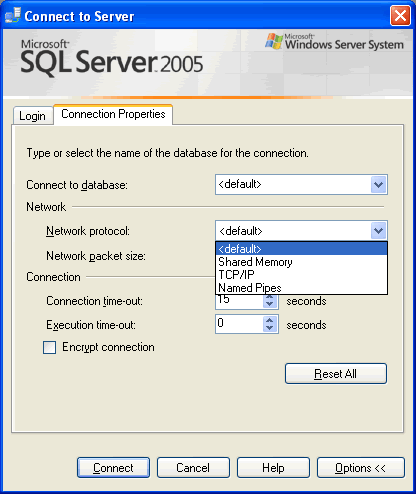
Following images quickly explain how to connect to SQL Server with different connection property. It can be useful when connection properties need to be changed for SQL Server when connected. I use this in my company when I connect to one of our servers using named pipes instead of TCP/IP. Let us learn about Connection Property of SQL Server Management Studio SSMS.
Image 1: Default Login
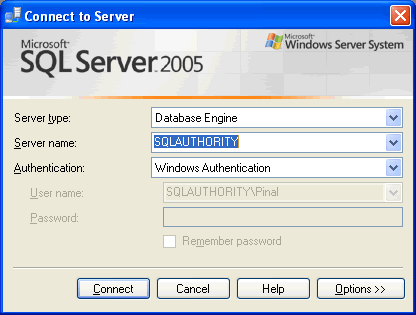
Image 2: Options
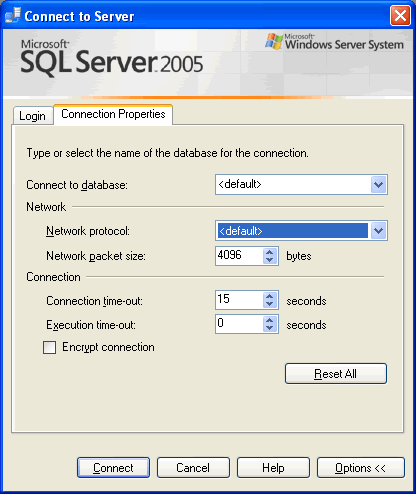
Image 3: Option Network Protocol Example
Here are few additional blog posts which are very relevant to this blog post and will be interesting reading.
SQL SERVER – Clear Drop Down List of Recent Connection From SQL Server Management Studio
Quite often it happens that SQL Server Management Studio’s Dropdown box is cluttered with many different SQL Server’s name. Sometime it contains the name of the server which does not exist or developer does not have access to it. It is very easy to clean the list and start over.
Published by Pinal Dave on SQLAuthority. More of my work at pinaldave.com.




3 Comments. Leave new
Hello Sir ,
You Solution is Fantastic Sir ……………
I got many Solution of my Problem From this Sites .
Thanks You Very Much
Good Afternoon,
can you tell me where SQL stores the information from previous logins? I would like to edit/remove old/redundant connections that clutter my drop-downs.
Many Thanks
Anton Liebscher
Your site is much appreciated and has solved a number of problems for me. Many Thanks.