

SQL Server logins follow Windows password rules by default. If a login has it turned off, here is a simple script to Enforce Password Policy again.

SQL SERVER – Login Failed – Error: 18456, Severity: 14, State: 38 – Reason: Failed to Open the Explicitly Specified Database
Error 18456 State 38: failed to open the explicitly specified database. The login worked and the database did not. The four usual causes.

SCOM – Alert: SQL Server Cannot Authenticate Using Kerberos Because the Service Principal Name (SPN) is Missing, Misplaced, or Duplicated
SCOM warned that SQL Server cannot use Kerberos because the Service Principal Name (SPN) is missing. Here is how I checked and fixed the SPNs for a client.

SQL SERVER – Setup Rule: Microsoft .NET Application Security. The computer cannot access the Internet
SQL Server setup warned on the Microsoft .NET Application Security rule because the computer cannot access the Internet. Here is what it means and what to do.

MySQL – Fix – Error – Your Password does not Satisfy the Current Policy Requirements
MySQL rejected every password with “does not satisfy the current policy requirements”. Here is how to check the validate_password settings and fix it.
SQL SERVER – Msg 3168, Level 16 – The Backup of the System Database on the Device Cannot be Restored Because it was Created by a Different Version of the Server
In the recent past, I have written a blog about Ransomware. Here is the link. system database – How to Protect Your Database from Ransomware?
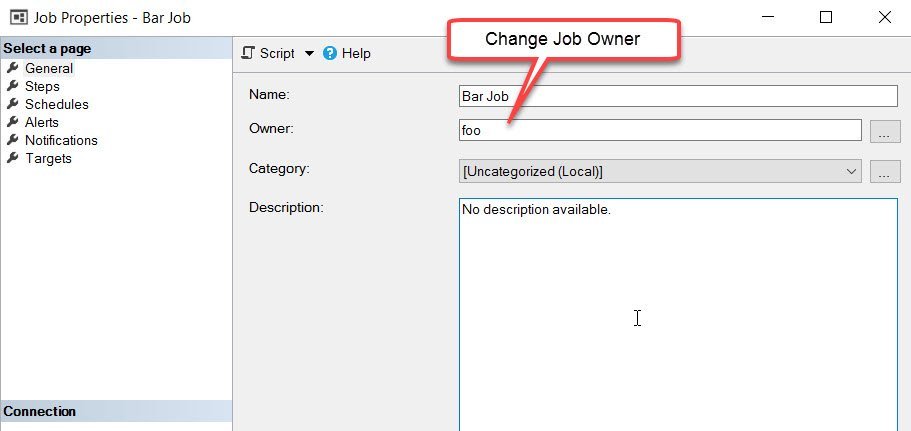
SQL SERVER – FIX: Msg 15170, Level 16, This login is the Owner of 1 Job(s). You Must Delete or Reassign these Jobs Before the Login can be Dropped
Msg 15170: this login is the owner of 1 job(s) and cannot be dropped. Here is how to find those jobs and reassign them first.