This month's discount Comprehensive Database Performance Health Check · Testimonials
SQLAuthority with Pinal Dave
Home
  • Consulting
    • Health Check
  • Free Videos
  • All Articles
    • AI
    • SQL Performance
    • SQL Tips and Tricks
    • Interview Questions and Answers
    • SQL Puzzle
    • SQL Video
    • SQLAuthority News
    • Personal
  • Books
  • Consulting
Rows of white coffee mugs on shelves, ready for the work week

SQL SERVER – Working with Business Days in SQL Server – A Different Approach

December 10, 2013
Pinal Dave
SQL Tips and Tricks
Excel, SQL Scripts, SQL Server

I recommend that you download XLeratorDB and try this problem along with me, this is going to be a fun exercise and something new to learn about Business Days.
Read More
SQL SERVER - Preserve Leading Zero While Coping to Excel from SSMS

SQL SERVER – Preserve Leading Zero While Coping to Excel from SSMS

September 30, 2012
Pinal Dave
SQL Tips and Tricks
Excel, SQL Function, SQL Server

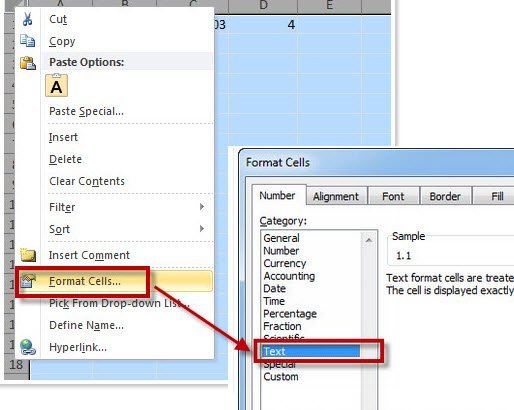
Want to preserve leading zero values when you paste SSMS results into Excel? The fix is in Excel: format the cells as Text first, and the zeros stay.

Read More
Gouache painting of a row of potted herbs on two greenhouse shelves with the lead pot painted red

Copy Column Headers From SSMS Results to Excel

September 26, 2012
Pinal Dave
SQL Tips and Tricks
Excel, SQL Server Management Studio, SQL Shortcut, SQL Utility

To copy column headers from SSMS results, use Copy with Headers or press Ctrl+Shift+C. This post also shows the Options setting that includes headers every time, why a change can seem to do nothing, and how to stop Excel from dropping leading zeros.

Read More
SQL SERVER - Excel Losing Decimal Values When Value Pasted from SSMS ResultSet

SQL SERVER – Excel Losing Decimal Values When Value Pasted from SSMS ResultSet

September 24, 2012
Pinal Dave
SQL Tips and Tricks
Excel, SQL Server, SQL Server Management Studio, SQL Utility

I often get questions that how to fix the issue where excel loses decimal values when values are pasted from SSMS Resultset. 

Read More
A small serving hatch in a brick wall with a tray of loaves on its ledge, the bakery kitchen hidden behind the wall

Connecting Excel to SQL Server Safely

January 24, 2009
Pinal Dave
SQL Tips and Tricks
Excel, SQL Server, SQL Server Security, SQL View

Connecting Excel to SQL Server safely means a narrow read-only view, a scoped login, controlled refresh load, and no saved password in the workbook.

Read More
Previous 1 2
  • Books
  • Testimonials
  • Privacy Policy

© 2006 – 2026 All rights reserved. pinal @ SQLAuthority.com