I use INTERSECT for a distinct shared-row question. It doesn’t preserve every matching pair. An equality join can return a different rowset because multiplicity and NULL comparison follow a different contract.

Identify the shared values
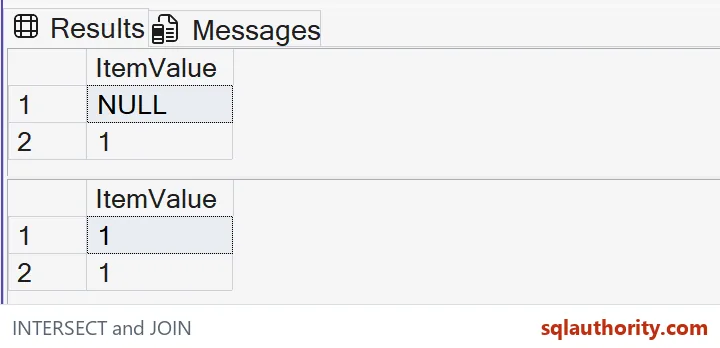
The left set includes repeated ones and repeated NULL values. The right set includes one and NULL once each, plus three. The expected INTERSECT result contains one and NULL, each returned once.
Two and three aren’t shared, so neither appears. I’d retain the complete inputs when explaining the result. The small example exposes the intersection rule directly. There is no hidden table state or inferred uniqueness.
WITH L AS
(
 SELECT CAST(ItemValue AS int) AS ItemValue
 FROM (VALUES (1),(1),(2),(CAST(NULL AS int)),(CAST(NULL AS int))) v(ItemValue)
), R AS
(
 SELECT CAST(ItemValue AS int) AS ItemValue
 FROM (VALUES (1),(3),(CAST(NULL AS int))) v(ItemValue)
)
SELECT ItemValue FROM L INTERSECT SELECT ItemValue FROM R
ORDER BY ItemValue;

WITH L AS
(
 SELECT CAST(ItemValue AS int) AS ItemValue
 FROM (VALUES (1),(1),(2),(CAST(NULL AS int)),(CAST(NULL AS int))) v(ItemValue)
), R AS
(
 SELECT CAST(ItemValue AS int) AS ItemValue
 FROM (VALUES (1),(3),(CAST(NULL AS int))) v(ItemValue)
)
SELECT l.ItemValue FROM L AS l JOIN R AS r ON l.ItemValue=r.ItemValue
ORDER BY l.ItemValue;
Keep the distinct-row contract explicit
INTERSECT returns distinct rows shared by both projected inputs. Repeated occurrences of one therefore don’t create repeated output rows. The same rule also reduces the repeated missing values to one shared result.
I’d use that behavior when the requirement concerns membership. It isn’t suitable by itself for reconciling how many copies of a record appeared on each side. A separate multiplicity check needs to retain the counts that this set operation deliberately removes.
Compare the equality join carefully
The second statement uses an ordinary equality join. Each left-side one matches the right-side one, producing two output rows. The join preserves those two matching pairs instead of returning one distinct shared value.
Adding DISTINCT to that output would change its multiplicity, but the NULL behavior would still need review. I’d avoid calling the two forms interchangeable without inspecting both concerns. The result contract comes first, before any access-path or timing comparison.

Read shared NULL under the set rule
INTERSECT treats two NULL values as equal when it compares distinct rows. That lets the shared NULL appear in INTERSECT. The ordinary equality join doesn’t establish a true NULL-equals-NULL match.
Both results are consistent with their own contracts. I’d describe the chosen operation precisely rather than presenting one as a broken version of the other. A caller needs to decide whether missing values should count as a shared set member.
Review the projection and its type
Both inputs project one int column named ItemValue. Their compatible types make the comparison explicit. If the projection grew to several columns, the complete row would participate in determining shared results.
I’d keep only the fields that define the intended membership question. Adding an unrelated description can prevent an otherwise shared identifier from matching. Removing a meaningful field can also make different business records look like the same projected row.
Retain rows rather than a success count
The expected first output has two distinct rows, while the second has two identical known rows. A count-only test would report two for both and miss the substantive difference. The complete tuples are the useful evidence.
The SELECT statements change no data and make no performance claim. I’d validate their full outputs before discussing a production rewrite. Then review the actual input constraints and plan separately, with the intended membership, multiplicity and missing-value rules recorded together.
Compare the full rows on your own data before you call two results the same.
A matching row count is not a matching result, it is the rows and their multiplicity.
Published by Pinal Dave on SQLAuthority. More of my work at pinaldave.com.
Discover more from SQL Authority with Pinal Dave
Subscribe to get the latest posts sent to your email.