
Interview question: How do you paginate rows in SQL Server?
Answer: Choose a stable sort key, then return only the requested page. ROW_NUMBER() is useful on SQL Server 2005 and later; OFFSET ... FETCH is available from SQL Server 2012. If a user moves forward through many pages, seeking after the last seen key can avoid a large offset.

I have used this question while helping organizations hire DBAs and developers. It often catches candidates who fetch the entire table into the application and discard every row except the current page. That moves unnecessary data and work to the client. My older answer walked through SQL Server 2000, 2005, and 2012. The version history is still useful, but the original examples mixed an old Person.Contact schema with version labels and had boundary problems. Here is one small data set so the methods can be compared directly.
-- Use a fresh query window; preserve any existing temporary table.
IF OBJECT_ID(N'tempdb..#Items') IS NOT NULL
    THROW 50111, '#Items already exists. Open a fresh query window.', 1;

CREATE TABLE #Items
(
    ItemID int NOT NULL PRIMARY KEY,
    ItemName varchar(20) NOT NULL
);
WITH n AS
(
    SELECT 1 AS ItemID
    UNION ALL
    SELECT ItemID + 1 FROM n WHERE ItemID < 30
)
INSERT #Items (ItemID, ItemName)
SELECT ItemID, 'Item ' + CONVERT(varchar(10), ItemID)
FROM n;

DECLARE @PageNumber int = 3, @PageSize int = 5;
Page three should return IDs 11 through 15. Include a unique key in the sort so ties cannot jump between pages.
SQL Server 2005 and later: number the rows, then select the requested range.
WITH Numbered AS
(
    SELECT ItemID, ItemName,
           ROW_NUMBER() OVER (ORDER BY ItemID) AS RowNumber
    FROM #Items
)
SELECT ItemID, ItemName
FROM Numbered
WHERE RowNumber BETWEEN (@PageNumber - 1) * @PageSize + 1
                    AND @PageNumber * @PageSize
ORDER BY RowNumber;
SQL Server 2012 and later: the concise OFFSET ... FETCH form returns the same page.
SELECT ItemID, ItemName
FROM #Items
ORDER BY ItemID
OFFSET (@PageNumber - 1) * @PageSize ROWS
FETCH NEXT @PageSize ROWS ONLY;
For a next-page button, keep the last seen ID. This keyset form also returns 11 through 15 without asking SQL Server to skip an ever-growing offset.
DECLARE @LastSeenID int = 10;
SELECT TOP (@PageSize) ItemID, ItemName
FROM #Items
WHERE ItemID > @LastSeenID
ORDER BY ItemID;

DROP TABLE #Items;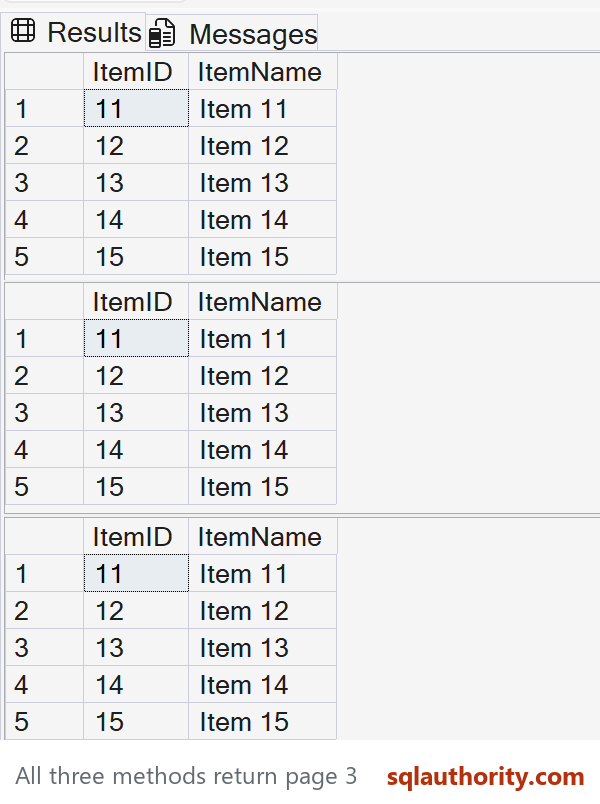
There is no single fastest paging method for every workload. Test the order, filters, index, and page depth on representative data. If rows change between requests, even a unique sort key alone cannot freeze a snapshot; decide whether the application needs snapshot consistency or simply a useful next-page experience.
The earlier paging comparisons remain useful version history:
- SQL SERVER – Tricks for Row Offset and Paging in Various Versions of SQL Server
- SQL SERVER – Server Side Paging in SQL Server 2012 Performance Comparison
- SQL SERVER – 2005 T-SQL Paging Query Technique Comparison (OVER and ROW_NUMBER)) – CTE vs. Derived Table
- SQL SERVER – T-SQL Paging Query Technique Comparison – SQL 2000 vs SQL 2005
- SQL SERVER – Server Side Paging in SQL Server 2012 – A Better Alternative
- SQL SERVER – Row Offset in SQL Server For Different Version
Published by Pinal Dave on SQLAuthority. More of my work at pinaldave.com.
Discover more from SQL Authority with Pinal Dave
Subscribe to get the latest posts sent to your email.




6 Comments. Leave new
For 5th page records, may be you need to set offset as (@pagenumber-1)*@rowsperpage
Thanks Pinal .But what about the maximum rows that can be retrieved from Offset Fetch COmmand
As many as you want Raj!
Just want to highlight the fact that, Fetch Next accepts variables too.
So we could change
FETCH NEXT 10 ROWS ONLY
to
FETCH NEXT @RowsPerPage ROWS ONLY
so the code is more reusable.
Thanks Nazer.
If I have posts and comments and I whant 10 posts after the first 30 and for each post first 3 comments after first 9, how would I write my sql ?