SPACE constructs repeated ordinary spaces, which are present text even when a grid looks blank. I show its boundaries before interpreting the result. Zero spaces, some spaces and missing output are different states.

Keep the requested count beside the constructed text
The first query supplies zero, one and three as explicit integer counts. Their expected bracketed displays are empty brackets, brackets containing one space and brackets containing three spaces. The brackets are a separate viewing aid.
The corresponding expected byte counts are zero, one and three. Those counts inspect the constructed varchar value itself. Neither bracket is included in that measurement.
I retain RequestedSpaces so the displayed result has a clear source. A blank-looking cell alone would conceal whether the request was zero or three. The source and byte count expose that difference.
This example builds only a few spaces. It does not test large text allocation or another character encoding. Its purpose is a small construction contract that can be inspected directly.
WITH Counts AS
(
    SELECT CaseId,RequestedSpaces
    FROM (VALUES (1,CAST(0 AS int)),(2,1),(3,3),(4,-1),
        (5,CAST(NULL AS int))) AS v(CaseId,RequestedSpaces)
)
SELECT CaseId,RequestedSpaces,'['+SPACE(RequestedSpaces)+']' AS VisibleText,
    DATALENGTH(SPACE(RequestedSpaces)) AS BlankBytes,
    LEN(SPACE(RequestedSpaces)) AS NonTrailingLength
FROM Counts
ORDER BY CaseId;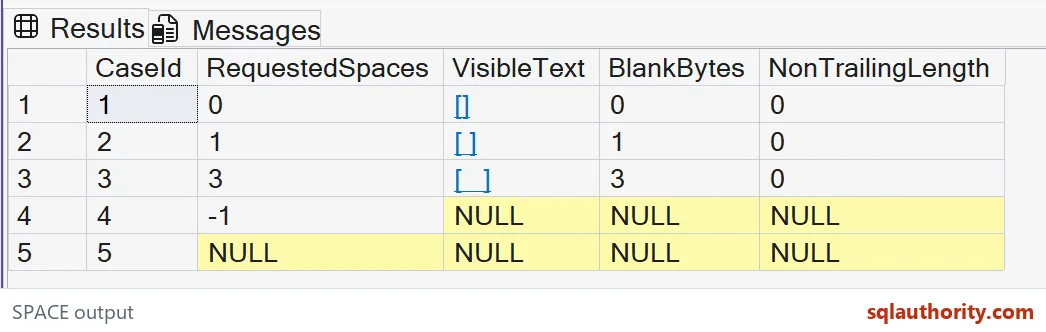
A zero LEN result does not mean no supplied spaces
LEN excludes trailing ordinary spaces. Every present value in this example consists entirely of those spaces. Its expected NonTrailingLength is therefore zero in all three present rows.
The three-space value still has three expected bytes. The length and byte-count expressions are answering different questions. Neither result is contradictory once the selected measurement is clear.
I’d use the byte-count witness when checking this constructed blank payload. A check based solely on LEN would merge every present sample with the zero-space case. That would lose the requested construction amount.
A validation rule may intentionally ignore all trailing spaces. In that case, a zero non-trailing length can be useful. Keep that rule separate from deciding whether a string actually contains characters.

Negative input is not another empty-string request
The fourth row supplies negative one. Its expected result is NULL rather than a present empty string. The final row supplies no count and is also expected to return NULL.
The original count column distinguishes a supplied unsuitable count from missing input. The display and both measurements remain NULL in those rows. They are not given empty brackets as an invented substitute.
If an application wants to clamp negative counts to zero, it needs an explicit policy. That would change the supplied request into a different one. This example preserves the difference instead.
I would validate a requested padding amount before using it in a formatting expression. A negative computed difference can indicate an already oversized source field. Hiding that difference with empty output could conceal a separate truncation problem.
Use construction only where the presentation contract needs it
SPACE returns varchar. It does not automatically create a Unicode padding contract or arbitrarily long text. For Unicode padding or more than eight thousand spaces, build the text with REPLICATE instead.
The example stays far below that boundary and makes no large-value claim. Its ordinary spaces are not tabs, line breaks or every Unicode whitespace character. A serialization format must name which character it permits.
Adding spaces for a report also does not align text reliably in every proportional font. The interface’s layout can be responsible for alignment instead. Character construction and visual column layout are separate decisions.
The query reads made-up counts and changes no tables or settings. Keep the expected zero, positive, negative and missing cases when adapting it. Those boundaries prevent a blank-looking display from becoming the only correctness test.
I use the bracketed column while explaining the sample, not as an instruction to store brackets with the payload. Return the actual constructed text to the format that needs it. Keep diagnostics separate from the final application value.
Keep the requested count beside the blank-looking result, and the story stays clear.
A blank-looking cell is not proof of an empty string, it may be exactly the spaces requested.
Published by Pinal Dave on SQLAuthority. More of my work at pinaldave.com.
Discover more from SQL Authority with Pinal Dave
Subscribe to get the latest posts sent to your email.