
The transaction log is the most misunderstood file in SQL Server. People treat it as a diary they can throw away, then wonder why the drive fills up on a Tuesday. The log is not a record of what happened. It is the mechanism that lets a change happen at all. Once you see it that way, its growth stops being a mystery.

Write It Down Before You Do It
When you update a row, SQL Server does not run to the data file and change it. It writes a description of the change into the log first. Only then does the page in memory get modified. The data file catches up later.
That order is the whole point. If the power fails halfway through, the log holds enough detail to put things right. On restart the work is either finished or undone cleanly. Without a log there is no way to promise that a transaction either fully happened or did not happen at all.
So the log is not optional, and it is not a copy of anything. Delete it and the database does not open.
Why It Grows
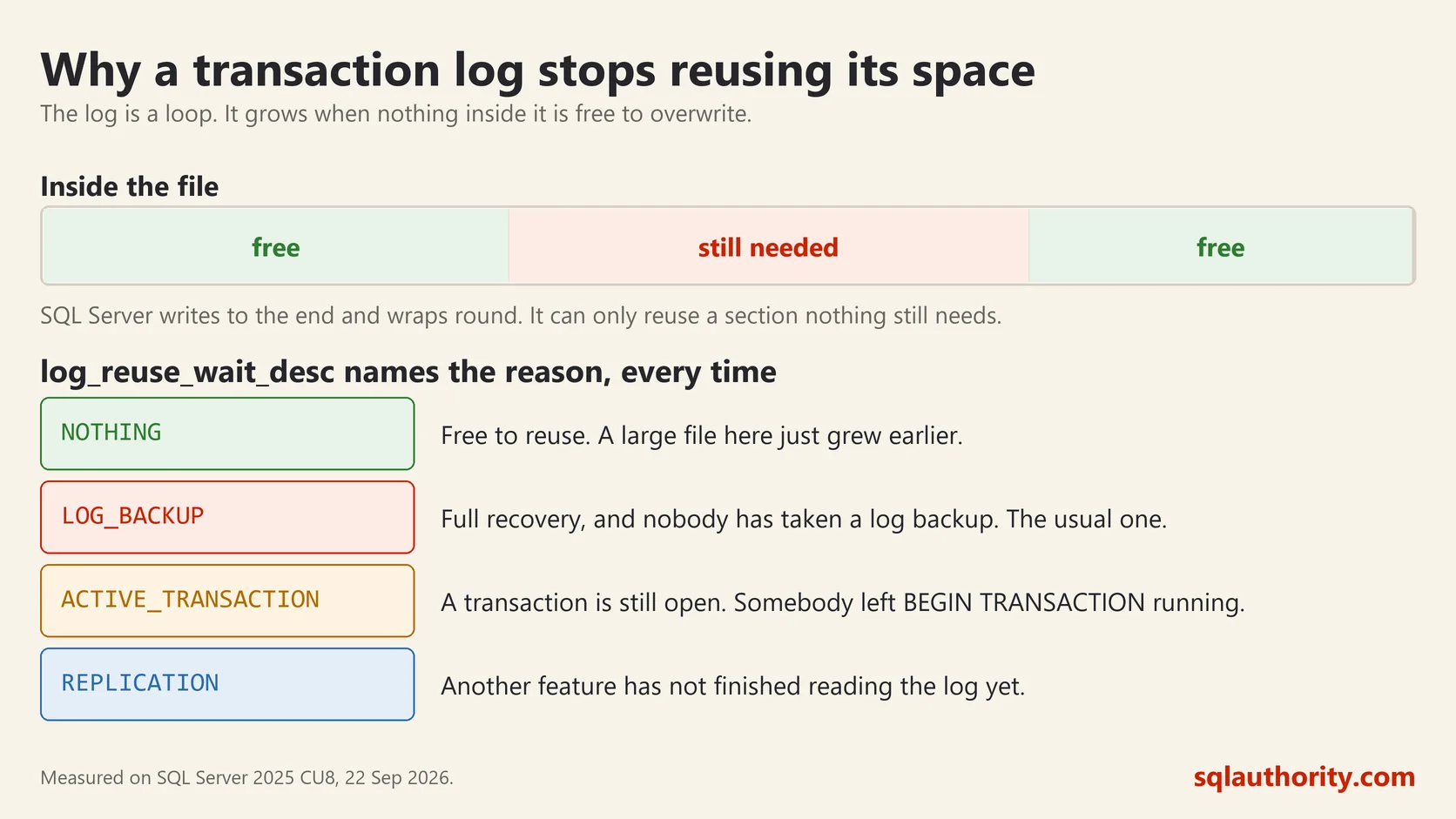
The log is a loop. SQL Server writes to the end, and when a section is no longer needed it becomes free for reuse. Growth happens when SQL Server reaches the end and finds nothing free to go back to, so it asks the file to get bigger.
The obvious cause is a large operation. I inserted twenty thousand rows into an empty database and its log went from small to 72 MB in one statement. A big delete, an index rebuild or a bulk load will all do the same. That is normal and expected.
The unpleasant cause is that something is preventing reuse. SQL Server tells you which, in one column. This is the first query to run whenever a log surprises you:
SELECT name, recovery_model_desc, log_reuse_wait_desc
FROM sys.databases
WHERE name = 'YourDatabase';
name recovery_model_desc log_reuse_wait_desc
BasicsLab FULL ACTIVE_TRANSACTIONThat was my test database mid-load, and the answer names the culprit. A few values you will actually meet:
- NOTHING means the log is free to reuse. If the file is still large, it grew earlier and is now mostly empty inside.
- LOG_BACKUP means the database is in full recovery and nobody has taken a log backup. This is the most common cause by a wide margin.
- ACTIVE_TRANSACTION means a transaction is still open. Somebody ran BEGIN TRANSACTION and went to lunch, or a large statement is still running.
- REPLICATION or AVAILABILITY_REPLICA means another feature has not finished reading the log yet.
The Recovery Model Decides Everything
In simple recovery, SQL Server frees the log for reuse at each checkpoint by itself. You cannot take log backups and you cannot restore to a point in time. For a development machine or a database you can reload, that is a fine trade.
In full recovery, the log is kept until you back it up. That is what buys you point in time restore, and it is the deal people accept without noticing the other half. A database in full recovery with no log backups will grow until the drive is full. It is not a bug. It is doing exactly what you asked.
Here is the same test database after a full backup and a log backup:
name        log_reuse_wait_desc
BasicsLab   NOTHING
One log backup, and the reason for waiting is gone. Note the file did not get smaller. The space inside it became free, which is what you actually want.
Full and Free Are Different Things
This query shows the size of the log file and how much of it is in use:
SELECT CAST(size * 8.0 / 1024 AS decimal(10,1)) AS log_mb,
       CAST(FILEPROPERTY(name, 'SpaceUsed') * 8.0 / 1024 AS decimal(10,1)) AS log_used_mb
FROM sys.database_files
WHERE type = 1;
log_mb log_used_mb
72.0 37.2A 72 MB file with 37 MB in use. Nothing is wrong here. The file grew once to handle a load and now has room to do it again without asking Windows for more space.
About Shrinking
Shrinking a log is not a fix, and doing it on a schedule is a mistake. The file will grow straight back, growth is slow, and the file ends up fragmented from all the growing and shrinking.
There is one fair reason to shrink. Something unusual happened, such as a stuck transaction or a missed backup, and the log ran up to a size it will never need again. You have fixed the real cause and you want the space back once.
DBCC SHRINKFILE (YourDatabase_log, 512);Pick a size the database will actually use, not the smallest number you can get away with. Then set a sensible fixed growth increment rather than a percentage, so the next growth is predictable.
If you remember one thing, make it this. When a log grows, do not shrink it. Read log_reuse_wait_desc and fix what it names. The column has told me the answer on client servers more often than any other single query in SQL Server.
The transaction log is not a history of your database, it is the promise that every change either finished or never happened.
This post was rewritten from scratch in September 2026. The original, published on 2009-04-18, was a short announcement about something that no longer exists. The address is the same, the subject is now a basic idea worth keeping.
Published by Pinal Dave on SQLAuthority. More of my work at pinaldave.com.



2 Comments. Leave new
SQL Server time out error not all times , but some times from VB 6.0 Exe
You need to find the cause of that from SQL side. May be blocking or long running queries.