
Question: Can I run one query against several SQL Server instances from SSMS?

DBAs do a difficult job, and a surprising amount of it is checking the same thing on many servers. I saw a senior DBA give a junior teammate a practical task: confirm that SQL Server 2016 SP1 had reached the development, test, and QA instances. Opening a separate query window for every server would work, but the senior DBA had a better routine.
Answer: Use a server group in SSMS Registered Servers. Add the instances to a local server group or a Central Management Server group. Right-click the group and choose New Query. SSMS opens a query window connected to the group and runs the statement on each connected server.
SELECT @@VERSION;The original SSMS capture below is worth keeping because it shows the exact workflow: two registered instances, one query, two result rows, and SSMS’s additional Server Name column. The result is from the original SQL Server 2016 SP1 example, so the version text is historical.
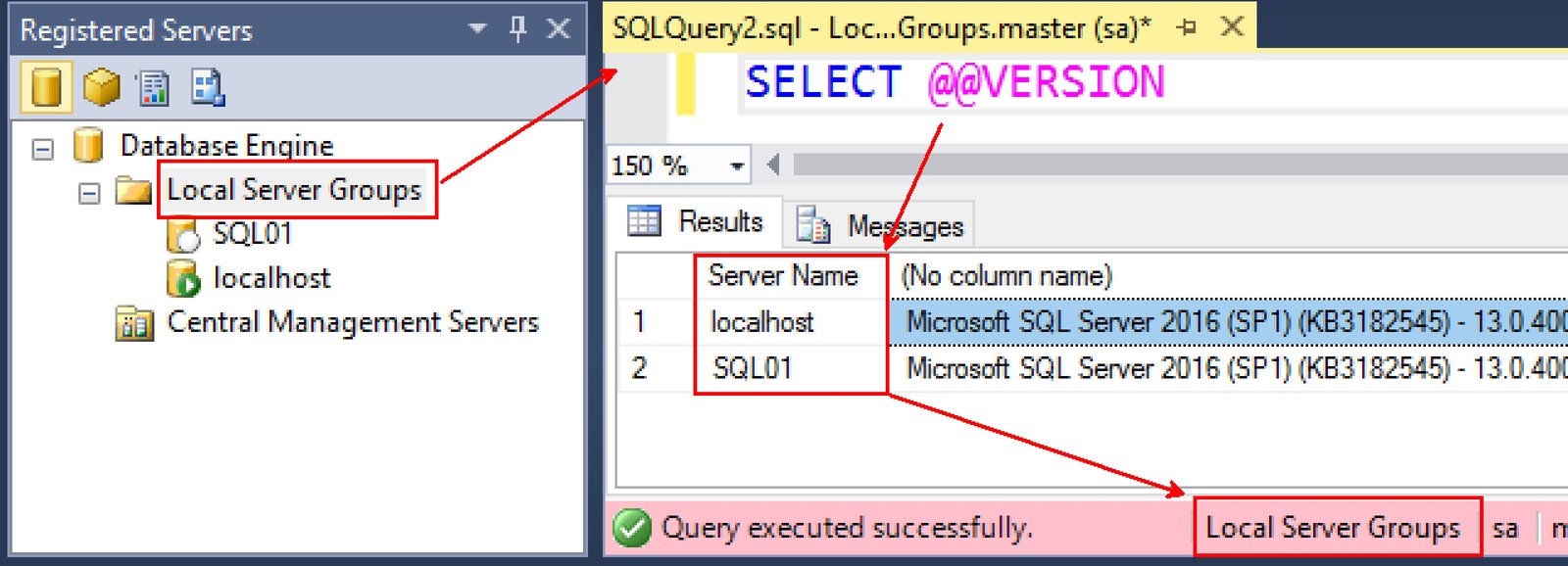
In current SSMS, the combined results grid and server-name column are the defaults for multiserver results, but these options can be changed under Tools, Options, Query Results, SQL Server, Multiserver Results. Check the connection count in the query window, for example Connected. (4/4), before trusting a fleet-wide result. A server that fails to connect may not produce a visible query error in the results grid.
Remember that a query opened from the group runs against every connected server in that group. For inventory checks, begin with read-only statements. If you later run a change statement, review the server list and permissions first. Different registered instances may use different login rights.
That is the useful trick: register the instances once, then ask the same question of the group and keep the server name beside each answer.
Published by Pinal Dave on SQLAuthority. More of my work at pinaldave.com.
Discover more from SQL Authority with Pinal Dave
Subscribe to get the latest posts sent to your email.




12 Comments. Leave new
Very useful tip. I did’n know about server groups
Thanks Juan.
I think this also depends more on the way we have configured the local server groups. I mean, I just see the local server when I run the command.
Very True.
Dear Pinal,
Nice blog. But i think some thing is wrong in this line “but it has the most stressful times when things go as per plan”. Please correct me if i wrong.
but it has the most stressful times when things don’t go as per plan
Hello Dear Pinal,
This possible with user database with a difference name, because this @@version execute in master(system database and return values), but other case Development, Test and Production database and retrieve data from same name table.
@@version should not be dependent on selected database.
Thank you Pinal.
using “EXECUTE sp_MSForEachDB ‘USE ?; select * from table_name'” get data from difference databases.
Yes. But I guess, that procedure is undocumented.
Pls also advise joining query between two different servers…
You can use linked server?