
There are multiple ways by which we can find a list of SQL Server instances name instances on a machine. In this blog, I would show a few ways to do it.
Command Prompt
Based on my research, registry key would have an entry whenever SQL is installed. So we can query the registry key to find details about instance name.
reg query "HKLM\Software\Microsoft\Microsoft SQL Server\Instance Names\SQL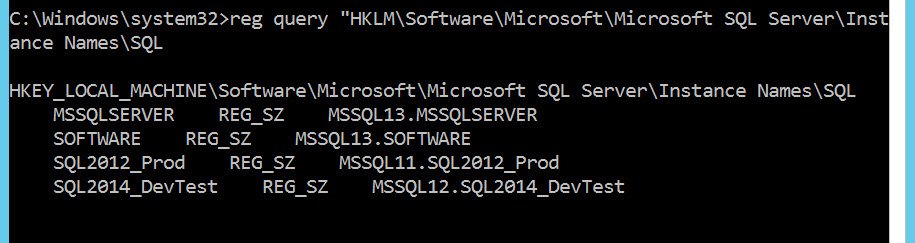
If we want to query services, then we can search for all services and look for display name
search query | findstr "DISPLAY_NAME"|findstr /C:"SQL Server ("The above method of registry, can’t tell the version.
PowerShell
Whatever we did on method 1, same can be achieved using PowerShell also. Below is the method where we query the registry.
Get-ItemProperty ‘HKLM:\Software\Microsoft\Microsoft SQL Server\Instance Names\SQL’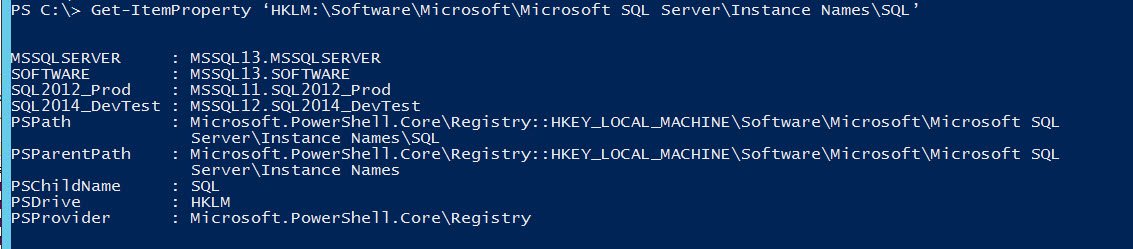
If we want to query services to get then another option would be to use below PowerShell
Get-Service | ?{ $_.DisplayName -like "SQL Server (*" }Do you know any more ways? Please share with others via comment.
Here is my earlier article on the same subject:
- SQL SERVER – Find Name of The SQL Server Instance
- SQL SERVER – Introduction to SERVERPROPERTY and example
- SQL SERVER – Find Hostname and Current Logged In User Name
- SQL SERVER – Q&A: SQL Clustering Virtual Server Name and Instance Name
Reading the Results When You List SQL Server Instances
The service names tell you a lot. The default instance runs as the service MSSQLSERVER, and each named instance runs as MSSQL$ followed by its name. So if you see MSSQL$SQL2019, you connect to it as ComputerName\SQL2019.
Once you are connected, SELECT SERVERPROPERTY('InstanceName') returns the instance name, or NULL for the default instance, and SELECT @@VERSION gives the version that the registry list could not show. I run both right after I connect, so I know exactly which instance and build I am working on.
To look for instances on other machines in the network, sqlcmd -L lists the servers that answer. It depends on the SQL Server Browser service and on network settings, so treat an empty list as a hint, not proof. And do not forget SQL Server Configuration Manager: it shows every instance on the machine, with its service account and state, on one screen. It is my favorite place to start on a machine I have never seen before.
Published by Pinal Dave on SQLAuthority. More of my work at pinaldave.com.
Discover more from SQL Authority with Pinal Dave
Subscribe to get the latest posts sent to your email.




10 Comments. Leave new
I think your meant to say ‘sc query’ vs ‘search query’
Here is what I use:
# import SQLPS if necessary
if((get-module|Where-Object {$_.Name -like “sqlps”}|Measure-Object).Count -eq 0){Import-Module sqlps};
Get-ChildItem SQLServer:\SQL\$server_name;
Pulling SQL Server instances from the registry is a little cleaner if you use:
(Get-ItemProperty ‘HKLM:\Software\Microsoft\Microsoft SQL Server\’).InstalledInstances
Getting instance names from Get-Service and just return the instance name:
(Get-Service -DisplayName “SQL Server (*”).DisplayName -replace ‘.*\((.*)\).*’, ‘$1’
Nice.
It seems it doesn’t return (LocalDB) instances
– T-SQL Query to find list of Instances Installed on a machine
DECLARE @GetInstances TABLE
( Value nvarchar(100),
InstanceNames nvarchar(100),
Data nvarchar(100))
Insert into @GetInstances
EXECUTE xp_regread
@rootkey = ‘HKEY_LOCAL_MACHINE’,
@key = ‘SOFTWARE\Microsoft\Microsoft SQL Server’,
@value_name = ‘InstalledInstances’
Select InstanceNames from @GetInstances
These are great, but I have been trying to find a way to list all databases in all of the instances on one SQL server. We have a number of servers with over 12 SQL instances and many databases that reside on those instances. Is there any way to do this? All I find are ways to get the databases from a single instance.
Hi Cheryl,
The Microsoft Assessment and Planning (MAP) Toolkit is very good for this, assuming you have enumeration rights on the databases
I have the same exact predicament. Did you ever figure it out? Ideally we should get a list with a column for the InstanceName and a column for the database name in the query results. Kindly let me know if you figured it out. THANK you in advance, Raphael.
Thank you, Zol’taan! That is PERFECT if I do not want to mess with PowerShell and such. Question: Would you known if there is a way to also include the databases inside each instance? So, we would have in the query results one column with the instance name, and another column with the databases belonging to the instance. I hope I explained it clearly enough. TIA, Raphael