
To restore database backup files safely, read the backup first, then restore under a name and paths you choose. A restore that fails costs a few minutes. A restore that succeeds over the wrong database costs a lot more.

Read the Backup Before You Restore It
A backup file can’t tell you what it holds, and its name can be wrong. Three commands read it without restoring anything. RESTORE HEADERONLY shows what the backup is. RESTORE FILELISTONLY lists the files inside, with the logical names you need later. RESTORE VERIFYONLY with CHECKSUM confirms the file is readable and its checksums match. Only a test restore proves the database comes back.
This demo needs a small database. The first script creates RestoreDemo with one table of three customers. It uses SIMPLE recovery, so the demo needs no log backups. The second script takes a full backup. COPY_ONLY keeps this backup from changing the differential base, so your regular differential backups are not affected. CHECKSUM makes SQL Server validate page checksums as it reads the pages. It also stores a checksum for the whole backup. A file name with no folder goes to the instance’s default backup folder.
IF DB_ID(N'RestoreDemo') IS NULL CREATE DATABASE RestoreDemo;
GO
ALTER DATABASE RestoreDemo SET RECOVERY SIMPLE;
GO
USE RestoreDemo;
GO
DROP TABLE IF EXISTS dbo.Customers;
CREATE TABLE dbo.Customers (
    CustomerID int           NOT NULL PRIMARY KEY,
    FullName   nvarchar(60)  NOT NULL,
    City       nvarchar(40)  NOT NULL
);
INSERT INTO dbo.Customers (CustomerID, FullName, City)
VALUES (1, N'Maya Collins', N'Portland'),
       (2, N'Leo Brennan', N'Austin'),
       (3, N'Priya Shah', N'Denver');
BACKUP DATABASE RestoreDemo TO DISK = N'RestoreDemo.bak' WITH COPY_ONLY, CHECKSUM, INIT, STATS = 50;
Now read the file. The three commands below are separate queries, and each one returns its own result.
RESTORE HEADERONLY FROM DISK = N'RestoreDemo.bak';

RESTORE FILELISTONLY FROM DISK = N'RestoreDemo.bak';

RESTORE VERIFYONLY FROM DISK = N'RestoreDemo.bak' WITH CHECKSUM;
The header has dozens of columns. These are the ones I read first.
| DatabaseName | BackupTypeDescription | IsCopyOnly | HasBackupChecksums | RecoveryModel |
|---|---|---|---|---|
| RestoreDemo | Database | 1 | 1 | SIMPLE |
The file list returns two rows. One is a data file with the logical name RestoreDemo (type D). The other is a log file named RestoreDemo_log (type L). VERIFYONLY ends with the message “The backup set on file 1 is valid.” Add BackupFinishDate to your own reading list. A quick look at the date prevents restoring last month’s backup over this month’s data.
Why a Plain Restore Fails
Every backup remembers the paths of the files it came from. When you restore database backup files under a new name with no other options, SQL Server reuses those paths.
USE master;
RESTORE DATABASE RestoreDemoCopy FROM DISK = N'RestoreDemo.bak';
Msg 1834, Level 16, State 1, Line 2
The file 'C:\Program Files\Microsoft SQL Server\MSSQL17.SQLDEV\MSSQL\DATA\RestoreDemo.mdf' cannot be overwritten.  It is being used by database 'RestoreDemo'.
Msg 3156, Level 16, State 4, Line 2
File 'RestoreDemo' cannot be restored to 'C:\Program Files\Microsoft SQL Server\MSSQL17.SQLDEV\MSSQL\DATA\RestoreDemo.mdf'. Use WITH MOVE to identify a valid location for the file.
Msg 1834, Level 16, State 1, Line 2
The file 'C:\Program Files\Microsoft SQL Server\MSSQL17.SQLDEV\MSSQL\DATA\RestoreDemo_log.ldf' cannot be overwritten.  It is being used by database 'RestoreDemo'.
Msg 3156, Level 16, State 4, Line 2
File 'RestoreDemo_log' cannot be restored to 'C:\Program Files\Microsoft SQL Server\MSSQL17.SQLDEV\MSSQL\DATA\RestoreDemo_log.ldf'. Use WITH MOVE to identify a valid location for the file.
Msg 3119, Level 16, State 1, Line 2
Problems were identified while planning for the RESTORE statement. Previous messages provide details.
Msg 3013, Level 16, State 1, Line 2
RESTORE DATABASE is terminating abnormally.
SQL Server tried to write the new database over the original files. RestoreDemo still uses them, so the restore stopped. Message 3156 names the fix: WITH MOVE.
A common second try is to create an empty database first and restore into it. That fails differently, because the empty database has nothing to do with the backup.
IF DB_ID(N'RestoreDemoCopy') IS NULL CREATE DATABASE RestoreDemoCopy;
GO
RESTORE DATABASE RestoreDemoCopy FROM DISK = N'RestoreDemo.bak';
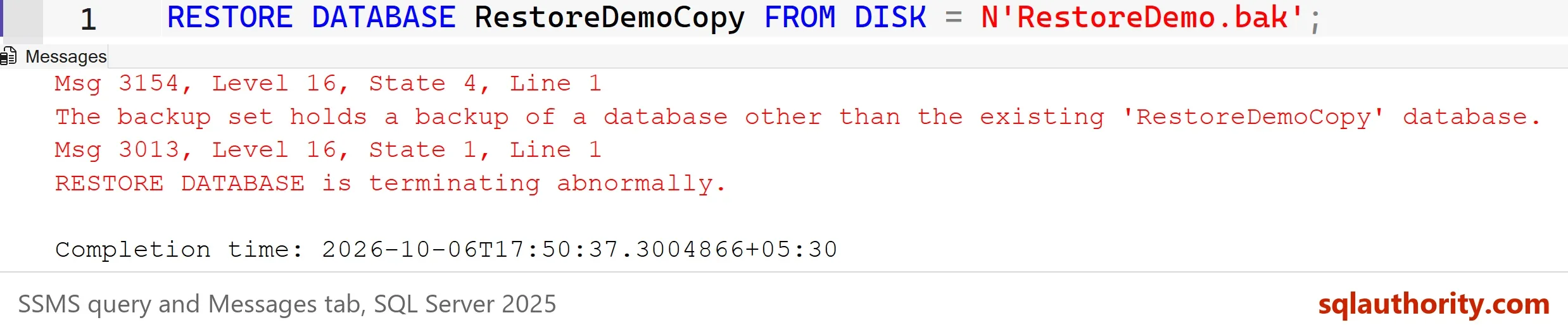
Message 3154 says the backup belongs to a different database than the one you named. SQL Server protects the existing database, and it should. Two fixes exist. Drop the empty database and restore under a free name, or overwrite it on purpose with WITH REPLACE.
Restore Database Backup Files With MOVE and REPLACE
The next script shows how to restore database backup files properly. MOVE maps each logical name from FILELISTONLY to a new path. I don’t know your folders, so the script reads the instance’s default data folder and builds the statement from it. It prints the statement first. That printed RESTORE is the one to keep in your own scripts.
REPLACE is the dangerous word here. It tells SQL Server to overwrite an existing database without asking. Here that database is an empty stand-in. If the target held real data, that data would be gone. Before you type it, read the database name twice.
ALTER DATABASE RestoreDemoCopy SET SINGLE_USER WITH ROLLBACK IMMEDIATE;
DECLARE @data nvarchar(260) = CONVERT(nvarchar(260), SERVERPROPERTY('InstanceDefaultDataPath'));
DECLARE @sql nvarchar(max) = N'RESTORE DATABASE RestoreDemoCopy
FROM DISK = N''RestoreDemo.bak''
WITH REPLACE,
     MOVE N''RestoreDemo'' TO N''' + @data + N'RestoreDemoCopy.mdf'',
     MOVE N''RestoreDemo_log'' TO N''' + @data + N'RestoreDemoCopy_log.ldf'',
     STATS = 50;';
PRINT @sql;
EXEC (@sql);
ALTER DATABASE RestoreDemoCopy SET MULTI_USER;
The SINGLE_USER line is for exclusive access. A restore needs the database to itself. WITH ROLLBACK IMMEDIATE disconnects everyone else and rolls back their open transactions. STATS = 50 prints a progress line about every 50 percent, which tells you a large restore is moving. Always set the database back to MULTI_USER afterward, so nobody stays locked out. If the restore fails, run that last line by hand, because the database stays in single-user mode.
SELECT name, state_desc, user_access_desc
FROM sys.databases
WHERE name LIKE N'RestoreDemo%'
ORDER BY name;

SELECT COUNT(*) AS CustomersInCopy FROM RestoreDemoCopy.dbo.Customers;
| name | state_desc | user_access_desc |
|---|---|---|
| RestoreDemo | ONLINE | MULTI_USER |
| RestoreDemoCopy | ONLINE | MULTI_USER |
The copy is online and holds all 3 customers. If the new name is free, leave REPLACE out. MOVE alone is enough, and nothing can be overwritten by mistake.
NORECOVERY and RECOVERY
A restored database is not open until SQL Server finishes recovery. When you have a full backup plus differential or log backups, every restore except the last uses WITH NORECOVERY. The last one uses WITH RECOVERY. Open the database too early and you must start again from the full backup.
You can see the state without any log files. This script restores the full backup with NORECOVERY, then finishes it.
RESTORE DATABASE RestoreDemoCopy FROM DISK = N'RestoreDemo.bak' WITH REPLACE, NORECOVERY;
SELECT name, state_desc FROM sys.databases WHERE name = N'RestoreDemoCopy';
RESTORE DATABASE RestoreDemoCopy WITH RECOVERY;
SELECT name, state_desc FROM sys.databases WHERE name = N'RestoreDemoCopy';
The first check shows RESTORING and the second shows ONLINE. A real chain adds RESTORE LOG ... WITH NORECOVERY steps between them, in the order the backups were taken.
The Other Errors People Hit
- Msg 3101, exclusive access could not be obtained. Another session has the database open. In tests on SQL Server 2025, a .NET connection left open in the target database stopped the restore with and without
REPLACE. A sqlcmd session holding an open transaction did not stop a restore withREPLACE. So don’t count onREPLACEto clear other sessions.SINGLE_USER WITH ROLLBACK IMMEDIATEdoes: it rolled that transaction back and ended the session. - Msg 3102, in use by this session. Your own query window sits in the target database. Run the restore from master.
- Msg 3201, cannot open backup device. A wrong file name gave operating system error 2, file not found. Error 5 means access denied: the SQL Server service account can’t read the folder.
- Msg 3159, tail of the log not backed up. A restore over a database in FULL recovery stops here until the log is backed up. Back up the log if the work matters. Use
REPLACEonly when it doesn’t.
Questions That Come Up Next
- One table or a few rows. A backup can’t restore a single table. Restore it under another name, as above, then copy the rows back with
INSERT ... SELECTfrom RestoreDemoCopy. - A point in time. The last log restore can use
WITH STOPAT = '...'to stop just before a mistake. - More than one data file. FILELISTONLY returns a row for every file, and every row needs its own
MOVE. - A network share. SQL Server can’t see drive letters you mapped in your own session. Use a full UNC path, and give the SQL Server service account access to the share.
- A newer backup on an older server. It fails with Msg 3169 or a message that the media family is incorrectly formed. Compatibility level doesn’t help.
- Logins after a restore elsewhere. Logins live in master, not in the backup. Create the login on the new server and map the orphaned user to it.
You could argue that the Restore Database dialog in Management Studio is faster for a one-off. It is. It also has a Script button that writes the same T-SQL. I still prefer the script, because a script can be reviewed, repeated and kept. A dialog is gone once you close it.
What to Remember
Read the backup before you restore it. Check the database name and date in the header, and verify the file with CHECKSUM. The header’s SoftwareVersionMajor column names the version that made the file. Here it says 17, which is SQL Server 2025. A backup restores to the same version or a newer one, never an older one. Restore under a new name with MOVE whenever you can, so nothing gets overwritten.
Use REPLACE only when you can name what you are overwriting. Restore from master, leave the database in MULTI_USER, and finish every chain with RECOVERY. Before you restore database backup files in production, practice the same steps on another server or under another name.
When you finish, run the cleanup script. SQL Server doesn’t delete backup files, so remove RestoreDemo.bak from your default backup folder yourself.
USE master;
GO
IF DB_ID(N'RestoreDemoCopy') IS NOT NULL
BEGIN
    ALTER DATABASE RestoreDemoCopy SET SINGLE_USER WITH ROLLBACK IMMEDIATE;
    DROP DATABASE RestoreDemoCopy;
END;
IF DB_ID(N'RestoreDemo') IS NOT NULL
BEGIN
    ALTER DATABASE RestoreDemo SET SINGLE_USER WITH ROLLBACK IMMEDIATE;
    DROP DATABASE RestoreDemo;
END;
EXEC msdb.dbo.sp_delete_database_backuphistory @database_name = N'RestoreDemoCopy';
EXEC msdb.dbo.sp_delete_database_backuphistory @database_name = N'RestoreDemo';
A backup is not proof, it is a file until you have restored it.
Published by Pinal Dave on SQLAuthority. More of my work at pinaldave.com.
Discover more from SQL Authority with Pinal Dave
Subscribe to get the latest posts sent to your email.




535 Comments. Leave new
SSMC Restore on *.bak does not seem to produce the same as TSQL Restore Command in the query window and or in C# using TSQL and C# using SMO.
Can you offer a possible cause, even better a solution?
As in a table I am checking (user logs) via TSQL/SMO will have hours of missing entries on completion where using the same *.bak file with SSMC returns the original set.