
Question: How can you find when a SQL Server service account’s domain password was last changed?
Answer: For a conventional domain user account, run net user with its account name and /domain, then inspect Password last set. This reads directory account information; it does not show the password or prove what credential the SQL Server service currently has stored.

If you have been a DBA for a while, you may recognize error1069: “The service did not start due to a logon failure.” I discussed it in SQL Server, Event ID7000, service logon failure. A common sequence is that the domain account password changes, but the SQL Server or SQL Server Agent service still has the previous credential.
I wanted a simple way to inspect the account’s password-change timestamp without asking for a domain-administrator login. On a domain-connected Windows machine, this example reads the sqlservice account:
net user sqlservice /domainReplace sqlservice with the actual account name. Run the command in Command Prompt or PowerShell. Leave off password, /add and /delete arguments: this task is an account-information query. Directory reachability and permission to read that account still matter.
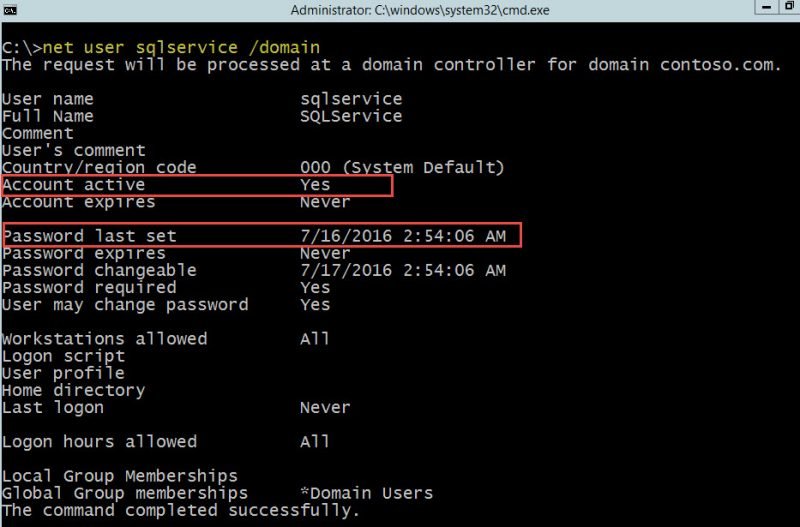
This is the original historical result, using the sample contoso.com domain and sqlservice account. Password last set gives the timestamp recorded by the directory controller answering the request. Compare it with the service failure timeline. It is a clue, not a test of the service’s stored password.
Check the rest of the logon failure
A changed password is not the only cause of error1069. A disabled or locked account, expired credential, missing logon rights or domain-connectivity problem can also prevent startup. Read the specific Windows event and verify which account the failed service actually uses.
If its stored credential needs updating, use SQL Server Configuration Manager and coordinate with the account owner. Do not reset the domain password simply to test this theory. Managed service accounts and built-in service identities need their own account-management process; a manual password replacement is not a universal remedy.
The practical answer is short: inspect the timestamp, connect it to the evidence and correct the actual cause. SQL Server cannot tell you the plaintext domain password, and you do not need it to begin the investigation.
Published by Pinal Dave on SQLAuthority. More of my work at pinaldave.com.
Discover more from SQL Authority with Pinal Dave
Subscribe to get the latest posts sent to your email.




1 Comment. Leave new
Wow very good …