A row version tag makes an updated row bigger after you turn on RCSI, even when the data is the same length. On full pages, that growth turns into page splits.

The Monday morning surprise
Here is a story I hear a lot. A team turns on READ_COMMITTED_SNAPSHOT on Friday to stop readers from blocking writers. Everyone is happy. On Monday the nightly update job is slower and the data file has grown.
Someone blames the setting, and they are partly right. When RCSI is on, SQL Server adds a small tag to every row you modify, so it can keep a version for readers. If your pages are packed tight, that extra room has to come from somewhere.
Let me show it on a small table. First, a demo database. It is created here and dropped in the last step.
USE master;
DROP DATABASE IF EXISTS SqlAuthorityDemo;
GO
CREATE DATABASE SqlAuthorityDemo;
GO
USE SqlAuthorityDemo;
Build packed pages and take a baseline
The table has 1,000 rows with a fixed 200-character payload. Fixed-width rows make the math easy, because the update below never changes the length of the data.
I save the first measurement in a temp table, so I can compare against it later. The pages are about 97 percent full, which is what a freshly loaded table looks like.
CREATE TABLE dbo.VersionTagDemo
(
    ItemId int PRIMARY KEY CLUSTERED,
    Payload char(200) NOT NULL
);

INSERT dbo.VersionTagDemo (ItemId, Payload)
SELECT value, REPLICATE('x', 200)
FROM GENERATE_SERIES(1, 1000);

SELECT N'before' AS phase, page_count, avg_record_size_in_bytes,
       avg_page_space_used_in_percent
INTO #Before
FROM sys.dm_db_index_physical_stats
     (DB_ID(), OBJECT_ID(N'dbo.VersionTagDemo'), 1, NULL, 'DETAILED')
WHERE index_level = 0 AND alloc_unit_type_desc = 'IN_ROW_DATA';

SELECT * FROM #Before;
The first row of the screenshot further down is this result: 27 leaf pages, an average record of 211 bytes. The index_level = 0 filter means we look only at the leaf pages, where the rows live.
Turn on RCSI and see that nothing happens
Now flip the switch. The second statement confirms the setting is on. Then I measure again.
ALTER DATABASE SqlAuthorityDemo
SET READ_COMMITTED_SNAPSHOT ON WITH ROLLBACK IMMEDIATE;

SELECT name, is_read_committed_snapshot_on
FROM sys.databases
WHERE name = N'SqlAuthorityDemo';

SELECT N'option only' AS phase, page_count, avg_record_size_in_bytes
FROM sys.dm_db_index_physical_stats
     (DB_ID(), OBJECT_ID(N'dbo.VersionTagDemo'), 1, NULL, 'DETAILED')
WHERE index_level = 0 AND alloc_unit_type_desc = 'IN_ROW_DATA';
The setting reads 1, but the table is exactly as before: 27 pages, 211 bytes. Turning RCSI on does not touch existing rows. The cost shows up only when a row is modified.
Update every row and measure again
Now I overwrite every payload with 200 new characters. Same length, same column, nothing exciting. The last column subtracts the baseline from the new record size.
UPDATE dbo.VersionTagDemo
SET Payload = REPLICATE('y', 200);

SELECT N'after update' AS phase, s.page_count, s.avg_record_size_in_bytes,
       s.avg_record_size_in_bytes - b.avg_record_size_in_bytes AS added_record_bytes,
       s.avg_page_space_used_in_percent
FROM sys.dm_db_index_physical_stats
     (DB_ID(), OBJECT_ID(N'dbo.VersionTagDemo'), 1, NULL, 'DETAILED') AS s
CROSS JOIN #Before AS b
WHERE s.index_level = 0 AND s.alloc_unit_type_desc = 'IN_ROW_DATA';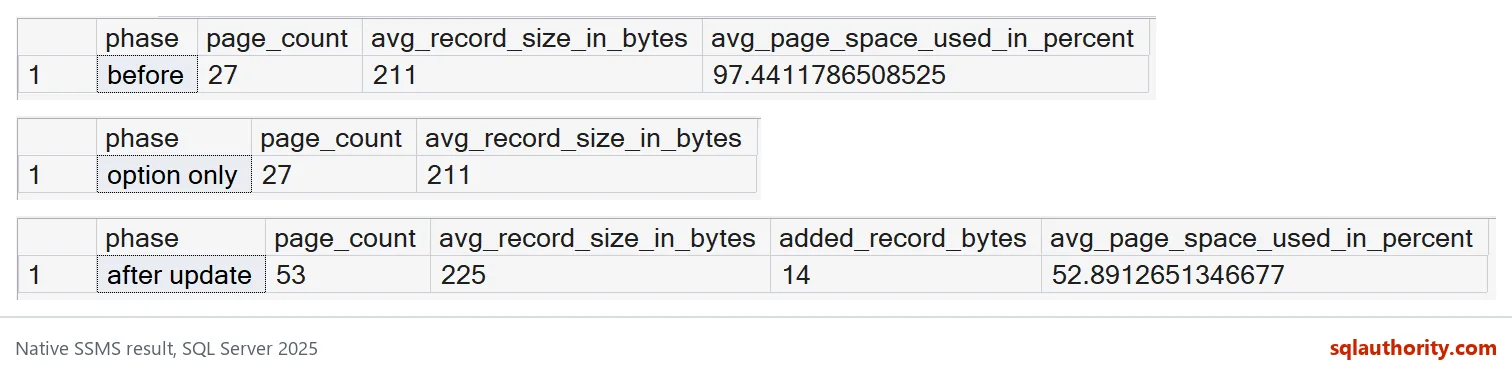
Each modified record grew by 14 bytes. The pages were nearly full, so there was no room for that growth. SQL Server split pages to make room.
Look at the page count. It went from 27 to 53, almost double, and the pages are now only about 53 percent full. A page split moves half the rows to a new page. So you pay twice: more pages to read, and a lot of empty space inside them.

What to do before you blame the setting
This demo is the worst case on purpose: full pages and every row updated at once. Your real tables are rarely that bad. Still, the check is cheap, so run it on a copy of a busy table.
If the growth hurts, a lower fill factor on the index leaves room for it. But a fill factor is applied only when you rebuild. It is not kept as a fixed amount of empty space afterward. It also makes the index bigger to read, so apply it to the tables that need it, not to everything.
One more honest note. This measures the tag on the table rows. It does not measure the row versions that SQL Server keeps for readers. That is a separate space cost, and it depends on how long your transactions stay open.
Finally, clean up. The demo created one database, so the last block drops it.
DROP TABLE IF EXISTS #Before;
GO
USE master;
DROP DATABASE IF EXISTS SqlAuthorityDemo;
Measure your own busiest table before you decide the setting is the villain.
A row version tag is not free storage, it is part of the price of RCSI.
Published by Pinal Dave on SQLAuthority. More of my work at pinaldave.com.
Discover more from SQL Authority with Pinal Dave
Subscribe to get the latest posts sent to your email.