
Question: Can one unchanged statement insert several rows in SQL Server, MySQL and PostgreSQL? Yes. For this simple two-column table, use one INSERT with several parenthesized rows in its VALUES list.

The interesting part of the original question was portability. Sharing the language name SQL does not make every feature interchangeable between products. This particular row-constructor form is a useful piece of common ground.
-- Use a new empty scratch database and confirm SampleTable does not exist.
-- This portable demo creates and drops ONLY its new sample table.
CREATE TABLE SampleTable(ID INT,Col1 VARCHAR(100));
INSERT INTO SampleTable(ID,Col1)
VALUES(1,'One'),(2,'Two'),(3,'Three');
SELECT ID,Col1 FROM SampleTable ORDER BY ID;
DROP TABLE SampleTable;
Run the complete demonstration only in a fresh empty scratch database, with that table name unused. It creates the table, inserts One, Two and Three, reads them in a deliberate order, then drops its own table. The INSERT statement itself is unchanged between the three products.
The original three demonstrations
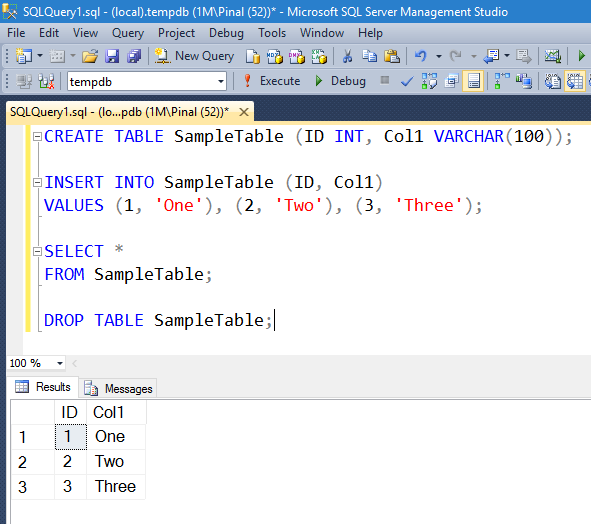
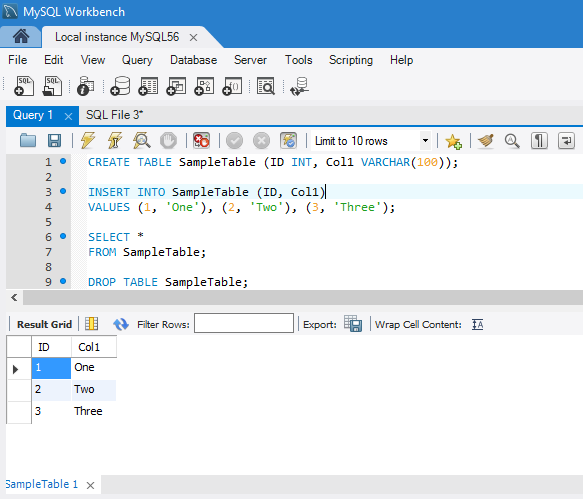
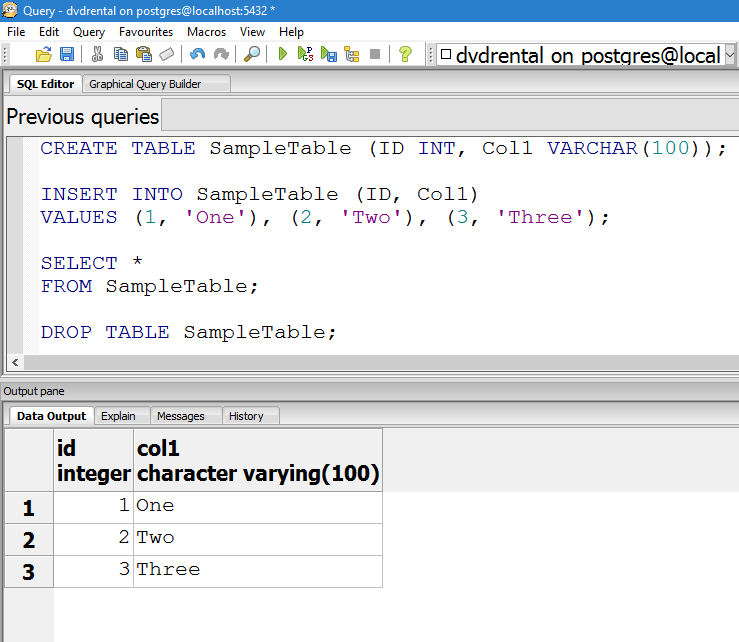
These historical screenshots are still useful because they show the same statement producing the same three values in three real tools. They are not presented as fresh executions on today’s versions.
Do not generalize the small example into every insert
In SQL Server, an INSERT using VALUES directly is limited to 1000 rows. Larger loads may use multiple statements, a derived table or a bulk method. Identity syntax, generated keys, conflict handling, types and transaction behavior differ between products, so a larger application still needs product-specific review.
The earlier UNION ALL approach provides the background. VALUES is simpler for this short literal list; neither approach promises portability for every expression used inside it.
Primary references: SQL Server row constructors, MySQL INSERT and PostgreSQL inserts.
Published by Pinal Dave on SQLAuthority. More of my work at pinaldave.com.
Discover more from SQL Authority with Pinal Dave
Subscribe to get the latest posts sent to your email.




10 Comments. Leave new
You should also mention that multiple values is available only for SQL Server version of 2008+ and that the values statement is limited to 1000 rows.
for sql server, I also like
insert into table1
(col1, col2, col3)
(select col1, col2, col3 where whatever = this)
Interesting. I’ve been using this for years with Microsoft SQL Server, but I didn’t realize that the same multi-row syntax works with MySQL and PostgreSQL as well.
Thanks!
Hi Pinal, it’s not related to the above post. I have another issue, importing .xlsx files using OPENROWSET is very slow. my excel file can contain up to 700,000 records. currently I tried with 400,000 and it took almost 25 Minutes to import the file. FYI the files are being uploaded from a web portal in a particular folder and I am importing it using a Stored Procedure in a scheduled Job. I am saving file and sheet names in a table and my SP then extract the pending file and sheet names and prepare a dynamic SQL query and finally execute it. Can you please suggest some other faster way to import xlsx file in sql server or any suggestion for my existing process.
The xlsx files will still be uploaded from a web portal.
Sample Query for my Project looks like this:
INSERT INTO myTable(field1, field2, field3)
SELECT * FROM OPENROWSET(‘Microsoft.ACE.OLEDB.12.0’,
‘Excel 12.0;Database=D:\Manish\SourceFiles\file10.xlsx;HDR=YES;IMEX=1’,
‘SELECT * FROM [items$]’);
This will also work:
INSERT INTO SampleTable (ID, Col1)
select 1, ‘One’ union all
select 2, ‘Two’ union all
select 3, ‘Three’
I have a question – I use this syntax in to load app dictionary. It’s about 5000 records so I have 5 insert statements to overcome 1000 rec limit.
I have the performance issue :
It takes about 7-8 secondsto do the insert – on the same server the same data amount insert as select takes less that a sec.
i have a table that has million records when i try to retrieve data or insert data via dyndns from vb6 its very slow some time query timed out expired error. on local system its working but on remote computer its taking too much time.
can we create a view using ‘select into’ statement and can we create a data type of unsigned int in a table,please
explain us with an example .
SELECT INTO is used to create table not view.
How about inserting into two tables with one query
Insert into table2(childID,action,chagedate)
Select Id,$action,getdate() from (
Insert into table1(col1,col2)
Output inserted.id
Value(@col1,@col2)
)