LEN versus DATALENGTH becomes important when trailing spaces and Unicode bytes affect the question I’m asking. The same displayed text can produce different counts. I separate character length from byte length before writing a validation rule.

Decide what length means
A form can limit the visible characters in a name. An export can limit the bytes in a record. Those rules sound similar until the input includes spaces or a different encoding.
LEN reports a character count that excludes trailing spaces. DATALENGTH reports the bytes representing the expression. Neither function knows whether your application considers a trailing space meaningful.
I don’t use a byte count as a universal character count. That would tie an application rule to its SQL representation. I also don’t use LEN to prove that stored text has no trailing spaces.
The first query keeps its inputs explicitly nvarchar. That removes a hidden conversion from the comparison. The trailing spaces remain in the literal even when a results grid makes them hard to see.
WITH Samples AS
(
    SELECT CaseId,TextValue
    FROM (VALUES
        (1,CAST(N'ABC  ' AS nvarchar(20))),
        (2,CAST(N'é ' AS nvarchar(20))),
        (3,CAST(N'' AS nvarchar(20))),
        (4,CAST(NULL AS nvarchar(20)))
    ) AS v(CaseId,TextValue)
)
SELECT CaseId,TextValue,LEN(TextValue) AS CharacterCount,
    DATALENGTH(TextValue) AS ByteCount
FROM Samples
ORDER BY CaseId;
Read the expected counts
The ABC input contains two trailing spaces. Its expected LEN result is 3, while its nvarchar byte count is 10. All five characters still participate in the byte representation.
The accented letter with one trailing space has an expected character count of 1. Its byte count is 4 for this nvarchar input. The example uses ordinary BMP characters, so it does not illustrate surrogate-pair counting.
The empty string is expected to produce zero for both counts. NULL produces NULL, rather than zero. I keep those cases separate because missing data and an explicitly empty value carry different meanings.
Keep the data type in the comparison
The second query compares the same ASCII text as varchar and nvarchar. Both expected character counts are 3. The expected byte counts are 5 and 10, including both trailing spaces.
This example does not establish that every varchar character occupies one byte. UTF-8 and other encodings require their own byte checks. Likewise, dividing every Unicode byte count by two does not describe every user-perceived character.
I’d use the declared type and actual encoding when estimating a byte limit. A value converted before measurement can change the answer. Measuring the source and measuring an exported representation are separate decisions.
SELECT LEN(CAST('ABC  ' AS varchar(20))) AS VarcharCharacters,
    DATALENGTH(CAST('ABC  ' AS varchar(20))) AS VarcharBytes,
    LEN(CAST(N'ABC  ' AS nvarchar(20))) AS UnicodeCharacters,
    DATALENGTH(CAST(N'ABC  ' AS nvarchar(20))) AS UnicodeBytes;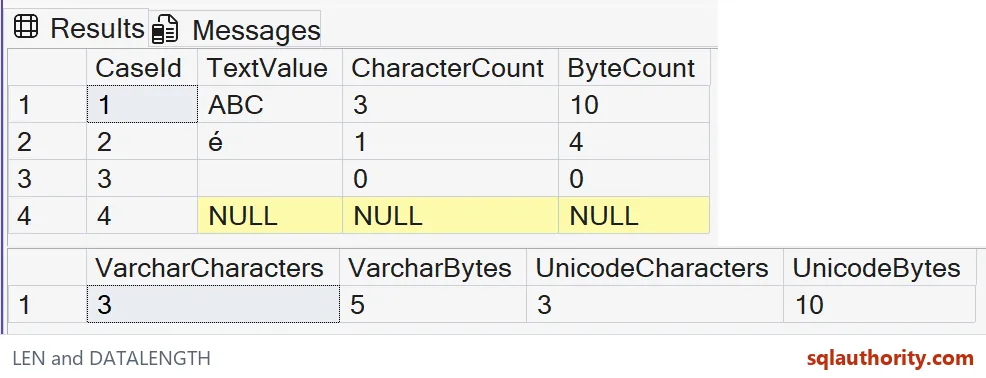

Use a rule that matches the requirement
If a rule accepts at most three non-trailing characters, LEN answers that specific question. If a payload permits at most eight nvarchar bytes, the ABC example exceeds that limit. A single word like length cannot express both rules.
A comparison between LEN and DATALENGTH can reveal an unexpected representation. It does not identify every kind of whitespace or every encoding issue. The functions report counts, rather than explaining why input contains particular characters.
Fixed-width character types introduce padding considerations too. I’d inspect the type before labeling extra bytes as user-entered spaces. This example uses variable-width types so that padding does not blur the intended lesson.
I’m tempted to trim first and then check everything. That changes the value being validated and can hide a meaningful suffix. When normalization is required, make it an explicit application rule before comparing the normalized result.
For a NULL input, decide whether your rule should reject, allow or flag missing text. Don’t let an unknown comparison accidentally choose the policy. Keep that decision visible alongside the length check.
Counting is simple once you know what you are counting.
A byte limit is not a character limit, it is a limit on the chosen representation.
Published by Pinal Dave on SQLAuthority. More of my work at pinaldave.com.
Discover more from SQL Authority with Pinal Dave
Subscribe to get the latest posts sent to your email.