Partitioned views split one big table into several ordinary tables and glue them back together with UNION ALL. SQL Server can skip the tables a query does not need, but only if their CHECK constraints are trusted.

Why split a table by year at all
Say you have an orders table that grows every year. Old years are rarely touched, but every report still pays for them. You want one table per year, and you want the old queries to keep working.
That is what a partitioned view does. Each year lives in its own table. A view stitches them together. The name of a table, like Orders2026, proves nothing about its rows, though. The proof is a CHECK constraint that says which dates may live there. SQL Server reads those constraints, and that is how it knows which tables to ignore.
So the constraint is the whole trick. Let me build a small version, and then show you how easy it is to switch that trick off by accident.
Build the member tables and the view
Each member table has a date range written as a half-open interval: from the first day, up to but not including the first day of the next year. The ranges touch but never overlap. The date is part of the primary key.
DROP VIEW IF EXISTS dbo.AllOrders;
DROP TABLE IF EXISTS dbo.Orders2025;
DROP TABLE IF EXISTS dbo.Orders2026;

CREATE TABLE dbo.Orders2025
(
    OrderId   int,
    OrderDate date NOT NULL,
    Amount    decimal(12,2),
    PRIMARY KEY (OrderId, OrderDate),
    CONSTRAINT CK_Orders2025 CHECK (OrderDate >= '20250101' AND OrderDate < '20260101')
);

CREATE TABLE dbo.Orders2026
(
    OrderId   int,
    OrderDate date NOT NULL,
    Amount    decimal(12,2),
    PRIMARY KEY (OrderId, OrderDate),
    CONSTRAINT CK_Orders2026 CHECK (OrderDate >= '20260101' AND OrderDate < '20270101')
);

INSERT dbo.Orders2025 VALUES (1, '20250501', 10);
INSERT dbo.Orders2026 VALUES (2, '20260501', 20);
Now the view. It must be the first statement in its batch, so it gets a block of its own.
CREATE VIEW dbo.AllOrders AS
SELECT OrderId, OrderDate, Amount FROM dbo.Orders2025
UNION ALL
SELECT OrderId, OrderDate, Amount FROM dbo.Orders2026;
Ask for one year
Now ask the view for 2026 only. Turn on STATISTICS IO, and in SSMS press Ctrl+M to include the actual execution plan. The IO output names every table the query touched.
SET STATISTICS IO ON;

SELECT OrderId, OrderDate, Amount
FROM dbo.AllOrders
WHERE OrderDate >= '20260101' AND OrderDate < '20270101'
ORDER BY OrderDate, OrderId;

SET STATISTICS IO OFF;
The result is OrderId 2, dated May 1, 2026, amount 20.00. The IO messages mention Orders2026 and nothing else. Orders2025 was never touched.
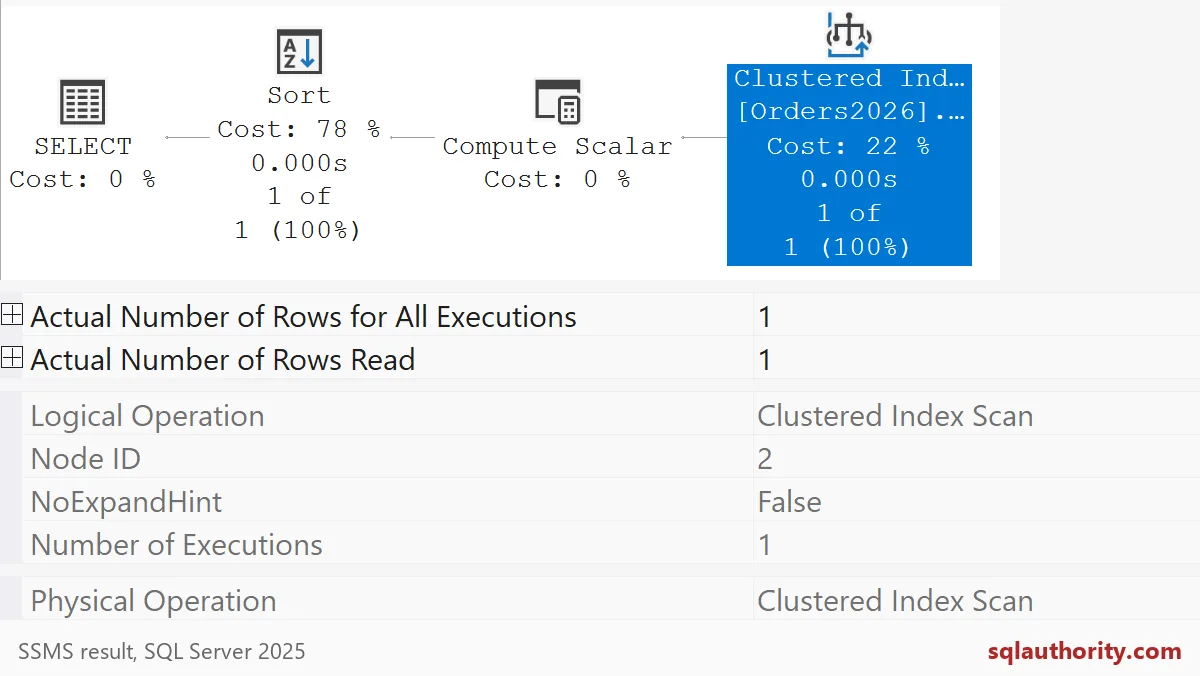
The plan agrees. It has a single branch, on Orders2026. The other member was removed before the query ran. Ask for 2025 instead, and the same thing happens in reverse.
SET STATISTICS IO ON;

SELECT OrderId, OrderDate, Amount
FROM dbo.AllOrders
WHERE OrderDate >= '20250101' AND OrderDate < '20260101'
ORDER BY OrderDate, OrderId;

SET STATISTICS IO OFF;
This time only Orders2025 is read. Good. The setup works.
Break the trust
Now the 2 AM scenario. A nightly load is slow, so someone disables the constraint on Orders2025 to speed things up. Afterwards they turn it back on, but without the word CHECK. The constraint is enabled again, yet SQL Server has not verified the old rows, so it marks the constraint as not trusted.
ALTER TABLE dbo.Orders2025 NOCHECK CONSTRAINT CK_Orders2025;
ALTER TABLE dbo.Orders2025 WITH NOCHECK CHECK CONSTRAINT CK_Orders2025;

SELECT name, is_disabled, is_not_trusted
FROM sys.check_constraints
WHERE parent_object_id IN (OBJECT_ID(N'dbo.Orders2025'), OBJECT_ID(N'dbo.Orders2026'))
ORDER BY name;
Both constraints show is_disabled 0, so nothing looks wrong. But CK_Orders2025 has is_not_trusted 1. Now run the 2026 query again.
SET STATISTICS IO ON;

SELECT OrderId, OrderDate, Amount
FROM dbo.AllOrders
WHERE OrderDate >= '20260101' AND OrderDate < '20270101'
ORDER BY OrderDate, OrderId;

SET STATISTICS IO OFF;
The answer is the same row. But now the IO messages list both Orders2026 and Orders2025. SQL Server can no longer trust the 2025 range, so it reads that table too, just to be safe. Nobody changed the query, and nothing failed. It simply got slower.

Restore the trust and know the limits
The fix is to re-enable the constraint WITH CHECK, which makes SQL Server validate the existing rows. Then run the query once more to see that the extra read is gone.
ALTER TABLE dbo.Orders2025 WITH CHECK CHECK CONSTRAINT CK_Orders2025;

SELECT name, is_disabled, is_not_trusted
FROM sys.check_constraints
WHERE parent_object_id IN (OBJECT_ID(N'dbo.Orders2025'), OBJECT_ID(N'dbo.Orders2026'))
ORDER BY name;

SET STATISTICS IO ON;

SELECT OrderId, OrderDate, Amount
FROM dbo.AllOrders
WHERE OrderDate >= '20260101' AND OrderDate < '20270101'
ORDER BY OrderDate, OrderId;

SET STATISTICS IO OFF;
Both constraints show is_not_trusted 0 again, and only Orders2026 is read.
A few limits to keep in mind. Every new year needs a new member table with a correct range, and an edited view. A wrong boundary creates a gap or an overlap. Writes through the view have extra rules, so test them before you promise anything. And this design does not give you everything table partitioning gives you. Check what you need before you replace one with the other. Then clean up.
DROP VIEW IF EXISTS dbo.AllOrders;
DROP TABLE IF EXISTS dbo.Orders2025;
DROP TABLE IF EXISTS dbo.Orders2026;
Next time a load finishes, check the trust flag before you go home.
A yearly table name is not a boundary, it is the trusted constraint that proves the range.
Published by Pinal Dave on SQLAuthority. More of my work at pinaldave.com.
Discover more from SQL Authority with Pinal Dave
Subscribe to get the latest posts sent to your email.