COMPRESS_ALL_ROW_GROUPS forces an open delta rowgroup into compressed columnstore storage. That sounds like pure tidiness. But used on every small batch, it can leave you with a pile of tiny compressed groups. Look at what you create before you schedule it.
Where small inserts land
A clustered columnstore index likes big loads. When you insert only a few rows, SQL Server does not compress them right away. It parks them in an open delta rowgroup, a small holding area, and compresses them later.
Let me show you with three rows. First the table and the index.
DROP TABLE IF EXISTS dbo.DeltaDemo;
GO
CREATE TABLE dbo.DeltaDemo (ItemId int NOT NULL, Amount decimal(12,2));
CREATE CLUSTERED COLUMNSTORE INDEX CCI_DeltaDemo ON dbo.DeltaDemo;
Force the open group into compression
The next block inserts the rows and looks at the rowgroup state. It then runs the command and looks again. The last query shows the data itself.
INSERT dbo.DeltaDemo VALUES (1, 10), (2, 20), (3, 30);

SELECT N'before' AS phase, partition_number, row_group_id, state_desc, total_rows, deleted_rows
FROM sys.dm_db_column_store_row_group_physical_stats
WHERE object_id = OBJECT_ID(N'dbo.DeltaDemo')
ORDER BY partition_number, row_group_id;

ALTER INDEX CCI_DeltaDemo ON dbo.DeltaDemo
    REORGANIZE WITH (COMPRESS_ALL_ROW_GROUPS = ON);

SELECT N'after' AS phase, partition_number, row_group_id, state_desc, total_rows, deleted_rows
FROM sys.dm_db_column_store_row_group_physical_stats
WHERE object_id = OBJECT_ID(N'dbo.DeltaDemo')
ORDER BY partition_number, row_group_id;

SELECT ItemId, Amount FROM dbo.DeltaDemo ORDER BY ItemId;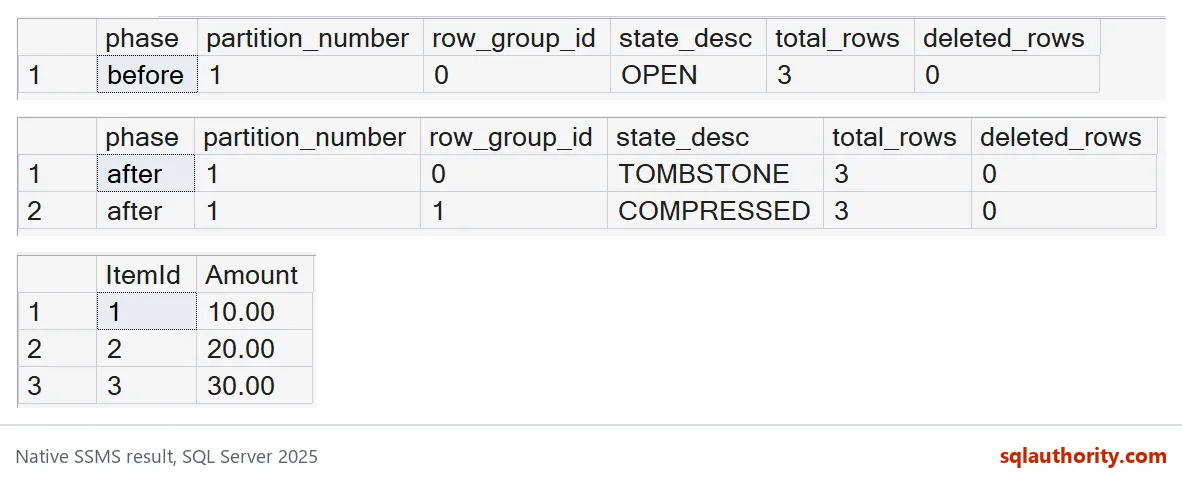
Before the command, you see one OPEN rowgroup with 3 rows. After it, you see a COMPRESSED rowgroup, number 1, with the same 3 rows. The old open group still appears as TOMBSTONE for a while, until background cleanup removes it.
That TOMBSTONE is not a duplicate copy. The last grid proves it: you still get exactly three rows, 1, 2 and 3. Compression changed where the rows live, not what they are.

The timer job that rebuilds everything
Now the mistake. Someone reads that the command is useful and adds it to a job that runs after every small load. It feels tidy. The inventory shows only COMPRESSED groups, and everyone relaxes.
Let me copy that job in miniature. This loop inserts one row, then forces compression, five times. Then it summarizes the rowgroups.
DROP TABLE IF EXISTS dbo.TinyBatches;
GO
CREATE TABLE dbo.TinyBatches (ItemId int NOT NULL, Amount decimal(12,2));
CREATE CLUSTERED COLUMNSTORE INDEX CCI_TinyBatches ON dbo.TinyBatches;
GO
DECLARE @i int = 1;
WHILE @i <= 5
BEGIN
    INSERT dbo.TinyBatches VALUES (@i, @i * 10);
    ALTER INDEX CCI_TinyBatches ON dbo.TinyBatches
        REORGANIZE WITH (COMPRESS_ALL_ROW_GROUPS = ON);
    SET @i += 1;
END;

SELECT MAX(row_group_id) AS highest_row_group_id,
       SUM(CASE WHEN state_desc = N'COMPRESSED' THEN 1 ELSE 0 END) AS compressed_groups,
       SUM(CASE WHEN state_desc = N'COMPRESSED' THEN total_rows ELSE 0 END) AS live_rows,
       SUM(CASE WHEN state_desc = N'TOMBSTONE' THEN 1 ELSE 0 END) AS tombstones
FROM sys.dm_db_column_store_row_group_physical_stats
WHERE object_id = OBJECT_ID(N'dbo.TinyBatches');
Five rows went in, yet the highest row_group_id is 12. Only two COMPRESSED groups hold the 5 live rows. The rest of the numbers were used up by groups that were built, then replaced, then left as TOMBSTONE for cleanup.
So on this SQL Server 2025 build, the command merged the small groups for us. That is the good news. The bad news is the churn: every pass rebuilt rows that were already compressed. With a real table, that is real CPU and log work for no gain. Check what your own version does before you schedule it.
Better habits
Let small batches pile up in the delta store until there is a meaningful amount of data. Then compress once. Look at your real ingest pattern and your real rowgroup sizes before putting this command on a frequent timer.
Also watch the deleted_rows column and partitions, not only the state. An inventory that says COMPRESSED everywhere does not prove your queries got faster. Measure reads and maintenance work with representative data.
The command earns its place at clear boundaries, like the end of a nightly load, when you know no more rows are coming for a while.
DROP TABLE IF EXISTS dbo.TinyBatches;
DROP TABLE IF EXISTS dbo.DeltaDemo;
Next time a columnstore looks messy, count the rowgroups before you reach for the command.
Forced compression is not a fuller rowgroup, it is a maintenance timing choice.
Published by Pinal Dave on SQLAuthority. More of my work at pinaldave.com.
Discover more from SQL Authority with Pinal Dave
Subscribe to get the latest posts sent to your email.