
My old interview answer compared EXCEPT with NOT IN using AdventureWorks product IDs. For that non-NULL key example they can return the same IDs. The interesting follow-up is what happens when NULLs or duplicate rows enter the question.

Question: Do EXCEPT and NOT IN always return the same rows?
Answer: No. EXCEPT returns distinct rows from the left query that are absent from the right. NOT IN is a membership predicate. It preserves duplicate outer rows when they qualify, and a NULL in its right-side list can make an unmatched comparison UNKNOWN, so the row does not pass WHERE.
The following standalone data makes both differences visible:
CREATE TABLE #LeftValues (ValueNumber int NULL);
CREATE TABLE #RightValues (ValueNumber int NULL);
INSERT #LeftValues VALUES (1), (2), (2), (NULL);
INSERT #RightValues VALUES (1), (NULL);

SELECT ValueNumber FROM #LeftValues
EXCEPT
SELECT ValueNumber FROM #RightValues;

SELECT ValueNumber FROM #LeftValues
WHERE ValueNumber NOT IN
      (SELECT ValueNumber FROM #RightValues);
EXCEPT returns the value 2 once. The NOT IN query returns no rows because of the right-side NULL. EXCEPT treats two NULLs as equal for distinct set comparison, so the left NULL is removed by the right NULL. If your requirement is “keep each left row with no match,” a correlated NOT EXISTS often expresses that intent more directly:
SELECT l.ValueNumber
FROM #LeftValues AS l
WHERE NOT EXISTS
      (SELECT 1 FROM #RightValues AS r
       WHERE r.ValueNumber = l.ValueNumber);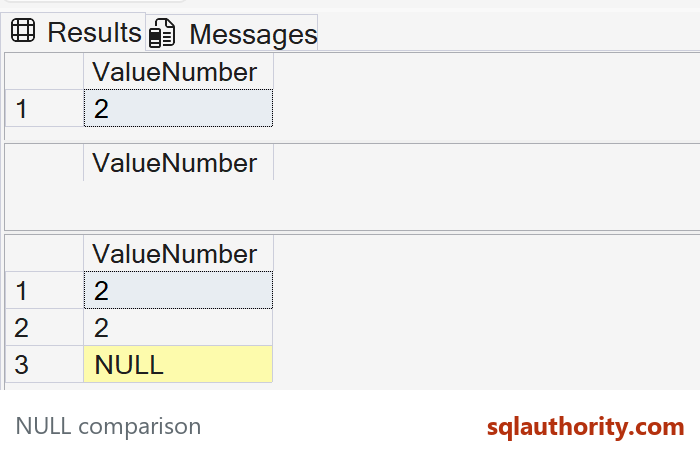
That last query preserves both copies of 2 and the left NULL under ordinary equality. Whether NULL should survive is a business rule to decide, not an accident of syntax. The original AdventureWorks examples remain a useful historical case, but two queries that agree on one non-NULL key set do not have identical semantics or guaranteed identical plans.
The original non-NULL product comparison
The original product-key queries are still useful. Here are both forms against the current AdventureWorks sample. The historical plan below came from the older sample, not this current server, and does not prove equivalence for nullable or duplicate inputs:
USE AdventureWorks2025;
GO
SELECT ProductID FROM Production.Product
EXCEPT
SELECT ProductID FROM Production.WorkOrder;

SELECT ProductID FROM Production.Product
WHERE ProductID NOT IN
      (SELECT ProductID FROM Production.WorkOrder);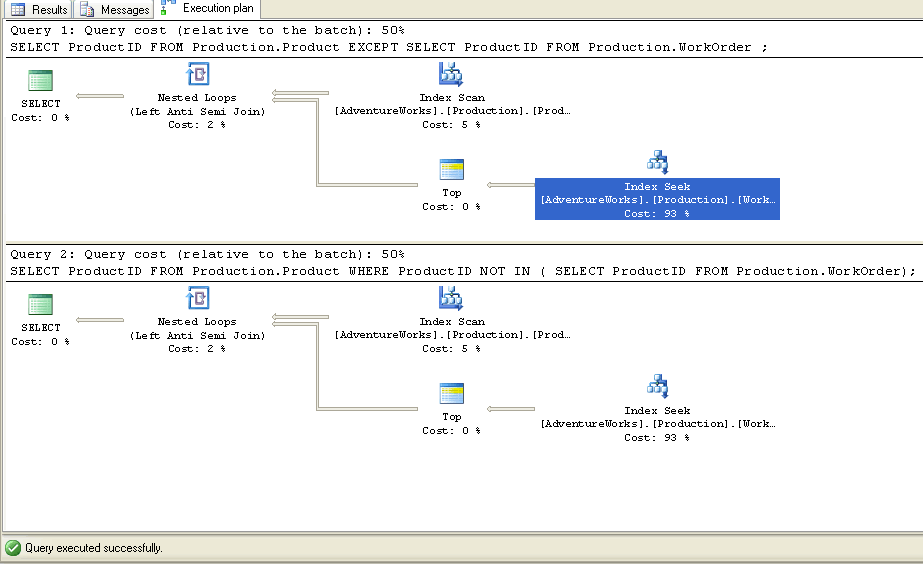
Published by Pinal Dave on SQLAuthority. More of my work at pinaldave.com.
Discover more from SQL Authority with Pinal Dave
Subscribe to get the latest posts sent to your email.




6 Comments. Leave new
Hi Pinal,
Where can i view the data/schema of the tables used in the examples.
If it’s just one column, surely both EXCEPT and NOT IN are the same. However, if more columns are involved, then they are quite different. EXCEPT works on all columns of the result set whereas NOT IN would work on the column being referenced.
You forgot the biggest difference — what happens if there is a NULL in the data. In that case except works as you would expect, but not in won’t return any rows.
Hey Pinal,
As per your explanation , ” Except ” and ” Not In ” both are same ?
Read Nakul’s answer above.
Having issue where an EXCEPT query works as expected in the query window, but when I put the same code into a Stored Procedure it returns many more records. Basically it is returning records where NULL is in the record, where in the query window it was correctly not returning these records where both datasets being compared both had a null in that column. Can you tell me how to correctly set the settings for my stored procedures so it works correctly with EXCEPT in relation to how it handles NULLS? I’m using SQL Server 2012 and server is in Compatability Level: SQL Server 2012(110). Thanks!