
In the recent past I have seen the best interaction and learning happens when we all get into a puzzle and challenge mode. And that just gets the creative juice in our minds and some really innovative solutions are given. So this blog is written like a nice trivia solution and I would love to hear from you on potential alternate solutions to this as you read the simplified solution. Today’s puzzle: how do you remove all characters from a string and keep only the numbers?
There are many situations where a developer needs to do a lot of string manipulation using T-SQL. There are many things which ideally should be done via SQLCLR.
One of my blog reader posted a comment recently
I want to get only integer part in string. for example, string contain ab123ce234fe means i want only integer part like 123234. how can i get?
I gave him below suggestion.
SET NOCOUNT ON
DECLARE @loop INT
DECLARE @str VARCHAR(8000)
SELECT @str = 'ab123ce234fe'
SET @loop = 0
WHILE @loop < 26
BEGIN
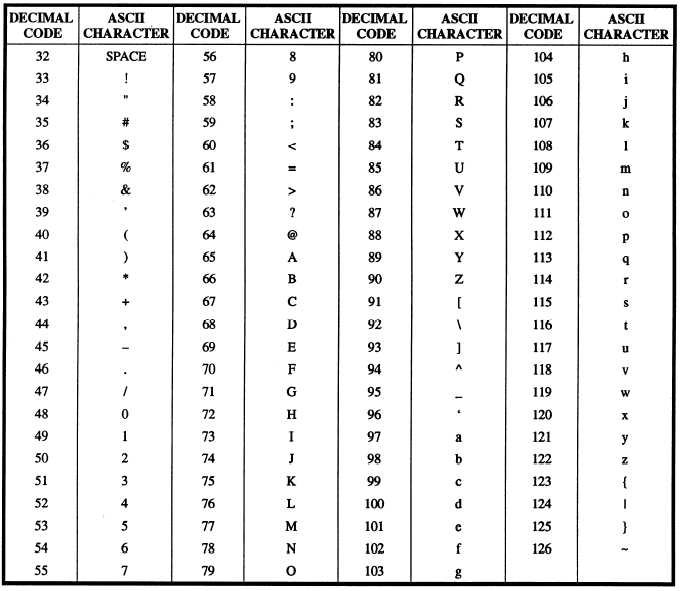
SET @str = REPLACE(@str, CHAR(65 + @loop), '')
SET @loop = @loop + 1
END
SELECT @str
Do you think there is a better way to remove all characters from a string and keep only the numbers? Please write it in comments section. It is going to be a great learning opportunity for all.
A Few Notes Before You Use This
This loop removes the letters A to Z. It removes lowercase letters too, because REPLACE follows the collation and the default collation is case insensitive. On a case sensitive collation, the lowercase letters stay behind. Also, spaces, dots and dashes are not letters, so the loop leaves them in place. Test it with your real data first, not only with a clean sample like this one.
If you are on SQL Server 2017 or later, TRANSLATE gives a shorter way to do the same job in one statement. It turns every letter into one marker character, and REPLACE then removes the marker.
SELECT REPLACE(TRANSLATE('ab123ce234fe', 'abcdefghijklmnopqrstuvwxyz', REPLICATE('#', 26)), '#', '');Published by Pinal Dave on SQLAuthority. More of my work at pinaldave.com.
Discover more from SQL Authority with Pinal Dave
Subscribe to get the latest posts sent to your email.


15 Comments. Leave new
If you expect few instances of characters it may save time to test for characters before going through all 26 letters:
SET NOCOUNT ON
DECLARE @loop INT
DECLARE @str VARCHAR(8000)
SELECT @str = ‘ab123ce234fe’
SET @loop = 0
WHILE @loop < 26 AND PATINDEX('%[a-z]%',@str) 0
BEGIN
SET @str = REPLACE(@str, CHAR(65 + @loop), ”)
SET @loop = @loop + 1
END
SELECT @str
Or even only looping through as many times as non-integer characters you have:
SET NOCOUNT ON
DECLARE @str VARCHAR(8000) = ‘ab123ce234fe’
DECLARE @pat INT = PATINDEX(‘%[a-z]%’,@str)
WHILE @pat 0
BEGIN
SET @str = LEFT(@str,@pat-1) + RIGHT(@str,LEN(@str)-@pat)
SET @pat = PATINDEX(‘%[a-z]%’,@str)
END
SELECT @str
This can also be done by using below query
CREATE FUNCTION udf_extractInteger(@string VARCHAR(2000))
RETURNS VARCHAR(2000)
AS
BEGIN
DECLARE @count int
DECLARE @intNumbers VARCHAR(1000)
SET @count = 0
SET @intNumbers = ”
WHILE @count =’0′ and SUBSTRING (@string, @count, 1) <='9'
BEGIN
SET @intNumbers = @intNumbers + SUBSTRING (@string, @count, 1)
END
SET @count = @count + 1
END
RETURN @intNumbers
END
GO
select dbo.udf_extractInteger('ab123ce234fe')
DECLARE @KeepValues AS VARCHAR(50),
@Str AS VARCHAR(500)
SET @KeepValues = ‘%[^a-z]%’
WHILE PATINDEX(@KeepValues, @Str) > 0
SET @Str = STUFF(@Str, PATINDEX(@KeepValues, @Str), 1, ”)
short and simple solution !! Thanks for sharing :)
For this case, its going to be as following:
DECLARE @KeepValues VARCHAR(50),@Str VARCHAR(500) = ‘ab123ce234fe’
SET @KeepValues = ‘%[^a-z]%’ — if you want only characters in the output
SET @KeepValues = ‘%[^0-9]%’ — If you want only integers in the output
WHILE PATINDEX(@KeepValues, @Str) > 0
SET @Str = STUFF(@Str, PATINDEX(@KeepValues, @Str), 1, ”)
select @Str
and suppose string contains ‘ab123cE234Fe’ then how should we handle it?
nice solution
SET NOCOUNT ON
DECLARE @loop INT
DECLARE @str VARCHAR(8000)
DECLARE @strs VARCHAR(8000)
SELECT @str = ‘ab123ce234fe’
SET @loop = 0
set @strs=”
WHILE @loop < LEN(@str)
BEGIN
if(ASCII(SUBSTRING(@str,@loop+1,1)) between 48 and 57)
begin
set @strs=@strs+SUBSTRING(@str,@loop+1,1)
end
SET @loop = @loop + 1
END
print @strs
Below is another Solution, not neccessarily easier to write or especially good but great to see another alternative:
Declare @strtest varchar(8000)
Declare @StrFinal varchar(8000)
Declare @start int
select @strtest = ‘ab123ce234fe’
set @StrFinal = ”
set @start = 1
while @start < 13
if isnumeric(SUBSTRING(@strtest,@start,1))= 1
Begin
set @StrFinal = @StrFinal + SUBSTRING(@strtest,@start,1)
set @start = @start + 1
End
else set @start = @start + 1
select @StrFinal
CREATE Function [fnRemoveNonNumericCharacters](@strText VARCHAR(1000))
RETURNS VARCHAR(1000)
AS
BEGIN
WHILE PATINDEX(‘%[^0-9]%’, @strText) > 0
BEGIN
SET @strText = STUFF(@strText, PATINDEX(‘%[^0-9]%’, @strText), 1, ”)
END
RETURN @strText
END
Mine is pretty close to Scott Williams… but there is a little difference.
CREATE Function [dbo].[RemoveAlphaCharacters](@Temp VarChar(5000))
Returns VarChar(1000)
AS
Begin
Declare @KeepValues as varchar(50)
Set @KeepValues = ‘%[^0-9 ]%’
While PatIndex(@KeepValues, @Temp) > 0
Set @Temp = Stuff(@Temp, PatIndex(@KeepValues, @Temp), 1, ”)
Return @Temp
End
If we had auxiliary table like, let’s say, numbers which contains numbers from 1 to
then we would use the next (just for variety’s sake :)
declare @str varchar (100) = ‘se345dsfg43dg435dfgh’;
select ” + symbol
from (
select number, SUBSTRING (@str, number, 1) as [symbol]
from dbo.numbers
where number <= LEN (@str)
and SUBSTRING (@str, number, 1) like '[0-9]'
)
data
order by number
for xml path ('')
i have somethink like
1)100w-123 i need output like 100-123
2)1110A123w i need output like 11110123
the above queries work for 2) case
can anyone help on 1 st case
Use the below code
SET NOCOUNT ON
DECLARE @loop INT
DECLARE @str VARCHAR(8000)
SELECT @str = ‘ab123ce234fe’
SET @loop = 0
WHILE @loop < 26 AND PATINDEX('%[a-z]%',@str) 0
BEGIN
SET @str = REPLACE(@str, CHAR(65 + @loop), ”)
SET @loop = @loop + 1
END
SELECT @str
Hello, I need help for solving the following problem: What is the appropriate way to replace:
1 / 2 / 3 / 4 / 5 / 6 / 7 / 8 / 9 / 10 / 11 / 12 / 13 / 14 / 15 D / 16 D / 17 D / 18 D with
text 1,text 2,text 3,text 4,text 5,text 6,text 7,text 8,text 9,text 10,text 11,text 12, text 13, another text 15,another text 16, another text 17, another text 18
Thank you.