
In this post titled SQL SERVER – Grouping by Multiple Columns to Single Column as A String we have seen how to group multiple column data in comma separate values in a single row grouping by another column by using FOR XML clause.
In this post we will see how we can produce the same result using the GROUP_CONCAT function in MySQL.
Let us create the following table and data.
CREATE TABLE TestTable (ID INT, Col VARCHAR(4));
INSERT INTO TestTable (ID, Col)
SELECT 1, 'A'
UNION ALL
SELECT 1, 'B'
UNION ALL
SELECT 1, 'C'
UNION ALL
SELECT 2, 'A'
UNION ALL
SELECT 2, 'B'
UNION ALL
SELECT 2, 'C'
UNION ALL
SELECT 2, 'D'
UNION ALL
SELECT 2, 'E';
Now to generate csv values of the column col for each ID, use the following code
SELECT ID, GROUP_CONCAT(col) AS CSV FROM TestTable
GROUP BY ID;
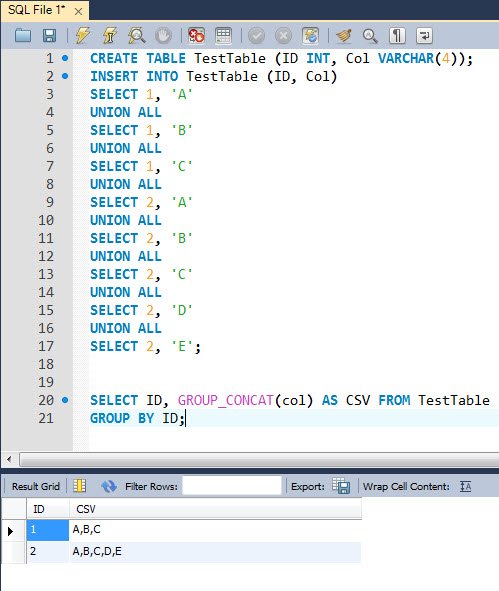
The result is
ID CSV
 1 A,B,C
 2 A,B,C,D,E
You can also change the delimiters. For example instead of comma, if you want to have a pipe symbol (|), use the following
SELECT ID, REPLACE(GROUP_CONCAT(col),',','|') AS CSV FROM TestTable
GROUP BY ID;
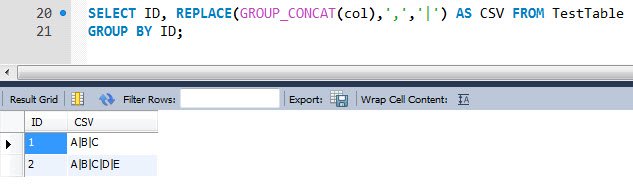
The result is
ID CSV
 1 A|B|C
 2 A|B|C|D|E
MySQL makes this Multiple Columns to Single Column task very simple with its support of GROUP_CONCAT function.
A Few Tips for GROUP_CONCAT
The REPLACE trick above works, but MySQL has a cleaner way to change the delimiter. GROUP_CONCAT accepts a SEPARATOR clause, and it can also sort the values inside each group. This version gives the same pipe separated result, in sorted order. Sorting inside the group is useful when you want the same order every time, because without ORDER BY the order of the values in the list is not guaranteed.
SELECT ID, GROUP_CONCAT(col ORDER BY col SEPARATOR '|') AS CSV
FROM TestTable
GROUP BY ID;
One caution. The result of GROUP_CONCAT is limited by the group_concat_max_len setting, which is 1024 by default. If your list is longer, MySQL cuts it off quietly and raises only a warning, so increase the setting for your session when you expect long lists. Also, the REPLACE trick changes every comma, including commas inside your data, while SEPARATOR does not. If you work on SQL Server 2017 or later, the STRING_AGG function does the same multiple columns to single column job with much less code than FOR XML.
Published by Pinal Dave on SQLAuthority. More of my work at pinaldave.com.
Discover more from SQL Authority with Pinal Dave
Subscribe to get the latest posts sent to your email.

4 Comments. Leave new
Hi,
This is easier than what i know in Sql server.There is no such keyword in sql server .
SELECT ID, stuff((Select ‘,’+col from @TestTable a1 where a.ID=a1.ID for xml path(”) ),1,1,”) AS CSV FROM @TestTable a
GROUP BY ID;
Also you can check this article –
Hi,
You may want to note that GROUP_CONCAT natively allows a custom seperator.
You can see this here:
So instead of using REPLACE(GROUP_CONCAT(col),’,’,’|’), you should instead use GROUP_CONCAT(col SEPARATOR ‘|’).
This is better as it will not replace the characters if the column data happens to contains ‘,’
How To do in in SQL?