Knowing which connections use TDS 8.0 takes more than checking the encryption flag. An encrypted connection can still speak the older protocol. So I look at the protocol, the encryption and the login method as three separate facts.

Encrypted is not the same as strict
Here is a question that arrives before every security review: “Are all our connections on TDS 8.0 with strict encryption?” The quick answer many people give is to look at encrypt_option. If it says TRUE, they say yes.
That answer is wrong. TRUE only says the traffic is encrypted. It does not say which protocol version the client and server agreed on. With strict mode, the client starts TLS first and checks the server certificate before any TDS conversation begins. That is a different handshake, and the DMV shows it as a different protocol value.
So there are three facts to keep apart: the protocol version, whether the traffic is encrypted, and how the login was authenticated. Each one has its own column.
List the connections and their protocol
This query joins connections to sessions and decodes the protocol value. I keep the connection ID in the output because one session can have more than one connection. Unknown values show up as “Other protocol” instead of being hidden.
SELECT c.connection_id, c.session_id, s.program_name, s.client_interface_name,
       CONVERT(varchar(10), CONVERT(binary(4), c.protocol_version), 1) AS ProtocolHex,
       CASE c.protocol_version
            WHEN 1946157060 THEN 'TDS 7.4'
            WHEN 134217728  THEN 'TDS 8.0'
            ELSE 'Other protocol'
       END AS ProtocolLabel,
       c.encrypt_option, c.auth_scheme
FROM sys.dm_exec_connections AS c
JOIN sys.dm_exec_sessions AS s ON s.session_id = c.session_id
WHERE s.is_user_process = 1
ORDER BY c.session_id, c.connection_id;
Your rows will differ from mine, because they depend on who is connected right now. Look at ProtocolLabel and encrypt_option side by side. A row with TRUE and TDS 7.4 is encrypted but not strict. Those are the connections you need to chase.
On a busy server this list gets long. A summary is easier to read in a meeting.
SELECT CASE c.protocol_version
            WHEN 1946157060 THEN 'TDS 7.4'
            WHEN 134217728  THEN 'TDS 8.0'
            ELSE 'Other protocol'
       END AS ProtocolLabel,
       c.encrypt_option,
       COUNT(*) AS Connections
FROM sys.dm_exec_connections AS c
JOIN sys.dm_exec_sessions AS s ON s.session_id = c.session_id
WHERE s.is_user_process = 1
GROUP BY c.protocol_version, c.encrypt_option
ORDER BY Connections DESC, ProtocolLabel;
One caution. This is a snapshot of connections open right now. A nightly job, a reporting tool or a service that connects once a day will not appear until it connects.
Read the raw protocol value
Why compare against 1946157060 and 134217728? Those are the numbers the DMV stores. Converting them to binary gives the hex values people recognize. The second query shows the same columns for your own connection.
SELECT CONVERT(varchar(10), CONVERT(binary(4), 1946157060), 1) AS Tds74Hex,
       CONVERT(varchar(10), CONVERT(binary(4), 134217728), 1) AS Tds80Hex;

SELECT CONVERT(varchar(10), CONVERT(binary(4), protocol_version), 1) AS CurrentProtocolHex,
       encrypt_option, auth_scheme
FROM sys.dm_exec_connections
WHERE session_id = @@SPID;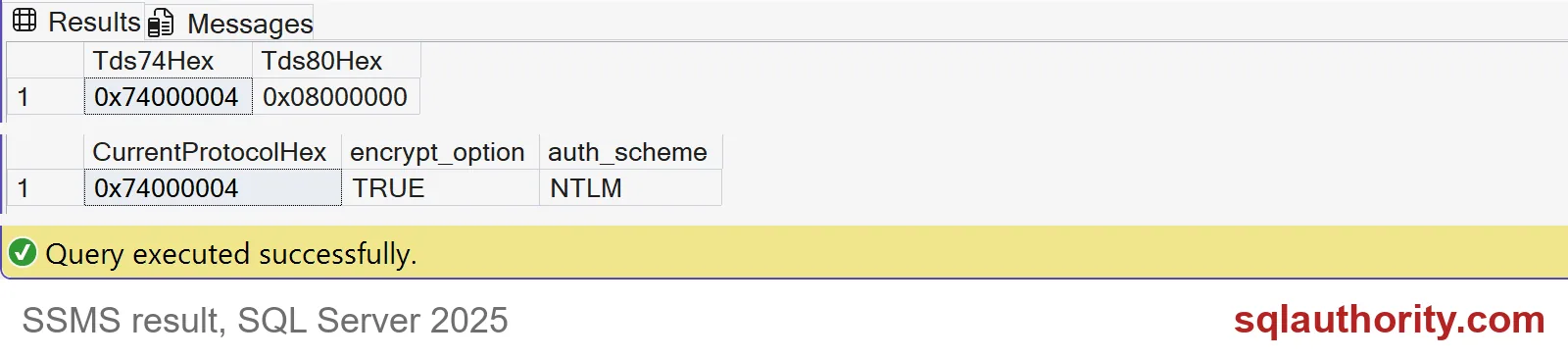
The constants render as 0x74000004 for TDS 7.4 and 0x08000000 for TDS 8.0. In the screenshot, my own SSMS connection shows 0x74000004, encrypt_option TRUE and auth_scheme NTLM. Encrypted, yet still on TDS 7.4. That is the whole point of this post in one row.
Your own connection may show different values, depending on the client and how you connect.

Test the real client path
The DMV tells you what happened. It cannot tell you what will happen after a change. For that you need a client that supports strict encryption and a server certificate that is trusted and matches the name in the connection string.
Do not fix a certificate error by telling the client to trust any certificate. That removes the protection you wanted. Fix the certificate instead.
Test the application login, the driver version, pooled connections and the scheduled jobs. Do this in test first. I did not set up a strict connection for this post, so the demo only shows how to read the protocol column.
Roll out from a complete client list
Before enforcing anything broadly, write down every client. For each one, record a successful strict connection. Also record one deliberate failure, for example a wrong certificate name, to prove validation really happens.
Keep the evidence separate. Authentication says who logged in. Encryption says the traffic is protected. Certificate validation says the server is who it claims to be. Each needs its own check. Nothing in this post changes any server setting.
Test the actual client path first, and the policy change becomes a calm afternoon.
An encrypted connection is not proof of strict mode, it is one connection property.
Published by Pinal Dave on SQLAuthority. More of my work at pinaldave.com.
Discover more from SQL Authority with Pinal Dave
Subscribe to get the latest posts sent to your email.