
Compare showplan is an SSMS feature that lays two execution plans side by side and highlights what differs. It tells you where to look, not why the query changed. That second part is still your job.

The query that “just got slow”
Someone pings you on Monday morning. “This query was fine on Friday.” Nothing in the code changed. An index was added over the weekend, or statistics were rebuilt, or a parameter value was different. You have two plans, one old and one new, and a headache.
Reading two big plans by eye is slow. Compare Showplan does the boring part. It matches the operators up and marks the ones that do not match. The catch is that you need both plans saved as files, and they must come from the same query. So save the plan every time you capture one.
Let me show it with a small example where I know the answer. One table, one query, one index added between the two captures.
Capture the plan before the index
The table has 1000 rows and no index. The query asks for one row. With SET STATISTICS XML ON, SQL Server returns the row and then the actual plan as XML.
DROP TABLE IF EXISTS dbo.PlanCompareDemo;
CREATE TABLE dbo.PlanCompareDemo (Id int NOT NULL, Amount int NOT NULL);

INSERT dbo.PlanCompareDemo (Id, Amount)
SELECT value, value * 10
FROM GENERATE_SERIES(1, 1000);
GO
SET STATISTICS XML ON;
SELECT Id, Amount FROM dbo.PlanCompareDemo WHERE Id = 500;
SET STATISTICS XML OFF;
GO
WITH XMLNAMESPACES (DEFAULT 'http://schemas.microsoft.com/sqlserver/2004/07/showplan')
SELECT TOP (1)
       p.query_plan.value('(//RelOp/@PhysicalOp)[1]', 'nvarchar(60)') AS Operator,
       qs.last_logical_reads,
       qs.last_rows
FROM sys.dm_exec_query_stats AS qs
CROSS APPLY sys.dm_exec_sql_text(qs.sql_handle) AS t
CROSS APPLY sys.dm_exec_query_plan(qs.plan_handle) AS p
WHERE t.text LIKE N'%PlanCompareDemo%WHERE%'
  AND t.text NOT LIKE N'%dm_exec_query_stats%'
ORDER BY qs.last_execution_time DESC;
In SSMS you can click the XML link and then save it as a .sqlplan file. You can also turn on Include Actual Execution Plan and use the right-click menu, Save Execution Plan As. Call this file the before plan.
The query returns Id 500 with Amount 5000. The second statement in the block asks the plan cache what the first operator was, so you can check without opening anything. It says Table Scan, with 1 row returned. A scan has to look at the whole table to find one row.
Change one thing and capture again
Now add an index that covers the query. Nothing else changes: same data, same predicate, same session. Changing only one thing is what makes the comparison fair.
CREATE UNIQUE INDEX IX_PlanCompareDemo
    ON dbo.PlanCompareDemo (Id) INCLUDE (Amount);
GO
SET STATISTICS XML ON;
SELECT Id, Amount FROM dbo.PlanCompareDemo WHERE Id = 500;
SET STATISTICS XML OFF;
GO
WITH XMLNAMESPACES (DEFAULT 'http://schemas.microsoft.com/sqlserver/2004/07/showplan')
SELECT TOP (1)
       p.query_plan.value('(//RelOp/@PhysicalOp)[1]', 'nvarchar(60)') AS Operator,
       qs.last_logical_reads,
       qs.last_rows
FROM sys.dm_exec_query_stats AS qs
CROSS APPLY sys.dm_exec_sql_text(qs.sql_handle) AS t
CROSS APPLY sys.dm_exec_query_plan(qs.plan_handle) AS p
WHERE t.text LIKE N'%PlanCompareDemo%WHERE%'
  AND t.text NOT LIKE N'%dm_exec_query_stats%'
ORDER BY qs.last_execution_time DESC;
The result is the same row, Id 500 and Amount 5000. That matters. If the two runs returned different rows, you would be comparing different questions. This time the check says Index Seek, still 1 row returned, and fewer logical reads than before. The exact read counts differ from server to server, so look at the direction, not the number. Save this plan as the after plan.
Open the two plans side by side
Open the before file in SSMS. Right-click an empty spot on the plan and choose Compare Showplan. Pick the after file. SSMS opens both plans, one above the other.
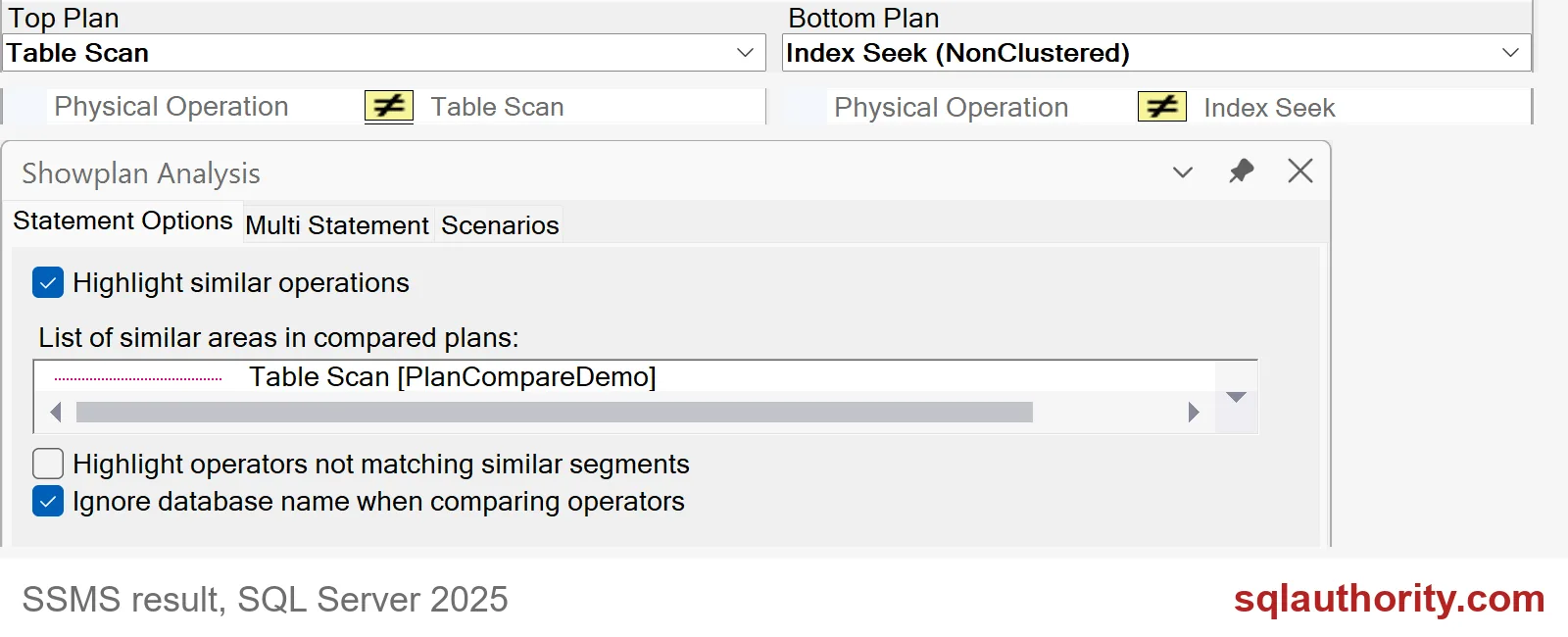
The screenshot shows both plans. The top plan is the Table Scan and the bottom plan is the Index Seek. The yellow not-equal marker next to Physical Operation says those two operators differ. The Showplan Analysis pane lists the parts SSMS considers similar, here the access to PlanCompareDemo.

Follow the first difference upward
A highlighted operator is a clue, not a verdict. Here it points at the access path, and I know why: I added an index. On your server you will have to find the reason.
Start at the leaves of the plan and work up. Compare the estimated rows with the actual rows. Look at the compile-time parameter values, because a different value can give a different plan. Check memory grants and spills. A plan with the same shape can still do very different work.
One more habit helps. Capture actual plans, not estimated ones, when you can. An estimated plan has no actual row counts, so half of the useful comparison is missing. Always note which kind each file is.
When you are done, remove the demo table.
DROP TABLE IF EXISTS dbo.PlanCompareDemo;Save both plans every time you tune something, and Monday mornings get a lot calmer.
A plan comparison is not a diagnosis, it is a map for the next check.
Published by Pinal Dave on SQLAuthority. More of my work at pinaldave.com.
Discover more from SQL Authority with Pinal Dave
Subscribe to get the latest posts sent to your email.


