
Union vs. Union All is one of the questions I am asked most often, so here is the short answer first: UNION ALL is faster, and UNION is the one you need when duplicates would be wrong.
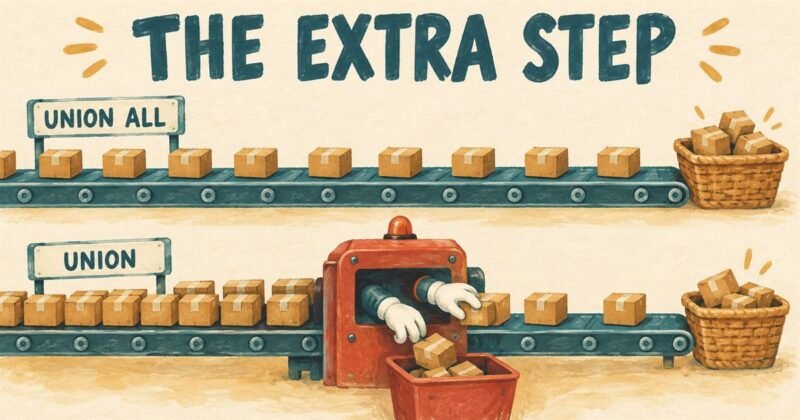
Why UNION is slower
This is the part that turns a memorised answer into an understood one, and it is what an interviewer is listening for.
UNION ALL simply hands you the rows from the first query, then the rows from the second. It has no thinking to do.
UNION has to guarantee that every row it gives you is unique. To do that it must compare every row against every other row, and the way SQL Server does that is to sort them all first. So UNION is doing everything UNION ALL does, plus a sort of the whole result, plus the work of removing what it finds.
Look at the execution plan for both and you will see it directly. The UNION plan carries an extra operator, a Sort or a Hash Match marked as aggregate or distinct. That single operator is the entire performance difference.
It also means the cost grows with the size of the result, not the complexity of the query. On ten rows you will never notice. On ten million, the sort may need memory, and if it does not get enough it spills to disk and the query falls off a cliff.
See it for yourself
CREATE TABLE #A (Val VARCHAR(10));
CREATE TABLE #B (Val VARCHAR(10));

INSERT INTO #A VALUES ('First'),('Second'),('Third'),('Fourth'),('Fifth');
INSERT INTO #B VALUES ('First'),('Second'),('Fifth'),('Sixth');

-- removes duplicates, has to sort
SELECT Val FROM #A
UNION
SELECT Val FROM #B;

-- keeps everything, no sort
SELECT Val FROM #A
UNION ALL
SELECT Val FROM #B;

DROP TABLE #A;
DROP TABLE #B;
Turn on the actual execution plan before you run it. The difference is visible without reading a single number.
What each one gives back
Using the two tables above.
UNION returns six rows: First, Second, Third, Fourth, Fifth, Sixth. Every value once.
UNION ALL returns nine rows: all five from the first table, then all four from the second, duplicates included.
Notice that UNION removed the duplicates across the two queries. That is the bit people forget. If the same customer appears in both tables, UNION shows them once, and your count is not the sum of the two counts any more.
So when should you use UNION?
Faster is not the same as correct, and reaching for UNION ALL out of habit will eventually give you a wrong answer rather than a slow one.
Use UNION ALL when the two sets cannot overlap, or when you want every row. Joining this year’s orders to last year’s orders. Stacking data from regional tables that hold different customers. Building a list you are about to count or sum anyway.
Use UNION when the same thing can appear in both sets and should be listed once. Every email address across customers and suppliers. Every product that sold in either quarter.
My own habit is to ask a single question before choosing: can a row appear in both halves? If it genuinely cannot, UNION ALL is both faster and clearer, because it tells the next reader that you knew there were no duplicates.
The rules both of them share
These trip up more people than the performance question does.
Both queries must return the same number of columns, and the types must be compatible. SQL Server matches them by position, not by name, so if your column order differs between the two halves, you will get data in the wrong columns rather than an error.
The column names come from the first query. Naming them in the second one changes nothing.
An ORDER BY belongs at the very end, and it sorts the combined result. You cannot order each half separately without wrapping them.
And one that catches everybody once: if you write a WHERE clause after the second SELECT, it applies to that query alone, not to the combined result. To filter the whole thing, wrap the union in a derived table or a CTE.
A quick note on DISTINCT
UNION is doing the same job as SELECT DISTINCT over the combined result. So writing UNION and then adding DISTINCT is asking for the same work twice. And if you find yourself writing UNION ALL followed by DISTINCT, you have written UNION the long way round.
I also compared these two with a fuller example and timings here: Difference Between Union vs. Union All, Optimal Performance Comparison.
Published by Pinal Dave on SQLAuthority. More of my work at pinaldave.com.
Discover more from SQL Authority with Pinal Dave
Subscribe to get the latest posts sent to your email.



190 Comments. Leave new
1,80,0,”
1,0,0,’a’
then how can i get it in one line..
What did you mean by one line? Did you mean single row with 8 columns?
Is there a limit on the number of UNIONS that you can do in a single query ?
How sixth appears twice in the result of UNION ALL.
Thanks for the blog. Keep up the work.
thank u
Hi All –
thanks for the explanantion about the UNION and UNION ALL
can any one help on this
———————————————————————
SELECT ‘My 1 Row123’
UNION
SELECT ‘My 2 Row123’
UNION
SELECT ‘My 12 Row123’
UNION
SELECT ‘My 13 Row123’
UNION
SELECT ‘My 122 Row123’
———————————————————————
SELECT ‘My 1 Row123’
UNION ALL
SELECT ‘My 2 Row123’
UNION ALL
SELECT ‘My 12 Row123’
UNION ALL
SELECT ‘My 13 Row123’
UNION ALL
SELECT ‘My 122 Row123’
——————————————————————–
when I use UNION, the result set is sorted by the column and not with UNION ALL..
Could anyone explain the reason for this?
Myself I got the answer for this :).. when we use UNION, SQL CLR will performs the sorting on the rowset and then takes the distinct, where as UNION ALL won’t perform this operation. see below link for more information:
Thanks,
Buddha
It is because with Union, Only distinct values are selected. Since the result set returns distinct values, Distinct Sort is performed in the back end. Vs. Union All does not eliminate duplicate rows and returns all the rows from all the tables. so you won’t see sorted result.
hi sir ,
i have a problem ,,i have one table field it has asset like(row wise car,computer) and other table field record is (id of these asset like 1,2,3)
then how to join these tables,, please reply me soon
i am pretty confused about primary key and foreign key i need a kindly reply about dat!
I am beginer in sql.. i have a problem..i will try combine two queries in sql using UNION..the result is fine…but my problem like
First table contain 2,5
second table contain 1,6
Final Result 1,2,5,6
but i want 2,5,1,6..
Anyway to get like that….?
please help me
Thanks advance
select row_number() over (order by (select 0)) as sno, col from table1
union
select row_number() over (order by (select 0)) as sno, col from table2
order by sno
I am doing a union of 3 complex queries with multiple joins (inner and left outer). Strangely UNION takes 22 sec while UNION ALL takes 24 sec
Hi,
I would like to union the two tables which are stored at different databases.Suppose the table A is stored in Database A and the table B is stored in Database B.How to write the query to unioj n these tables?
Can anyone help me?
Hi Pinal,
Can you please explain how
if that all the records returned are unique from your union, UNION ALL gives faster results?
Thanks
Faisal
If you use UNION ALL, it does not have to search for duplicates, it just pastes he second table below the first.
If you are sure there are no duplicates, using UNION is useless and therefor less efficient, since it will be searching for duplicates to delete that are not there. It will find nothing and ‘afterwards’ do exactly what UNION ALL would have done already.
Kind regards,
Daan
Very simply, the UNION of two or more datasets/tables is a result set containing all of the rows from all tables with all duplicate rows , if any, removed.
The UNION ALL of two or more datasets/tables is a result set containing all rows from all tables including ALL duplicates, if any.
Thank you, perfect explanation !
It should be noted that union and union all can not be used to combine sequence values. Refer this post for more information
Hi Pinal,
Is there any alternate wy to avoid Union or union all.
I have 2 columns in table like below
col1 col2
1 2
3 4
5 6
and i want result as below without union/ union all
col1
1
2
3
4
5
6
Please advice !! Thanks
Discuss null value with join, union with example
Hi kathan ,
create table samp (no1 int , no2 int)
insert into samp values (1,2)
insert into samp values (3,4)
insert into samp values (5,6)
select * from samp
— code :
declare @a int
declare @b int
declare cur cursor
static for select * from samp
open cur
if @@CURSOR_ROWS > 0
begin
declare @tab table (col int)
fetch next from cur into @a , @b
while (@@FETCH_STATUS = 0)
BEGIN
INSERT INTO @tab values(@a),(@b)
fetch next from cur into @a , @b
END
end
select * from @tab
close cur
deallocate cur