To restore a database in SSMS, right-click Databases, choose Restore Database and pick the backup file. Then name the destination and choose the recovery state. The dialog has three pages, and each one answers a question the restore will otherwise answer for you.

A Backup Chain to Restore From
You need backups before you can restore anything. The first script creates a database named SsmsRestoreDemo in FULL recovery with three bookings. It takes a full backup, adds a booking, takes a differential backup, adds another booking and takes a log backup. File names without a folder go to the instance’s default backup folder.
IF DB_ID(N'SsmsRestoreDemo') IS NULL CREATE DATABASE SsmsRestoreDemo;
GO
ALTER DATABASE SsmsRestoreDemo SET RECOVERY FULL;
GO
USE SsmsRestoreDemo;
GO
DROP TABLE IF EXISTS dbo.Bookings;
CREATE TABLE dbo.Bookings (BookingID int NOT NULL PRIMARY KEY, GuestName nvarchar(60) NOT NULL);
INSERT INTO dbo.Bookings (BookingID, GuestName) VALUES (1, N'Maya Collins'), (2, N'Leo Brennan'), (3, N'Priya Shah');
BACKUP DATABASE SsmsRestoreDemo TO DISK = N'SsmsRestoreDemo_full.bak' WITH CHECKSUM, INIT, NAME = N'SsmsRestoreDemo full';
INSERT INTO dbo.Bookings (BookingID, GuestName) VALUES (4, N'Noah Kim');
BACKUP DATABASE SsmsRestoreDemo TO DISK = N'SsmsRestoreDemo_diff.bak' WITH DIFFERENTIAL, CHECKSUM, INIT, NAME = N'SsmsRestoreDemo differential';
INSERT INTO dbo.Bookings (BookingID, GuestName) VALUES (5, N'Sam Rivera');
BACKUP LOG SsmsRestoreDemo TO DISK = N'SsmsRestoreDemo_log.trn' WITH CHECKSUM, INIT, NAME = N'SsmsRestoreDemo log';
Open the Dialog and Choose the Source
In SSMS 22, to restore a database from a file, right-click Databases in Object Explorer. Don’t right-click the database. Choose Restore Database. The first choice is the source. Database lists backups from this server’s own history in msdb. Device lets you browse to a backup file. You need it for a file from another server, because that server’s history isn’t here.
After you pick the file, SSMS lists the backup sets it found under Backup sets to restore. Each row shows a type: full, differential or transaction log. Tick every row you want. SSMS restores every set except the last with NORECOVERY and recovers the last, unless you choose another recovery state. For our demo, tick all three, and the database ends with five bookings.
In the Destination box, type the database name. A new name makes a copy and leaves the original alone. An existing name targets that database, and the Options page decides whether it can be overwritten. Next to Restore to on the General page, the Timeline button restores to a point in time. Use it when you need to stop before a mistake.
The Files Page and the Options Page
The Files page decides where the data and log files go. Tick Relocate all files to folder and give a data folder and a log folder. When you restore under a new name, the new files must not collide with the original files. Read the paths SSMS proposes, because they’re the ones SQL Server will use.
The Options page holds the choices that matter most. Overwrite the existing database is WITH REPLACE. It tells SQL Server to replace a database without asking, so check the destination name twice. Recovery state offers three choices. RESTORE WITH RECOVERY opens the database. NORECOVERY leaves it restoring, so you can add more backups. STANDBY leaves it readable between restores.
Two more boxes on that page protect you. Close existing connections to destination database disconnects other sessions, which a restore needs. Take tail-log backup before restore is ticked by default when you overwrite a database in FULL recovery. The next section shows why.
The Tail-Log Error
The tail of the log is the work done since the last log backup. A restore over the database would destroy it. In our demo, a sixth booking arrives after the log backup. Then the script tries to restore the full backup over the original database. It uses no tail backup and no REPLACE. It runs from master, because a session inside the target database can’t restore it.
USE master;
GO
INSERT INTO SsmsRestoreDemo.dbo.Bookings (BookingID, GuestName) VALUES (6, N'Ana Torres');
RESTORE DATABASE SsmsRestoreDemo FROM DISK = N'SsmsRestoreDemo_full.bak';
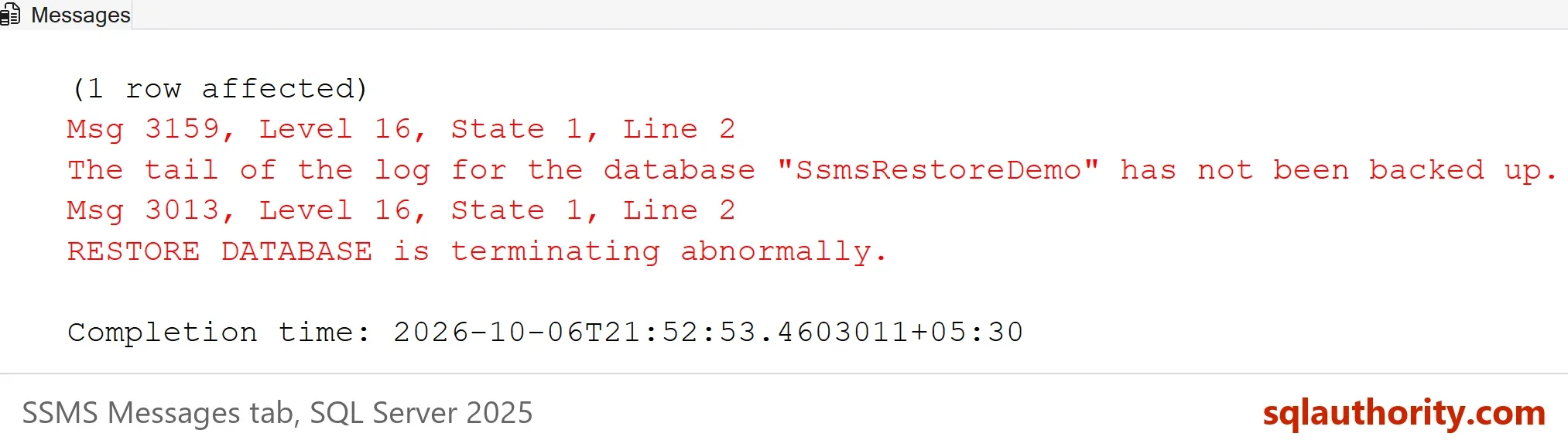
The picture shows the first sentence of message 3159, because the Messages pane cuts off the rest. The line above it, (1 row affected), is the sixth booking. The full text is below.
Msg 3159, Level 16, State 1, Line 2
The tail of the log for the database "SsmsRestoreDemo" has not been backed up. Use BACKUP LOG WITH NORECOVERY to backup the log if it contains work you do not want to lose. Use the WITH REPLACE or WITH STOPAT clause of the RESTORE statement to just overwrite the contents of the log.
Msg 3013, Level 16, State 1, Line 2
RESTORE DATABASE is terminating abnormally.
SQL Server refused, and it was right. The sixth booking exists only in the log. The dialog avoids this error by taking the tail-log backup for you. In T-SQL, back up the log first, or use WITH REPLACE when you want that work gone.
Restore the Chain Into a Copy
The dialog’s Script button writes the T-SQL for your settings, and you should read it once. The script below does the same job as the three ticked rows. It restores the full backup as SsmsRestoreDemoCopy with NORECOVERY, adds the differential, and finishes with the log backup. It reads the instance’s data folder, so you don’t type a path.
DECLARE @data nvarchar(260) = CONVERT(nvarchar(260), SERVERPROPERTY('InstanceDefaultDataPath'));
DECLARE @sql nvarchar(max) = N'RESTORE DATABASE SsmsRestoreDemoCopy FROM DISK = N''SsmsRestoreDemo_full.bak''
WITH NORECOVERY,
     MOVE N''SsmsRestoreDemo'' TO N''' + @data + N'SsmsRestoreDemoCopy.mdf'',
     MOVE N''SsmsRestoreDemo_log'' TO N''' + @data + N'SsmsRestoreDemoCopy_log.ldf'';';
EXEC (@sql);
SELECT name, state_desc FROM sys.databases WHERE name = N'SsmsRestoreDemoCopy';
RESTORE DATABASE SsmsRestoreDemoCopy FROM DISK = N'SsmsRestoreDemo_diff.bak' WITH NORECOVERY;
RESTORE LOG SsmsRestoreDemoCopy FROM DISK = N'SsmsRestoreDemo_log.trn' WITH RECOVERY;
SELECT name, state_desc FROM sys.databases WHERE name = N'SsmsRestoreDemoCopy';
SELECT COUNT(*) AS Bookings FROM SsmsRestoreDemoCopy.dbo.Bookings;| name | state_desc |
|---|---|
| SsmsRestoreDemoCopy | RESTORING |
| name | state_desc |
|---|---|
| SsmsRestoreDemoCopy | ONLINE |
| Bookings |
|---|
| 5 |
The first check shows RESTORING, because the chain isn’t finished. After the log restore, the copy is ONLINE and holds five bookings. The sixth booking isn’t there, because no backup holds it.
Practice Before You Need It
You could argue that a restore is rare, so rehearsing it wastes time. Rare is the problem. The people who restore successfully under pressure are the ones who did it last month. Pick a backup, restore it under a new name, and compare the row counts with the original.
The restore chain is also the part that surprises people. A full backup alone brings back the database as of the full backup. The differential and the logs bring it forward. Skip one and the chain stops. Keep the files together, and name them so the order is obvious.
What to Remember
Before you restore a database, read the backup sets, then tick them. Choose Device for a file from another server. Use a new name unless you mean to overwrite. Leave the tail-log box ticked, and finish every chain with recovery. Click Script once, so you know the T-SQL behind the buttons.
When you finish with the demo, run the cleanup script. Then remove the three backup files from your default backup folder yourself. SQL Server doesn’t delete them.
USE master;
GO
IF DB_ID(N'SsmsRestoreDemoCopy') IS NOT NULL
BEGIN
    ALTER DATABASE SsmsRestoreDemoCopy SET SINGLE_USER WITH ROLLBACK IMMEDIATE;
    DROP DATABASE SsmsRestoreDemoCopy;
END;
IF DB_ID(N'SsmsRestoreDemo') IS NOT NULL
BEGIN
    ALTER DATABASE SsmsRestoreDemo SET SINGLE_USER WITH ROLLBACK IMMEDIATE;
    DROP DATABASE SsmsRestoreDemo;
END;
EXEC msdb.dbo.sp_delete_database_backuphistory @database_name = N'SsmsRestoreDemoCopy';
EXEC msdb.dbo.sp_delete_database_backuphistory @database_name = N'SsmsRestoreDemo';
A restore is not a button you press in a crisis, it is a skill you practice before the crisis.
Published by Pinal Dave on SQLAuthority. More of my work at pinaldave.com.
Discover more from SQL Authority with Pinal Dave
Subscribe to get the latest posts sent to your email.