INNER HASH JOIN does two jobs at once. It asks for a hash join, and it also freezes the order in which your tables are joined. Most people only notice the first job.
The tuning trick that bites later
A slow query lands on your desk. You try a hash join hint and it runs faster on your laptop. You ship it. A month later the data has changed, the query crawls, and nobody remembers the hint.
The surprise is that a join hint written in the FROM clause also forces the join order. SQL Server will join the tables in the order you typed them. Let me prove that with three tiny tables. Only the last one has a useful filter.
CREATE TABLE #Customers (Id int PRIMARY KEY);
CREATE TABLE #Orders (Id int PRIMARY KEY, CustomerId int NOT NULL);
CREATE TABLE #OrderLines (Id int PRIMARY KEY, OrderId int NOT NULL, Selected bit NOT NULL);

INSERT #Customers VALUES (1), (2);
INSERT #Orders VALUES (10, 1), (20, 2);
INSERT #OrderLines VALUES (100, 10, 1), (200, 20, 0);
First, the query with no hints
I turn on STATISTICS PROFILE so each plan comes back as text. In SSMS you can also press Ctrl+M and read the graphic plan. The screenshots below are graphic plans of the same queries.
SET STATISTICS PROFILE ON;

SELECT c.Id AS CustomerId, o.Id AS OrderId, l.Id AS LineId
FROM #Customers AS c
JOIN #Orders AS o ON o.CustomerId = c.Id
JOIN #OrderLines AS l ON l.OrderId = o.Id
WHERE l.Selected = 1;
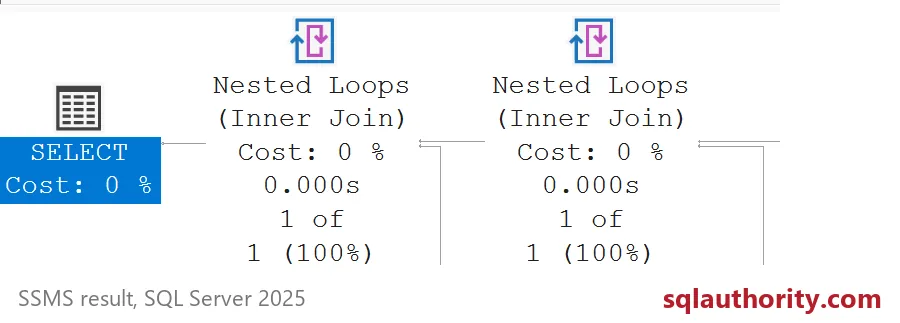
The result is one row: customer 1, order 10, line 100. Look at the plan rows. The optimizer chose Nested Loops joins, and it started with #OrderLines because that table has the filter. It found one line first, then looked up the order and the customer.
Now add INNER HASH JOIN
Same query, same answer, but the first join now says INNER HASH JOIN.
SELECT c.Id AS CustomerId, o.Id AS OrderId, l.Id AS LineId
FROM #Customers AS c
INNER HASH JOIN #Orders AS o ON o.CustomerId = c.Id
JOIN #OrderLines AS l ON l.OrderId = o.Id
WHERE l.Selected = 1;
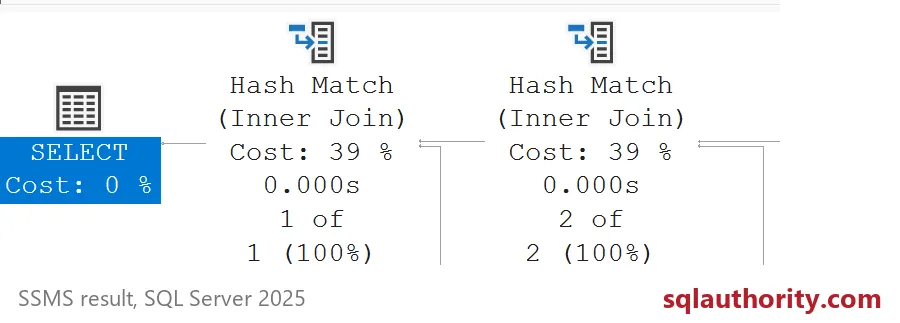
The output carries a warning: the join order has been enforced because a local join hint is used. It is easy to miss, so read it. Both joins are now hash joins, and the order is the one I typed: customers with orders first, then order lines.
That first join returns two rows, not one. The selective filter on #OrderLines can no longer go first. On a table with millions of rows, that difference is the whole story.

The softer option: OPTION (HASH JOIN)
If you only want to test hash joins, put the hint at the end of the query. It limits the algorithm but leaves the order to the optimizer.
SELECT c.Id AS CustomerId, o.Id AS OrderId, l.Id AS LineId
FROM #Customers AS c
JOIN #Orders AS o ON o.CustomerId = c.Id
JOIN #OrderLines AS l ON l.OrderId = o.Id
WHERE l.Selected = 1
OPTION (HASH JOIN);
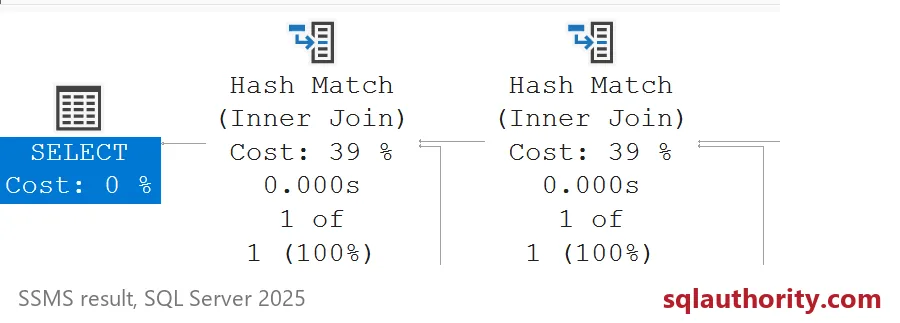
You get hash joins again, and no join order warning. This plan starts from #OrderLines, just like the unhinted one. So the operator names alone do not tell you which hint you used.

What I would do with this
Use a hint to learn, not to live with. Check statistics, parameters and indexes first. If a hint must stay, write down why and when to retest it. Compare the unhinted plan again after big data or index changes.
SET STATISTICS PROFILE OFF;

DROP TABLE IF EXISTS #OrderLines;
DROP TABLE IF EXISTS #Orders;
DROP TABLE IF EXISTS #Customers;
Read the warning next time, because it tells you what else the hint took away.
A join hint is not just an algorithm choice, it is also a join order lock.
Published by Pinal Dave on SQLAuthority. More of my work at pinaldave.com.
Discover more from SQL Authority with Pinal Dave
Subscribe to get the latest posts sent to your email.