
Question: What are different ways to find a table’s row count? Use partition metadata for a quick inventory, SSMS properties for a visual check, or COUNT_BIG(*) when you need an exact count of rows visible to that query.

This question keeps coming back, and there are five good answers. Along the way it’s worth knowing whether the table is a heap or has clustered storage, and how many nonclustered indexes it carries.
1. sys.partitions
SELECT SCHEMA_NAME(t.schema_id) AS SchemaName, t.name AS TableName,
       SUM(p.rows) AS TotalRowCount
FROM sys.tables AS t
JOIN sys.partitions AS p ON t.object_id = p.object_id
WHERE p.index_id IN (0, 1)
GROUP BY t.schema_id, t.name
ORDER BY SchemaName, TableName;
Sum all base-table partitions, using index_id 0 for a heap or 1 for its clustered storage. Counting every index would count copies of the same table’s rows. These metadata counts are approximate.
2. sys.dm_db_partition_stats
SELECT sc.name AS SchemaName, t.name AS TableName,
       SUM(p.row_count) AS TotalRowCount
FROM sys.tables AS t
JOIN sys.schemas AS sc ON sc.schema_id = t.schema_id
JOIN sys.dm_db_partition_stats AS p ON p.object_id = t.object_id
WHERE p.index_id IN (0, 1)
GROUP BY sc.name, t.name
ORDER BY TotalRowCount DESC, SchemaName, TableName;
This groups the partitions into one count per schema-qualified table. The DMV is still an approximate metadata count, with version-dependent permissions.
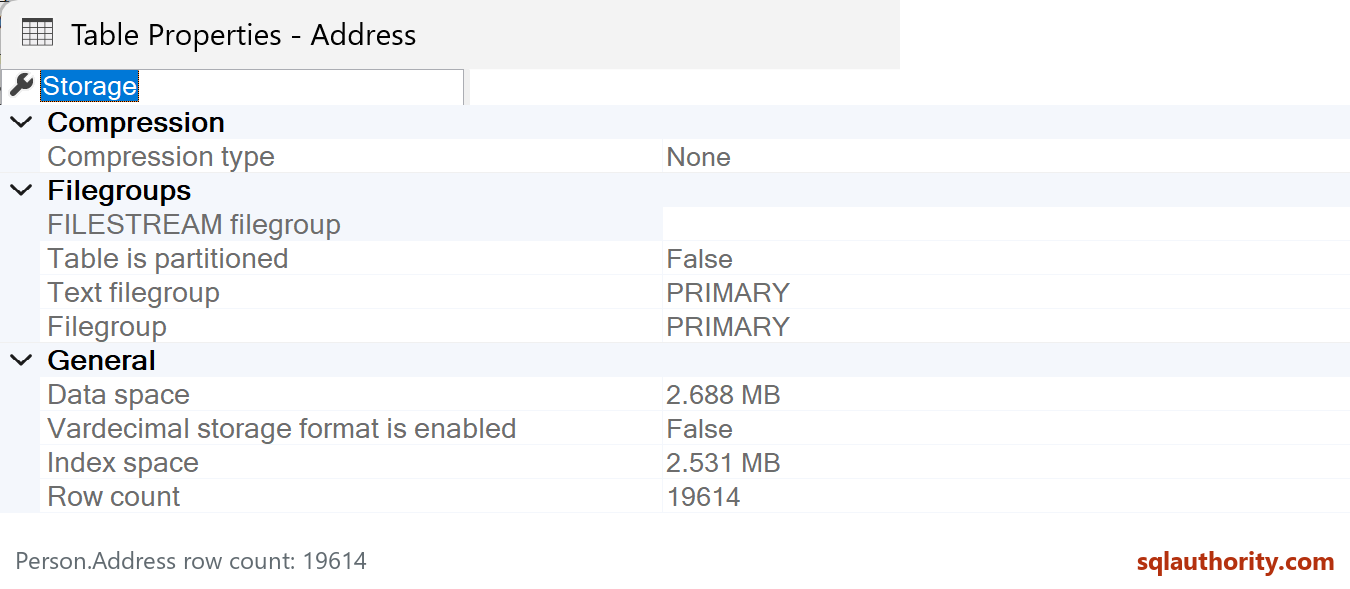
3. SSMS Table Properties
Right-click the table, choose Properties and inspect its Storage page’s Row count. Refresh when necessary. This is another metadata view, not an independent exact count.
4. Row Count With Storage and Index Counts
WITH RowCounts AS (
    SELECT object_id, SUM(rows) AS TotalRowCount
    FROM sys.partitions WHERE index_id IN (0, 1)
    GROUP BY object_id
), IndexCounts AS (
    SELECT object_id, COUNT(*) AS NonclusteredRowstoreIndexes
    FROM sys.indexes WHERE type = 2 AND is_hypothetical = 0
    GROUP BY object_id
)
SELECT sc.name AS SchemaName, t.name AS TableName,
       base.type_desc AS BaseStorage,
       COALESCE(ic.NonclusteredRowstoreIndexes, 0) AS NonclusteredRowstoreIndexes,
       COALESCE(rc.TotalRowCount, 0) AS TotalRowCount
FROM sys.tables AS t
JOIN sys.schemas AS sc ON sc.schema_id = t.schema_id
LEFT JOIN sys.indexes AS base ON base.object_id = t.object_id AND base.index_id IN (0, 1)
LEFT JOIN RowCounts AS rc ON rc.object_id = t.object_id
LEFT JOIN IndexCounts AS ic ON ic.object_id = t.object_id
ORDER BY SchemaName, TableName;
Aggregate the partitions before joining the index inventory. This avoids multiplying counts or returning misleading separate rows when a table is partitioned. The index column deliberately counts real nonclustered rowstore indexes (type 2), including disabled ones; it’s not a count of every XML, spatial or columnstore index.
5. COUNT_BIG(*)
SELECT COUNT_BIG(*) AS ExactRowCount
FROM Person.Address;
COUNT_BIG returns a bigint and counts every visible row, including rows containing NULL values. Isolation and concurrent changes still determine what the statement sees.
This is my least favorite method for a quick inventory of every large table, because it may do substantial work. But when the task requires an exact count, that work can be justified; metadata isn’t an exact substitute. Which method fits your requirement, a quick inventory or an exact answer?

A metadata row count is not an exact count, it is a fast estimate, and COUNT_BIG is what you run when the number must be right.
Published by Pinal Dave on SQLAuthority. More of my work at pinaldave.com.
Discover more from SQL Authority with Pinal Dave
Subscribe to get the latest posts sent to your email.




1 Comment. Leave new
To check row counts in a table quickly, I use stored procedure ‘sp_spaceused’. It returns space used for data and indexes as well. Very handy for DBA.