
It has been a while since we have had a puzzle on this blog post, so today we are going to see a very simple but brain teaser puzzle. This puzzle is about Deleting Qualified Rows From Multiple Tables. This question was actually asked to me by my client while working together on the Comprehensive Database Performance Health Check.

You can watch my free SQL Server videos on my YouTube channel.
Puzzle Setup – Multiple Tables
The problem which I am going to describe happened with my one of the largest client who is working in the financial technology area (a private bank). However, due to privacy issues, I can’t write here the details about their table structure, I am going to use a sample database of the students and class.
The setup is very simple. We have three tables.
Table 1: Student – Containing student names
Table 2: Class – Containing the class name
Table 3: StudentClass- Containing the relationship between student and class
Here is the script to set up that up:
USE TempDB
GO
-- Set up environment
CREATE TABLE Student (ID INT, StudentName VARCHAR(100))
GO
CREATE TABLE Class (ID INT, ClassName VARCHAR(100))
GO
CREATE TABLE StudentClass (ID INT, ClassID INT, StudentID INT)
GO
-- Populate Data
INSERT INTO Student (ID, StudentName)
SELECT 1, 'Mark'
UNION
SELECT 2, 'John'
UNION
SELECT 3, 'Thomas'
GO
-- Populate Data
INSERT INTO Class (ID, ClassName)
SELECT 1, 'Maths'
UNION
SELECT 2, 'English'
UNION
SELECT 3, 'Science'
GO
-- Populate Data
INSERT INTO StudentClass (ID, ClassID, StudentID)
SELECT 1, 1, 1
UNION
SELECT 2, 2, 2
UNION
SELECT 3, 1, 3
UNION
SELECT 4, 2, 1
UNION
SELECT 5, 2, 3
UNION
SELECT 6, 3, 1
GO
-- Query to List all Students and Classes
SELECT DISTINCT s.StudentName,
		c.ClassName
FROM StudentClass sc
INNER JOIN Class c ON c.ID = sc.ClassID
INNER JOIN Student s ON s.ID = sc.StudentID
GO
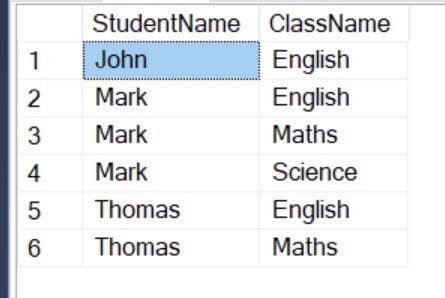
Here is the output of the query which we just ran. It lists the name of the students with the class they are enrolled in.
Puzzle Statement – Delete from Multiple Tables
Due to some reason, in the school, the class of English was canceled during the summer. All the students who had enrolled in the English class were affected. Here are two scenarios for us for the students who had taken English class.
Scenario 1: If a student has enrolled in a single class of English – Remove from the Student’s list and Remove from the StudentClass list.
Scenario 2: If a student has enrolled in multiple class with English class – Remove from the StudentClass list.

Here is the initial script was written which satisfies both the scenarios.
SET STATISTICS IO ON
-- Delete from Students Table
DELETE s
FROM Student s
INNER JOIN StudentClass sc ON s.ID = sc.StudentID
INNER JOIN Class c ON c.ID = sc.ClassID
WHERE c.ClassName = 'English' AND
	sc.StudentID IN
		(SELECT sc2.StudentID
		FROM StudentClass sc2
		GROUP BY sc2.StudentID
		HAVING COUNT(*) = 1)
GO
-- Delete from StudentClass Table
DELETE sc
FROM StudentClass sc
INNER JOIN Class c ON c.ID = sc.ClassID
WHERE c.ClassName = 'English'
GO
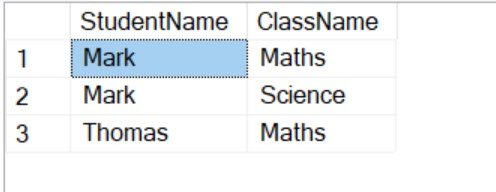
If you run the above query, you will get the following output.
Additionally, when I go to messages, it shows the following output for multiple tables:
Table ‘Student’. Scan count 1, logical reads 2, physical reads 0, read-ahead reads 0, lob logical reads 0, lob physical reads 0, lob read-ahead reads 0.
Table ‘Class’. Scan count 1, logical reads 1, physical reads 0, read-ahead reads 0, lob logical reads 0, lob physical reads 0, lob read-ahead reads 0.
Table ‘StudentClass’. Scan count 7, logical reads 9, physical reads 0, read-ahead reads 0, lob logical reads 0, lob physical reads 0, lob read-ahead reads 0.
Table ‘Worktable’. Scan count 0, logical reads 0, physical reads 0, read-ahead reads 0, lob logical reads 0, lob physical reads 0, lob read-ahead reads 0.
(1 row affected)
Table ‘StudentClass’. Scan count 1, logical reads 1, physical reads 0, read-ahead reads 0, lob logical reads 0, lob physical reads 0, lob read-ahead reads 0.
Table ‘Class’. Scan count 1, logical reads 6, physical reads 0, read-ahead reads 0, lob logical reads 0, lob physical reads 0, lob read-ahead reads 0.
(3 rows affected)
Your Task:
Optimize the above DELETE statement. That’s it!
How to Participate
Once you figure out how to optimize the DELETE statement, post your answer in the comments section. Your answer will be invisible until July 20th. I will publish all the answers on July 20th.
I will check the performance of the DELETE statement by running above DELETE statement and your modified suggestion. If your suggestion takes less amount of total logical reads, you will be the winner.
You have complete freedom to do anything to optimize the DELETE statement. Here are a few ideas:
- Re-write DELETE statement
- Combine DELETE operations
- USE CTE
- USE TempTables
- Create Indexes
- Use Subqueries
Pretty much anything you can think of it, you can try. However, your answer should be correct and logical reads should be less. I will also test by passing the different subject in the WHERE clause and will see that your query follows both the scenarios mentioned above.
Published by Pinal Dave on SQLAuthority. More of my work at pinaldave.com.



48 Comments. Leave new
DELETE A FROM StudentClass A INNER JOIN Class B ON A.CLASSID=B.ID
WHERE B.ClassName =’ENGLISH’
DELETE FROM Student WHERE ID NOT IN (SELECT StudentID FROM StudentClass)