ENCRYPTBYPASSPHRASE is the easiest encryption in SQL Server: one function in, one function out. The catch is that the passphrase is now your problem. Where it lives matters more than the ciphertext.
Encrypt a value and get it back
Picture a teammate saying, “We encrypted the column, so we are safe.” My first question would be: where does the passphrase live? Let me show the function first, then that question.
The query encrypts a short text, then decrypts it with the right phrase and with a wrong one.
DECLARE @Phrase nvarchar(128) = N'Blue lantern phrase';
DECLARE @Cipher varbinary(8000) = ENCRYPTBYPASSPHRASE(@Phrase, N'Sample confidential value');
SELECT DATALENGTH(@Cipher) AS CipherBytes,
       CONVERT(nvarchar(200), DECRYPTBYPASSPHRASE(@Phrase, @Cipher)) AS Recovered,
       CONVERT(nvarchar(200), DECRYPTBYPASSPHRASE(N'Wrong phrase', @Cipher)) AS WrongPhrase;
A 25-character value became 84 bytes, so store the result in a varbinary column. The right phrase returns the text. The wrong phrase does not raise an error. It returns NULL. A NULL looks like a missing value, so an application can show a blank and nobody notices. Check for it on purpose.
Two small traps: random output and the wrong type
Encrypt the same text twice and you get two different results. SQL Server adds random bytes each time. That is good for security, but you cannot compare or search ciphertext for equality.
The second trap is the data type. The function returns bytes, and you must convert them to the type you encrypted. Convert to varchar instead of nvarchar and the grid shows a single letter S. The value is still 50 bytes long. The rest is hiding behind zero bytes.
DECLARE @Phrase nvarchar(128) = N'Blue lantern phrase';
DECLARE @A varbinary(8000) = ENCRYPTBYPASSPHRASE(@Phrase, N'Sample confidential value');
DECLARE @B varbinary(8000) = ENCRYPTBYPASSPHRASE(@Phrase, N'Sample confidential value');
SELECT CASE WHEN @A = @B THEN 'same' ELSE 'different' END AS TwoCiphertexts,
       CONVERT(varchar(200), DECRYPTBYPASSPHRASE(@Phrase, @A)) AS WrongType,
       DATALENGTH(CONVERT(varchar(200), DECRYPTBYPASSPHRASE(@Phrase, @A))) AS WrongTypeBytes;
Tie a value to its row
The function also takes an authenticator, an extra value used on both sides. Use a stable row id. If someone copies the ciphertext to another row, decryption returns NULL. The query below uses the authenticators 7 and 8. The screenshot shows its result under the first query’s result, so you can see both together.
DECLARE @Phrase nvarchar(128) = N'Row binding phrase';
DECLARE @Cipher varbinary(8000) = ENCRYPTBYPASSPHRASE(@Phrase, N'Sample value', 1, N'7');
SELECT CONVERT(nvarchar(200), DECRYPTBYPASSPHRASE(@Phrase, @Cipher, 1, N'7')) AS SameRow,
       CONVERT(nvarchar(200), DECRYPTBYPASSPHRASE(@Phrase, @Cipher, 1, N'8')) AS OtherRow;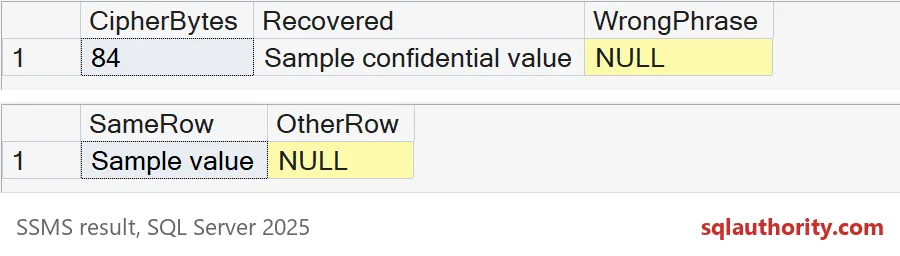
Here is the same idea in a table. Two accounts each hold a value tied to their own id. Then I copy account 2’s ciphertext onto account 1. Account 1 now reads NULL, and account 2 still works.
DROP TABLE IF EXISTS #Accounts;
CREATE TABLE #Accounts (AccountId int PRIMARY KEY, Secret varbinary(8000) NOT NULL);

INSERT #Accounts (AccountId, Secret)
VALUES (1, ENCRYPTBYPASSPHRASE(N'Row binding phrase', N'Value for account 1', 1, N'1')),
       (2, ENCRYPTBYPASSPHRASE(N'Row binding phrase', N'Value for account 2', 1, N'2'));

UPDATE a SET Secret = b.Secret
FROM #Accounts AS a
JOIN #Accounts AS b ON b.AccountId = 2
WHERE a.AccountId = 1;

SELECT AccountId,
       CONVERT(nvarchar(200), DECRYPTBYPASSPHRASE(N'Row binding phrase', Secret, 1, CONVERT(nvarchar(36), AccountId))) AS Recovered
FROM #Accounts
ORDER BY AccountId;
The authenticator does not hide the phrase, and it does not stop an authorized update. It only catches ciphertext that was moved.
Where the passphrase really lives
Now back to my first question. Many teams put the phrase inside a stored procedure. It is quick. It is also a plain-text copy of your secret. Anyone who can view the definition can read it.
CREATE OR ALTER PROCEDURE dbo.SaveNote @Note nvarchar(200)
AS
SELECT ENCRYPTBYPASSPHRASE(N'Blue lantern phrase', @Note) AS Cipher;
GO
SELECT OBJECT_NAME(object_id) AS module_name,
       CASE WHEN definition LIKE N'%Blue lantern phrase%' THEN 'phrase visible' ELSE 'not visible' END AS in_definition
FROM sys.sql_modules
WHERE object_id = OBJECT_ID(N'dbo.SaveNote');
GO
DROP PROCEDURE IF EXISTS dbo.SaveNote;
The result says “phrase visible”. Traces, exported scripts and captured parameters can make more copies. Keep the phrase out of module text, limit who can see those paths, and keep it in a proper secret store. For a long-lived design, look at a symmetric key protected by a certificate.

Plan for changing the phrase
Sooner or later someone leaves the team, and the phrase has to change. Keep a key version next to each value. Re-encrypt in small batches, check that the new phrase works, and only then retire the old one. Old backups still need the old phrase, so test a restore and a decrypt before you celebrate.
DROP TABLE IF EXISTS #Notes;
CREATE TABLE #Notes (NoteId int PRIMARY KEY, KeyVersion tinyint NOT NULL, Cipher varbinary(8000) NOT NULL);

INSERT #Notes
VALUES (1, 1, ENCRYPTBYPASSPHRASE(N'Old phrase', N'First note')),
       (2, 1, ENCRYPTBYPASSPHRASE(N'Old phrase', N'Second note'));

UPDATE #Notes
SET Cipher = ENCRYPTBYPASSPHRASE(N'New phrase', DECRYPTBYPASSPHRASE(N'Old phrase', Cipher)),
    KeyVersion = 2
WHERE KeyVersion = 1;

SELECT NoteId, KeyVersion,
       CONVERT(nvarchar(200), DECRYPTBYPASSPHRASE(N'New phrase', Cipher)) AS WithNew,
       CONVERT(nvarchar(200), DECRYPTBYPASSPHRASE(N'Old phrase', Cipher)) AS WithOld
FROM #Notes
ORDER BY NoteId;
Both notes read fine with the new phrase and return NULL with the old one. That is the result you want before the old phrase is retired.
Before you trust a ciphertext, find out who can reach the phrase.
Encryption is not a vault, it is a lock whose key you still have to guard.
Published by Pinal Dave on SQLAuthority. More of my work at pinaldave.com.
Discover more from SQL Authority with Pinal Dave
Subscribe to get the latest posts sent to your email.