
This puzzle returns an asterisk instead of a number, and SQL Server raises no error at all. Run the script, read the result, and write down your guess before you scroll to the answer.

The Puzzle
A variable holds a phone number. It is declared as varchar(8), a number is assigned to it, and a query reads it back. The script is short and has no table in it.
DECLARE @phone_no varchar(8);
SET @phone_no = 910034568;
SELECT @phone_no AS phone_no;
| phone_no |
|---|
| * |
The question: why does the query return an asterisk instead of a number, when the variable clearly received 910034568? Nothing failed, nothing warned, and the value is gone. Take a minute with it. Most wrong guesses teach something. Common guesses are the size, the missing quotes and an overflow. Each is part of the story.
The Answer
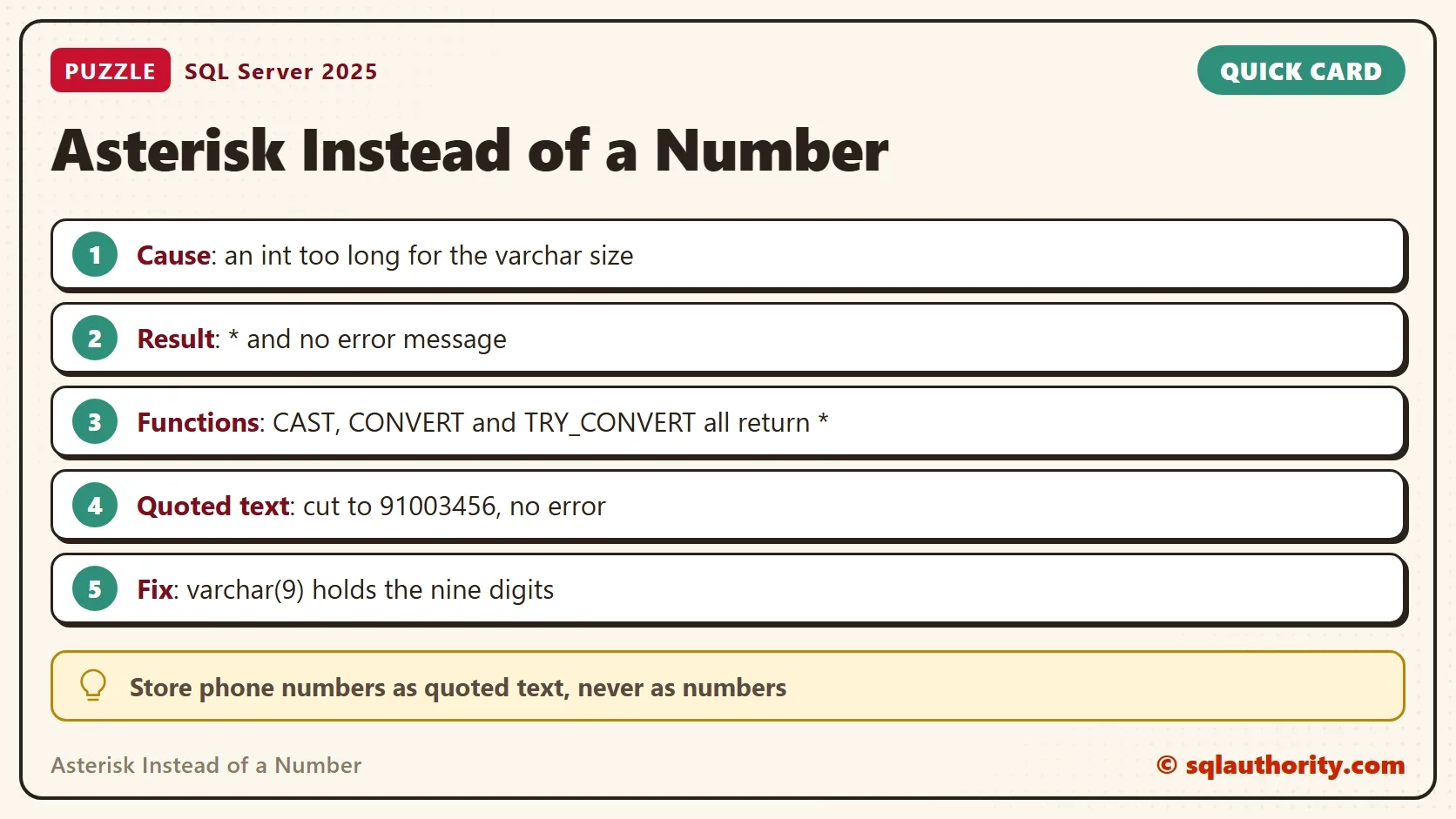
The number is an integer, not text. Without quotes, 910034568 is an int literal, so the assignment converts an int to a varchar. That conversion needs nine characters, and the variable holds eight. When an integer doesn’t fit in the character result, SQL Server writes an asterisk. The documentation describes this as a result length that is too short to display.
The same rule applies when you convert on purpose. This query tries CAST, CONVERT and TRY_CONVERT with eight characters, then CAST with nine. The last column quotes the number, so it is text from the start.
SELECT CAST(910034568 AS varchar(8))       AS CastInt,
       CONVERT(varchar(8), 910034568)      AS ConvertInt,
       TRY_CONVERT(varchar(8), 910034568)  AS TryConvertInt,
       CAST(910034568 AS varchar(9))       AS NineWide,
CAST('910034568' AS varchar(8)) AS QuotedText;| CastInt | ConvertInt | TryConvertInt | NineWide | QuotedText |
|---|---|---|---|---|
| * | * | * | 910034568 | 91003456 |
Three things stand out. TRY_CONVERT doesn’t return NULL here, so it won’t protect you. Nine characters fit, so the value comes back whole. The quoted version doesn’t give an asterisk at all. It cuts the ninth digit and returns 91003456. That’s the dangerous result, because it looks like a real phone number.
You could argue that an asterisk is a poor way to report a problem. A proper error would be better. That’s fair, but compare the alternatives. The asterisk can’t be mistaken for data, while a silently shortened string passes every eyeball check. Both are bad. The asterisk is the one you notice.
Where the Asterisk Stops
Not every numeric type behaves this way. The integer family does: int, smallint and tinyint all return an asterisk when the result is too short. Try 300 as a smallint and 200 as a tinyint in a varchar(2), and both return *. The next script shows two cases that raise an error.
DECLARE @phone_no nvarchar(8);
SET @phone_no = 910034568;
GO
SELECT CAST(9100345680 AS varchar(8)) AS TenDigits;
Msg 8115, Level 16, State 2, Line 2
Arithmetic overflow error converting expression to data type nvarchar.
Msg 8115, Level 16, State 5, Line 1
Arithmetic overflow error converting numeric to data type varchar.
The first batch only changes the variable to nvarchar(8), and the same assignment now fails with message 8115. The second shows a ten digit number. It is larger than the biggest int, 2,147,483,647. SQL Server reads it as numeric, and numeric converts with an error. A bigint or a decimal behaves the same way. So the asterisk depends on the type you start with, not only on the length.
A stored procedure parameter converts values the same way. The system procedure sp_executesql takes typed parameters, so it shows this without creating anything.
EXEC sp_executesql N'SELECT @phone_no AS phone_no;', N'@phone_no varchar(8)', @phone_no = 910034568;
The result is the same asterisk. A procedure of your own behaves the same way: a varchar(8) parameter, called with an unquoted number, returns an asterisk. That’s how this puzzle reaches production code. Someone passes a number where text was expected.
How to Fix It
Fix the type before the size. A phone number is text. It has no arithmetic, it can start with a zero, and it can carry a plus sign or a dash. Store it as a string, pass it in quotes, and size the variable for the longest value you expect. Then the conversion never happens.
DECLARE @phone_no varchar(15) = '910034568';
SELECT @phone_no AS phone_no, LEN(@phone_no) AS Characters;
| phone_no | Characters |
|---|---|
| 910034568 | 9 |
When a number must become text, size the target for the whole range of its type. An int needs at most eleven characters, because the smallest value, -2147483648, includes a minus sign. A varchar(11) always holds an int. A column helps you too. A string that is too long for a varchar(8) column fails with a truncation error. A variable cuts it silently.
What to Remember
An asterisk instead of a number means an integer didn’t fit the character size you gave it. Look at the type on the right side of the assignment, then at the size on the left. Numeric, decimal and bigint values raise error 8115 instead, and quoted text truncates without a word.
Check every unquoted number that lands in a varchar variable. Check the size too: it should fit tomorrow’s data, not only today’s. Both are cheap to fix, and neither shows up until a longer value arrives.
An asterisk is not a bug in your data, it is SQL Server telling you the number did not fit.
Published by Pinal Dave on SQLAuthority. More of my work at pinaldave.com.
Discover more from SQL Authority with Pinal Dave
Subscribe to get the latest posts sent to your email.



50 Comments. Leave new
So VARCHAR is holding only the characters you assigned to it and that’s why retrieve as *, which means there are different amount of characters than 8 :)
You have specified a string as Varcha(8) and your length is 9 digits, then you got the * as result, because you are not specifing the digits into a quotes E.i.(SET @phone_no=’910034568′). Then your result would be for example: [91003456]
However if you specify the correct length as Varchar(9) and your Set is like SET @phone_no=910034568 then you get the correct result.
So VARCHAR is holding only the amount of characters you assigned to it and that’s why retrieve as *, which means there are different amount of characters than 8 :)
You have specified a string as Varcha(8) and your length is 9 digits, then you got the * as result, because you are not specifying the digits into a quotes E.i.(SET @phone_no=’910034568′). then your result would be for example: [91003456]
However if you specify the correct length as Varchar(9) and your Set is like SET @phone_no=910034568 then you get the correct result.
The size of varchar declared is 8 while the phone no is 10 digits
There is a implicit conversion of integer to varchar and it returns back an * implying that an error has occurred.
You have defined less length than actual variable value length. that’s why this type of result you got.
implicit conversion failed due to 9 character in input as variable declared as varchar(8) which caused the result to *
Pinal could you explain this. Have we got the right answer?
This is implicit conversion issue when you are trying to convert 9 digits of number to varchaar which resulted in output as * .But when we write same query with number in single quote ‘910034568’ we can see output as 91003456.
* means everything. This is an overflow situation where all of the available destination varchar field is used, and then some. If you assign it with single quotes, the string assignation left justifies and truncates, but that never gets called on assignation of the implicit conversion from int to varchar(8).
It makes perfect sense. Justification and truncation of a string still gives a fair representation of the value, but doing it for a number means that it could be many factors of 10 incorrect. It’s far better to throw an error: For example:
DECLARE @phone_no varchar(8)
SET @phone_no=910034568
SELECT CONVERT(int, @phone_no) as phone_no
Gives:
Msg 245, Level 16, State 1, Line 3
Conversion failed when converting the varchar value ‘*’ to data type int.
Imagine if that number went on to used in an interest calculation on your savings. If it was a factor of 10 out, it’s better it causes a problem at source, rather than a factor of 10 problem in your savings! ;-)
Refer:https://docs.microsoft.com/en-us/sql/t-sql/data-types/int-bigint-smallint-and-tinyint-transact-sql?view=sql-server-2017
Converting integer data
When integers are implicitly converted to a character data type, if the integer is too large to fit into the character field, SQL Server enters ASCII character 42, the asterisk (*).
Integer constants greater than 2,147,483,647 are converted to the decimal data type, not the bigint data type. The following example shows that when the threshold value is exceeded, the data type of the result changes from an int to a decimal.