
INNER JOIN returning more records than exist in one table can be correct. The result contains a row for every pair that satisfies the join condition.

A reader named Jeff once asked me about a query that returned more rows than the source table. My first reaction was that it could not happen. Once Jeff explained the query, I understood why it was possible.
Jeff had previously asked about the installation summary file. This time, the question led us to a small join puzzle.
Set Up the Sample Data
The first two tables contain the same three numbers and a NULL. The third table contains five rows with the value 2 and one NULL.
DECLARE @First TABLE (Col1 int NULL);
DECLARE @Second TABLE (Col1 int NULL);
DECLARE @Third TABLE (Col1 int NULL);
INSERT @First VALUES (1),(2),(3),(NULL);
INSERT @Second VALUES (1),(2),(3),(NULL);
INSERT @Third VALUES (2),(2),(2),(2),(2),(NULL);
Run these statements in the same query window as the examples below. Table variables exist only within their batch, so run the setup and the selected query together.
Join with an Equal Condition
First, join the two tables with unique non-NULL values. Each number matches one row in the other table.
SELECT f.Col1 AS fCol1
FROM @First AS f
INNER JOIN @Second AS s ON s.Col1 = f.Col1
ORDER BY f.Col1;
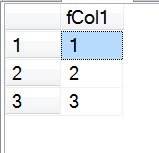
The result contains three rows: 1, 2 and 3. NULL does not match NULL with the equal operator, so the NULL rows do not appear.
Join with a Not Equal Condition
Now change the join condition to not equal. Each non-NULL number in the first table matches two different numbers in the second table.
SELECT f.Col1 AS fCol1
FROM @First AS f
INNER JOIN @Second AS s ON s.Col1 <> f.Col1
ORDER BY f.Col1;
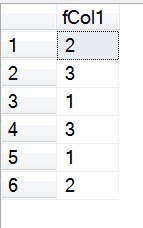
The result contains six rows, even though each input table has only four rows. There are two matches for each of the three non-NULL values. Comparisons involving NULL do not evaluate to true, so those pairs are excluded.
The equal and not equal results together cover all pairs of non-NULL values in this example. They do not cover the NULL pairs from a full CROSS JOIN.
Join to Repeated Values
An equal condition can also produce more rows. Here, the first table has one matching value of 2, and the third table has five.
SELECT f.Col1 AS fCol1
FROM @First AS f
INNER JOIN @Third AS t ON t.Col1 = f.Col1
ORDER BY f.Col1;
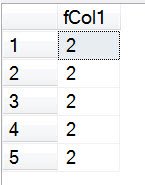
The single value from the first table matches five rows in the third table. That produces five result rows. They look identical because the SELECT list shows only the value from the first table.
Check the Matches First
When a join returns more rows than expected, inspect the join condition and count the matches on each side. Include a key from each table in the SELECT list while investigating, so you can see which rows match.
If you only need to know whether a match exists, consider EXISTS. If you need every matching pair, an INNER JOIN is appropriate. DISTINCT can remove repeated output values, but it should not hide a join that does not reflect the question.
For a visual introduction to joins, see Introduction to Joins.
A join result is not a count of one table, it is a count of matching pairs.
Published by Pinal Dave on SQLAuthority. More of my work at pinaldave.com.
Discover more from SQL Authority with Pinal Dave
Subscribe to get the latest posts sent to your email.




28 Comments. Leave new
Thank you Dave! I found the same scenario where I had to join multiple tables using a Code (varchar) instead of an Id, falsely believing each code was unique. Of course as you said, the join condition was satisfied for these duplicate codes, therefore much more records were returned in the result table than I was expecting.
You have saved my day once more :) Thanks again!
Thank you for the explanation. So may i know how do i resolve such a situation? I am using SAS for my assignment. Please help. Thank you.
This was an excellent article and it helped me.
I had a series of joins that added these two new joins, below.
They appear to have reproduced the authors Query 3 example above with huge increase in number of rows :
INNER JOIN AdventureWorksDW2019.dbo.FactCurrencyRate as FCR
ON FCR.DateKey = DD.DateKey
INNER JOIN AdventureWorksDW2019.dbo.FactCurrencyRate
ON FCR.CurrencyKey = FRS.CurrencyKey
Rewrote the query like this to solve the problem,
not sure if this is standard syntax, but it worked on SQL Server :
INNER JOIN AdventureWorksDW2019.dbo.FactCurrencyRate as FCR
ON ( FCR.DateKey = DD.DateKey
AND FCR.CurrencyKey = FRS.CurrencyKey )