
This XML Data Type Quiz asks which xml method reads a value from a document as a SQL type. The method names sound alike, and each one does a different job. Read the setup, pick your answer, and then run the script to check yourself.

The Quiz
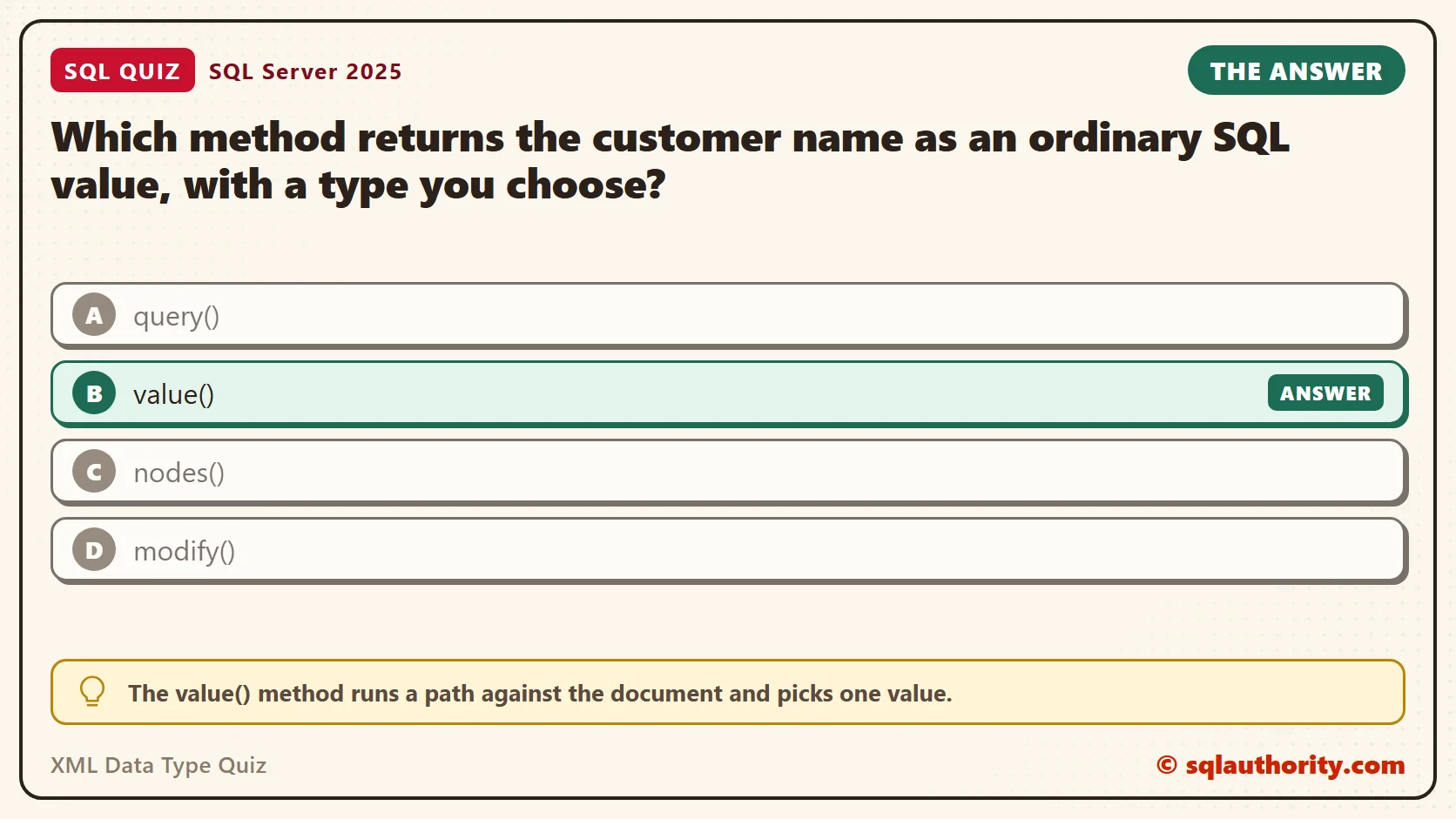
An order system stores each order as one XML document in an xml column. The document holds a customer name and two items. A report needs the customer name as an ordinary nvarchar column. Then it can be sorted, compared and joined like any other column.
The xml type has five methods: query(), value(), exist(), nodes() and modify(). Here is the choice for this quiz.
Which method returns the customer name as an ordinary SQL value, with a type you choose?
A. query()
B. value()
C. nodes()
D. modify()
Take a moment and pick one before you read on.
The Answer
The answer is B. The value() method runs a path against the document and picks one value. It converts that value to the SQL type you name in its second argument. What comes back is a normal nvarchar, int or date, so it fits in a column.
The other methods do different work. The query() method returns xml, nodes() returns rows, and modify() changes the document and returns nothing. The exist() method returns a bit that says whether a match exists. Only value() extracts a piece of the document and gives it the SQL type you name.
Prove It
Here is the quiz as a script. It creates a small database called SqlQuizXmlDataType, used only for this example, so run it on a test server. It starts with SET QUOTED_IDENTIFIER ON because the xml methods need that setting. SSMS turns it on for you, but sqlcmd doesn’t.
IF DB_ID(N'SqlQuizXmlDataType') IS NULL CREATE DATABASE SqlQuizXmlDataType;
GO
USE SqlQuizXmlDataType;
GO
SET QUOTED_IDENTIFIER ON;
GO
DROP TABLE IF EXISTS dbo.QuizOrder;
CREATE TABLE dbo.QuizOrder
(
    OrderID int PRIMARY KEY,
    Doc xml NOT NULL
);
INSERT INTO dbo.QuizOrder (OrderID, Doc)
VALUES (1001, N'<order id="1001"><customer>Avery</customer><item sku="A1" qty="2">Paneer Wrap</item><item sku="B7" qty="1">Mango Lassi</item></order>');
SELECT
    Doc.value('(/order/customer)[1]', 'nvarchar(40)') AS CustomerName,
    Doc.value('(/order/item/@qty)[1]', 'int') AS FirstQty,
    Doc.exist('/order/item[@sku="B7"]') AS HasB7,
    Doc.query('/order/item[@sku="A1"]') AS FirstItem
FROM dbo.QuizOrder;
On SQL Server 2025, the query returned one row. CustomerName is an nvarchar and FirstQty is an int. HasB7 is a bit. FirstItem is still xml, so its value is a piece of the document.
| CustomerName | FirstQty | HasB7 | FirstItem |
|---|---|---|---|
| Avery | 2 | 1 | <item sku=”A1″ qty=”2″>Paneer Wrap</item> |

Why the Other Answers Are Wrong
A is tempting, because query() looks like the method that gets data. It does return the data, but wrapped as xml. Even a single name comes back as an xml value, and you still need value() to turn it into text.
C is wrong because nodes() doesn’t return a value at all. It splits a document into rows, one for each match, and you read each row with value() or query(). You can’t select it directly. You join to it with CROSS APPLY.
D is wrong because modify() edits the document. It works only inside an UPDATE, or in a SET statement on an xml variable.
The fifth method, exist(), isn’t among the choices. It returns a bit, which is a plain value too, but it is a yes or no test. It never gives you the customer name.
Turn Repeated Elements Into Rows
An order can have any number of items. To list them as rows, call nodes() for the repeating element and read each row with value(). Run this after the first script.
SELECT i.n.value('@sku', 'varchar(10)') AS Sku,
       i.n.value('@qty', 'int') AS Qty,
       i.n.value('.', 'nvarchar(40)') AS ItemName
FROM dbo.QuizOrder AS o
CROSS APPLY o.Doc.nodes('/order/item') AS i(n);
The result is two plain rows, one for each item in the document.
| Sku | Qty | ItemName |
|---|---|---|
| A1 | 2 | Paneer Wrap |
| B7 | 1 | Mango Lassi |
Test for a Match With exist()
The exist() method is a scalar test. It returns 1 for a match and 0 for no match. It returns NULL when the xml value itself is NULL. That makes it a good fit for a WHERE clause. This query keeps the orders that contain sku B7 and shows what a missing sku returns.
SELECT OrderID,
       Doc.exist('/order/item[@sku="B7"]') AS HasB7,
       Doc.exist('/order/item[@sku="Z9"]') AS HasZ9,
       CAST(NULL AS xml).exist('/order') AS NullDoc
FROM dbo.QuizOrder
WHERE Doc.exist('/order/item[@sku="B7"]') = 1;| OrderID | HasB7 | HasZ9 | NullDoc |
|---|---|---|---|
| 1001 | 1 | 0 | NULL |
The order passed the filter, the missing sku gave 0, and the NULL document gave NULL. Notice what exist() leaves out. It says a match exists, but it never hands you the matched value. For that you still need value().
The One Rule of value()
The value() method needs a path that finds at most one node. Leave out the [1] below. SQL Server can’t know that the path finds only one item, because an order can hold many.
SELECT Doc.value('(/order/item/@qty)', 'int') AS Qty FROM dbo.QuizOrder;This is the text SSMS shows in the Messages tab. It is output, not code to run.
Msg 2389, Level 16, State 1, Line 1
XQuery [dbo.QuizOrder.Doc.value()]: 'value()' requires a singleton (or empty sequence), found operand of type 'xdt:untypedAtomic *'
The error appears before the query runs, even when the table holds only one item. Put [1] around the path, and the same call returns 2.
SELECT Doc.value('(/order/item/@qty)[1]', 'int') AS Qty FROM dbo.QuizOrder;Now try modify(). It changes the quantity of the Mango Lassi item inside the document, and value() reads the new number back. The UPDATE changes a row, so keep it on the test database.
UPDATE dbo.QuizOrder
SET Doc.modify('replace value of (/order/item[@sku="B7"]/@qty)[1] with "3"')
WHERE OrderID = 1001;
SELECT Doc.value('(/order/item[@sku="B7"]/@qty)[1]', 'int') AS NewQty FROM dbo.QuizOrder;
The query returned 3. The document changed in place, and no other column was touched.
Pick the Type With Care
The second argument of value() is a promise about the data. If the promise is wrong, SQL Server tells you. Asking for the customer name as an int fails with error 245. The message says the conversion of the nvarchar value ‘Avery’ to int failed.
Two other cases give no error, and that makes them easier to miss. A type that is too short cuts the text. A path that finds nothing returns NULL. Check both in this query.
SELECT Doc.value('(/order/customer)[1]', 'nvarchar(3)') AS ShortName,
       Doc.value('(/order/discount)[1]', 'int') AS Discount
FROM dbo.QuizOrder;
The query returned Ave for ShortName and NULL for Discount. The first one cut the name, and the second one found no discount element. A NULL here can mean a typo in the path, so read paths with care.
What to Remember
Each method answers one kind of question. Use value() to get a plain value and exist() to test for a match. Use nodes() to get rows, query() to get a piece of XML, and modify() to change the document.
When I read a query that mixes these methods, I check two things. Every value() call needs a type that fits the data and a path ending in [1]. And any filter on exist() belongs in the WHERE clause, so each row is tested once. When you finish testing, remove the example database.
USE master;
GO
ALTER DATABASE SqlQuizXmlDataType SET SINGLE_USER WITH ROLLBACK IMMEDIATE;
DROP DATABASE SqlQuizXmlDataType;
An xml column is not a text field to search, it is a document you question.
Published by Pinal Dave on SQLAuthority. More of my work at pinaldave.com.
Discover more from SQL Authority with Pinal Dave
Subscribe to get the latest posts sent to your email.



1 Comment. Leave new
Thank you, your post was very helpful.