SQUARE returns float even when the supplied value uses an exact numeric type. I keep that conversion visible instead of assuming the function preserves its input’s decimal contract.

A familiar operation can have a different type
Squaring a number means multiplying it by itself. SQL expressions can perform that operation through multiplication or through SQUARE. The mathematical intent can match while the type contract differs. That distinction matters before substituting one expression for another.
SQUARE accepts float or any input that converts implicitly to float. Its native return type is float. An int or decimal argument therefore doesn’t request an int or decimal result. This article doesn’t apply POWER’s separate return-type rules to SQUARE.
I’d check the actual function rather than infer its behavior from the name. A concise expression can introduce approximate arithmetic into an otherwise exact calculation. That may be acceptable for a measurement. It needs a different review for exact accounting or identifiers.
Keep the original numbers beside their squares
The demonstration uses negative three, negative 1.25, zero and positive two. A fifth input is NULL. Each input is explicitly decimal(7,2). The result is cast to decimal(12,6) for a fixed display contract.
The non-NULL results are nine, 1.5625, zero and four. A negative input has a positive square because both factors are negative. The final decimal representation keeps six fractional digits. That displayed width doesn’t describe the native result type.
A metadata property column identifies the native type as float for the non-NULL expressions. The missing input produces NULL for both the result and property. Those outputs keep missingness separate from a measured zero. No replacement policy is applied.
WITH Inputs AS
(
    SELECT Id, CAST(InputValue AS decimal(7,2)) AS InputValue
    FROM (VALUES (1, -3.00), (2, -1.25), (3, 0.00),
                 (4, 2.00), (5, NULL)) AS v(Id, InputValue)
)
SELECT Id, InputValue, CAST(SQUARE(InputValue) AS decimal(12,6)) AS DisplaySquare,
       CONVERT(varchar(20), SQL_VARIANT_PROPERTY(
           SQUARE(InputValue), 'BaseType')) AS NativeType
FROM Inputs
ORDER BY Id;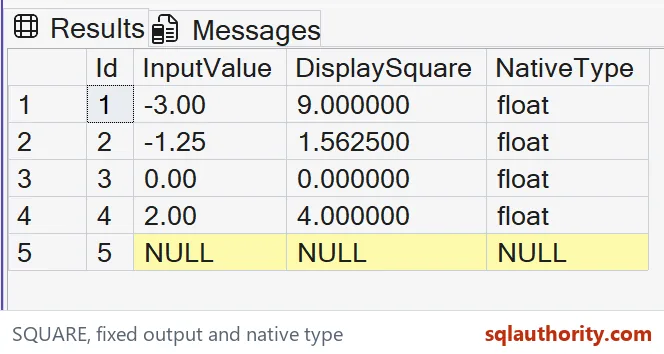
Choose exact multiplication when exactness is required
An explicitly typed multiplication expression has its own precision and scale rules. It can be appropriate when the calculation must remain exact decimal arithmetic. Its available width still needs review. Overflow doesn’t disappear merely because float was avoided.
I can defend SQUARE for a calculation whose source and destination already use approximate numbers. That choice fits the same numerical contract. Replacing an exact decimal calculation requires stronger justification. A successful example with small values isn’t enough.
The sample values are safely within its selected display width. Larger inputs can exceed either a calculation or final conversion range. This article makes no unlimited-range claim. Choose real input limits and output precision before applying the pattern broadly.

Verify the stated output contract
Compare the final decimal values rather than demanding unrestricted equality between floating intermediates. That narrow contract is deliberate. It makes the selected display values reviewable. It doesn’t establish arbitrary approximation bounds for all possible inputs.
The complete script reads a literal VALUES list through a CTE. It creates no objects or state changes. ORDER BY fixes the five-row sequence. Input, displayed square and native-type metadata appear together in each output tuple.
Compare every result, base-type property and SQL type across the complete input set. Keep the original value beside its square. Retain the NULL row during that check. A count of four visible numbers would omit part of the stated input contract.
Use SQUARE where float is fine, and say so out loud.
A familiar square is not a guaranteed exact numeric result, it is an operation that returns float.
Published by Pinal Dave on SQLAuthority. More of my work at pinaldave.com.
Discover more from SQL Authority with Pinal Dave
Subscribe to get the latest posts sent to your email.