A ROW_NUMBER self-join finds the previous row by numbering the rows and joining each number to the one before it. It works, but only if you first decide what “previous” means.

What does “previous row” even mean?
A junior developer once asked me for “the change since the last reading.” I asked one question back: last by what? The table had no order. A table never promises one. Rows come back in whatever order the engine finds them.
So before any code, write the rule. Here the rule is: within each account, order by date, and if two readings share a date, order by the unique Id. That second part matters. Without a tie-breaker, two rows with the same date can come back in either order.
Before LAG existed, we built this with ROW_NUMBER and a self-join. You will still meet that pattern in old code, so it pays to read it fluently. Let me set up a tiny table that has all the traps: a tied date, a NULL amount, and two accounts.
Build a table with traps
Rows 1 and 2 share a date. Row 2 has a NULL amount. Account 20 has a single row. The table is temporary, so the demo cleans up after itself.
DROP TABLE IF EXISTS #Measurements;

CREATE TABLE #Measurements
(
    Id         int PRIMARY KEY,
    AccountId  int  NOT NULL,
    MeasuredAt date NOT NULL,
    Amount     int  NULL
);

INSERT #Measurements (Id, AccountId, MeasuredAt, Amount)
VALUES (1, 10, '20260101', 5),
       (2, 10, '20260101', NULL),
       (3, 10, '20260102', 8),
       (4, 20, '20260101', 9);
The ROW_NUMBER self-join
The CTE numbers the rows inside each account, using the rule we wrote down. Then the query joins every row to the row whose number is one lower. It uses a LEFT JOIN, so the first row of each account stays in the result with a NULL neighbor.
WITH Numbered AS
(
    SELECT *,
           ROW_NUMBER() OVER (PARTITION BY AccountId ORDER BY MeasuredAt, Id) AS rn
    FROM #Measurements
)
SELECT currentRow.AccountId,
       currentRow.Id,
       previousRow.Id     AS PreviousId,
       previousRow.Amount AS PreviousAmount
FROM Numbered AS currentRow
LEFT JOIN Numbered AS previousRow
  ON previousRow.AccountId = currentRow.AccountId
 AND previousRow.rn = currentRow.rn - 1
ORDER BY currentRow.AccountId, currentRow.MeasuredAt, currentRow.Id;
The same answer with LAG
LAG says the same thing in one line per column. The PARTITION BY and ORDER BY are copied exactly from the CTE. That is the whole point: both queries must use the same rule, or they answer different questions.
SELECT AccountId,
       Id,
       LAG(Id)     OVER (PARTITION BY AccountId ORDER BY MeasuredAt, Id) AS PreviousId,
       LAG(Amount) OVER (PARTITION BY AccountId ORDER BY MeasuredAt, Id) AS PreviousAmount
FROM #Measurements
ORDER BY AccountId, MeasuredAt, Id;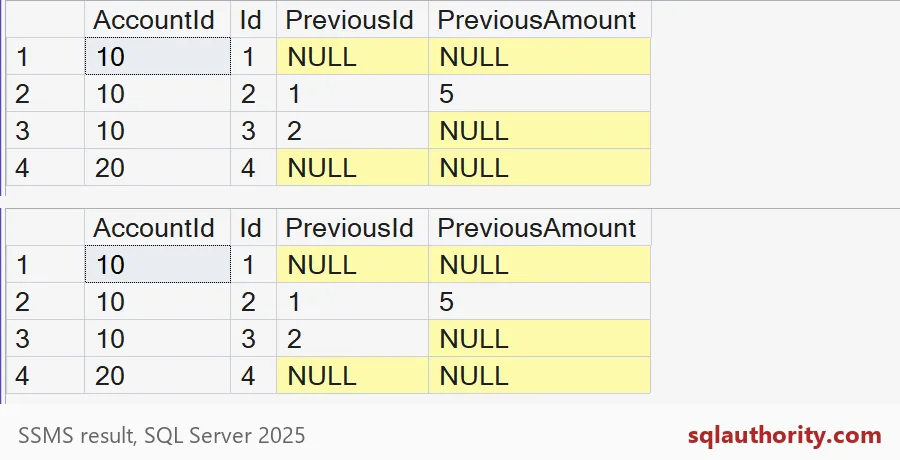
The two grids match. Id 1 has no previous row. Id 2 points back to Id 1 and its amount of 5. Id 3 points back to Id 2, but the previous amount is NULL. Id 4 is the first row of account 20, so it has no previous row, even though account 10 has rows before it. Partitioning stopped the neighbor from leaking across accounts.

A missing row is not the same as a NULL amount
Look at Id 3 again. Its PreviousAmount is NULL because the previous row exists and its amount is NULL. Now look at Id 1. Its PreviousAmount is also NULL, but there is no previous row at all. Same NULL, two different meanings.
That is why both queries also return PreviousId. A NULL PreviousId means no neighbor. A NULL amount with a real PreviousId means the neighbor had no amount. LAG can also take a default, which is where people get hurt, so try it.
SELECT Id,
       LAG(Amount, 1, 0) OVER (PARTITION BY AccountId ORDER BY MeasuredAt, Id) AS PreviousAmountOrZero
FROM #Measurements
ORDER BY AccountId, MeasuredAt, Id;
Ids 1 and 4 now show 0, because they have no neighbor. Id 3 still shows NULL, because its neighbor exists. The default fills in a missing row only. If you add ISNULL around the result as well, the two cases blur together and you lose the difference.
Which one should you write
For new code, I reach for LAG. It states the request directly, and the next person reads it in seconds. The self-join is still worth knowing, because old reports are full of it, and you may need to fix one.
If you ever compare the two for speed, look at actual plans on your own data. Do not trust a guess. And when you convert old code, keep the PARTITION BY and ORDER BY identical, then compare the outputs row by row, as the screenshot does. Finish with the cleanup.
DROP TABLE IF EXISTS #Measurements;Next time you need the previous row, write down the neighbor rule first.
The previous row is not a storage neighbor, it is the predecessor in a defined order.
Published by Pinal Dave on SQLAuthority. More of my work at pinaldave.com.
Discover more from SQL Authority with Pinal Dave
Subscribe to get the latest posts sent to your email.