A POC index gives a window function its rows already in order, so SQL Server skips the sort. The letters stand for Partition, Order and Covering, and the key columns follow that same order.

Why the report is slow
Say a nightly report calculates a running total per customer. It uses ROW_NUMBER and SUM with an OVER clause. It was fine last year. This year it crawls, and the plan shows a big Sort.
The window needs rows grouped by customer and sorted by date, one customer at a time. If no index hands them over in that order, SQL Server sorts them first. A sort costs memory and time, and it grows faster than the row count.
A POC index removes that work. P is the partition column, O is the order column, and C means the index covers the query. Put the partition column first, then the order columns, and put the rest in INCLUDE.
Build a table to test with
The demo uses 2,000 orders for 20 customers. Dates repeat inside each customer, so the order key needs OrderId as a tie-breaker.
DROP TABLE IF EXISTS dbo.WindowOrders;
GO
CREATE TABLE dbo.WindowOrders (
    OrderId int PRIMARY KEY,
    CustomerId int NOT NULL,
    OrderDate date NOT NULL,
    Amount decimal(12,2) NOT NULL);

INSERT dbo.WindowOrders (OrderId, CustomerId, OrderDate, Amount)
SELECT value,
       1 + (value - 1) / 100,
       DATEADD(day, (value - 1) % 20, CONVERT(date, '20260101')),
       CONVERT(decimal(12,2), 10)
FROM GENERATE_SERIES(1, 2000);
Next is a small temporary procedure that inspects the plan SQL Server just used. It counts the Sort operators and reports whether an ordered index scan was used. I will run it after each window query.
CREATE OR ALTER PROCEDURE #CheckPlan
AS
WITH XMLNAMESPACES (DEFAULT 'http://schemas.microsoft.com/sqlserver/2004/07/showplan')
SELECT TOP (1)
       qp.query_plan.value('count(//RelOp[@PhysicalOp="Sort"])', 'int') AS SortOperators,
       qp.query_plan.value('(//RelOp[@PhysicalOp="Index Scan"]/IndexScan/@Ordered)[1]', 'int') AS OrderedScan,
       qp.query_plan.value('(//RelOp[@PhysicalOp="Index Scan"]/IndexScan/Object/@Index)[1]', 'nvarchar(128)') AS IndexUsed
FROM sys.dm_exec_query_stats AS qs
CROSS APPLY sys.dm_exec_sql_text(qs.sql_handle) AS st
CROSS APPLY sys.dm_exec_query_plan(qs.plan_handle) AS qp
WHERE st.text LIKE N'%RunningAmount%FROM dbo.WindowOrders%'
  AND st.text NOT LIKE N'%dm_exec_query_stats%'
ORDER BY qs.last_execution_time DESC;
Run the window query without an index
Press Ctrl+M in SSMS to include the actual execution plan, then run the query. It returns 2,000 rows. The window calculation is the point, so ignore the grid and look at the plan.
SELECT CustomerId, OrderId, OrderDate,
       ROW_NUMBER() OVER (PARTITION BY CustomerId ORDER BY OrderDate, OrderId) AS SequenceNumber,
       SUM(Amount) OVER (PARTITION BY CustomerId ORDER BY OrderDate, OrderId ROWS UNBOUNDED PRECEDING) AS RunningAmount
FROM dbo.WindowOrders
ORDER BY CustomerId, OrderDate, OrderId;
Now run the checker.
EXEC #CheckPlan;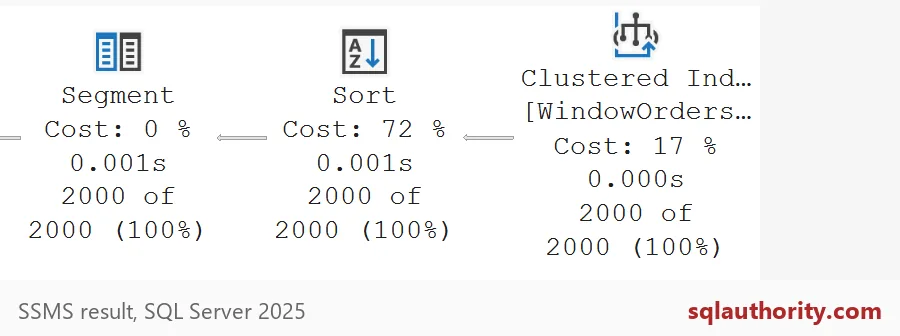
It shows one Sort operator and no ordered scan. The picture shows what that looks like: rows come from the clustered index, a Sort puts them in window order, and then the Segment operator starts a new group for each customer. In that plan excerpt, the Sort is the most expensive step at 72 percent.
Add the POC index
The key is CustomerId, OrderDate, OrderId. That is partition, then order, with the tie-breaker last. Amount sits in INCLUDE so the index covers the running total without a trip back to the table.
CREATE INDEX IX_WindowOrders_POC
ON dbo.WindowOrders (CustomerId, OrderDate, OrderId)
INCLUDE (Amount);
Run the same window query again, then the checker.
SELECT CustomerId, OrderId, OrderDate,
       ROW_NUMBER() OVER (PARTITION BY CustomerId ORDER BY OrderDate, OrderId) AS SequenceNumber,
       SUM(Amount) OVER (PARTITION BY CustomerId ORDER BY OrderDate, OrderId ROWS UNBOUNDED PRECEDING) AS RunningAmount
FROM dbo.WindowOrders
ORDER BY CustomerId, OrderDate, OrderId;
EXEC #CheckPlan;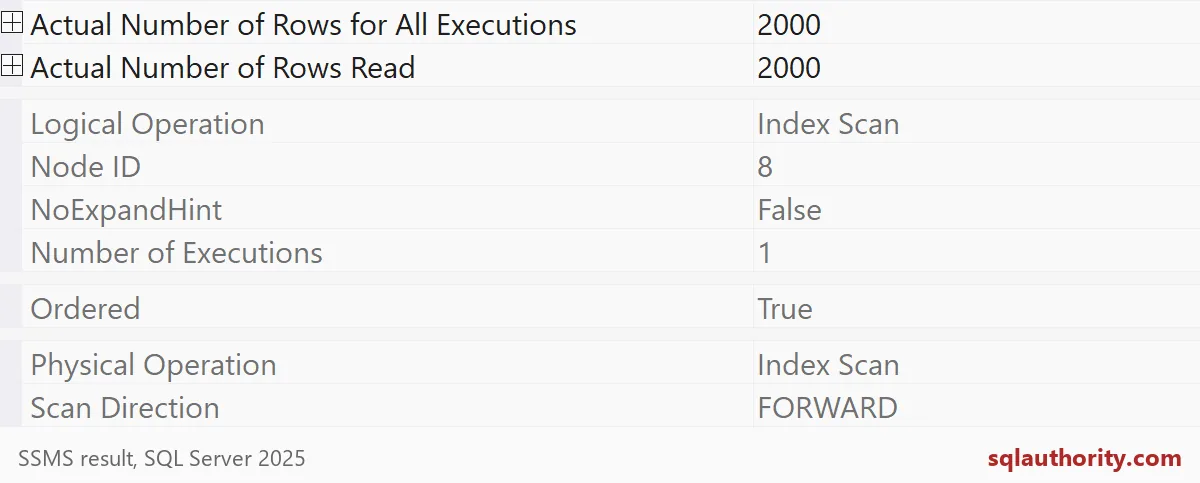
Now the Sort operator count is zero. The checker reports an ordered scan of IX_WindowOrders_POC. The properties in the picture say the same: an Index Scan with Ordered true, reading and returning 2,000 rows once. The index already stores rows in the order the window wants, so SQL Server just reads them.

The same columns in the wrong order
Here is the mistake I see most. Someone creates an index on the right columns in the wrong order. The next block swaps the first two key columns and checks the plan again.
DROP INDEX IX_WindowOrders_POC ON dbo.WindowOrders;

CREATE INDEX IX_WindowOrders_WrongOrder
ON dbo.WindowOrders (OrderDate, CustomerId, OrderId)
INCLUDE (Amount);
SELECT CustomerId, OrderId, OrderDate,
ROW_NUMBER() OVER (PARTITION BY CustomerId ORDER BY OrderDate, OrderId) AS SequenceNumber,
SUM(Amount) OVER (PARTITION BY CustomerId ORDER BY OrderDate, OrderId ROWS UNBOUNDED PRECEDING) AS RunningAmount
FROM dbo.WindowOrders
ORDER BY CustomerId, OrderDate, OrderId;EXEC #CheckPlan;The Sort count is back to 1, and the scan of IX_WindowOrders_WrongOrder reports OrderedScan 0. The index has the same columns, but it is ordered by date first, so it cannot feed a window that partitions by customer. Column order is the whole trick.
Count the cost before you add one
Every extra index takes space and slows inserts and updates. Different windows need different orders, and one index cannot serve them all. Start with the query that hurts most. Check its plan, build the index for that window, and check again. Your plan might choose another path on your data, so look before you celebrate.
The last block drops the helper procedure and the demo table.
DROP PROCEDURE IF EXISTS #CheckPlan;
DROP TABLE IF EXISTS dbo.WindowOrders;
Next time a window query is slow, look for the Sort first.
A POC index is not a magic index, it is an order built for one window.
Published by Pinal Dave on SQLAuthority. More of my work at pinaldave.com.
Discover more from SQL Authority with Pinal Dave
Subscribe to get the latest posts sent to your email.