The real data type gives you four bytes and about seven significant digits, and it quietly rounds the rest. That is fine for a sensor reading. It is a problem for a balance. Let me show you where it bites.

Why people pick real in the first place
Picture a junior DBA tuning a wide table. They see a column typed as float, which takes 8 bytes. Real takes 4. Across a few hundred million rows that sounds like free space. So the column gets changed, the tests pass, and everyone moves on.
Then, a few weeks later, a report total is off by a small amount. Nothing failed. Nothing even warned. The data type simply never promised exact answers.
See what a real value actually stores
The seven digits are significant digits, not seven digits after the decimal point. Let me store the same number in a real, a float and a decimal, then ask SQL Server what it kept. I convert each one to eight decimal places so the stored value becomes visible.
DECLARE @r real = 1234567.89,
        @f float(53) = 1234567.89,
        @d decimal(18,2) = 1234567.89;
SELECT CONVERT(decimal(18,8), @r) AS RealStored,
       CONVERT(decimal(18,8), @f) AS FloatToEightPlaces,
       @d AS ExactDecimal,
       DATALENGTH(@r) AS RealBytes,
       DATALENGTH(@f) AS FloatBytes,
       SQL_VARIANT_PROPERTY(@r, 'BaseType') AS RealBaseType,
       SQL_VARIANT_PROPERTY(CAST(1 AS float(24)), 'BaseType') AS Float24BaseType;
I typed 1234567.89 and real kept 1234567.875. The decimal kept 1234567.89, and so did the 8-byte float. Real uses 4 bytes and float(53) uses 8. Also notice that float(24) is simply real wearing a different name.
Where does “seven digits” come from? Real holds 24 bits of precision. Multiply that by the base-10 logarithm of 2 and you get roughly seven decimal digits.
SELECT CONVERT(int, SQL_VARIANT_PROPERTY(CAST(0 AS real), 'Precision')) AS PrecisionBits,
       CONVERT(int, FLOOR(CONVERT(int,
           SQL_VARIANT_PROPERTY(CAST(0 AS real), 'Precision')) * LOG10(2.0))) AS ApproxDecimalDigits;
The result says 24 bits and 7 digits. Treat seven as a rule of thumb. It does not mean every seven-digit number survives, as the first demo just showed.
Catch a value that is too big
Real also has a ceiling. Give it something enormous and the assignment fails. The CATCH block below shows the real error number and message, so you can see them on your own server.
BEGIN TRY
    DECLARE @tooLarge real = 9E+40;
    SELECT @tooLarge AS ConvertedValue;
END TRY
BEGIN CATCH
    SELECT ERROR_NUMBER() AS ErrorNumber,
           ERROR_MESSAGE() AS ErrorMessage;
END CATCH;
On my SQL Server 2025 test this returns error 232, Arithmetic overflow error for type real. The SELECT inside the TRY never ran. This one is the easy failure, because you get a loud error you cannot miss.
Watch a small addition disappear
The quiet failure is the dangerous one. Add 1 to 100 million in real and see what survives. I convert the answers to decimal so you can read the digits. The second part tries the same thing at 16,777,216.
DECLARE @large real = 100000000, @small real = 1;
SELECT CONVERT(decimal(18,0), @large + @small) AS ApproximateSum,
       CONVERT(decimal(18,0), @large)
           + CONVERT(decimal(18,0), @small) AS ExactSum,
       CASE WHEN @large + @small = @large THEN 1 ELSE 0 END AS AdditionWasLost;
DECLARE @boundary real = 16777216;
SELECT CONVERT(decimal(18,0), @boundary + CAST(1 AS real)) AS PlusOne,
       CONVERT(decimal(18,0), @boundary + CAST(2 AS real)) AS PlusTwo;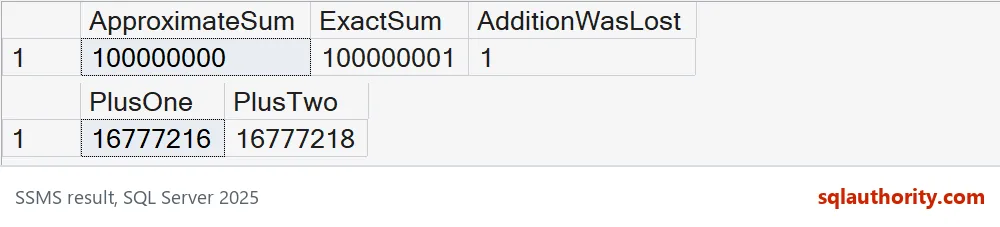
The real sum is 100000000. The decimal sum is 100000001. AdditionWasLost is 1, so the extra 1 vanished without a sound. At 16777216, adding 1 gives 16777216 again, but adding 2 gives 16777218. At that size real can only step in twos, so a lone 1 gets rounded away.
Watch the loss pile up
One lost unit looks harmless. Now repeat the loss a hundred thousand times. This loop adds 0.10 to a real total and to a decimal total, the way a running balance would.
DECLARE @RealTotal real = 0,
        @DecimalTotal decimal(18,2) = 0,
        @i int = 0;
WHILE @i < 100000
BEGIN
    SET @RealTotal += 0.10;
    SET @DecimalTotal += 0.10;
    SET @i += 1;
END;
SELECT CONVERT(decimal(18,4), @RealTotal) AS RealTotal,
       @DecimalTotal AS DecimalTotal;
The decimal total lands on exactly 10000.00, which is right. The real total says 9998.5566. That is off by about 1.44, and nothing raised an error. Every single addition looked reasonable. The small errors just kept adding up in one direction. If this were a customer balance, someone would be reading this number out on a call.

Decide the arithmetic requirement first
I use decimal for any amount that must reconcile to the cent. Real is a fair choice for measurements where a tiny error is already accepted, like temperatures or sensor readings. To check your own tables, test the largest legitimate value together with the smallest meaningful change. If the small change disappears, you have your answer.
Four bytes saved per row is nice. Explaining a wrong total to the accountant is not.
Write down the precision you need before you decide that four bytes are enough.
Approximate storage is not a smaller exact number, it is a different arithmetic promise.
Published by Pinal Dave on SQLAuthority. More of my work at pinaldave.com.
Discover more from SQL Authority with Pinal Dave
Subscribe to get the latest posts sent to your email.