
Is executing a stored procedure with result sets in SQL Server 2012 faster than using a temp table? Earlier I posted article SQL SERVER – Denali – Executing Stored Procedure with Result Sets. After reading this SQL Expert Ramdas asked following and very interesting question:
This is a nice feature and i am sure would be used a lot. How is the performance of this as compared with using temp tables?
I really loved this question, I ran the following code and measured the performance difference using execution plans.
USE AdventureWorks2008R2
GO
CREATE PROCEDURE mySP (@ShiftID INT)
AS
SELECT [ShiftID]
,[Name]
,[StartTime]
,[EndTime]
,[ModifiedDate]
FROM [HumanResources].[Shift]
WHERE [ShiftID] = @ShiftID
GO
-- Executing Stored Procedure
EXEC mySP @ShiftID = 2
WITH RESULT SETS
(
(
[ShiftID] TINYINT
,[Name] NVARCHAR(50)
,[StartTime] DATETIME
,[EndTime] DATETIME
,[UpdateDate] DATETIME -- Notice Name Change
)
);
GO
-- Create TempTable and Inserting into it
CREATE TABLE #mySP
([ShiftID] TINYINT
,[Name] NVARCHAR(50)
,[StartTime] DATETIME
,[EndTime] DATETIME
,[UpdateDate] DATETIME)
INSERT INTO #mySP
EXEC mySP @ShiftID = 2;
SELECT *
FROM #mySP
GO
-- Clean up
DROP TABLE #mySP;
DROP PROCEDURE mySP;
Let us examine the results.
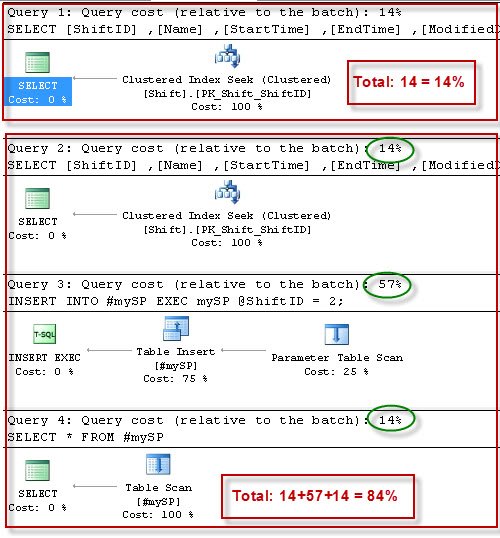
From the resultset it is very clear that new method takes only 14% where as compared to it the old method which has cost of 84%. I love the new method of result sets in SQL Server 2012, which was code named ‘Denali’. Thanks Ramdas for interesting question.
A Fair Way to Compare the Two Methods
Looking at this test again, I want to add one honest note. The percentages in an execution plan are estimated costs relative to the batch. They are a good hint, but they are not the time your query actually took. The temp table method also does more work by design, because it creates a table and writes every row into it. So when you compare the two methods on your own system, measure both ways.
SET STATISTICS TIME ON;
SET STATISTICS IO ON;
-- run each method here
SET STATISTICS TIME OFF;
SET STATISTICS IO OFF;
Look at the elapsed time and logical reads in the Messages tab. Run each method a few times, because the first run also pays for compiling the plan and reading data from disk. Also remember the real strength of WITH RESULT SETS. You can rename columns and change the data types of the output without creating any extra table. If you only need to read the data once, that is simple and clean. If you need to join, filter or reuse the rows later, a temp table is still the right tool.
Want to try this yourself? Here is how to install AdventureWorks.
Published by Pinal Dave on SQLAuthority. More of my work at pinaldave.com.
Discover more from SQL Authority with Pinal Dave
Subscribe to get the latest posts sent to your email.




4 Comments. Leave new
hi Pinal,
Thank you for providing the answer for my question by providing a detailed article. Thanks Pinal.
Is it possible (and how) to consume result table from sp (eg. JOIN)?
Refer this
hi,
how can i use with result set in c#.net ?