XML sql:column binds a relational value from the current row into an XQuery expression. I keep that value typed rather than concatenate it into query text. The row’s requested identifier can then select a matching XML node.

Bind the requested value from the current row
Each row of the example holds a requested integer beside a small XML document. The first document contains items with identifiers two and four. The first requested identifier is two.
The XQuery predicate compares each item’s id attribute with sql:column(“i.WantedId”). The alias identifies the relational column in the current SQL row. It is not an XML path or a session variable.
The first expected HasMatch result is one. The requested identifier occurs in the document. The second row requests three from the same item list and expects zero.
I return the requested identifier beside the existence result. That makes the row-specific binding visible. Reusing a document does not require reusing the same requested value.
WITH Inputs AS
(
    SELECT CaseId,WantedId,Document FROM (VALUES
        (1,CAST(2 AS int),CAST(N'<items><item id="2"/><item id="4"/></items>' AS xml)),
        (2,CAST(3 AS int),CAST(N'<items><item id="2"/><item id="4"/></items>' AS xml)),
        (3,CAST(2 AS int),CAST(N'<items/>' AS xml)),
        (4,CAST(2 AS int),CAST(NULL AS xml))
    ) AS v(CaseId,WantedId,Document)
)
SELECT i.CaseId,i.WantedId,
    i.Document.exist('/items/item[@id = sql:column("i.WantedId")]') AS HasMatch
FROM Inputs AS i ORDER BY i.CaseId;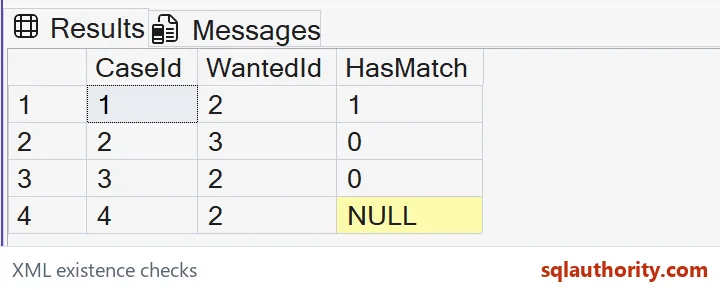
Ask for a node that satisfies the comparison
The expression selects item nodes whose attribute comparison succeeds. The exist method tests whether that selection is nonempty. It does not return the selected item or its attribute value.
This distinction matters when writing the XQuery. A scalar Boolean expression can itself form a nonempty result even when its value is false. Here the comparison belongs inside a node-selection predicate.
The expected zero at the second row means no item node meets that predicate. It does not mean the document is absent. The document is present and contains other items.
I keep these two rows together to distinguish a present matching document from a present nonmatching one. Both use the same schema-free shape. The requested relational integer is the changing input.
Empty XML and missing XML are different inputs
The third row supplies a present items element with no child items. Its expected HasMatch result is zero. There are no candidate nodes for the predicate to select.
The fourth row supplies SQL NULL for the entire XML value. Its expected HasMatch result is NULL. That missing document is different from a present document with no matching nodes.
An application can assign separate meanings to those states. An empty collection might be a completed response with no entries. A missing document might indicate that no response was stored.
Replacing a missing document with an empty root element would change the source meaning. A present empty collection and a missing document are different states. Preserve both when that distinction belongs to the interface.

Keep the binding and document contract explicit
sql:column maps a supported relational value into an XQuery value. This example supplies an integer and untyped numeric attribute text. It does not concatenate the integer into executable XQuery syntax.
The function has restrictions on its context and supported source types. This example uses a normal SELECT row with a non-XML relational column. It does not claim support for every join or user-defined type.
Real documents may use namespaces or a different node shape. Their paths must reflect that contract. A matching local element name alone is not proof that a namespace-qualified path is correct.
A matching node, a nonmatching document, an empty collection and a missing document answer different questions. Keep their outcomes beside the requested relational identifier. The row binding alone cannot supply a missing document.
Bind the value, keep the states apart, and the answer stays clear.
A missing match is not a missing document, it is a present document without that node.
Published by Pinal Dave on SQLAuthority. More of my work at pinaldave.com.
Discover more from SQL Authority with Pinal Dave
Subscribe to get the latest posts sent to your email.