The choice of CTE or temp table comes down to one question: do you want that intermediate result computed once and stored, or just named? A CTE gives a query a name. A temp table keeps the rows. They are not the same thing, and neither is always faster.

A CTE is a name, not a saved result
A junior developer once asked me, “Is a CTE faster than a temp table?” I get this question a lot. The honest answer is that a CTE does not store anything. It is a name for a query inside one statement.
Use that name twice and SQL Server may run the underlying query twice. It may not. The execution plan tells you which, so you have to look. Let me build a small case where you can see it.
The block below creates 20,000 rows in 100 groups. Each group gets a total, which is the intermediate result we care about.
DROP TABLE IF EXISTS #StoredGroupTotals;
DROP TABLE IF EXISTS #IntermediateSource;

CREATE TABLE #IntermediateSource
(
    ItemId int PRIMARY KEY,
    GroupId int NOT NULL,
    Amount decimal(19,2) NOT NULL
);

INSERT #IntermediateSource
SELECT value, value % 100, CONVERT(decimal(19,2), value % 37)
FROM GENERATE_SERIES(1, 20000);
Reference the CTE twice
This query compares each group’s total with the next group’s total. That needs the grouped result twice, once as a and once as b. I turn on STATISTICS IO and STATISTICS PROFILE so the numbers show up next to the results. In SSMS you can also press Ctrl+M and read the actual plan.
SET STATISTICS IO ON;
SET STATISTICS PROFILE ON;

WITH GroupTotals AS
(
    SELECT GroupId, SUM(Amount) AS TotalAmount
    FROM #IntermediateSource
    GROUP BY GroupId
)
SELECT a.GroupId, a.TotalAmount, b.TotalAmount AS NextGroupTotal
FROM GroupTotals AS a
LEFT JOIN GroupTotals AS b ON b.GroupId = a.GroupId + 1
ORDER BY a.GroupId;
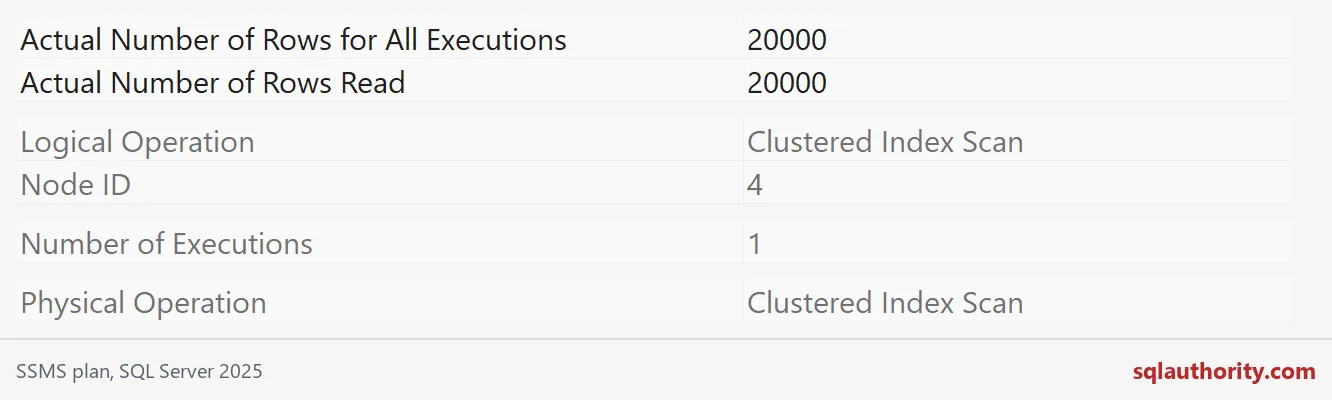
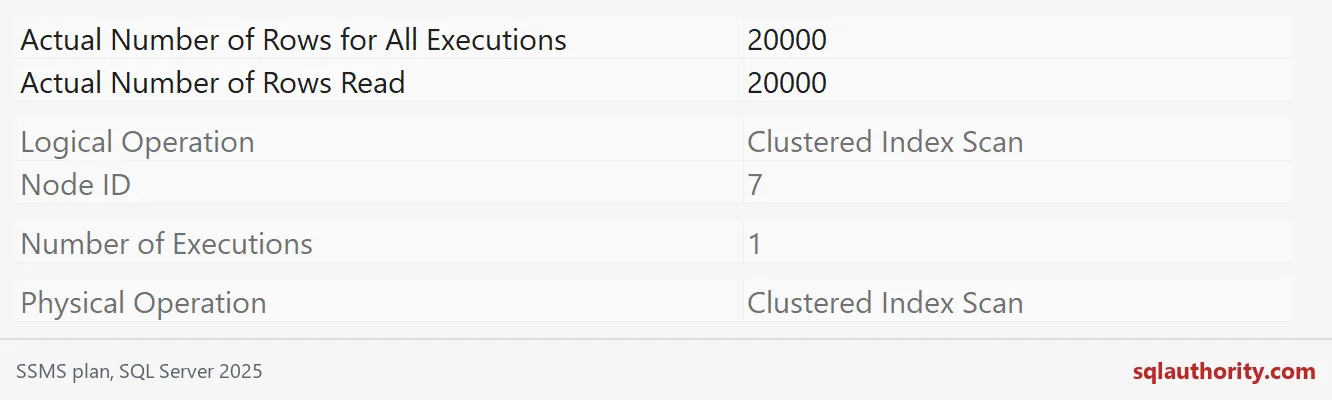
The profile has two Hash Match aggregates and two Clustered Index Scans of the source. Each scan returns 20,000 rows in one execution. The Messages tab agrees: the source table shows a scan count of 2. The grouping ran twice.
Store the result once
Now do the grouping one time and keep the 100 rows in a temp table. I add a unique clustered index on GroupId, because the join looks rows up by that column. The final query is the same join as before.
SELECT GroupId, SUM(Amount) AS TotalAmount
INTO #StoredGroupTotals
FROM #IntermediateSource
GROUP BY GroupId;

CREATE UNIQUE CLUSTERED INDEX CX_StoredGroupTotals ON #StoredGroupTotals (GroupId);

SELECT a.GroupId, a.TotalAmount, b.TotalAmount AS NextGroupTotal
FROM #StoredGroupTotals AS a
LEFT JOIN #StoredGroupTotals AS b ON b.GroupId = a.GroupId + 1
ORDER BY a.GroupId;
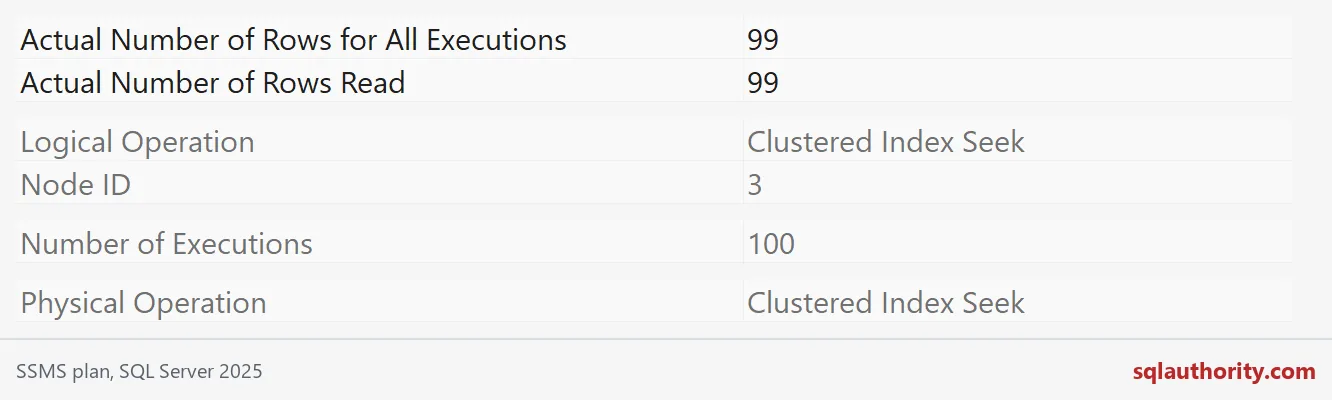
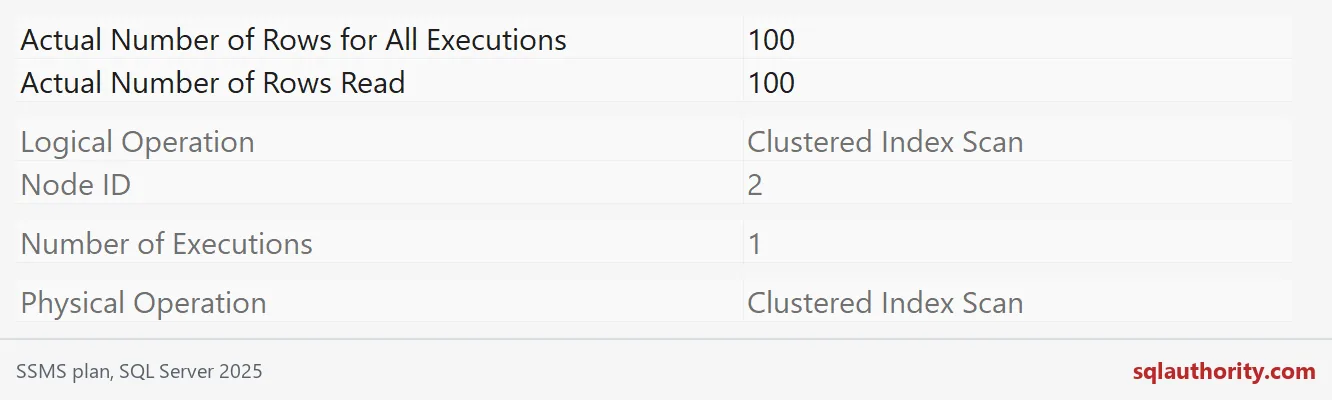
The source is scanned once to build the temp table. The join then scans the 100 stored rows once and seeks into them 100 times. Those seeks return 99 rows in total, because the last group has no next group.

Add up the whole bill
Here is the part people skip. Add up the logical reads in the Messages tab for everything the temp table version did. In my run it read more pages in total than the CTE version, because those 100 seeks are not free. With only 100 summary rows, there was little to save.
So count the whole cost: create, fill, index, query, and cleanup. Compare that with the CTE on your own data, using your real group counts.
How I choose
I start with a CTE when the result is used once and the query reads well. I try a temp table when the result is used several times, when later steps benefit from an index, or when the optimizer guesses badly on a complex statement. A temp table also gives the next statement real row counts to plan with.
It is not free, though. Temp tables cost writes, and they can trigger recompiles. Revisit the choice when the data size or the reuse count changes.
The last block turns the statistics output off and removes the temp tables.
SET STATISTICS PROFILE OFF;
SET STATISTICS IO OFF;

DROP TABLE IF EXISTS #StoredGroupTotals;
DROP TABLE IF EXISTS #IntermediateSource;
Next time someone says one is always faster, ask to see the plan.
A CTE is not a saved result, it is a name that may run again.
Published by Pinal Dave on SQLAuthority. More of my work at pinaldave.com.
Discover more from SQL Authority with Pinal Dave
Subscribe to get the latest posts sent to your email.